
1. บทนำและเรื่องอื่นๆview
The Yamaha NX-50 Premium Computer Speakers are designed to provide high-quality audio for various devices, including personal computers, laptops, tablets, and smartphones. Featuring a unique cabinet shape and front-ported design, these speakers deliver clear sound reproduction.
คุณสมบัติหลัก:
- Dual mini-jack inputs with auto-mix functionality for simultaneous playback from two audio sources.
- Front-panel volume control and headphone jack for convenient access.
- Automatic standby mode for power efficiency, eliminating the need for manual power cycling.
- Robust construction with metal grilles for durability and aesthetic appeal.
- Versatile connectivity for computers, TVs, smartphones, and tablets.
2. เนื้อหาบรรจุภัณฑ์
ตรวจสอบว่ามีสินค้าทั้งหมดที่ระบุไว้ด้านล่างอยู่ในบรรจุภัณฑ์:
- Yamaha NX-50 Speaker Units (Left and Right)
- อะแดปเตอร์ AC
- 3.5mm Stereo Mini Cable (Audio Input Cable)
- สายเชื่อมต่อลำโพง (สำหรับเชื่อมต่อลำโพงซ้ายและขวา)
3. การตั้งค่า
Follow these steps to set up your Yamaha NX-50 speakers:
- การจัดวาง: Position the left and right speakers on a stable, flat surface, such as a desk or shelf. Ensure they are equidistant from your listening position for optimal stereo imaging. The right speaker typically houses the main controls and connections.
- เชื่อมต่อลำโพง: Connect the left speaker to the right speaker using the provided speaker connection cable. This cable typically connects to a dedicated output on the right speaker and an input on the left speaker.
- เชื่อมต่อแหล่งเสียง: Use the 3.5mm stereo mini cable to connect your audio source (e.g., computer, smartphone) to one of the "INPUT" jacks on the rear of the right speaker. The NX-50 features two mini-jack inputs, allowing you to connect two sources simultaneously.
- เชื่อมต่อพลังงาน: Plug the AC power adapter into the "DC IN" jack on the rear of the right speaker, then plug the adapter into a standard electrical outlet.
- เปิดเครื่อง: Turn on the main power switch located on the rear of the right speaker. The power indicator on the front panel will illuminate.
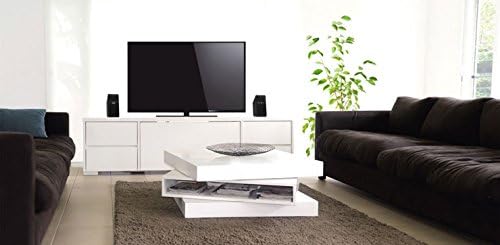
Image: Yamaha NX-50 speakers integrated into a home entertainment setup, demonstrating typical placement next to a television.

ภาพ: ภาพระยะใกล้ view of the Yamaha NX-50 speakers, highlighting their design and front grilles.
4. คู่มือการใช้งาน
เปิด/ปิดเครื่องและสแตนด์บาย:
After connecting the power adapter and turning on the main power switch on the rear, the speakers will enter an active state. The NX-50 features an automatic standby function. If no audio signal is detected for a period, the speakers will automatically enter a low-power standby mode. They will automatically reactivate when an audio signal is detected again. This feature helps conserve energy.
การควบคุมระดับเสียง:
Adjust the overall volume using the large rotary knob located on the front panel of the right speaker. Turn clockwise to increase volume and counter-clockwise to decrease it.
เอาท์พุตหูฟัง:
A 3.5mm headphone jack is located on the front panel of the right speaker. Plugging in headphones will mute the main speakers, allowing for private listening.
Connecting Multiple Audio Sources:
The NX-50 includes two mini-jack inputs. You can connect two different audio devices simultaneously. The speakers will automatically mix the audio from both sources, allowing for seamless transitions or combined playback.
5. การบำรุงรักษา
Proper maintenance ensures the longevity and optimal performance of your speakers.
- การทำความสะอาด: Gently wipe the speaker cabinets with a soft, dry cloth. For stubborn dirt, slightly dampชุบผ้าด้วยน้ำ หลีกเลี่ยงการใช้น้ำยาทำความสะอาดที่มีฤทธิ์กัดกร่อน ตัวทำละลาย หรือสเปรย์เคมี เพราะอาจทำให้พื้นผิวเสียหายได้
- ลูกกรง: The metal grilles can be carefully cleaned with a soft brush to remove dust. Do not attempt to remove the grilles.
- การระบายอากาศ : Ensure that the speakers have adequate ventilation around them. Do not block any vents or place them in enclosed spaces that could lead to overheating.
- พื้นที่จัดเก็บ: หากต้องเก็บรักษาลำโพงเป็นเวลานาน ควรตัดการเชื่อมต่อจากแหล่งจ่ายไฟและเก็บไว้ในที่แห้งและเย็น หลีกเลี่ยงแสงแดดโดยตรงและอุณหภูมิที่สูงหรือต่ำเกินไป
6 การแก้ไขปัญหา
If you encounter issues with your Yamaha NX-50 speakers, refer to the following common problems and solutions:
| ปัญหา | สาเหตุที่เป็นไปได้ | สารละลาย |
|---|---|---|
| ไม่มีเสียงออกจากลำโพง |
|
|
| เสียงผิดเพี้ยนหรือไม่ชัดเจน |
|
|
| Speakers not entering auto standby. |
|
|
7. ข้อมูลจำเพาะ
| คุณสมบัติ | รายละเอียด |
|---|---|
| ชื่อรุ่น | เอ็นเอ็กซ์-50 |
| ประเภทลำโพง | เดสก์ท็อป |
| การใช้ที่แนะนำ | For Computers, TV, Smartphones, Tablets |
| อุปกรณ์ที่รองรับ | Smartphone, Tablet, Desktop, Laptop |
| จำนวนหน่วย | 2.0 ชิ้น (คู่) |
| การกำหนดค่าช่องเสียงรอบทิศทาง | 2.0 |
| สี | สีดำ |
| ขนาดผลิตภัณฑ์ (แต่ละลำโพง) | ลึก 3.4 นิ้ว x กว้าง 7.3 นิ้ว x สูง 7.3 นิ้ว |
| น้ำหนักสินค้า | 4.3 ปอนด์ (น้ำหนักรวมสำหรับทั้งคู่) |
| อิมพีแดนซ์ | 6 โอห์ม |
| จำนวนรายการ | 2 (speakers) |
| วิธีการควบคุม | Manual (Front Panel Volume) |
| เทคโนโลยีการสื่อสารไร้สาย | None (Wired) |
| ขนาดลำโพง | 2.75 Inches (driver) |
| แหล่งพลังงาน | AC (via adapter) |
| ประเภทไดร์เวอร์เสียง | ไดร์เวอร์แบบไดนามิก |
| กำลังขับสูงสุดของลำโพง | 75 วัตต์ |
| เทคโนโลยีการเชื่อมต่อ | Auxiliary (3.5mm mini-jack) |
| โหมดเอาต์พุตเสียง | สเตอริโอ |
| ประเภทการติดตั้ง | ที่วางบนโต๊ะ |
| ผู้ผลิต | ยามาฮ่า อิเล็กทรอนิกส์ |
8. การรับประกันและการสนับสนุน
การรับประกันแบบจำกัด:
The Yamaha NX-50 speakers come with a limited warranty. Please refer to the warranty card included with your product or visit the official Yamaha webดูรายละเอียดข้อกำหนดและเงื่อนไขเกี่ยวกับการรับประกัน ระยะเวลา และขั้นตอนการเคลมได้ที่เว็บไซต์ โปรดเก็บหลักฐานการซื้อไว้เพื่อใช้ยืนยันการรับประกัน
การสนับสนุนลูกค้า:
For technical assistance, troubleshooting beyond this manual, or service inquiries, please contact Yamaha customer support. Contact information can typically be found on the official Yamaha webเว็บไซต์หรือในบรรจุภัณฑ์ของผลิตภัณฑ์