
1. บทนำ
The Comfast CF-WU720N is a compact 150Mbps Wireless USB Adapter designed to provide high-speed wireless connectivity for your desktop or notebook computer. It allows you to connect to a wireless network and access the internet, share files, and enjoy online gaming at speeds up to 150Mbps. This adapter is compliant with IEEE 802.11b/g/n standards and supports USB 2.0 for efficient data transfer.
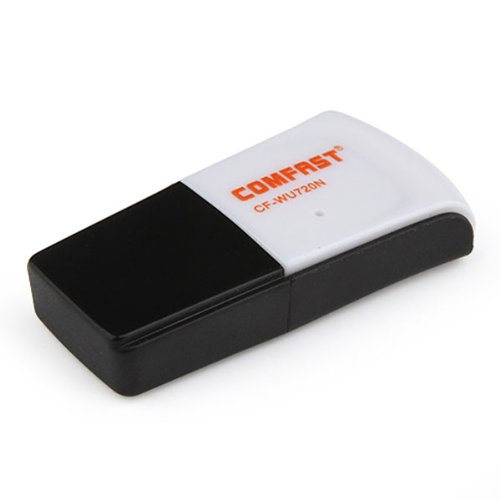
Image 1.1: The Comfast CF-WU720N Wireless USB Adapter, a compact device for wireless connectivity.
2. คุณสมบัติของผลิตภัณฑ์
- Meets IEEE 802.11b/g/n wireless standards.
- Supports USB 2.0 interface for broad compatibility.
- Utilizes Realtek 8191 SU chipset for reliable performance.
- Achieves wireless connection rates up to 150Mbps.
- Supports wireless roaming technology for seamless connectivity.
- Strong compatibility with various popular operating systems.
- Compact size: approximately 39 x 12 x 7mm (1.5 x 0.7 x 0.3 inches).
- Lightweight design: approximately 5g.
3. เนื้อหาบรรจุภัณฑ์
โปรดตรวจสอบว่าสินค้าทั้งหมดมีอยู่ในแพ็คเกจ:
- 1 x Comfast CF-WU720N Wireless USB Adapter
- คู่มือการติดตั้งด่วน 1 ชุด
- 1 x CD-ROM Driver
- ใบรับประกัน 1 ใบ

Image 3.1: The retail packaging for the Comfast CF-WU720N, showing the adapter inside.
4. การตั้งค่าและการติดตั้ง
4.1. การติดตั้งไดร์เวอร์
Before connecting the USB adapter, it is recommended to install the necessary drivers from the provided CD-ROM. This ensures proper functionality and compatibility with your operating system.
- Insert the driver CD-ROM into your computer's optical drive.
- If the installer does not launch automatically, navigate to "My Computer" or "This PC," open the CD-ROM drive, and run the setup executable (e.g., "setup.exe" or "autorun.exe").
- ทำตามคำแนะนำบนหน้าจอเพื่อทำการติดตั้งไดรเวอร์ให้เสร็จสมบูรณ์ คุณอาจต้องรีสตาร์ทคอมพิวเตอร์หลังจากติดตั้งเสร็จ
- บันทึก: If your computer does not have an optical drive, you may need to download the latest drivers from the manufacturer's official webเว็บไซต์.
4.2. การเชื่อมต่ออะแดปเตอร์ USB
Once the drivers are installed, you can connect the Comfast CF-WU720N Wireless USB Adapter to your computer.
- Locate an available USB 2.0 or 3.0 port on your desktop or laptop computer.
- Carefully insert the Comfast CF-WU720N adapter into the USB port. Ensure it is fully seated.
- The operating system should automatically detect the adapter and configure it using the installed drivers. A small LED indicator on the adapter may light up or blink, indicating activity.
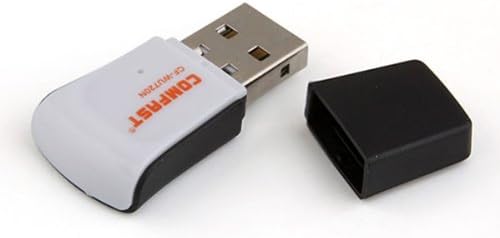
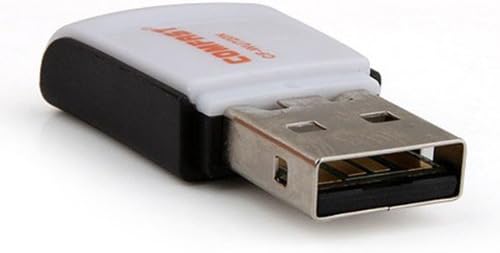
Image 4.1: The Comfast CF-WU720N adapter with its protective cap removed, revealing the USB connector. Image 4.2: A side view of the adapter, highlighting its compact design and USB interface.
5. คู่มือการใช้งาน
After successful driver installation and adapter connection, you can now connect to a wireless network.
- การเข้าถึงการตั้งค่าเครือข่าย:
- หน้าต่าง: Click the wireless network icon in the system tray (usually bottom-right corner).
- MacOS: Click the Wi-Fi icon in the menu bar (usually top-right corner).
- ลินุกซ์: Access network settings through your desktop environment's network manager.
- เลือกเครือข่ายของคุณ: A list of available wireless networks (SSIDs) will appear. Select the name of your desired network.
- เชื่อมต่อ: คลิก "เชื่อมต่อ" หรือ "เข้าร่วม" หากเครือข่ายมีการรักษาความปลอดภัย คุณจะได้รับแจ้งให้ป้อนรหัสความปลอดภัยของเครือข่าย (รหัสผ่าน)
- ยืนยันการเชื่อมต่อ: Once connected, the network icon will typically change to indicate a successful connection, and you should be able to access the internet.
6. การบำรุงรักษา
To ensure optimal performance and longevity of your Comfast CF-WU720N Wireless USB Adapter, follow these simple maintenance guidelines:
- รักษาความสะอาด: ค่อยๆ เช็ดอะแดปเตอร์ด้วยผ้าแห้งเนื้อนุ่มเพื่อกำจัดฝุ่น หลีกเลี่ยงการใช้น้ำยาทำความสะอาดหรือสารละลาย
- ป้องกันขั้วต่อ USB: When not in use, keep the protective cap on the USB connector to prevent dust and damage.
- หลีกเลี่ยงเงื่อนไขที่รุนแรง: อย่าให้อะแดปเตอร์สัมผัสกับอุณหภูมิที่สูงหรือความชื้นสูง หรือโดนแสงแดดโดยตรง
- จัดการอย่างระมัดระวัง: หลีกเลี่ยงการทำตกหรือให้อะแดปเตอร์ได้รับแรงกระแทกรุนแรง
- การอัปเดตไดรเวอร์: ตรวจสอบผู้ผลิตเป็นระยะ website for updated drivers to ensure the best performance and compatibility.
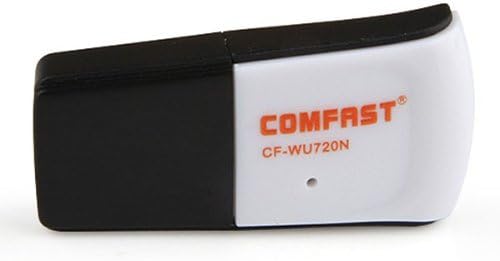
Image 6.1: The Comfast CF-WU720N adapter with its protective cap in place, ready for storage or transport.
7 การแก้ไขปัญหา
If you encounter issues with your Comfast CF-WU720N Wireless USB Adapter, refer to the following common solutions:
| ปัญหา | วิธีแก้ปัญหาที่เป็นไปได้ |
|---|---|
| Adapter not detected / No Wi-Fi networks visible. |
|
| ไม่สามารถเชื่อมต่อกับเครือข่าย Wi-Fi ที่ระบุได้ |
|
| Slow connection speed or frequent disconnections. |
|
8. ข้อมูลจำเพาะ
| คุณสมบัติ | รายละเอียด |
|---|---|
| แบบอย่าง | CF-WU720N |
| มาตรฐานไร้สาย | IEEE802.11b/g/n ไร้สาย |
| อินเทอร์เฟซ | ยูเอสบี 2.0 |
| ชิปเซ็ต | Realtek 8191 SU |
| ความเร็วไร้สาย | สูงสุดถึง 150Mbps |
| ช่วงความถี่ | 2.4 กิกะเฮิรตซ์ |
| คุณสมบัติด้านความปลอดภัย | WPA/WPA2, WPA-PSK/WPA2-PSK, 64/128-bit WEP |
| ระบบปฏิบัติการ | Windows XP/Vista/7/8/10, macOS, Linux (driver dependent) |
| ขนาด (กว้าง x ยาว x สูง) | ประมาณ 39 x 12 x 7 มม. (1.5 x 0.7 x 0.3 นิ้ว) |
| น้ำหนัก | ประมาณ 5กรัม |
9. การรับประกันและการสนับสนุน
This product comes with a warranty as specified on the included Warranty Card. Please refer to the card for details regarding warranty period, terms, and conditions.
For technical support, driver updates, or further assistance, please visit the official Comfast webหรือติดต่อฝ่ายบริการลูกค้า ข้อมูลการติดต่อมักจะอยู่บนบรรจุภัณฑ์ของผลิตภัณฑ์หรือเว็บไซต์ของผู้ผลิต webเว็บไซต์.
โปรดเก็บใบเสร็จรับเงินของคุณไว้เพื่อวัตถุประสงค์การรับประกัน