
1. บทนำ
The Orbit 94886 Pocket Star Ultima is a digital irrigation controller designed for indoor use, capable of managing up to 6 watering stations. This manual provides comprehensive instructions for the installation, programming, and operation of your new irrigation timer, ensuring efficient and effective watering for your landscape. Its user-friendly interface, featuring a large LCD display and intuitive buttons, simplifies the programming process.
2. ข้อมูลด้านความปลอดภัย
- This controller is designed for indoor use only. Do not install it outdoors or in areas exposed to direct weather conditions.
- ตรวจสอบให้แน่ใจว่าได้ตัดการเชื่อมต่อแหล่งจ่ายไฟแล้วก่อนที่จะดำเนินการเดินสายไฟหรือบำรุงรักษาใดๆ
- ใช้เฉพาะอะแดปเตอร์แปลงไฟ AC 24V ที่ระบุไว้เท่านั้น การใช้แหล่งจ่ายไฟที่ไม่ถูกต้องอาจทำให้เครื่องเสียหายและทำให้การรับประกันเป็นโมฆะ
- Keep the controller away from water sources and high humidity to prevent electrical hazards.
- Do not attempt to open or repair the controller yourself. Refer all servicing to qualified personnel.
3. เนื้อหาบรรจุภัณฑ์
Your Orbit 94886 Pocket Star Ultima package should contain the following item:
- One (1) Orbit 94886 Pocket Star Ultima 6-Station Indoor Irrigation Controller.
4. สินค้าหมดview
The Orbit Pocket Star Ultima controller features a clear LCD display, intuitive navigation buttons, and a rotary dial for easy program selection. The terminal block for wiring is located at the bottom of the unit, protected by a removable cover.

รูปที่ 4.1 : ด้านหน้า view of the Orbit 94886 Pocket Star Ultima controller, showing the LCD screen, control buttons, and rotary dial.

Figure 4.2: The controller with its bottom cover attached, illustrating its compact design.
5. การตั้งค่า
5.1. การติดตั้ง
The Orbit 94886 controller is designed for indoor installation. Choose a clean, dry location away from direct sunlight and extreme temperatures. Mount the unit securely to a wall using appropriate screws and anchors.

รูปที่ 5.1: อดีตample installation diagram, showing the indoor controller connected to an outdoor irrigation valve.
5.2. การเดินสาย
Before wiring, ensure the power supply to the controller is disconnected. The terminal block is located at the bottom of the unit. Use simple tool-less "push-in" terminals for easy wire connections.
- Common Wire (COM): Connect the common wire from your irrigation valves to the terminal labeled "COM". This is typically a white wire.
- Station Wires (1-6): Connect each individual valve wire to its corresponding station terminal (1 through 6).
- Rain Sensor (SENSOR): If using a rain sensor (sold separately), connect its wires to the "SENSOR" terminals. The controller supports a normally closed rain sensor.
- Pump Start Relay (PUMP): If you have a pump start relay or master valve, connect its wires to the "PUMP" terminals.
- 24V AC Power (24VAC): Connect the 24V AC power adapter wires to the "24VAC" terminals.
รูปที่ 5.2: รายละเอียด view of the wiring terminal block, showing connections for 24VAC, SENSOR, COM, stations 1-6, and PUMP.
Important Power Limitation Warning:
The controller's power supply has specific current limitations. Each valve connected should not exceed 150mA (milliampere) at 24V. The total current drawn by all simultaneously active valves must not exceed 500mA. For example, if your valves draw 150mA each, you can operate a maximum of 3 valves simultaneously. If your valves draw 220mA each, you can operate a maximum of 2 valves simultaneously. Exceeding these limits can damage the controller.
6. คู่มือการใช้งาน
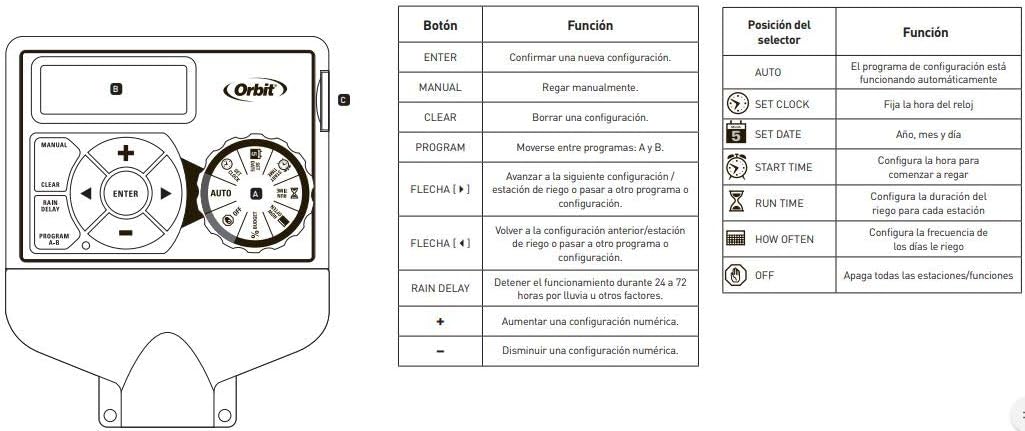
The controller features a rotary dial to select different functions and buttons for navigation and setting values.

Figure 6.1: Controller interface with a guide to button and dial functions.
6.1. ฟังก์ชันของปุ่มหมุน
- ตั้งนาฬิกา: ใช้สำหรับตั้งเวลาและวันปัจจุบัน
- วันที่ตลาดหลักทรัพย์ฯ: Used to set the current year, month, and day.
- เวลาเริ่มต้น: Used to set the start times for your watering programs.
- เวลาทำงาน: Used to set the duration for each watering station (1 to 99 minutes).
- บ่อยแค่ไหน: Used to set the watering frequency (e.g., specific days of the week, odd/even days).
- อัตโนมัติ: The default operating mode where programmed schedules run automatically.
- ปิด: Disables all watering programs and functions.
6.2. ปุ่มฟังก์ชัน
- เข้า: Confirms a setting or moves to the next step.
- คู่มือ: เริ่มการรดน้ำด้วยตนเอง
- ชัดเจน: Clears a setting or program.
- ฝนตกล่าช้า: Activates the rain delay function (24, 48, or 72 hours).
- PROGRAM A-B: Switches between independent programs (A, B, C). The controller supports 3 independent programs.
- ปุ่ม +/-: Adjust numerical values up or down.
- ปุ่มลูกศร (ซ้าย/ขวา): Navigate through settings or stations.
6.3. Programming Your Controller
- Set Current Time and Date: หมุนแป้นหมุนไปที่ ตั้งนาฬิกา และ กำหนดวันที่. Use the +/- buttons to adjust values and ENTER to confirm.
- เลือกโปรแกรม: กดปุ่ม โครงการ AB button to select Program A, B, or C. Each program can have up to 4 start times.
- กำหนดเวลาเริ่มต้น: หมุนแป้นหมุนไปที่ เวลาเริ่มต้น. Use the +/- buttons to set up to four start times for the selected program. Press ENTER after each time.
- กำหนดเวลาการทำงาน: หมุนแป้นหมุนไปที่ เรียกใช้เวลา. Use the arrow buttons to select each station (1-6) and the +/- buttons to set the watering duration (1-99 minutes) for that station. Press ENTER after each.
- ตั้งค่าความถี่ในการรดน้ำ: หมุนแป้นหมุนไปที่ บ่อยแค่ไหน. Select specific days of the week, or choose odd/even day watering. Use the arrow and +/- buttons to make your selections.
- เปิดใช้งานโปรแกรม: หมุนแป้นหมุนไปที่ ออโต้ to enable the programmed schedule.
6.4. คู่มือการใช้งาน
To water manually, turn the dial to ออโต้แล้วกดปุ่ม คู่มือ button. Use the arrow buttons to select the desired station and the +/- buttons to set the run time. Press ENTER to start manual watering. The controller will return to automatic mode after the manual cycle is complete.
6.5. ฟังก์ชั่นหน่วงเวลาฝน
If rain is expected or has occurred, you can temporarily suspend watering. Turn the dial to ออโต้แล้วกดปุ่ม ฝนตกหนัก button. Use the +/- buttons to select a delay of 24, 48, or 72 hours. The controller will automatically resume the programmed schedule after the delay period.
7. การบำรุงรักษา
- รักษาตัวควบคุมให้สะอาด ปราศจากฝุ่นและสิ่งสกปรก ใช้ผ้าแห้งนุ่มๆ ในการทำความสะอาด
- Ensure the installation area remains dry and protected from moisture.
- ตรวจสอบการเชื่อมต่อสายไฟเป็นระยะเพื่อให้แน่ใจว่ามีความปลอดภัย
- During winter months in cold climates, it is recommended to disconnect the controller and store it indoors to prevent damage from freezing temperatures.
8 การแก้ไขปัญหา
| ปัญหา | สาเหตุที่เป็นไปได้ | สารละลาย |
|---|---|---|
| หน้าจอแสดงผลของคอนโทรลเลอร์ว่างเปล่า | No power or faulty power adapter. | Check power outlet and power adapter connection. Ensure the 24VAC terminals are correctly wired. |
| Stations are not watering. | Controller is in OFF mode; incorrect programming; faulty wiring; rain sensor activated. | Turn dial to AUTO. Verify program settings (start times, run times, frequency). Check wiring to valves. Check if rain sensor is wet or activated. |
| Only some stations are watering. | Faulty valve; wiring issue to specific station; power limitation exceeded. | Check wiring for the non-watering stations. Test the valve manually. Ensure total current draw does not exceed 500mA (max 150mA per valve). |
| Controller resets or behaves erratically. | Power fluctuations; internal fault; excessive current draw. | มั่นใจได้ถึงการจ่ายไฟฟ้าที่เสถียร Verify that the total current draw from active valves does not exceed 500mA. If problems persist, contact support. |
9. ข้อมูลจำเพาะ
- ยี่ห้อ: วงโคจร
- แบบอย่าง: 94886
- จำนวนสถานี: 6
- การติดตั้ง: ในร่ม
- กำลังไฟเข้า: 24 โวลต์เอซี
- Max Current per Valve: 150มิลลิแอมป์ (0.15แอมป์)
- Max Total Current: 500มิลลิแอมป์ (0.5แอมป์)
- ขนาดผลิตภัณฑ์ (ยาวxกว้างxสูง): 14.6 ซม. x 6.2 ซม. x 23.5 ซม.
- วัสดุ: พลาสติก
- ประเภทจอภาพ: จอแอลซีดี
- อุณหภูมิในการทำงาน: 10 Degrees Celsius (minimum, typical operating range is wider)
- ความเข้ากันได้ของสมาร์ทโฮม: ไม่เข้ากัน
- ยูพีซี: 046878941267
10. การรับประกัน
The Orbit 94886 Pocket Star Ultima 6-Station Indoor Irrigation Controller comes with a รับประกันจำกัด 3 ปี from the date of purchase. This warranty covers defects in materials and workmanship under normal use. Please retain your proof of purchase for warranty claims. The warranty does not cover damage caused by improper installation, misuse, accidents, unauthorized repairs, or exceeding the specified electrical current limits.
11. การสนับสนุน
For technical assistance, troubleshooting beyond this manual, or warranty inquiries, please contact Orbit customer support. You can typically find contact information on the Orbit webไซต์หรือบนบรรจุภัณฑ์ผลิตภัณฑ์
Orbit Worldwide Webเว็บไซต์: www.orbitonline.com