
การแนะนำ
The Bogen TAMB2PS Telephone Access Module is designed to serve as an interface between a telephone system and a paging system. This module facilitates dual-purpose voice paging, allowing for seamless communication. It is compatible with various analog telephone port types and supports both station port and trunk port operations. A 24V power supply is included and is essential for all operational modes.
ข้อมูลด้านความปลอดภัยที่สำคัญ
คำเตือน: ผลิตภัณฑ์นี้มีสารเคมีที่รัฐแคลิฟอร์เนียระบุว่าอาจก่อให้เกิดมะเร็ง ความพิการแต่กำเนิด หรืออันตรายต่อระบบสืบพันธุ์ โปรดใช้ความระมัดระวังในการจัดการ และปฏิบัติตามระเบียบข้อบังคับท้องถิ่นเกี่ยวกับการกำจัดทิ้ง
สินค้าเกินview และคุณสมบัติที่สำคัญ
The TAMB2PS module integrates telephone and paging functionalities. Its key features include:
- 600-ohm output: Ensures compatibility with various audio systems.
- Adjustable tone volume: Allows customization of alert tones.
- Background music input with volume control: Enables integration of background music, which can be muted during paging.
- Dual-purpose voice paging: Supports both telephone and paging system integration.
- Analog telephone port compatibility: Works with a full range of analog telephone port types.
- Station port or trunk port operation: Flexible deployment options.
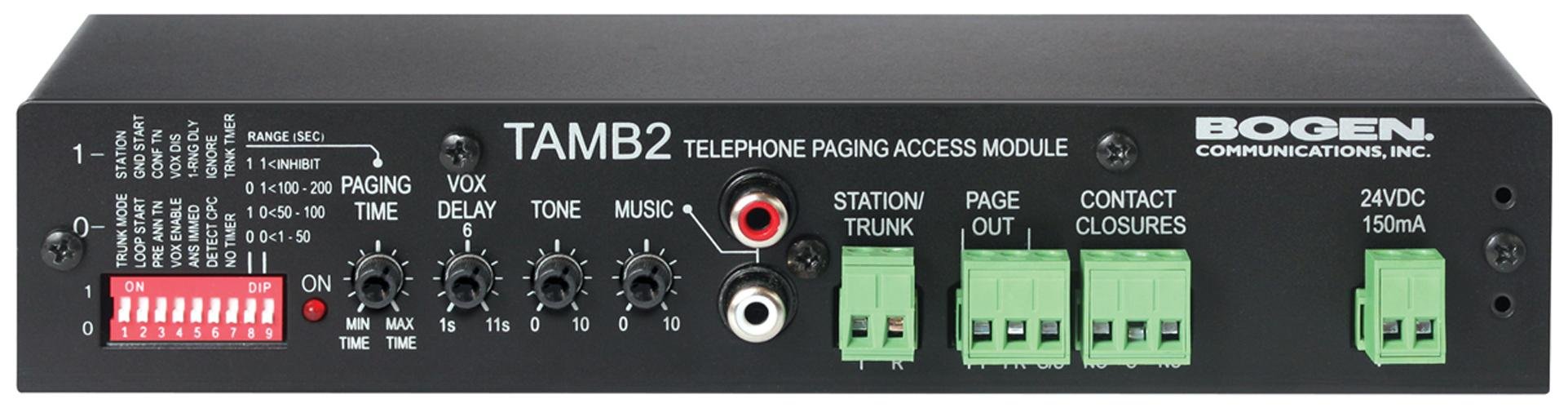
Figure 1: Bogen TAMB2PS Telephone Access Module with included power supply. This image shows the front and side view of the compact black unit, highlighting its various ports and indicators.
การติดตั้งและการตั้งค่า
Follow these steps to properly set up your Bogen TAMB2PS module:
- แกะโมดูล: Carefully remove the TAMB2PS module and its 24V power supply from the packaging.
- Connect to Telephone System: Connect the module to your analog telephone system. The TAMB2PS supports both station port and trunk port configurations. Refer to your telephone system's documentation for the appropriate connection method.
- Connect to Paging System: Connect the 600-ohm output of the TAMB2PS to the input of your paging amplifier. Ensure proper impedance matching for optimal audio quality.
- Background Music Input (Optional): If using background music, connect your audio source (e.g., CD player, radio) to the line-level input RCA jacks on the module. Adjust the background music volume control as needed.
- เชื่อมต่อพาวเวอร์ซัพพลาย: Plug the included 24V power supply into the designated power input on the TAMB2PS module, then connect the power supply to a standard electrical outlet. The module requires continuous power for operation.
- การทดสอบเบื้องต้น: After all connections are made, perform a test page through the telephone system to verify proper functionality and audio output.
การดำเนินการ
Once installed, the Bogen TAMB2PS operates as follows:
- Voice Paging: To initiate a page, access the telephone line connected to the TAMB2PS module. Speak into the telephone handset to broadcast your message through the connected paging system.
- Background Music Muting: When a page is initiated, the TAMB2PS automatically mutes the background music playing through its input, allowing the page to be heard clearly. Music resumes once the page is complete.
- การปรับระดับเสียง: Use the adjustable tone volume control on the module to set the desired level for any alert tones generated by the system.
การซ่อมบำรุง
The Bogen TAMB2PS module requires minimal maintenance to ensure long-term performance:
- การทำความสะอาด: ควรเช็ดทำความสะอาดภายนอกตัวเครื่องด้วยผ้าแห้งเนื้อนุ่มเป็นระยะ ห้ามใช้น้ำยาทำความสะอาดหรือสารละลายใดๆ
- สิ่งแวดล้อม: Ensure the module is installed in a dry, well-ventilated area, away from direct sunlight, extreme temperatures, and excessive dust.
- การเชื่อมต่อสายเคเบิล: ตรวจสอบการเชื่อมต่อสายเคเบิลทั้งหมดเป็นประจำเพื่อให้แน่ใจว่าแน่นหนาและไม่มีความเสียหาย
การแก้ไขปัญหา
If you encounter issues with your TAMB2PS module, refer to the following common problems and solutions:
- ไม่มีเอาต์พุตเสียง:
- Verify the 24V power supply is correctly connected and receiving power.
- Check all audio connections between the TAMB2PS and the paging ampชีวิต.
- Ensure the telephone line connected to the module is active and functioning.
- Confirm the paging amplifier is powered on and its volume is adjusted appropriately.
- Low Paging Volume:
- Adjust the output level control on the TAMB2PS module.
- Increase the input sensitivity or volume on your paging ampชีวิต.
- Ensure the telephone system's output level to the TAMB2PS is sufficient.
- เสียงหึ่งๆ หรือเสียงซ่า:
- Check for ground loops. Try connecting the TAMB2PS and paging amplifier to the same power outlet or using a ground loop isolator.
- Ensure all cables are properly shielded and not running parallel to power lines.
- ตรวจสอบสายเคเบิลว่ามีรอยชำรุดหรือจุดเชื่อมต่อหลวมหรือไม่
- Background Music Not Muting:
- Verify the background music source is connected to the correct input on the TAMB2PS.
- Ensure the telephone system is properly signaling the TAMB2PS when a page is initiated.
If problems persist, contact Bogen customer support or a qualified technician.
ข้อมูลจำเพาะทางเทคนิค
| คุณสมบัติ | ข้อมูลจำเพาะ |
|---|---|
| ยี่ห้อ | โบเก้น |
| ชื่อรุ่น | TAMB2PS |
| หมายเลขรุ่นสินค้า | TAMB2PS |
| ขนาดสินค้า (กxยxส) | 8.5 x 3 x 1.75 นิ้ว |
| น้ำหนักสินค้า | 2 ปอนด์ |
| ประเภทขั้วต่อ | RCA (for background music input) |
| ปริมาณสูงสุดtage | 24 Volts DC (from included power supply) |
| อิมพีแดนซ์เอาต์พุต | 600 โอห์ม |
| การใช้งานภายใน/ภายนอกอาคาร | ในร่ม |
| ยูพีซี | 643749567672, 765368482058 |
| ASIN | B00D61HS2I |
หมายเหตุ: ข้อมูลจำเพาะอาจเปลี่ยนแปลงได้โดยไม่ต้องแจ้งให้ทราบล่วงหน้า
ข้อมูลการรับประกัน
Specific warranty details for the Bogen TAMB2PS Telephone Access Module are typically provided with the product packaging or can be found on the official Bogen Communications website. Please retain your proof of purchase for warranty claims. For the most current and detailed warranty information, please visit the manufacturer's official support page or contact your authorized dealer.
การสนับสนุนลูกค้า
For technical assistance, product inquiries, or further support regarding your Bogen TAMB2PS module, please contact Bogen Communications directly:
- ผู้ผลิต Webเว็บไซต์: เยี่ยมชมเว็บไซต์อย่างเป็นทางการของ Bogen Communications webเว็บไซต์นี้รวบรวมเอกสารผลิตภัณฑ์ คำถามที่พบบ่อย และข้อมูลการติดต่อ
- บริการลูกค้า: Refer to the contact details provided in your product packaging or on the manufacturer's webไซต์สำหรับการสนับสนุนทางโทรศัพท์หรืออีเมล
When contacting support, please have your product model number (TAMB2PS) and purchase information readily available.