
1. บทนำ
This manual provides instructions for the OEM RMT-B119A remote control, designed as a replacement or secondary remote for various Sony Blu-ray player models. This remote offers full functionality for controlling your Blu-ray player's features.
Compatible Sony Blu-ray Player Models:
- BDP-BX59
- บีดีพี-S390
- บีดีพี-S590
- BDP-BX110
- บีดีพี-S1100
- บีดีพี-S3100
- BDP-BX310
2. การตั้งค่า
2.1 การติดตั้งแบตเตอรี่
รีโมทคอนโทรลต้องใช้แบตเตอรี่ AAA สอง (2) ก้อน (ไม่ได้รวมอยู่ด้วย) ทำตามขั้นตอนเหล่านี้เพื่อติดตั้งแบตเตอรี่:
- ค้นหาฝาปิดช่องใส่แบตเตอรี่ที่ด้านหลังของรีโมทคอนโทรล
- กดแท็บลงแล้วเลื่อนฝาลงเพื่อเปิดช่อง
- ใส่แบตเตอรี่ AAA สองก้อน โดยตรวจสอบให้แน่ใจว่าขั้วบวก (+) และขั้วลบ (-) ตรงกับเครื่องหมายภายในช่อง
- เลื่อนฝาปิดช่องใส่แบตเตอรี่กลับเข้าที่จนกระทั่งล็อคเข้าที่อย่างแน่นหนา
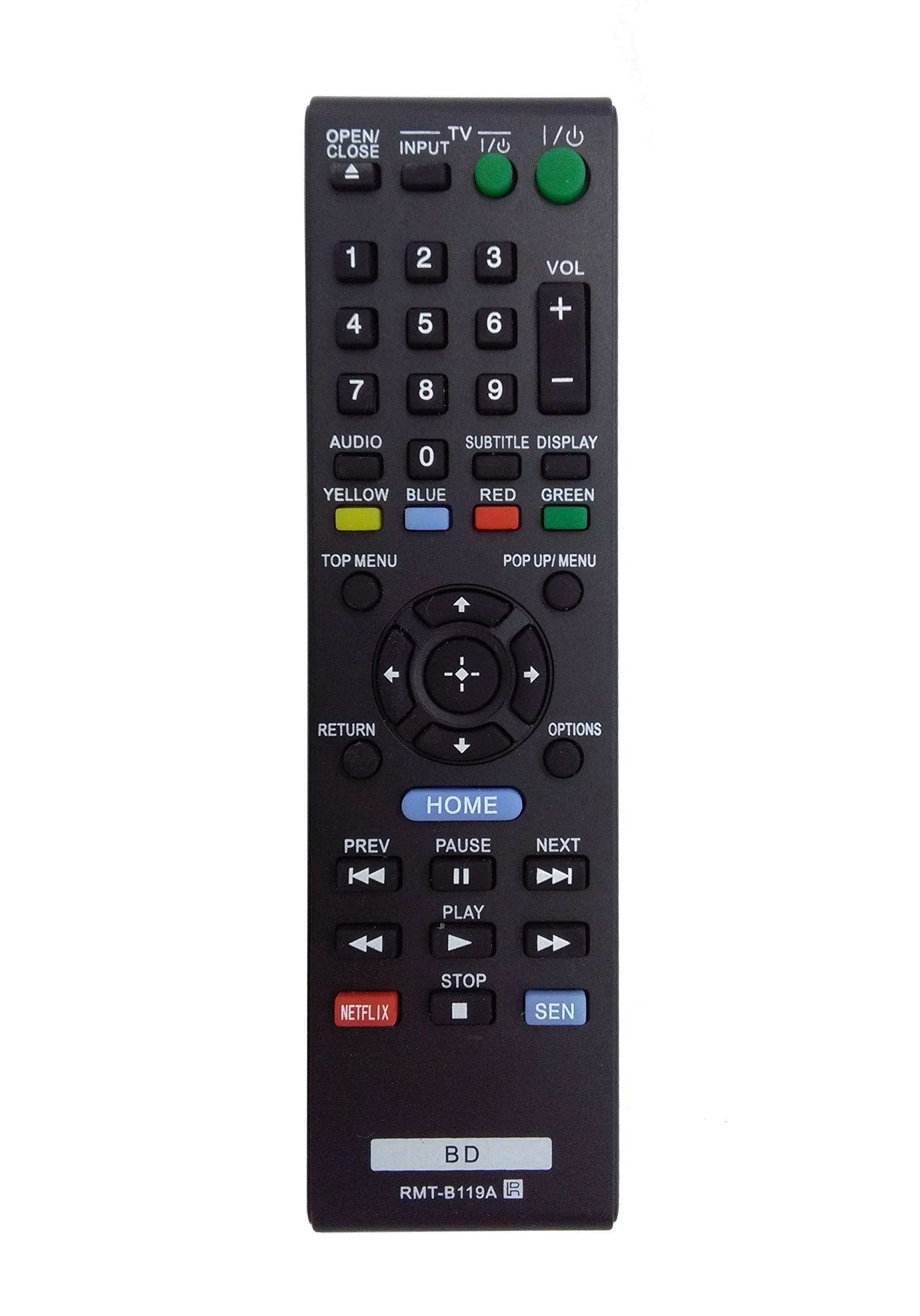
Image: The OEM RMT-B119A remote control, showing the full button layout on the front and a partial view of the open battery compartment on the back, revealing the battery terminals.
3. คู่มือการใช้งาน
3.1 การจัดวางปุ่มและฟังก์ชันของรีโมทคอนโทรล
Familiarize yourself with the buttons on your RMT-B119A remote control. Below is a description of each button's primary function.
Image: The OEM RMT-B119A remote control, displaying all buttons and their labels.
- พลังงาน (อินพุต/เอาต์พุต): เปิดหรือปิดเครื่องเล่นบลูเรย์
- OPEN/CLOSE (▲): เปิดหรือปิดถาดใส่แผ่นดิสก์
- อินพุต: Switches the input source on the connected TV (if programmed).
- ทีวี: Switches the remote to TV control mode (if programmed).
- แป้นตัวเลข (0-9): Used for direct track selection, chapter selection, or entering numerical data.
- ปริมาณ (+/-): Adjusts the volume level (typically for the connected TV, if programmed).
- เสียง: Changes the audio track or language during playback.
- SUBTITLE DISPLAY: Toggles subtitle display on or off, or cycles through available subtitle languages.
- YELLOW, BLUE, RED, GREEN: Color-coded function buttons, typically used for specific features within menus or interactive content. Their function varies depending on the disc or menu.
- เมนูยอดนิยม: Accesses the main menu of the Blu-ray disc.
- POP UP/MENU: Displays the pop-up menu during disc playback.
- Directional Pad (↑↓←→): นำทางผ่านเมนูและตัวเลือก
- Center Button (Enter/Select): ยืนยันการเลือกหรือเข้าสู่รายการเมนู
- กลับ: กลับไปยังหน้าจอหรือเมนูที่แล้ว
- ตัวเลือก: Displays context-sensitive options or settings.
- บ้าน: Accesses the Blu-ray player's home menu.
- ก่อนหน้า (◀◀): Skips to the beginning of the current track/chapter or the previous track/chapter.
- PAUSE (▌▌): หยุดการเล่นชั่วคราว
- NEXT (▶▶): ข้ามไปยังแทร็กหรือบทถัดไป
- เล่น (▶): เริ่มหรือเล่นต่อ
- หยุด (■): หยุดการเล่น
- เน็ตฟลิกซ์: Direct access button for the Netflix streaming service.
- เซน: Direct access button for the Sony Entertainment Network (now PlayStation Video/Music).
- บีดี: Likely a dedicated button for Blu-ray Disc functions or to switch to Blu-ray mode.
4. การบำรุงรักษา
เพื่อให้รีโมทคอนโทรลของคุณใช้งานได้ยาวนานและทำงานได้อย่างถูกต้อง โปรดปฏิบัติตามคำแนะนำในการบำรุงรักษาเหล่านี้:
- การทำความสะอาด: เช็ดรีโมทคอนโทรลด้วยผ้าแห้งนุ่มๆ สำหรับคราบสกปรกฝังแน่น ให้เช็ดด้วยน้ำสะอาดเล็กน้อยampชุบผ้าด้วยน้ำหรือน้ำยาทำความสะอาดอ่อนๆ ที่ไม่ทำให้เกิดรอยขีดข่วน หลีกเลี่ยงการใช้สารเคมีหรือตัวทำละลายที่รุนแรง
- การเปลี่ยนแบตเตอรี่: ควรเปลี่ยนแบตเตอรี่เมื่อรีโมทตอบสนองช้าลงหรือหยุดทำงาน ควรเปลี่ยนแบตเตอรี่ทั้งสองก้อนพร้อมกันด้วยแบตเตอรี่ใหม่ชนิดเดียวกันเสมอ
- พื้นที่จัดเก็บ: เก็บรีโมทไว้ในที่แห้งและเย็น หลีกเลี่ยงแสงแดดโดยตรง อุณหภูมิที่สูงหรือต่ำเกินไป และความชื้นสูง หากไม่ได้ใช้งานรีโมทเป็นเวลานาน ให้ถอดแบตเตอรี่ออกเพื่อป้องกันการรั่วไหล
- หลีกเลี่ยงการหยด: ปกป้องรีโมตจากแรงกระแทก เพราะการตกอาจทำให้ส่วนประกอบภายในเสียหายได้
5 การแก้ไขปัญหา
หากคุณพบปัญหาเกี่ยวกับรีโมทคอนโทรล โปรดดูตารางต่อไปนี้สำหรับปัญหาและวิธีแก้ไขที่พบบ่อย:
| ปัญหา | สาเหตุที่เป็นไปได้ | สารละลาย |
|---|---|---|
| รีโมทไม่ทำงาน | แบตเตอรี่หมดหรือใส่ไม่ถูกต้อง | เปลี่ยนแบตเตอรี่ใหม่โดยตรวจสอบให้แน่ใจว่าขั้วถูกต้อง (+/-) |
| การทำงานระยะไกลมีเป็นระยะๆ | แบตเตอรี่เหลือน้อยหรือมีสิ่งกีดขวาง | Replace batteries. Ensure no objects are blocking the remote's signal path to the Blu-ray player. |
| รีโมทไม่สามารถควบคุมทีวีได้ | Remote not programmed for TV or TV mode not selected. | This remote is primarily for Blu-ray players. TV control functionality may require specific programming not covered by this manual, or may not be supported by this OEM model. |
| ปุ่มไม่ตอบสนองหรือติดขัด | มีสิ่งสกปรกหรือเศษฝุ่นอยู่ใต้กระดุม | Clean the remote control surface. Avoid spilling liquids on the remote. |
6. ข้อมูลจำเพาะ
- ยี่ห้อ: โออีเอ็ม
- หมายเลขรุ่น: RMT-B119A
- เทคโนโลยีการเชื่อมต่อ: อินฟาเรด (IR)
- อุปกรณ์ที่รองรับ: Sony Blu-ray Players (specific models listed in Introduction)
- แหล่งพลังงาน: 2 x แบตเตอรี่ AAA (ไม่รวม)
- ระยะสูงสุด: ประมาณ 10 เมตร (33 ฟุต)
- คุณสมบัติพิเศษ: การออกแบบตามหลักสรีรศาสตร์
7. การรับประกันและการสนับสนุน
This OEM RMT-B119A remote control comes with a รับประกัน 30 วัน นับจากวันที่ซื้อ โดยครอบคลุมถึงข้อบกพร่องจากการผลิต โปรดเก็บหลักฐานการซื้อไว้เพื่อขอรับสิทธิ์การรับประกัน
For technical support or warranty inquiries, please contact the retailer or manufacturer directly. Refer to your purchase documentation for specific contact information.