
สินค้าเกินview
The Focusrite ISA Two is a classic dual mono transformer-based microphone preamplifier designed for professional audio recording. It incorporates the renowned Lundahl LL1538 mic input transformer, originally selected by Rupert Neve for the ISA 110, ensuring exceptional audio quality.
คุณสมบัติที่สำคัญ ได้แก่:
- Lundahl LL1538 Transformer: Utilizes the high-quality Lundahl LL1538 mic input transformer for superior sound.
- High Gain and Low Noise: Offers up to 80 dB of clean gain on the microphone input with minimal noise.
- ความต้านทานอินพุตตัวแปร: Four selectable input impedance settings, including the original ISA 110 value, allow for optimal matching with various microphones.
- User-Calibrated Metering: Each channel features an eight-LED array for clear level display, with a rear panel calibration knob to match DAW converters.
- อินพุตที่หลากหลาย: Two 1/4-inch front panel DI inputs for instruments and rear panel TRS line inputs.
- ตัวกรองความถี่สูง: An 18dB/octave high-pass filter, based on the ISA 110 module, is built-in for precise low-frequency control.
- Balanced Inserts: Each channel includes balanced insert points (1/4-inch TRS send and receive) for integrating external hardware processors.
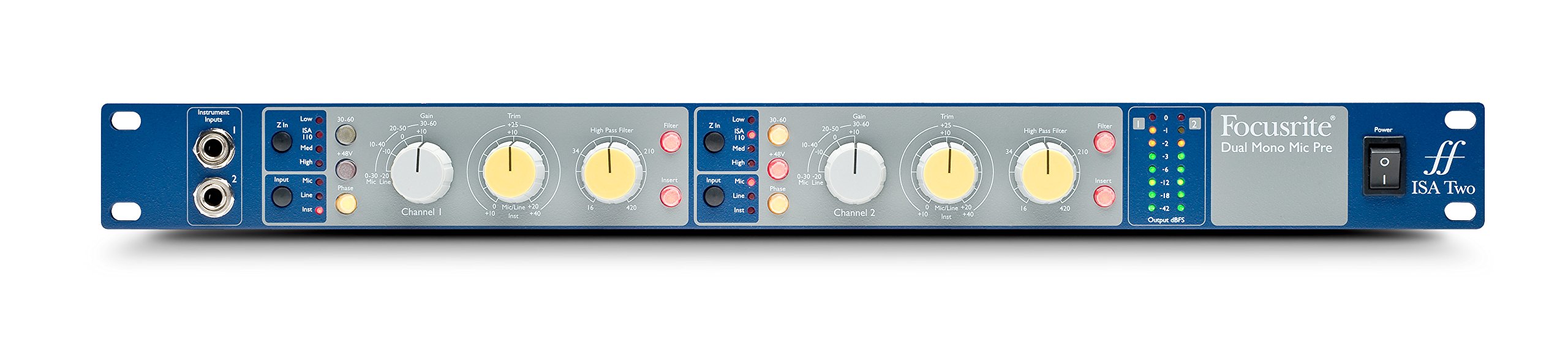
รูปที่ 1 : ด้านหน้า view of the Focusrite ISA Two preampเครื่องแสดงasing its controls and metering.
เนื้อหาแพ็คเกจ
ตรวจสอบว่ามีรายการทั้งหมดอยู่ในแพ็คเกจ:
- Focusrite ISA Two Unit
- สายไฟ IEC
คู่มือการติดตั้ง
Follow these steps to set up your ISA Two preampเครื่องฟอก:
- การติดตั้งแร็คเมาท์: The ISA Two is designed for standard 19-inch rack mounting. Secure the unit using appropriate rack screws.
- การเชื่อมต่อไฟฟ้า: Connect the supplied IEC power cable to the rear panel power inlet and then to a suitable AC power source. Ensure the power switch is in the OFF position before connecting.
- การเชื่อมต่อไมโครโฟน: Use balanced XLR cables to connect your microphones to the 'MIC INPUT' XLR connectors on the rear panel for each channel.
- Connecting Line Sources: For line-level signals, use balanced TRS cables to connect to the 'LINE INPUT' TRS connectors on the rear panel.
- เครื่องมือเชื่อมต่อ: For instruments such as guitars or basses, use 1/4-inch jack cables to connect to the 'Instrument Inputs' on the front panel.
- การเชื่อมต่อขาออก: Connect the 'OUTPUT' XLR connectors on the rear panel to your audio interface, mixer, or other recording equipment using balanced XLR cables.
- Insert Connections: If using external hardware processors, connect them to the 'SEND' and 'RETURN' 1/4-inch TRS jacks on the rear panel for each channel.

Figure 2: Rear panel of the Focusrite ISA Two, showing microphone, line, output, and insert connections.
คำแนะนำการใช้งาน
This section details the operation of the ISA Two preamplifier's controls:
- เปิดเครื่อง: After all connections are made, switch the power button on the front panel to the ON position.
- การเลือกอินพุต: Use the 'Input' buttons (Mic, Line, Inst) to select the appropriate input source for each channel. Ensure only one input type is active per channel.
- Gain Control: The large 'Gain' knob adjusts the primary gain level (e.g., 0-30 dB, 30-60 dB). The smaller 'Trim' knob provides fine-tuning (+/-10 dB) for precise level setting.
- Variable Input Impedance (Z In): For microphone inputs, select one of the four impedance settings (Low, ISA 110, Med, High) to optimize the interaction with your microphone. Experiment to find the best sonic match.
- พลังปีศาจ (+48V): Activate the +48V button for condenser microphones that require phantom power. Ensure the microphone is connected before engaging phantom power.
- ตัวกรองความถี่สูงผ่าน (HPF): Engage the 'Filter' button and use the 'High Pass Filter' knob to remove unwanted low-frequency rumble or proximity effect. The filter offers an 18dB/octave slope.
- Insert Function: Press the 'Insert' button to engage any external hardware processors connected to the rear panel insert points.
- การวัดแสง: Monitor your signal levels using the eight-LED array. Adjust gain and trim to achieve optimal levels without clipping (red LEDs). The VU meter provides an average level indication.
For a visual demonstration of the ISA Two in action, watch the official product video:
Video 1: Focusrite ISA Two Classic Dual Mono Transformer-Based Microphone Preamplifier in use during a recording session. This video demonstrates the preamplifier's features and sound quality in a practical studio environment.
การซ่อมบำรุง
To ensure the longevity and optimal performance of your Focusrite ISA Two, follow these maintenance guidelines:
- การทำความสะอาด: ใช้ผ้าแห้งเนื้อนุ่มเช็ดทำความสะอาดภายนอกตัวเครื่อง หลีกเลี่ยงน้ำยาทำความสะอาดที่มีฤทธิ์กัดกร่อน สารละลาย หรือแว็กซ์
- การระบายอากาศ : Ensure adequate airflow around the unit, especially if rackmounted, to prevent overheating.
- พื้นที่จัดเก็บ: When not in use for extended periods, store the unit in a cool, dry environment away from direct sunlight and extreme temperatures.
- การจัดการสายเคเบิล: Keep cables organized and free from kinks or excessive tension to prevent damage to connectors and the unit.
การแก้ไขปัญหา
If you encounter issues with your ISA Two, consider the following common troubleshooting steps:
- ไม่มีไฟฟ้า: Check the power cable connection to both the unit and the wall outlet. Ensure the power switch is ON.
- ไม่มีเอาต์พุตเสียง: Verify all input and output cables are securely connected. Check the input selection (Mic, Line, Inst) and ensure phantom power is engaged if using a condenser microphone. Confirm gain levels are appropriately set.
- เสียงเพี้ยน: Reduce the input gain and trim levels. Check for proper impedance matching with your microphone. Ensure no cables are damaged.
- สัญญาณไม่ต่อเนื่อง: Inspect all cable connections for looseness or damage. Try swapping cables to isolate a faulty one.
- เสียงรบกวน/เสียงฮัม: Ensure all equipment is properly grounded. Check for nearby sources of electromagnetic interference.
If problems persist after these steps, contact Focusrite support for further assistance.
ข้อมูลจำเพาะทางเทคนิค
| ข้อมูลจำเพาะ | ค่า |
|---|---|
| ยี่ห้อ | โฟคัสไรต์ |
| ชื่อรุ่น | ไอเอสเอสอง |
| เทคโนโลยีการเชื่อมต่อ | อนาล็อก |
| ประเภทขั้วต่อ | 2 เข้า / 2 ออก |
| สี | Blue / Gray |
| น้ำหนักสินค้า | 7 ปอนด์ |
| ขนาดรายการ (ยาว x กว้าง x สูง) | 5.55 x 15.16 x 26.06 นิ้ว |
| วัสดุ | สแตนเลส |
| แพลตฟอร์มฮาร์ดแวร์ | ไมค์พรีamp |
| จำนวนช่องสัญญาณ | 2 |
| การตอบสนองความถี่ | ความถี่ 20 กิโลเฮิรตซ์ |
| วัสดุของตู้หุ้ม | สแตนเลส |
| หมายเลขรุ่น | AMS-ISA-2 |
| หมายเลขประจำตัวการค้าสากล (GTIN) | 815301005148 |
| ยูพีซี | 815301005148 |
| หมายเลขชิ้นส่วน Mfr | ไอเอสเอสอง |
การรับประกันและการสนับสนุน
The Focusrite ISA Two comes with a รับประกัน 2 ปี นับจากวันที่ซื้อ ครอบคลุมถึงข้อบกพร่องในการผลิตและการทำงานผิดปกติภายใต้การใช้งานปกติ
สำหรับการขอรับการสนับสนุนทางเทคนิค การลงทะเบียนผลิตภัณฑ์ หรือเพื่อ... view the full warranty terms and conditions, please visit the official Focusrite webเว็บไซต์นี้ คุณยังสามารถค้นหาคำถามที่พบบ่อยและแหล่งข้อมูลเพิ่มเติมได้ที่นั่น
การสนับสนุนทางออนไลน์: www.focusrite.com/support