การแนะนำ
This manual provides essential instructions for setting up, operating, maintaining, and troubleshooting your Kodak EasyShare M583 14 MP Digital Camera. Please read this guide thoroughly to ensure proper use and to maximize your camera's performance.
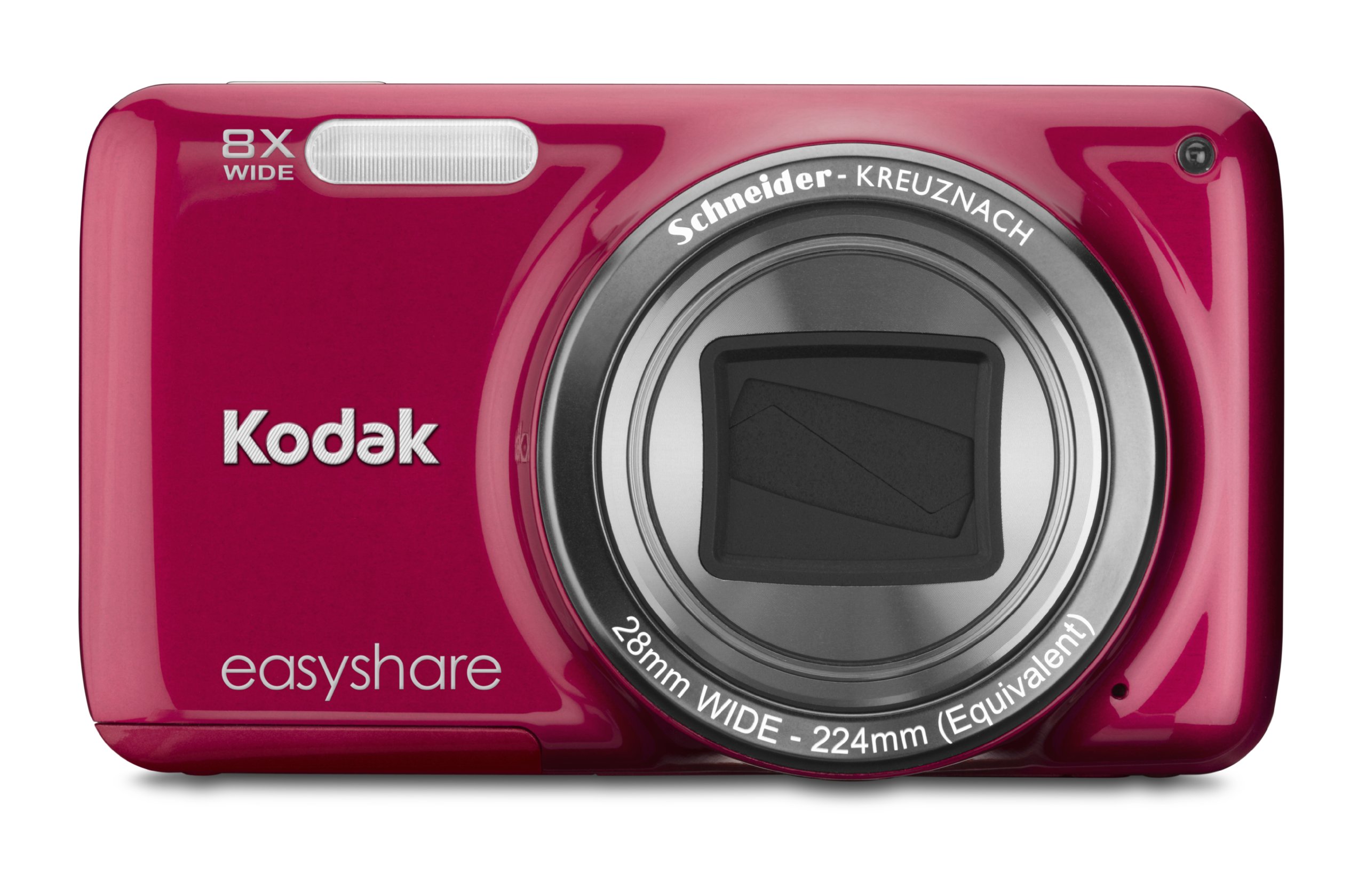
ภาพ: ด้านหน้า view of the Kodak EasyShare M583 Digital Camera in red, showcasing the lens and branding.
การตั้งค่า
1. การติดตั้งและการชาร์จแบตเตอรี่
The Kodak EasyShare M583 uses a rechargeable Li-Ion battery.
- เปิดฝาช่องใส่แบตเตอรี่ที่อยู่บริเวณด้านล่างของกล้อง
- Insert the Li-Ion battery, ensuring the contacts align correctly.
- ปิดฝาช่องใส่แบตเตอรี่ให้แน่น
- Connect the camera to a power source using the supplied USB cable for charging. The battery indicator light will show charging status.
2. การติดตั้งการ์ดหน่วยความจำ
The camera supports MicroSD and MicroSDHC memory cards. A memory card is required to store photos and videos.
- หาช่องเสียบการ์ดหน่วยความจำ ซึ่งโดยทั่วไปจะอยู่ใกล้กับช่องใส่แบตเตอรี่
- Insert the MicroSD/MicroSDHC card with the gold contacts facing down, pushing gently until it clicks into place.
- ในการถอดออก ให้กดการ์ดเข้าไปอีกครั้งจนกว่าการ์ดจะเด้งออกมา
บันทึก: The camera supports up to 4 GB of memory. Ensure the card is formatted in the camera before first use.
คำแนะนำการใช้งาน
1. Powering On and Basic Photography
- กดปุ่ม พลัง button to turn on the camera. The lens will extend.
- จัดกรอบภาพถ่ายของคุณโดยใช้หน้าจอ LCD ขนาด 3 นิ้ว
- Press the shutter button halfway down to focus. The camera will confirm focus.
- Press the shutter button completely to capture the image.

ภาพ: ด้านหน้า view of the Kodak EasyShare M583 camera, showing the extended lens and flash unit.
2. ฟังก์ชั่นซูม
The camera features an 8x optical zoom. Use the zoom lever (W/T) located near the shutter button to adjust the focal length.
- Move the lever towards T (เลนส์เทเลโฟโต้) สำหรับซูมเข้า
- Move the lever towards W (กว้าง) เพื่อซูมออก
3. การบันทึกวิดีโอ
To record videos, press the dedicated video record button. The camera supports 720p HD video.
- กดปุ่ม บันทึกวิดีโอ ปุ่มเพื่อเริ่มการบันทึก
- กดปุ่มอีกครั้งเพื่อหยุดการบันทึก
- Videos are saved to the memory card in MP4 format.
4. Image Stabilization and Flash Modes
- The camera incorporates both digital and optical image stabilization to reduce blur caused by camera shake.
- The built-in flash operates in automatic mode, activating when lighting conditions require it.
5. เรื่องviewการสร้างและแบ่งปันเนื้อหา
View your captured photos and videos on the 3-inch LCD screen.
- กดปุ่ม Review button (usually indicated by a play icon) to enter playback mode.
- ใช้ปุ่มควบคุมทิศทางเพื่อเลื่อนดูภาพและวิดีโอของคุณ
- To share content, press the dedicated แบ่งปัน button. This allows one-button upload to email, KODAK PULSE Display, and various social networking sites.

ภาพ: ด้านหลัง view of the Kodak EasyShare M583 camera, displaying the 3-inch LCD screen with sharing options for platforms like Twitter and Facebook.
6. การเชื่อมต่อกับคอมพิวเตอร์
Connect the camera to your computer using the supplied USB cable to transfer photos and videos.
- ตรวจสอบให้แน่ใจว่ากล้องเปิดอยู่
- Connect one end of the USB cable to the camera's USB port and the other end to your computer.
- The camera will appear as a removable drive, allowing you to access your media files.
การซ่อมบำรุง
1. การทำความสะอาดกล้อง
- ใช้ผ้านุ่มที่ไม่เป็นขุยในการทำความสะอาดตัวกล้อง
- สำหรับการทำความสะอาดเลนส์และหน้าจอ LCD ให้ใช้ผ้าทำความสะอาดเลนส์และน้ำยาทำความสะอาดเฉพาะ หลีกเลี่ยงวัสดุที่มีฤทธิ์กัดกร่อน
- Do not use organic solvents such as alcohol or thinner.
2. การดูแลแบตเตอรี่
- ชาร์จแบตเตอรี่ให้เต็มก่อนใช้งานครั้งแรก
- หลีกเลี่ยงการให้แบตเตอรี่สัมผัสกับอุณหภูมิที่สูงเกินไป
- หากจะไม่ใช้กล้องเป็นเวลานาน ให้ถอดแบตเตอรี่ออก
3. การจัดเก็บ
- เก็บกล้องไว้ในที่แห้งและเย็น หลีกเลี่ยงแสงแดดโดยตรงและความชื้นสูง
- ใช้เคสใส่กล้องเพื่อป้องกันฝุ่นและรอยขีดข่วน
การแก้ไขปัญหา
| ปัญหา | สารละลาย |
|---|---|
| กล้องไม่สามารถเปิดได้ | ตรวจสอบให้แน่ใจว่าแบตเตอรี่ชาร์จเต็มแล้วและใส่ถูกต้อง ลองชาร์จแบตเตอรี่อย่างน้อย 30 นาที |
| Blurred pictures. | Press the shutter button halfway to allow the camera to focus before fully pressing to capture. Ensure sufficient lighting. Image stabilization is active, but excessive movement can still cause blur. |
| Lens does not extend or retract. | Check for obstructions around the lens. Remove and reinsert the battery to reset the camera. If the issue persists, contact support. |
| การ์ดหน่วยความจำไม่ได้รับการรู้จัก | Ensure the MicroSD/MicroSDHC card is inserted correctly. Try reinserting the card. If possible, test with another compatible memory card. Format the card in the camera if it's new or causing issues (this will erase all data). |
| กล้องหยุดนิ่งหรือไม่ตอบสนอง | Remove the battery for a few seconds, then reinsert it and power on the camera. |
ข้อมูลจำเพาะ
| คุณสมบัติ | รายละเอียด |
|---|---|
| ชื่อรุ่น | M583 |
| ความละเอียดของเซนเซอร์ภาพ | 14 MP |
| ซูมออปติคอล | 8x |
| ซูมดิจิตอล | 5x |
| ขนาดหน้าจอ | 3 นิ้ว (จอ LCD) |
| ระบบป้องกันภาพสั่นไหว | ดิจิตอล, ออปติคัล |
| ความละเอียดวิดีโอ | 720p (30 เฟรมต่อวินาที) |
| รองรับ File รูปแบบ | JPEG (Images), MP4 (Video) |
| ประเภทการ์ดหน่วยความจำ | Micro SD, Micro SDHC |
| ประเภทแบตเตอรี่ | ลิเธียมไอออน |
| การเชื่อมต่อ | ยูเอสบี |
| น้ำหนักสินค้า | 0.32 ปอนด์ |
| เลนส์ | 28mm wide-angle lens with 8x optical zoom |
| รูรับแสงสูงสุด | เอฟ2.8 |
ข้อมูลการรับประกัน
KODAK products are manufactured to high quality standards. For specific warranty terms and conditions applicable to your Kodak EasyShare M583 camera, please refer to the warranty card included with your purchase or visit the official KODAK support webไซต์นี้ โปรดเก็บหลักฐานการซื้อไว้เพื่อใช้ยืนยันการรับประกัน
การสนับสนุนลูกค้า
If you encounter issues not covered in this manual or require further assistance, please contact KODAK customer support.
- การสนับสนุนทางออนไลน์: Visit the official KODAK support webเว็บไซต์สำหรับคำถามที่พบบ่อย ไดรเวอร์ และการดาวน์โหลดซอฟต์แวร์
- การสนับสนุนทางโทรศัพท์: Refer to your product packaging or the KODAK webเว็บไซต์สำหรับหมายเลขติดต่อในภูมิภาค
When contacting support, please have your camera model (M583) and serial number ready.