
การแนะนำ
The Heco Horizon 10 A is a passive subwoofer designed to enhance the low-frequency audio performance of your home theater or stereo system. This manual provides essential information for the safe and optimal use of your subwoofer. Please read these instructions carefully before installation and operation.
การตั้งค่า
1. การเปิดออกและการตรวจสอบ
- นำซับวูฟเฟอร์ออกจากบรรจุภัณฑ์อย่างระมัดระวัง
- Inspect the unit for any signs of damage during transit. If damage is found, do not proceed with installation and contact your retailer.
- เก็บบรรจุภัณฑ์เดิมไว้เพื่อการขนส่งหรือจัดเก็บในอนาคต
2 การวาง
The placement of your subwoofer significantly impacts its sound performance. Consider the following guidelines:
- ตำแหน่งมุม: Placing the subwoofer in a corner often maximizes bass output, but can sometimes lead to boomy or uneven bass.
- ตำแหน่งผนัง: Placing it along a wall can also enhance bass.
- ระบบเสียงในห้อง: Experiment with different positions in your listening room to find the optimal balance of bass depth and clarity.
- หลีกเลี่ยงสิ่งกีดขวาง: Ensure the subwoofer's driver is not obstructed.
3. การเชื่อมต่อ
The Heco Horizon 10 A is a passive subwoofer and requires an external amplifier or AV receiver with a dedicated subwoofer output or speaker-level outputs to function. It does not have a built-in ampชีวิต.
- หมดแรง: ให้แน่ใจว่าคุณ amplifier/receiver and all audio components are turned off before making any connections.
- การเตรียมสายลำโพง: Strip approximately 1/2 inch (12 mm) of insulation from the ends of your speaker cables. Twist the bare wires tightly to prevent stray strands.
- เชื่อมต่อกับ Ampเครื่องฟอก: Connect the speaker cables from the subwoofer output (or appropriate speaker-level outputs) of your amplifier/receiver to the binding posts on the back of the Heco Horizon 10 A subwoofer.
- Ensure Correct Polarity: Connect the positive (+) terminal (red) on the amplifier to the positive (+) terminal on the subwoofer, and the negative (-) terminal (black) on the amplifier to the negative (-) terminal on the subwoofer. Incorrect polarity can result in poor bass performance.
- การเชื่อมต่อที่ปลอดภัย: ตรวจสอบให้แน่ใจว่าการเชื่อมต่อทั้งหมดแน่นหนาและปลอดภัยเพื่อป้องกันการสูญเสียสัญญาณหรือไฟฟ้าลัดวงจร
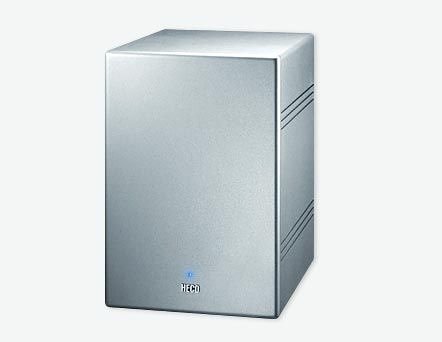
Figure 1: Heco Horizon 10 A passive subwoofer, showcasing its silver enclosure and front-facing speaker grille. This image illustrates the general appearance of the unit.
การดำเนินงาน
1. เปิดเครื่องครั้งแรก
หลังจากเชื่อมต่อทุกอย่างเสร็จเรียบร้อยแล้ว ให้เปิดเครื่องของคุณ amplifier/receiver. Start with the volume at a low level.
2. Adjusting Settings (via Amplifier/Receiver)
Since the Horizon 10 A is a passive subwoofer, all adjustments for volume, crossover frequency, and phase will be made on your external amplifier หรือเครื่องรับ AV
- ระดับซับวูฟเฟอร์: Adjust the subwoofer output level on your amplifier to blend seamlessly with your main speakers. The bass should be felt, not overtly heard as a separate speaker.
- ความถี่ครอสโอเวอร์: Set the crossover frequency on your amplifier. This determines the point at which frequencies below the setting are sent to the subwoofer, and frequencies above are sent to your main speakers. A common starting point is 80 Hz, but this may vary depending on your main speakers' low-frequency capabilities.
- การควบคุมเฟส: บาง amplifiers offer a phase control (0° or 180°). Experiment with this setting to achieve the most coherent bass response with your main speakers.
3. ระยะเวลาปรับตัว
Like all new speakers, your Heco Horizon 10 A subwoofer will benefit from a break-in period. During the first 20-50 hours of use, operate the subwoofer at moderate volume levels. This allows the driver's suspension to loosen up, leading to improved bass response and overall sound quality.
การซ่อมบำรุง
- การทำความสะอาด: Use a soft, dry cloth to wipe the exterior of the subwoofer. Avoid using abrasive cleaners, solvents, or liquid sprays, as these can damage the finish.
- ฝุ่น: Regularly dust the subwoofer to prevent accumulation, especially around the speaker grille.
- สิ่งแวดล้อม: ควรวางซับวูฟเฟอร์ให้ห่างจากแสงแดดโดยตรง แหล่งความร้อน และความชื้นมากเกินไป ตรวจสอบให้แน่ใจว่ามีการระบายอากาศที่ดีรอบๆ ตัวเครื่อง
- การจัดการ: When moving the subwoofer, lift it carefully to avoid dropping or damaging the enclosure or driver.
การแก้ไขปัญหา
If you experience issues with your Heco Horizon 10 A subwoofer, consult the following troubleshooting guide:
ไม่มีเสียงจากซับวูฟเฟอร์
- ตรวจสอบ Ampพลังงาน lifier: ให้แน่ใจว่าคุณ ampเครื่องขยายเสียง/เครื่องรับเปิดอยู่และทำงานถูกต้อง
- ตรวจสอบการเชื่อมต่อ: Double-check all speaker cable connections between the amplifier and the subwoofer. Ensure they are secure and correctly wired (positive to positive, negative to negative).
- Ampการตั้งค่าไลเออร์: Confirm that the subwoofer output on your amplifier/receiver is enabled and the volume level is not set to minimum or muted. Check crossover settings.
- แหล่งข้อมูล: Test with different audio sources to rule out an issue with the input signal.
เสียงเบสผิดเพี้ยนหรือไม่ชัดเจน
- ระดับเสียง: The subwoofer or amplifier volume may be set too high, causing distortion. Reduce the volume.
- การตั้งค่าครอสโอเวอร์: ปรับความถี่ครอสโอเวอร์บนของคุณ amplifier. If it's set too high, the subwoofer might be trying to reproduce frequencies it's not designed for, leading to distortion.
- การจัดวาง: Subwoofer placement can cause room modes that result in uneven or boomy bass. Try repositioning the subwoofer.
- ความสมบูรณ์ของสายเคเบิล: ตรวจสอบสายลำโพงว่ามีรอยชำรุดหรือการเชื่อมต่อหลวมหรือไม่
Humming or Buzzing Sound
- ลูปกราวด์: This is often caused by a ground loop. Try connecting all audio components to the same power outlet or power strip.
- การป้องกันสายเคเบิล: Ensure high-quality, shielded speaker cables are used.
- การรบกวน: Move the subwoofer or cables away from other electronic devices that might be causing interference.
ข้อมูลจำเพาะ
| คุณสมบัติ | ข้อมูลจำเพาะ |
|---|---|
| ชื่อรุ่น | Horizon 10 A |
| ยี่ห้อ | Heco |
| ประเภทลำโพง | ซับวูฟเฟอร์ |
| กำลังขับสูงสุดของลำโพง | 10 วัตต์ |
| เทคโนโลยีการเชื่อมต่อ | มีสาย |
| โหมดเอาต์พุตเสียง | ล้อมรอบ |
| ประเภทการติดตั้ง | ที่วางบนโต๊ะ |
| คำแนะนำการใช้งานผลิตภัณฑ์ | For surround sound systems, televisions, stereo systems |
| อุปกรณ์ที่รองรับ | แล็ปท็อปโทรทัศน์ |
| การกำหนดค่าเสียงเซอร์ราวด์ | 2 |
| สี | เงิน |
| ส่วนประกอบที่รวมอยู่ | ไม่มี |
| กันน้ำ | เลขที่ |
| แหล่งพลังงาน | ไฟฟ้าแบบมีสาย |
| ASIN | B0000D86CZ |
| มีจำหน่ายครั้งแรก | 15 มกราคม 2020 |
| ผู้ผลิต | Heco |
การรับประกันและการสนับสนุน
For detailed warranty information, technical support, or service inquiries regarding your Heco Horizon 10 A subwoofer, please refer to the official Heco webหรือติดต่อฝ่ายบริการลูกค้าโดยตรง โปรดเก็บหลักฐานการซื้อไว้เพื่อใช้ในการเคลมประกัน