
1. บทนำ
This manual provides instructions for the setup, operation, and maintenance of your Bose MediaMate Computer Speakers. These speakers are designed to enhance the audio experience for your computer, whether for music, movies, or gaming. The compact design and upward-angled sound projection optimize audio delivery for desktop use, occupying minimal desk space.
2. ข้อมูลด้านความปลอดภัย
Please read and follow all safety instructions before using this product to prevent electric shock, fire, or injury. Keep this manual for future reference.
- อย่าให้ลำโพงโดนน้ำหรือความชื้น
- Do not place the speakers near heat sources such as radiators, heat registers, stoves, or other apparatus (including ampเครื่องให้ความร้อน) ที่ผลิตความร้อน
- ใช้เฉพาะอุปกรณ์เสริม/สิ่งที่แนบที่ผู้ผลิตกำหนดเท่านั้น
- ถอดปลั๊กอุปกรณ์นี้ในระหว่างพายุฝนฟ้าคะนองหรือเมื่อไม่ได้ใช้งานเป็นเวลานาน
- แจ้งบริการทั้งหมดให้ช่างที่ผ่านการรับรองทราบ จำเป็นต้องให้บริการเมื่ออุปกรณ์ได้รับความเสียหายในลักษณะใดก็ตาม เช่น สายไฟหรือปลั๊กชำรุด ของเหลวหกหรือมีวัตถุตกลงไปในอุปกรณ์ อุปกรณ์โดนฝนหรือความชื้น ไม่สามารถทำงานได้ตามปกติ หรือตกหล่น
3. เนื้อหาบรรจุภัณฑ์
ตรวจสอบว่ามีรายการทั้งหมดอยู่ในแพ็คเกจของคุณ:
- Bose MediaMate Computer Speakers (2 units)
- อะแดปเตอร์แปลงไฟ
- Audio Cable (3.5mm stereo jack)
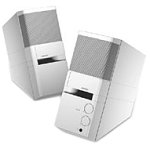
Image: The Bose MediaMate Computer Speakers in Gray. The image shows two compact speakers, one with visible volume and mix controls, and a headphone jack.
4. การตั้งค่า
Follow these steps to set up your Bose MediaMate Computer Speakers:
- การจัดวาง: Place the speakers on a flat, stable surface on either side of your computer monitor. Ensure they are angled slightly upward towards your listening position for optimal sound.
- เชื่อมต่อสายสัญญาณเสียง: Connect the 3.5mm audio cable from the back of the primary speaker (the one with controls) to the audio output jack on your computer.
- เชื่อมต่อพลังงาน: Plug the power adapter into the power input on the primary speaker, then plug the adapter into a wall outlet.
- เปิดเครื่อง: Turn on the speakers using the volume knob. The power indicator light should illuminate.
5. คู่มือการใช้งาน
Once set up, operating your MediaMate speakers is straightforward:
- การควบคุมระดับเสียง: Use the large knob labeled "VOLUME" on the front of the primary speaker to adjust the overall sound level.
- การควบคุมการผสม: The "MIX" knob allows you to blend audio from two different sources if you have a second device connected to the auxiliary input.
- แจ็คหูฟัง: For private listening, plug your headphones into the headphone jack located on the front of the primary speaker. This will mute the speakers.
- อินพุตคู่: The speakers feature dual inputs, allowing you to connect and mix two audio sources simultaneously. For example, you can connect your computer and a portable music player.
6. การบำรุงรักษา
เพื่อให้ลำโพงของคุณมีอายุการใช้งานยาวนานและทำงานได้อย่างมีประสิทธิภาพสูงสุด:
- การทำความสะอาด: Use a soft, dry cloth to clean the exterior surfaces of the speakers. Do not use liquid cleaners or aerosols.
- ฝุ่น: ควรปัดฝุ่นตะแกรงลำโพงเป็นประจำเพื่อป้องกันการสะสมของฝุ่นที่อาจส่งผลต่อคุณภาพเสียง
- พื้นที่จัดเก็บ: หากต้องเก็บรักษาลำโพงเป็นเวลานาน ควรตัดการเชื่อมต่อจากแหล่งจ่ายไฟและเก็บไว้ในที่แห้งและเย็น
7 การแก้ไขปัญหา
If you encounter issues with your Bose MediaMate speakers, refer to the following common problems and solutions:
| ปัญหา | สาเหตุที่เป็นไปได้ | สารละลาย |
|---|---|---|
| ไม่มีเสียง |
|
|
| เสียงเพี้ยน |
|
|
| มีลำโพงใช้งานได้เพียงตัวเดียว |
|
|
8. ข้อมูลจำเพาะ
- ยี่ห้อ: โบส
- แบบอย่าง: MediaMate
- การเชื่อมต่อ: 3.5mm Audio Input, AC Power
- เอาต์พุตเสียง: สเตอริโอ
- ประเภทลำโพง: มัลติมีเดีย
- วัสดุ: โลหะ
- ขนาดลำโพง: 6 Centimeters (Audio Driver)
- น้ำหนักสินค้า: 3 ปอนด์
- สี: สีเทา
9. การรับประกันและการสนับสนุน
Bose MediaMate Computer Speakers come with a limited warranty. For specific warranty details and duration, please refer to the warranty card included with your product or visit the official Bose webเว็บไซต์.
For technical support, product registration, or service inquiries, please contact Bose customer service:
- โทรศัพท์: 800-444-2673
- Webเว็บไซต์: www.bose.com
Please have your product model number (MediaMate) and purchase date available when contacting support.