
1. Муқаддима
Thank you for choosing the VINNFIER HYPERBAR 600 BTRW Soundbar System. This manual provides essential information for the safe and efficient operation of your new home theatre system. Please read these instructions carefully before use and retain them for future reference.
The HYPERBAR 600 BTRW is designed to enhance your audio experience with powerful, immersive sound. It features a soundbar and a wireless subwoofer, offering versatile connectivity options including Bluetooth and AUX, and is suitable for wall-mounting.
2. Дар қуттӣ чӣ мавҷуд аст
Ҳама ҷузъҳоро бодиққат кушоед ва боварӣ ҳосил кунед, ки шумо чизҳои зеринро гирифтаед:
- 1 x Hyperbar 600 Soundbar
- 1 x Сабвуфери бесим
- 1 x Идоракунии дурдаст
- 1 x Дастури корбар (ин ҳуҷҷат)
- 1 x кабели ARC HDMI
- 1 x адаптери барқ
- Бурдҳо барои васлкунии девор
- Optical Cable (may be included depending on region/package)
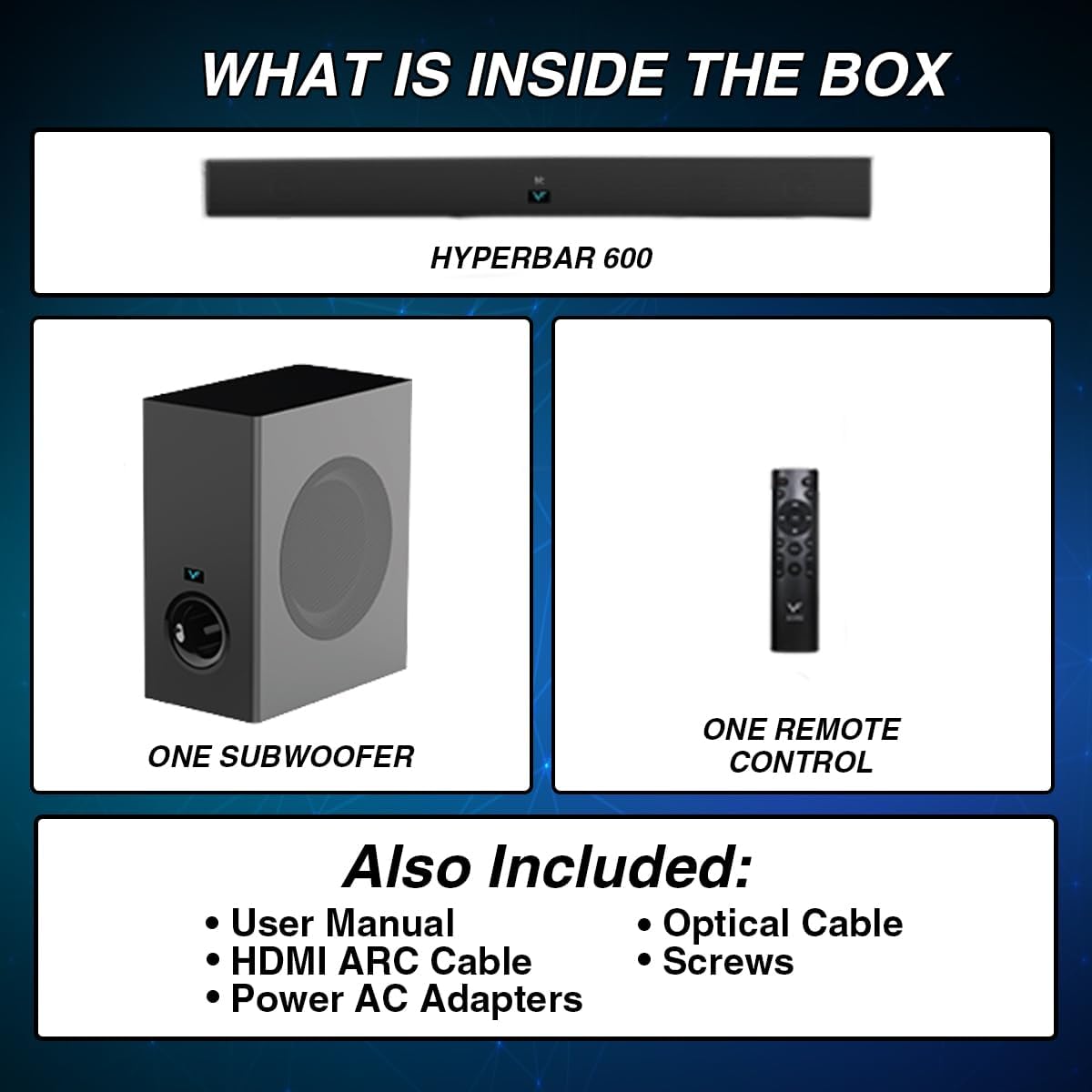
Image: Contents of the product packaging, showing the soundbar, wireless subwoofer, remote control, and various cables and accessories.
3. Маҳсулот ба охир расидview
The VINNFIER HYPERBAR 600 BTRW consists of a main soundbar unit and a wireless subwoofer. Familiarize yourself with the components before setup.

Image: Product dimensions of the soundbar (700mm x 90mm x 65mm) and the wireless subwoofer (160mm x 280mm x 330mm).

Image: Visual representation of the soundbar and its 6.5-inch wireless subwoofer, highlighting their audio output capabilities.
4. Танзимот
4.1 Ҷойгиркунии ибтидоӣ
Place the soundbar on a stable, flat surface in front of your television, ensuring it does not obstruct the TV's remote sensor. Position the wireless subwoofer on the floor near the soundbar for optimal bass performance.
4.2 Пайвастшавии барқ
- Connect the power adapter to the soundbar's DC input port.
- Адаптери барқро ба васлаки деворӣ пайваст кунед.
- Connect the subwoofer's power cord to a wall outlet. The subwoofer will automatically pair with the soundbar when both are powered on.
4.3 Васлкунии девор (ихтиёрӣ)
The soundbar is designed to be wall-mountable. Use the provided screws and follow these steps:
- Determine the desired mounting location on the wall, ensuring it is level and structurally sound.
- Mark the positions for the mounting screws using the soundbar's wall-mount brackets as a guide.
- Drill pilot holes at the marked positions. Insert wall anchors if necessary.
- Secure the mounting screws into the wall, leaving a small gap for the soundbar to hook onto.
- Carefully hang the soundbar onto the screws, ensuring it is securely seated.

Image: The soundbar installed on a wall beneath a television, demonstrating its wall-mountable design.
5. Дастурҳои истифодабарӣ
5.1 Фаъол кардан/хомӯш кардан
Барои фаъол ё хомӯш кардани система, тугмаи барқро дар саундбар ё идоракунии дурдаст пахш кунед.
5.2 Интихоби режим
Press the Mode button on the soundbar or the remote control to cycle through available input modes: Bluetooth, AUX, HDMI ARC, and Optical (if connected).
5.3 Назорати баландии овоз
Use the Volume Up (+) and Volume Down (-) buttons on the soundbar or the remote control to adjust the audio level.
5.4 Вуруди микрофон
The soundbar features dual microphone inputs for karaoke. Connect your microphones to the designated jacks on the soundbar.
6. Пайвастшавӣ
6.1 Пайвасти Bluetooth
- Turn on the soundbar and select Bluetooth mode. The LED indicator will flash, indicating it is in pairing mode.
- Дар дастгоҳи худ бо Bluetooth (масалан, смартфон, планшет), дастгоҳҳои мавҷудаи Bluetooth-ро ҷустуҷӯ кунед.
- Select "HYPERBAR 600 BTRW" from the list.
- Once connected, the LED indicator on the soundbar will stop flashing and remain solid. You can now stream audio from your device.

Image: A smartphone displaying a music app, wirelessly connected to the soundbar via Bluetooth, indicated by a Wi-Fi-like symbol.
6.2 Пайвасти AUX
Connect an audio device (e.g., MP3 player, TV headphone jack) to the soundbar's AUX input using a 3.5mm audio cable. Select AUX mode on the soundbar.
6.3 HDMI ARC Connection
Connect one end of the HDMI ARC cable to the HDMI ARC port on your TV and the other end to the HDMI ARC port on the soundbar. Select HDMI ARC mode on the soundbar. Ensure your TV's HDMI ARC function is enabled in its settings.
7. Нигоҳдорӣ
7.1 Тозакунӣ
Wipe the surfaces of the soundbar and subwoofer with a soft, dry cloth. Do not use liquid cleaners or abrasive materials, as they may damage the finish.
7.2 Нигоҳдорӣ
If storing the system for an extended period, disconnect it from power, clean it, and store it in a cool, dry place away from direct sunlight and extreme temperatures.
8. Баррасии мушкилот
If you encounter issues with your HYPERBAR 600 BTRW, refer to the following common problems and solutions:
| Мушкилот | Сабаби эҳтимолӣ | Ҳалли |
|---|---|---|
| Не қудрат | Сими барқ пайваст нашудааст; Васлаки барқ фаъол нест | Боварӣ ҳосил кунед, ки кабелҳои барқӣ ба саундбар/сабвуфер ва розеткаи барқии корӣ боэътимод пайваст карда шудаанд. |
| Садо нест | Incorrect input mode; Volume too low; Cables not connected properly | Select the correct input mode (Bluetooth, AUX, HDMI ARC). Increase volume. Check all audio cables for secure connections. |
| Bluetooth пайваст нест | Саундбар дар ҳолати ҷуфтшавӣ нест; Дастгоҳ аз ҳад дур аст; Халалрасонӣ | Ensure soundbar is in Bluetooth pairing mode. Move device closer to the soundbar. Avoid sources of interference. |
| Сабвуфер пайваст намешавад | Subwoofer not powered on; Too far from soundbar | Ensure subwoofer is powered on. Place subwoofer within close proximity to the soundbar. |
9. Мушаххасоти
| Хусусият | Мушаххасоти |
|---|---|
| Бренд | ВИНФИЕР |
| Номи модел | HYPERBAR 600 BTRW |
| Maximum Speaker Power Output | 240 Ватт |
| Soundbar Output Power | 120W RMS (60W + 60W) |
| Ҳокимияти хуруҷи сабвуфер | 120W RMS (60W + 60W) |
| Ҷавоби басомад | 50 Гц |
| Технологияи пайвастшавӣ | Bluetooth, AUX, HDMI ARC |
| Ҳолати баромади аудио | 3D садои атроф |
| Навъи васлкунӣ | Ба девор васл карда мешавад |
| Материал | Пластмасса |
| Навъи баландгӯяк | Саундбар бо сабвуфери бесим |
| Хусусиятҳои махсус | 3D Sound Effect, Dual Microphone Jack |
| Диаметри сабвуфер | 6.5 инч |
| Диапазони Bluetooth | 10 метр |
| Латифи овозӣ | 40 Миллисония |
| Шумораи каналҳои аудиоӣ | 2.1 |
| Импеданс | 8 Ом |
| Дастгоҳҳои мувофиқ | Телевизион |
| Манбаи нерӯ | Электри симдор |
| Андозаҳои садои панели (W x D x H) | 700 x 90 x 65 мм |
| Андозаҳои сабвуфер (W x D x H) | 160 x 280 x 330 мм |
10. Кафолат ва дастгирӣ
10.1 Маълумот дар бораи кафолат
This VINNFIER HYPERBAR 600 BTRW Soundbar System comes with a Кафолати 1-солаи истеҳсолкунанда аз рӯзи харид. Лутфан далели хариди худро барои даъвоҳои кафолат нигоҳ доред.
10.2 Дастгирии муштариён
For technical assistance, troubleshooting beyond this manual, or warranty inquiries, please contact your retailer or the VINNFIER customer support service. Refer to the product packaging or VINNFIER's official webсайт барои маълумот барои тамос.