
1. Муқаддима
This manual provides detailed instructions for the installation, operation, and maintenance of your Tiandy TC-C32XN 2MP Fixed IP Dome Turret Camera. Please read this manual thoroughly before using the product to ensure correct usage and optimal performance. Keep this manual for future reference.
2. Маълумот оид ба бехатарӣ
- Боварӣ ҳосил кунед, ки манбаи барқ ба талаботи камера мувофиқат мекунад, то аз вайроншавӣ пешгирӣ карда шавад.
- Камераро дар ҳарорати аз ҳад зиёд, намӣ ё муҳитҳои зангзананда қарор надиҳед.
- Avoid pointing the camera directly at strong light sources for extended periods, as this may damage the image sensor.
- Бо камера эҳтиёткор бошед. Онро наафтонед ва ба ларзишҳои сахт дучор накунед.
- Ҳамаи насб ва хидматрасонӣ бояд аз ҷониби кормандони баландихтисос анҷом дода шаванд.
- Пеш аз тоза кардан ё анҷом додани нигоҳдорӣ барқро ҷудо кунед.
3. Мундариҷаи баста
Боварӣ ҳосил кунед, ки ҳама ашё дар бастаи шумо мавҷуданд:
- Tiandy TC-C32XN 2MP Fixed IP Dome Turret Camera
- Адаптер
- Виддаҳо ва симҳои деворӣ
- Дастури оғози зуд (агар дохил карда шуда бошад)
4. Маҳсулот ба охир расидview
The Tiandy TC-C32XN is a 2MP Fixed IP Dome Turret Camera designed for reliable surveillance. It features Smart IR for clear night vision up to 30 meters, a built-in microphone, and an SD card slot for local storage.

Расми 4.1: Пеш view of the Tiandy TC-C32XN camera, showing the lens and IR illuminators.
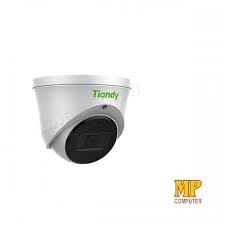
Расми 4.2: Тараф view of the Tiandy TC-C32XN camera, highlighting its dome turret form factor.
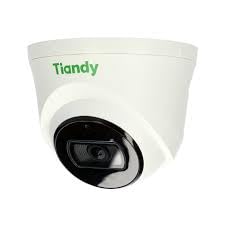
Расми 4.3: кунҷӣ view of the Tiandy TC-C32XN camera, showcasing тарҳи компакти он.
5. Танзим ва насб
5.1 Васлкунӣ
- Ҷойгирро интихоб кунед: Choose a suitable outdoor or indoor location (IP67 rated for outdoor use) that provides the desired viewing angle and is within reach of power and network connections. The camera is designed for protruding mounting.
- сӯрохиҳои пармакунӣ: Барои нишонагузорӣ ва парма кардани сӯрохиҳо барои винтҳои васлкунӣ, аз шаблони васлкунии додашуда (агар лозим бошад) истифода баред.
- Камераро муҳофизат кунед: Attach the camera base securely to the mounting surface using the provided screws and wall plugs.
5.2 Ноқилҳо
- Пайвасти барқ: Connect the provided adapter to the camera's power input and then to a power outlet. The camera operates on corded electric power.
- Пайвасти шабакавӣ: Connect an Ethernet cable from your network router or PoE switch to the camera's Ethernet port. This camera supports Ethernet connectivity for data transmission.
5.3 Танзимоти ибтидоӣ
- Фаъол: Once wired, power on the camera.
- Network Discovery: Use the Tiandy client software or a network scanner tool to discover the camera's IP address on your local network.
- Access Camera: Кушодани а web барои дастрасӣ ба браузер ва суроғаи IP-и камераро ворид кунед web interface. Log in using the default credentials (refer to the quick start guide for default username/password).
- Иваз кардани пароли пешфарз: Барои амният, ҳангоми ворид шудан ба система пароли пешфарзро фавран иваз кунед.
- NVR Integration: If using with an NVR, add the camera to your NVR system following the NVR's instructions. This camera is compatible with all brand NVRs.
- Танзимоти барномаи мобилӣ: Download the official Tiandy mobile application (available for Android and iOS) and follow the in-app instructions to add your camera for remote viewва назорат.
6. Дастурҳои истифодабарӣ
6.1 Зиндагӣ View ва Сабт
Ба камераи зинда дастрасӣ пайдо кунед view тавассути web interface, NVR, or mobile app. Configure recording schedules and methods (continuous, motion-triggered) via the camera's settings.
6.2 Smart IR and Night Vision
The camera features Smart IR technology, which automatically adjusts the intensity of its infrared LEDs to prevent overexposure of objects close to the camera, ensuring clear images in low-light conditions up to 30 meters. It also supports 'Night Color' low light technology for enhanced visibility.
6.3 Муайянкунии ҳаракат ва огоҳиҳо
Configure motion detection zones and sensitivity in the camera settings. The camera supports 'Motion Only' alert types. When motion is detected, the camera can trigger recordings, send notifications to your mobile device, or activate other configured actions. It also supports advanced features like tripwire and perimeter intrusion detection.
6.4 Функсияи аудио
The built-in microphone allows for audio monitoring of the surveillance area. Audio settings can be adjusted in the camera's web интерфейс ё NVR.
6.5 Нигоҳдории корти SD
Insert a compatible SD card into the camera's SD card slot for local storage of recordings. Ensure the card is formatted correctly via the camera's settings. The camera supports SD flash memory type.
6.6 Тугмаи Reset
A reset button is included for restoring the camera to its factory default settings. Consult the quick start guide for the exact location and procedure for your model.
7. Нигоҳдорӣ
- Тозакунӣ: Линза ва корпуси камераро бо матои нарм ва хушк нарм пок кунед. Аз маводи кимиёвии сахт ё тозакунандаҳои абразивӣ истифода набаред.
- Навсозии нармафзор: Regularly check the Tiandy official webсайт барои навсозиҳои нармафзор. Навсозии нармафзори камераи шумо самаранокӣ ва амнияти беҳтаринро таъмин мекунад.
- Санҷиши кабелӣ: Ҳамаи кабелҳоро мунтазам аз назар гузаронед, хусусан барои насби беруна, аломатҳои фарсудашавӣ ё вайроншавӣ.
8. Баррасии мушкилот
- Не қудрат: Ensure the power adapter is securely connected and the power outlet is functional.
- Видео нест: Check network cable connections. Verify the camera's IP address and network settings. Ensure the camera is properly added to your NVR or viewнармафзор.
- Сифати пасти тасвир: Clean the camera lens. Adjust focus if applicable. Check lighting conditions and camera placement.
- Масъалаҳои пайвастшавӣ ба шабака: Verify router and network cable functionality. Restart the camera and network devices.
- Мумкин нест Web Интерфейс: Ensure your computer is on the same network segment as the camera. Verify the camera's IP address. Try resetting the camera to factory defaults if necessary (this will erase all settings).
9. Мушаххасоти
| Хусусият | Мушаххасоти |
|---|---|
| Модели | TC-C32XN |
| Ҳалли самаранок | 2 МП (1920x1080) |
| Меъёри кадр | 30 кадр дар як сония |
| Технологияи сенсори акс | CMOS (1/2.8") |
| Диапазони биниши шабона | 30 Metres (Smart IR) |
| Технологияи нури паст | Ранги шабона |
| Масштаби оптикӣ | 3 х |
| Микрофони дарунсохт | Бале |
| Ковокии корти SD | Yes (Flash Memory Type: SD) |
| Навъи огоҳӣ | Motion Only (supports tripwire and perimeter) |
| Технологияи пайвастшавӣ | Wireless (IR), Ethernet |
| Манбаи нерӯ | Электри симдор |
| Рейтинги байналмилалии муҳофизат | IP67 |
| Формаи форма | Dome Turret |
| Навъи васлкунӣ | Барҷаста |
| Мутобиқати системаи оператсионӣ | Android, iOS |
| Андозаҳои маҳсулот (L x W x H) | 50 x 50 x 70 Миллиметр |
| Вазни ашё | 20 грамм |
| Компонентҳои дохилшуда | Адаптер |
| Ранги | Сафед |
10. Кафолат ва дастгирӣ
For warranty information and technical support, please refer to the warranty card included with your product or visit the official Tiandy website. Contact the seller or manufacturer directly for assistance with product issues or inquiries.