
1. Муқаддима
This manual provides detailed instructions for the Blackweb SDVD1183-BW Portable Blu-ray/DVD Player. Please read this manual thoroughly before using the device to ensure proper operation and to maximize your viewтаҷрибаи гӯш кардан ва шунавидан. Ин дастурро барои истинод дар оянда нигоҳ доред.
2. Маълумот оид ба бехатарӣ
- Дастгоҳро ба борон, намӣ ё ҳарорати аз ҳад зиёд нагузоред.
- Аз партофтан ё дучори таъсири сахти дастгоҳ худдорӣ намоед.
- Дастгоҳро худатон ба қисмҳо ҷудо кунед ё таъмир накунед. Ҳама хидматрасониро ба кормандони соҳибихтисос муроҷиат кунед.
- Use only the provided power adapters and accessories.
- вентилятсияи дурустро таъмин кунед; ягон сӯрохии вентиляцияро маҳкам накунед.
- Батареяҳоро мувофиқи қоидаҳои маҳаллӣ партов кунед.
3. Мундариҷаи баста
Боварӣ ҳосил кунед, ки ҳама ашё дар бастаи шумо мавҷуданд:
- Сиёҳweb SDVD1183-BW Portable Blu-ray/DVD Player
- Адаптери барқии AC
- Адаптери барқи мошин
- Кабели A/V
- Назорати дурдаст
- Дастури корбар (ин ҳуҷҷат)
4. Маҳсулот ба охир расидview
4.1 Асосӣ View

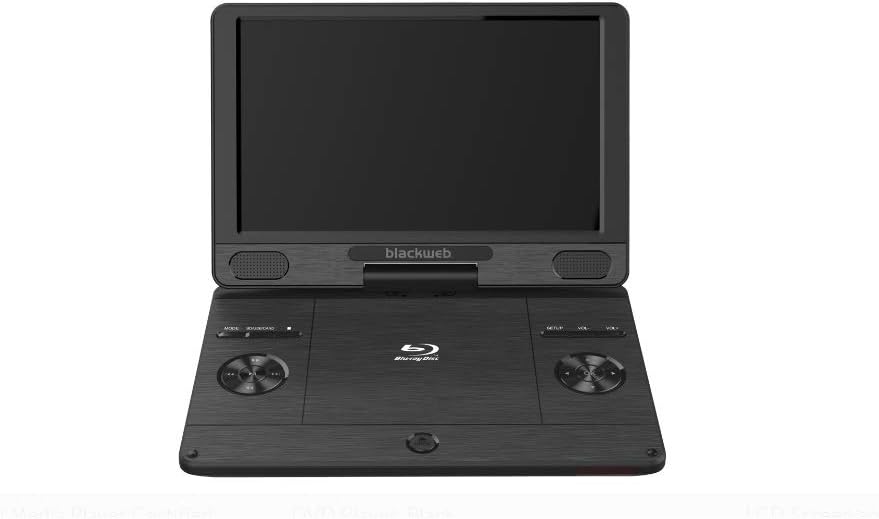
Тасвир: Пеш view аз Сиёҳweb SDVD1183-BW Portable Blu-ray/DVD Player, showing the open 11.4-inch screen, integrated speakers, and control buttons on the base.
Пеш view displays the 11.4-inch HD screen, stereo speakers, and essential control buttons on the player's base. These buttons typically include MODE, SOURCE/CARD, SETUP, and Volume controls (VOL+, VOL-).
4.2 Side/Rear View
Тасвир: тараф view аз Сиёҳweb SDVD1183-BW Portable Blu-ray/DVD Player, closed, highlighting the various input/output ports.
The side and rear panels house various connectivity ports. These include the DC IN port for power, USB port for external storage, SD/MMC card slot, HDMI OUT for connecting to external displays, AV OUT for analog video/audio, a headphone jack, and an Ethernet port for network connectivity. A power ON/OFF switch is also located on the side.
5. Танзимот
5.1 Пур кардани батарея
Before first use, fully charge the player's internal Lithium Ion battery. Connect the AC power adapter to the DC IN port on the player and plug it into a wall outlet. The charging indicator light will illuminate, typically turning off or changing color when fully charged.
5.2 Фурӯзон/хомӯш кардан
To power on the player, slide the ON/OFF switch to the 'ON' position. To power off, slide the switch to the 'OFF' position.
5.3 Connecting to External Display (HDMI)
Ба view content on a larger screen, connect an HDMI cable (not included) from the player's HDMI OUT port to an HDMI input on your TV or monitor. Select the corresponding HDMI input on your external display.
5.4 Ворид кардани диск
Gently open the disc compartment lid. Place a Blu-ray disc, DVD, or CD onto the spindle with the label side facing up. Press down gently on the center of the disc until it clicks into place. Close the lid firmly.
5.5 Using USB/SD Card
Insert a USB flash drive into the USB port or an SD/MMC card into the card slot. The player should automatically detect the media. If not, use the SOURCE/CARD button to select the appropriate input source.
6. Дастурҳои истифодабарӣ
6.1 Бозии асосӣ
After inserting a disc or connecting USB/SD media, the player will typically begin playback automatically or display a menu. Use the navigation buttons on the player or remote control to select options and press the PLAY/PAUSE button to start or pause playback.
6.2 Истифодаи пулти дурдаст
The included remote control provides full functionality for the player. Point the remote control directly at the player's IR sensor. Functions include: Play, Pause, Stop, Fast Forward, Rewind, Skip Track/Chapter, Menu, Setup, Volume Up/Down, and Mute.
6.3 Adjusting Volume and Screen
Use the VOL+ and VOL- buttons on the player or remote control to adjust the audio volume. Screen brightness, contrast, and other display settings can typically be adjusted through the SETUP menu.
6.4 Бозии медиа
The player supports a wide range of media formats, including:
- Дискҳо: CD-R/RW, DVD±R/RW, CD, Video CD, BD-R, BD-RE, Blu-ray Disc
- Аудио: WMA, DTS, Dolby Digital, Dolby Digital Plus, Dolby TrueHD
- Видео: MPEG-1, MPEG-2, MPEG-4, WMV, H.264, VC-1
- Тасвирҳо: GIF, JPEG, PNG
6.5 Network Connection (Ethernet)
Connect an Ethernet cable to the player's Ethernet port for wired network access. This feature may be used for firmware updates or accessing online content if supported by the player's software.
7. Нигоҳдорӣ
7.1 Тоза кардани плеер
Wipe the player's exterior with a soft, dry cloth. Do not use liquid cleaners, aerosols, or abrasive materials. For the screen, use a soft, lint-free cloth specifically designed for electronics displays.
7.2 Нигоҳубини диск
Handle discs by their edges to avoid fingerprints. Keep discs clean and free of scratches. Store discs in their cases when not in use.
7.3 Нигоҳубини батарея
To prolong battery life, avoid fully discharging the battery frequently. Charge the battery regularly, even if the player is not used for extended periods. Avoid exposing the player to extreme heat or cold, which can degrade battery performance.
8. Баррасии мушкилот
Агар шумо бо плеери худ бо мушкилот дучор шавед, ба мушкилот ва роҳҳои ҳалли маъмулии зерин муроҷиат кунед:
- Не қудрат: Ensure the AC adapter is securely connected and plugged into a working outlet. Check if the battery is charged. Verify the ON/OFF switch is in the 'ON' position.
- Сурат нест: If using an external display, ensure the HDMI cable is connected correctly and the TV/monitor is set to the correct input source. Check the player's screen brightness settings.
- Овоз нест: Check the volume level on the player and any connected external audio devices. Ensure headphones are fully plugged in if used. Verify audio settings in the SETUP menu.
- Диск бозӣ намекунад: Ensure the disc is inserted correctly and is clean and free of scratches. Verify the disc format is supported by the player (e.g., Blu-ray, DVD, CD). Some Blu-ray discs may have region coding; ensure it matches the player's region.
- USB/SD Card Not Recognized: Ensure the USB drive or SD card is formatted to a compatible file system (e.g., FAT32). Reinsert the media. Try a different USB port or SD card slot if available.
9. Мушаххасоти
| Хусусият | Мушаххасоти |
|---|---|
| Рақами модел | SDVD1183-BW |
| Андозаи экран | 11.4 инч |
| Навъи медиа | Blu-Ray, DVD, CD, USB, SD/MMC |
| Форматҳои бозишаванда | CD-R/RW, DVD±R/RW, CD, Video CD, BD-R, BD-RE, Blu-ray Disc, GIF, JPEG, PNG, WMA, DTS, MPEG-1, MPEG-2, MPEG-4, WMV, H.264, VC-1 |
| Технологияи пайвастшавӣ | Ethernet, HDMI, USB |
| Андозаҳои маҳсулот | 16 x 14.5 x 3.5 инч |
| Вазни ашё | 5.6 фунт |
| Батареяҳо | 1 батареяи литий ион лозим аст |
| Ранги | Сиёҳ |
10. Маълумот дар бораи кафолат
This Blackweb product comes with a limited manufacturer's warranty. Please refer to the warranty card included in your original product packaging for specific terms, conditions, and duration of coverage. Keep your purchase receipt as proof of purchase for any warranty claims.
11. Дастгирӣ
For technical assistance, troubleshooting beyond this manual, or customer service inquiries, please refer to the contact information provided in your product packaging or visit the official Blackweb дастгирй мекунанд website. Have your model number (SDVD1183-BW) and purchase details ready when contacting support.