
1. పరిచయం
This manual provides detailed instructions for the assembly, operation, and maintenance of your Askar 80ED Telescope. The Askar 80ED is an 80mm F7 refractor telescope with a 560mm focal length, featuring Extra Low Dispersion (ED) achromatic glass and a dual-speed focuser, designed for both astrophotography and astronomical observation.
Please read this manual thoroughly before using your telescope to ensure proper handling and optimal performance.
2. పెట్టెలో ఏముంది
Upon opening the Askar 80ED box, you will find the following components:
- Askar 80ED Optical Tube Assembly (OTA)
- వినియోగదారు మాన్యువల్
- వారంటీ కార్డ్
- నాణ్యత తనిఖీ సర్టిఫికేట్
- Tube Rings with Handle Bar
- Vixen-style Dovetail Plate
- Dust Caps for Objective and Focuser
3. ఉత్పత్తి ముగిసిందిview
The Askar 80ED telescope is engineered for high-quality imaging and observation. Key features include:
- 80mm ED Glass Objective Lens: Minimizes chromatic aberration, improving resolution, contrast, and color fidelity.
- Retractable Lens Hood: Can be reversed and screwed in to reduce overall size for transport or extended to minimize stray light during use.
- Dual-Speed Rack-and-Pinion 2-inch Focuser: Provides both coarse and fine focusing adjustments for precise control. The focuser has a travel length of 7cm and includes an enlarged locking screw for stability.
- Dual Finder Bases: Located on both sides of the lens tube, offering versatile mounting options for finder scopes and other accessories.
- 2-inch Adapter: Equipped with an internal copper-plated lining to protect connected devices.
- 200mm Standard Vixen-Style Dovetail Plate: Compatible with most equatorial mounts.
- Slotted Top Handle: Allows for mounting additional astronomical equipment.


4. సెటప్
4.1 Mounting the Telescope
- Unpack the Telescope: Carefully remove the telescope from its packaging. Ensure all protective materials are removed.
- Attach to Mount: The Askar 80ED comes with a Vixen-style dovetail plate. Attach this plate to a compatible equatorial mount or tripod. Secure it firmly using the mounting screws. The dovetail bar also features a 1/4 threaded hole for attaching a tripod quick release plate.
- Adjust Tube Rings: Loosen the thumb screws on the tube rings to adjust the telescope's balance on the mount. Once balanced, tighten the screws to secure the telescope.
- Extend Lens Hood: Extend the retractable lens hood to its full length to prevent stray light from entering the optical path and to protect the objective lens from dew.


5. ఆపరేటింగ్ మోడ్లు
5.1 Visual Observation Mode
- డస్ట్ ప్లగ్ తొలగించండి: Remove the dust plug from the 2-inch focuser adapter.
- Attach 1.25-inch Adapter: If using 1.25-inch eyepieces, insert the provided 1.25-inch adapter into the 2-inch focuser. Secure it with the thumbscrew.
- Insert Diagonal and Eyepiece: Insert a 1.25-inch erecting prism diagonal into the 1.25-inch adapter, then insert your desired 1.25-inch eyepiece into the diagonal. Secure both with their respective thumbscrews.
- దృష్టి: Use the dual-speed focuser knobs to achieve a sharp image. The larger knob provides coarse adjustment, while the smaller knob offers fine adjustment for precise focusing.
5.2 Astrophotography Mode
For astrophotography, you will typically use dedicated imaging accessories such as reducers or flatteners, and an astronomical camera.
- Remove 2-inch Adapter: Unscrew and remove the 2-inch focuser adapter.
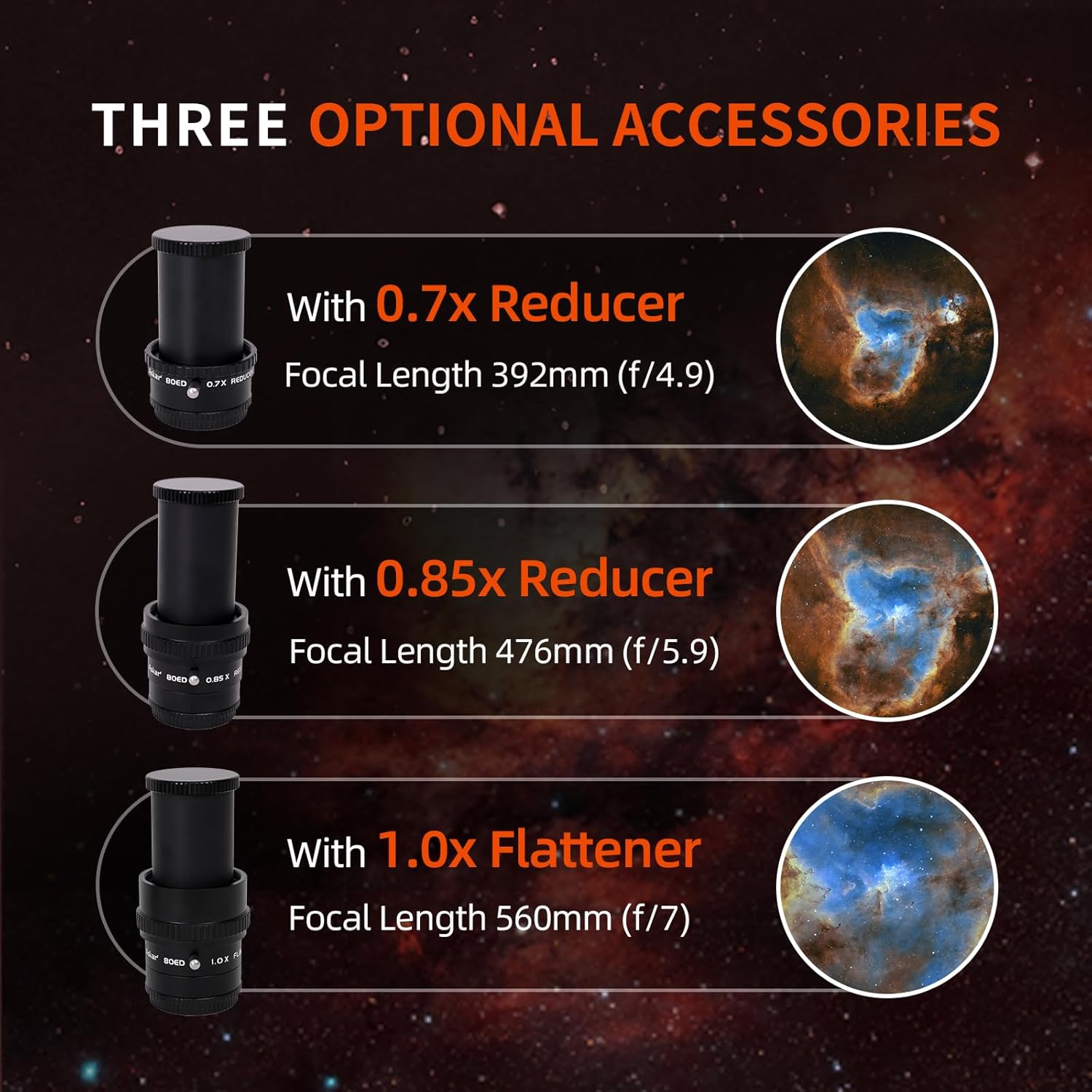
- Install Imaging Accessory: Attach your chosen imaging accessory (e.g., 1.0x flattener, 0.85x reducer, or 0.7x reducer) to the focuser. Ensure it is securely threaded. These accessories feature a built-in 360° rotator for convenient framing.
- కెమెరాను అటాచ్ చేయండి: Connect your astronomical camera to the imaging accessory. The required backfocus distance for proper focusing is typically 55mm from the M48 thread of the accessory. For cameras with a backfocus of 17.5mm, an appropriate extension ring may be needed.
- Electronic Focuser Installation (Optional):
- Loosen the focuser locking screw.
- Unscrew the coarse adjustment knob using a 2mm hex wrench.
- Install the appropriate flexible coupling onto the focuser shaft.
- Attach the Electronic Automatic Focuser (EAF) bracket to the focuser body.
- Mount the EAF onto the bracket and connect it to the coupling.
6. నిర్వహణ
- క్లీనింగ్ ఆప్టిక్స్: Use a soft brush or compressed air to remove loose dust from the objective lens. For smudges or fingerprints, use a specialized optical cleaning solution and a microfiber cloth. Avoid touching optical surfaces directly.
- నిల్వ: When not in use, store the telescope in a dry, dust-free environment. Keep the dust caps on the objective lens and focuser to protect the optics.
- Dew Prevention: The retractable lens hood helps prevent dew formation. For prolonged use in humid conditions, consider using a dew heater.
- యాంత్రిక భాగాలు: ఎప్పటికప్పుడు అన్ని స్క్రూలు మరియు కనెక్షన్లను బిగుతు కోసం తనిఖీ చేయండి. ఎక్కువగా బిగించవద్దు.
7. స్పెసిఫికేషన్లు
| ఫీచర్ | వివరాలు |
|---|---|
| బ్రాండ్ | అస్కర్ |
| మోడల్ పేరు | Askar 80ED |
| ఆబ్జెక్టివ్ లెన్స్ వ్యాసం | 80మి.మీ |
| ఫోకల్ లెంగ్త్ | 560మి.మీ |
| ఫోకల్ రేషియో | F7 |
| ఆప్టికల్ డిజైన్ | Extra Low Dispersion (ED) Achromatic Refractor |
| Focuser Type | Dual-Speed Rack-and-Pinion 2-inch Focuser |
| Focuser Travel Length | 7సెం.మీ |
| టెలిస్కోప్ మౌంట్ వివరణ | Equatorial Mount (compatible with Vixen-style dovetail) |
| ఫైండర్స్కోప్ | Dual finder bases for various accessories |
| అనుకూల పరికరాలు | Camera, Mount |
| ఉత్పత్తి కొలతలు | 18"D x 8"W x 7"H (సుమారుగా 45.7cm D x 20.3cm W x 17.8cm H) |
| నికర బరువు | 1.7 కిలోలు (సుమారుగా) |
| అదనపు ఫీచర్లు | Retractable lens hood, dual-speed focuser, dual finder bases, compatible with optional imaging accessories (0.85x reducer, 0.7x reducer, 1x flattener) |

8. ట్రబుల్షూటింగ్
- Fuzzy Images:
- Ensure the focuser is properly adjusted. Use the fine adjustment knob for precise focus.
- Check for dew on the objective lens. Extend the dew shield or use a dew heater.
- Verify that all optical accessories (diagonal, eyepiece, reducers/flatteners) are clean and correctly installed.
- For astrophotography, confirm the correct backfocus distance is achieved with all accessories.
- No Image Visible:
- Ensure all dust caps are removed from both ends of the telescope and any installed accessories.
- Check that the eyepiece or camera is securely inserted and focused.
- Verify that the telescope is pointed at a celestial object and not obstructed.
- Telescope Movement Issues:
- Ensure the tube rings are tightened sufficiently to prevent slippage.
- Check that the dovetail plate is securely attached to your mount.
9. వారంటీ మరియు మద్దతు
The Askar 80ED Telescope comes with a 1 సంవత్సరాల వారంటీ కొనుగోలు చేసిన తేదీ నుండి. ఈ వారంటీ తయారీ లోపాలను కవర్ చేస్తుంది మరియు సాధారణ ఉపయోగంలో మెటీరియల్స్ మరియు పనితనంలో లోపాలు లేకుండా ఉత్పత్తిని నిర్ధారిస్తుంది.
For warranty claims, technical support, or any inquiries regarding your Askar 80ED Telescope, please contact Askar customer service or visit the official Askar webతదుపరి సహాయం కోసం సైట్.
తయారీదారు: అస్కర్