
1. పరిచయం
The BRESSER WiFi Eyepiece Camera Model 15068 is designed to capture high-quality photos and videos through various optical devices such as telescopes, binoculars, and microscopes. Featuring a 1.47-inch integrated display and WiFi connectivity for mobile app control, this camera allows you to record your observations in 2K video and 1920x1080px photo resolution. It is compatible with eyepieces ranging from 30mm to 65mm in diameter, offering versatility for different observation scenarios.
2. భద్రతా సమాచారం
- పరికరాన్ని తీవ్రమైన ఉష్ణోగ్రతలు, ప్రత్యక్ష సూర్యకాంతి లేదా అధిక తేమకు గురిచేయవద్దు.
- పరికరాన్ని నీరు మరియు ఇతర ద్రవాలకు దూరంగా ఉంచండి.
- కెమెరాను విడదీయడానికి లేదా సవరించడానికి ప్రయత్నించవద్దు. ఇది వారంటీని రద్దు చేసి నష్టాన్ని కలిగించవచ్చు.
- Use only the provided or recommended charging cable.
- పిల్లలకు దూరంగా ఉంచండి.
3. ప్యాకేజీ విషయాలు
మీ ప్యాకేజీలో అన్ని అంశాలు ఉన్నాయని ధృవీకరించండి:
- BRESSER WiFi Eyepiece Camera (Model 15068)
- USB-C ఛార్జింగ్ కేబుల్
- సూచనల మాన్యువల్ (ఈ పత్రం)
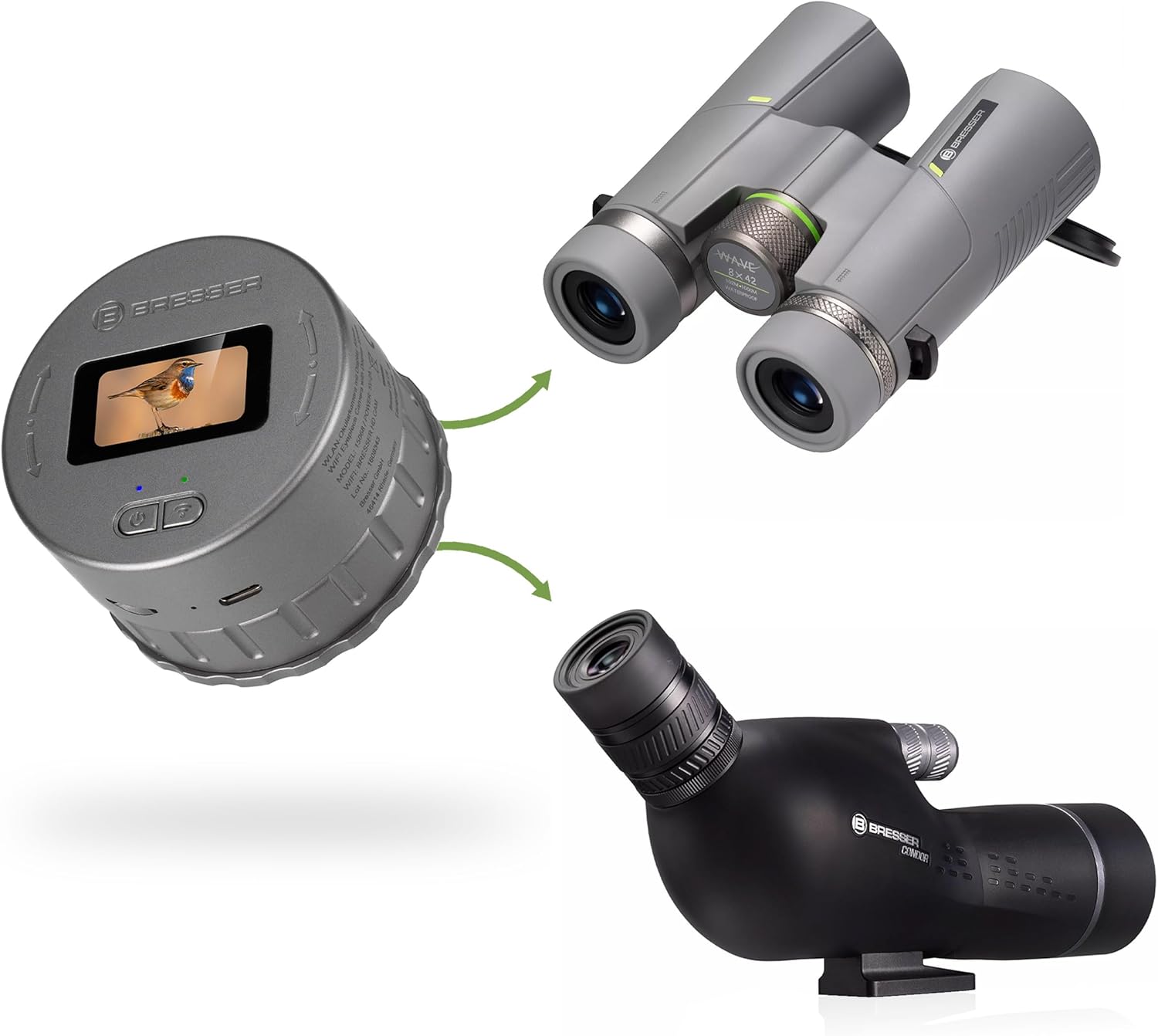
Image: The BRESSER WiFi Eyepiece Camera shown with its included USB-C charging cable.
4. ఉత్పత్తి ముగిసిందిview
కెమెరా యొక్క భాగాలు మరియు నియంత్రణలతో మిమ్మల్ని మీరు పరిచయం చేసుకోండి.
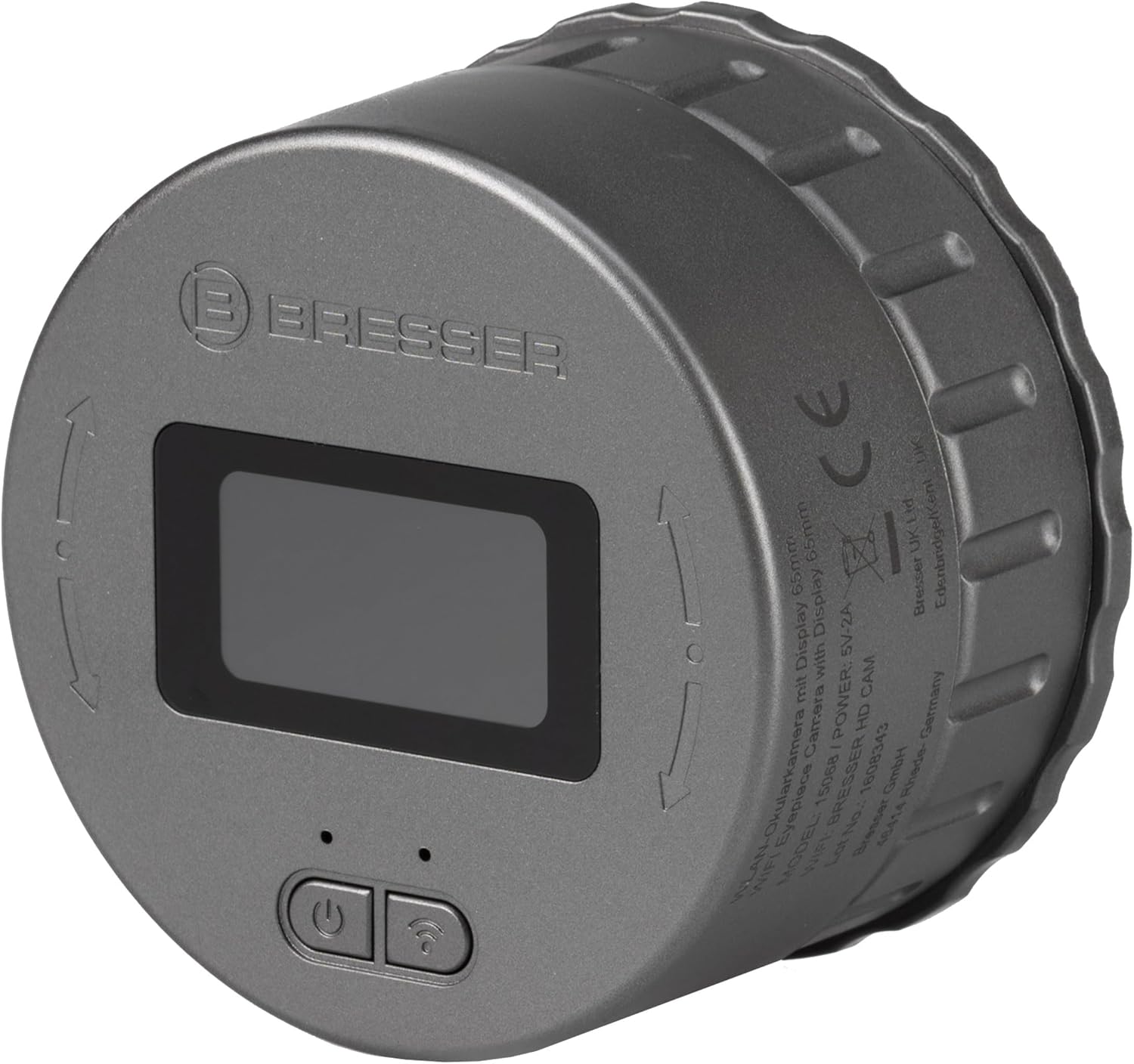
చిత్రం: పైన view of the camera, highlighting the 1.47-inch display, power button, and WiFi button.
- 1.47-అంగుళాల డిస్ప్లే: రియల్-టైమ్ అందిస్తుంది view and access to camera settings.
- పవర్ బటన్: Used to turn the camera on/off and navigate menus.
- వైఫై బటన్: Activates/deactivates the WiFi function for app connection.

చిత్రం: వైపు view of the camera, showing the USB-C charging port and the MicroSD card slot.
- USB-C పోర్ట్: అంతర్గత బ్యాటరీని ఛార్జ్ చేయడానికి.
- మైక్రో SD కార్డ్ స్లాట్: For inserting a MicroSD card (up to 128GB, not included) to store recordings.

చిత్రం: దిగువన view of the camera, illustrating the adjustable clamp mechanism for attaching to optical devices.
- సర్దుబాటు చేయగల Clamp: Secures the camera to eyepieces with diameters between 30mm and 65mm.
5. సెటప్
5.1 కెమెరాను ఛార్జ్ చేయడం
Before first use, fully charge the camera. Connect the USB-C cable to the camera's USB-C port and the other end to a USB power adapter (not included) or a computer's USB port. The charging indicator will show the charging status.
5.2 మైక్రో SD కార్డ్ని చొప్పించడం
The camera requires a MicroSD card (up to 128GB, Class 10 or higher recommended) for storing photos and videos. Gently insert the MicroSD card into the card slot until it clicks into place. Ensure the card is inserted in the correct orientation. To remove, press the card in again until it springs out.
5.3 Attaching to an Optical Device
The camera's adjustable clamp allows it to be mounted on various optical devices.
- Ensure your telescope, binocular, or microscope eyepiece has a diameter between 30mm and 65mm.
- cl విప్పుamp on the camera's base by rotating it counter-clockwise.
- Carefully place the camera over the eyepiece of your optical device.
- cl బిగించండిamp by rotating it clockwise until the camera is securely attached. Do not overtighten.
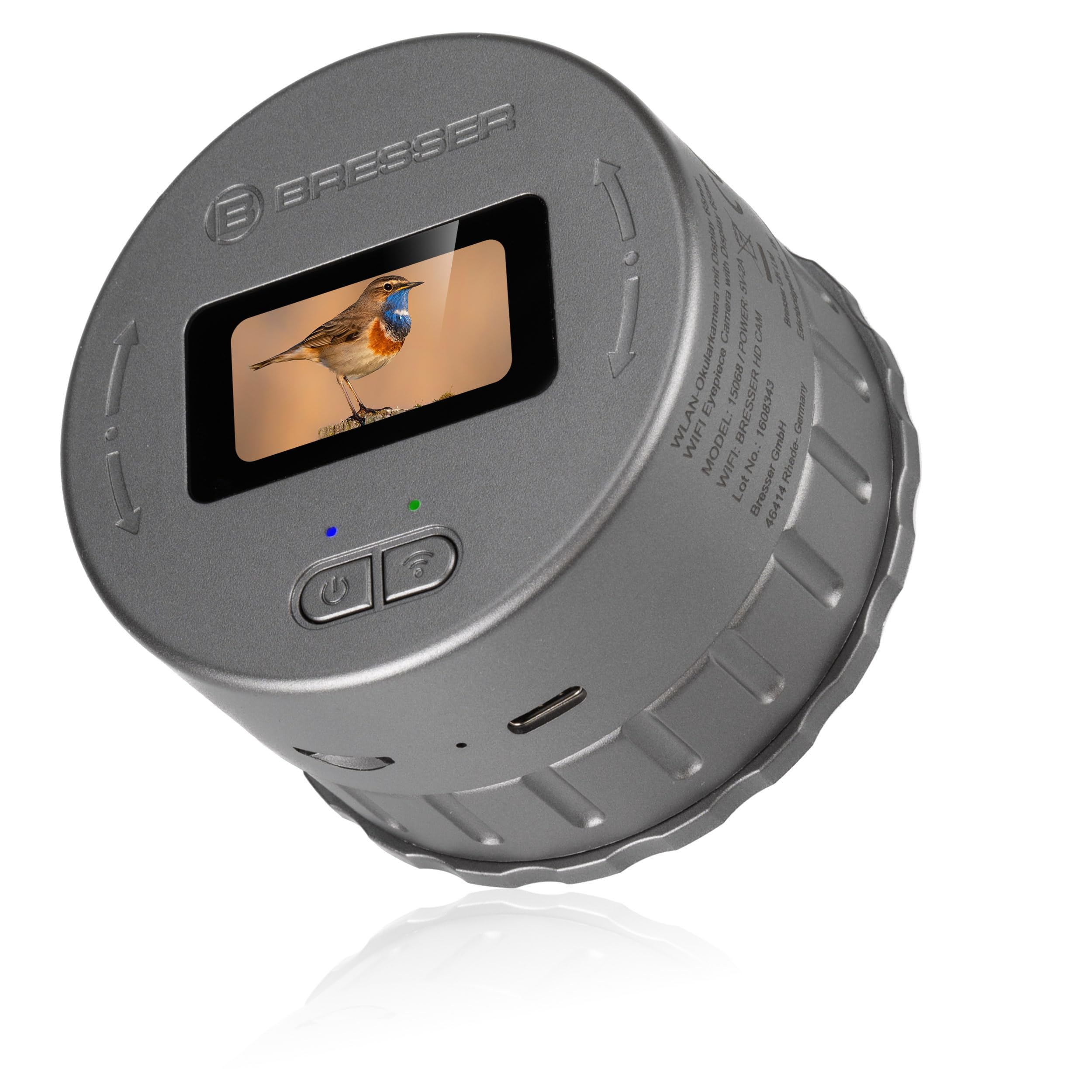
Image: The camera shown mounted on both a pair of binoculars and a spotting scope/telescope, demonstrating its versatility.
5.4 Mobile App Installation and Connection
The BRESSER WiFi Eyepiece Camera can be controlled via a dedicated mobile application available for Android and iOS devices.
- Download the official BRESSER app from your device's app store (e.g., Google Play Store or Apple App Store).
- Turn on the camera by pressing and holding the Power button.
- Press the WiFi button on the camera to activate its WiFi hotspot. The WiFi indicator will illuminate.
- On your mobile device, go to WiFi settings and connect to the camera's WiFi network (e.g., "BRESSER HD CAM").
- Open the BRESSER app. The app should automatically detect and connect to the camera, providing a live view.
6. ఆపరేటింగ్ సూచనలు
6.1 పవర్ ఆన్/ఆఫ్
- పవర్ ఆన్ చేయడానికి: డిస్ప్లే వెలిగే వరకు పవర్ బటన్ను కొన్ని సెకన్ల పాటు నొక్కి ఉంచండి.
- పవర్ ఆఫ్ చేయడానికి: డిస్ప్లే ఆఫ్ అయ్యే వరకు పవర్ బటన్ను నొక్కి పట్టుకోండి.
6.2 Using the Integrated Display
The 1.47-inch display provides a live view from the camera and allows basic control without the app.
- The display shows the live image, battery status, recording mode, and MicroSD card status.
- Use the Power button to cycle through different modes or confirm selections (short press).
6.3 ఫోటోలు మరియు వీడియోలను సంగ్రహించడం
You can capture images and videos directly from the camera or via the mobile app.
- Via Camera Buttons: లైవ్లో ఉండగా view, a short press of the Power button typically initiates photo capture or starts/stops video recording, depending on the selected mode.
- మొబైల్ యాప్ ద్వారా: Once connected, the app provides dedicated buttons for photo capture and video recording. You can also adjust settings like resolution and loop recording duration.
- Photos are saved in JPG format (1920x1080px).
- Videos are saved in MP4 format (2K resolution).
6.4 Loop Recording Function
The camera supports loop recording, allowing continuous recording in segments.
- This feature can be configured via the mobile app.
- Available recording durations are 1, 3, or 5 minutes per segment.
- When the MicroSD card is full, the oldest recordings will be overwritten by new ones.
6.5 ప్లేబ్యాక్ మరియు File నిర్వహణ
రికార్డ్ చేయబడింది files are stored on the MicroSD card. You can access them through the mobile app or by connecting the camera to a computer.
- మొబైల్ యాప్ ద్వారా: The app's album section allows you to view, download, and share your photos and videos.
- కంప్యూటర్ ద్వారా: Connect the camera to your computer using the USB-C cable. The camera will appear as a removable storage device, allowing you to transfer fileనేరుగా లు.
7. నిర్వహణ
7.1 శుభ్రపరచడం
- కెమెరా బాడీని శుభ్రం చేయడానికి మృదువైన, పొడి వస్త్రాన్ని ఉపయోగించండి.
- For the lens and display, use a specialized lens cleaning cloth and solution to avoid scratches.
- రాపిడి క్లీనర్లు లేదా ద్రావకాలు ఉపయోగించవద్దు.
7.2 నిల్వ
- కెమెరాను చల్లని, పొడి ప్రదేశంలో, ప్రత్యక్ష సూర్యకాంతి మరియు తీవ్రమైన ఉష్ణోగ్రతలకు దూరంగా ఉంచండి.
- ఎక్కువసేపు నిల్వ చేస్తుంటే, దాని జీవితకాలం పొడిగించడానికి బ్యాటరీ పాక్షికంగా (సుమారు 50%) ఛార్జ్ చేయబడిందని నిర్ధారించుకోండి.
8. ట్రబుల్షూటింగ్
| సమస్య | సాధ్యమైన కారణం | పరిష్కారం |
|---|---|---|
| కెమెరా పవర్ ఆన్ అవ్వదు. | తక్కువ బ్యాటరీ. | Charge the camera using the USB-C cable. |
| WiFiకి కనెక్ట్ చేయడం సాధ్యం కాలేదు. | WiFi not activated on camera; incorrect network selected; app issue. | Ensure WiFi is enabled on the camera. Select the correct "BRESSER HD CAM" network. Restart the app and camera. |
| MicroSD card not recognized or recording fails. | Card not inserted correctly; incompatible card; card full or corrupted. | Reinsert the card. Try a different MicroSD card (up to 128GB, Class 10). Format the card (via app or computer). |
| చిత్ర నాణ్యత తక్కువగా ఉంది. | Eyepiece not clean; camera not securely attached; focus issue on optical device. | Clean the camera lens and optical device eyepiece. Ensure the camera is firmly attached. Adjust the focus of your telescope/binoculars. |
9. స్పెసిఫికేషన్లు
| ఫీచర్ | వివరాలు |
|---|---|
| మోడల్ సంఖ్య | 15068 |
| వీడియో రిజల్యూషన్ | 2K |
| ఫోటో రిజల్యూషన్ | 1920 x 1080px (4 MP CMOS sensor) |
| ప్రదర్శన పరిమాణం | 1.47 అంగుళాలు |
| Eyepiece Diameter Compatibility | 30 - 65 మి.మీ. |
| నిల్వ | మైక్రో SD కార్డ్, 128 GB వరకు (చేర్చబడలేదు) |
| కనెక్టివిటీ | WiFi (for mobile app control) |
| అనుకూల పరికరాలు | Telescopes, Binoculars, Microscopes, Android/iOS devices |
| వీడియో ఫార్మాట్ | MP4 |
| ఫోటో ఫార్మాట్ | JPG |
| పవర్ ఇన్పుట్ | 5V-2A (via USB-C) |
| ప్రత్యేక లక్షణాలు | WiFi control, live view via app, loop recording (1, 3, 5 min) |
10. వారంటీ మరియు మద్దతు
BRESSER ఉత్పత్తులు నాణ్యత మరియు విశ్వసనీయత కోసం రూపొందించబడ్డాయి. వారంటీ సమాచారం మరియు సాంకేతిక మద్దతు కోసం, దయచేసి అధికారిక BRESSER ని చూడండి. website or contact your local BRESSER distributor. Keep your proof of purchase for warranty claims.
For further assistance, visit the BRESSER webసైట్: www.bresser.de