
Gazechimp JY-100F
Gazechimp JY-100F Coin Acceptor Selector Instruction Manual
Model: JY-100F | Brand: Gazechimp
పరిచయం
Thank you for choosing the Gazechimp JY-100F Coin Acceptor Selector. This manual provides detailed instructions for the setup, operation, and maintenance of your device. Please read this manual thoroughly before installation and use to ensure proper function and longevity of the product.
The JY-100F is an electronic coin acceptor designed for various coin-operated machines. It accurately identifies genuine coins based on their material and diameter, rejecting fakes. Its CPU automatically remembers currency settings, making it user-friendly and adaptable to different coin types.
ఉత్పత్తి ముగిసిందిview
The Gazechimp JY-100F Coin Acceptor Selector is constructed from high-quality PP material, ensuring durability and wear resistance. It features advanced coin recognition technology for reliable operation.

మూర్తి 1: ముందు మరియు వైపు view of the Gazechimp JY-100F Coin Acceptor with key dimensions. The unit measures approximately 123mm in height, 66mm in width (front plate), and 125mm in depth (including internal mechanism). The internal mechanism height is 90mm.
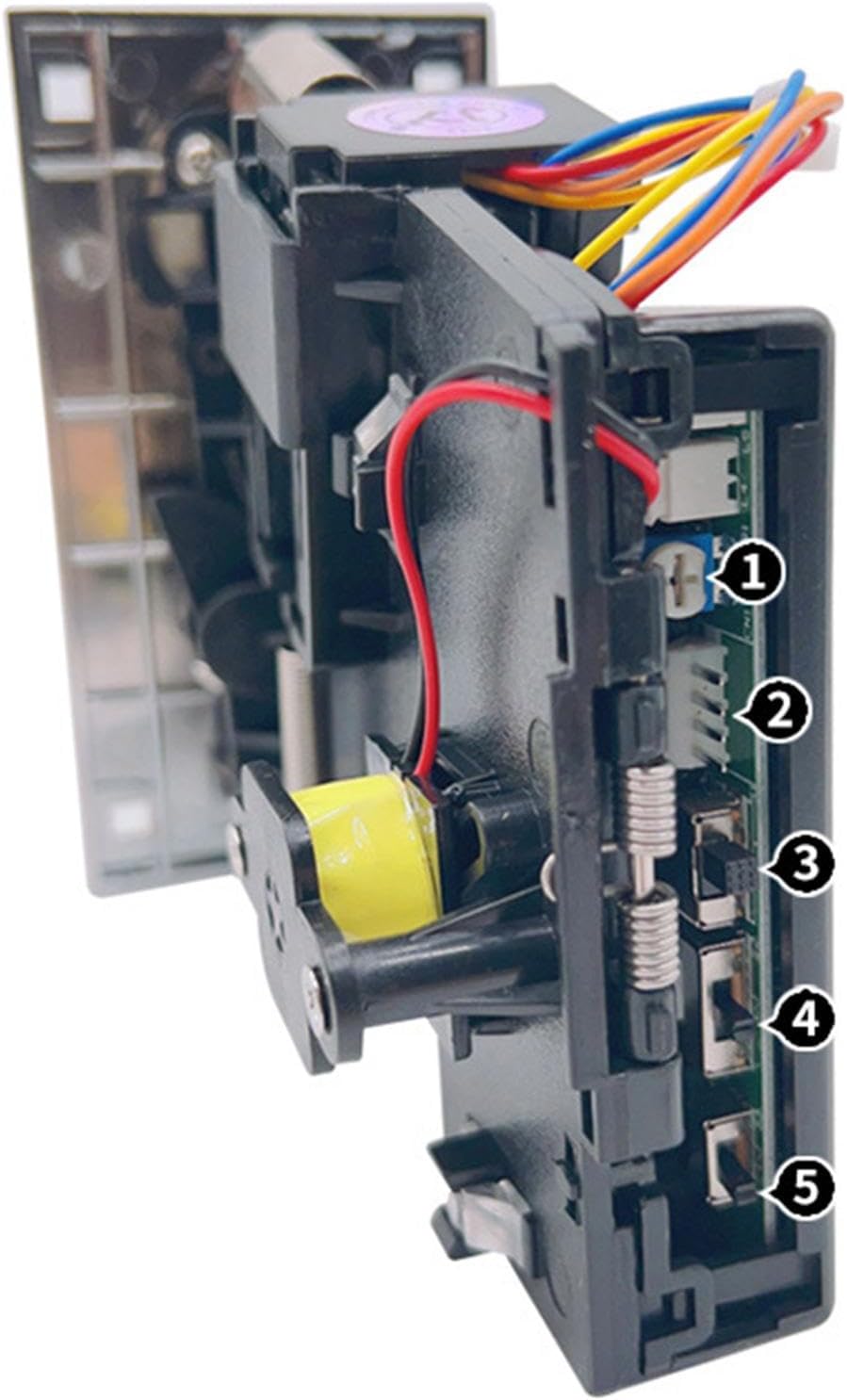
మూర్తి 2: వైపు view of the JY-100F Coin Acceptor, highlighting the adjustment switches. These switches (labeled 1 through 5) are used for fine-tuning coin recognition parameters and output settings.
స్పెసిఫికేషన్లు
| ఫీచర్ | వివరణ |
|---|---|
| మోడల్ | JY-100F |
| మెటీరియల్ | High-quality PP (Polypropylene) |
| Dimensions (Front Plate) | సుమారు 12.3 సెం.మీ (ఎత్తు) x 6.6 సెం.మీ (వెడల్పు) |
| Dimensions (Overall Depth) | సుమారు 12.5 సెం.మీ |
| Coin Recognition | Based on coin material and diameter |
| మెమరీ ఫంక్షన్ | CPU automatically remembers currency settings |
| అవుట్పుట్ సిగ్నల్ | Normal Open (NO) and Normal Close (NC) switch for coin identification |
| అప్లికేషన్లు | Vending machines, arcade games, coin-operated telephones, washing machines, toy cars, massage chairs, etc. |
సెటప్ మరియు ఇన్స్టాలేషన్
Before installation, ensure the power to your machine is off. Mount the coin acceptor securely in the designated slot of your machine using the provided screws.
Coin Programming
The JY-100F allows you to program the desired coin type. Follow these steps:
- Locate the coin programming button or switch on the side of the unit (refer to Figure 2, item 1).
- Press and hold the programming button until the indicator light flashes.
- Insert approximately 20-30 samples of the desired coin, one by one, into the coin slot. This allows the CPU to learn the coin's characteristics.
- Once the programming is complete, the indicator light will stop flashing. The CPU will automatically store these settings.
గమనిక: The CPU automatically remembers the currency settings, so there is no need to compare sample currency after initial programming.
వైరింగ్ రేఖాచిత్రం
Connect the coin acceptor to your machine's control board according to the following general wiring scheme. Specific wiring may vary based on your machine's requirements. Consult your machine's manual for detailed wiring instructions.
- రెడ్ వైర్: +12V DC Power Input
- బ్లాక్ వైర్: గ్రౌండ్ (GND)
- వైట్ వైర్: Coin Signal Output (Pulse)
- Gray Wire: Counter (Optional)
- పసుపు వైర్: Inhibit (Optional)
Ensure all connections are secure to prevent malfunctions.
ఆపరేటింగ్ సూచనలు
Once installed and programmed, the JY-100F Coin Acceptor operates automatically.
- Ensure the machine is powered on.
- Insert a programmed coin into the coin slot.
- The coin acceptor will verify the coin's authenticity.
- If the coin is genuine, it will be accepted, and a signal will be sent to the machine's control board.
- If the coin is fake or unrecognized, it will be rejected and returned through the coin return slot.
Adjusting Sensitivity and Output
The coin acceptor features switches for adjusting sensitivity and output signal characteristics (refer to Figure 2). These adjustments allow for fine-tuning the acceptance rate and signal duration.
- Switch 2 (Sensitivity): Adjusts the sensitivity of coin recognition. Higher sensitivity may accept slightly worn coins but could also increase the risk of accepting fakes. Lower sensitivity reduces fake acceptance but might reject some genuine coins.
- Switch 3 (Pulse Length): Controls the duration of the coin signal pulse. Adjust this according to your machine's control board requirements.
- Switch 4 (NO/NC): Toggles between Normal Open (NO) and Normal Close (NC) for the coin identification signal output. Select the setting compatible with your machine's input.
- Switch 5 (Coin Speed): Adjusts the speed at which coins are processed.
Make small adjustments and test thoroughly to find the optimal settings for your specific coins and machine.
నిర్వహణ
Regular maintenance ensures the optimal performance and longevity of your coin acceptor.
- శుభ్రపరచడం: Periodically clean the coin path and sensors to remove dust, dirt, or coin residue. Use a soft, dry cloth or a small brush. Do not use abrasive cleaners or liquids that could damage electronic components.
- తనిఖీ: Regularly inspect the coin acceptor for any signs of wear, damage, or loose connections.
- Coin Path Clearance: Ensure the coin path is clear of any obstructions.
Always disconnect power to the machine before performing any maintenance.
ట్రబుల్షూటింగ్
If you encounter issues with your JY-100F Coin Acceptor, refer to the following common problems and solutions:
| సమస్య | సాధ్యమైన కారణం | పరిష్కారం |
|---|---|---|
| Coins are consistently rejected. | Incorrect coin programming, low sensitivity, dirty sensors, coin path obstruction. | Re-program the coin type. Increase sensitivity (Switch 2). Clean the coin path and sensors. Check for obstructions. |
| Accepting fake or incorrect coins. | High sensitivity, incorrect coin programming. | Decrease sensitivity (Switch 2). Re-program the coin type with accurate sampలెస్. |
| No signal output after coin acceptance. | Incorrect NO/NC setting, wiring issue, incorrect pulse length. | Check NO/NC switch (Switch 4) setting. Verify wiring connections. Adjust pulse length (Switch 3). |
| Coin jams. | Deformed coins, foreign objects, dirty coin path. | Remove jammed coins carefully. Clean the coin path. Use only undamaged coins. |
ఈ పరిష్కారాలను ప్రయత్నించిన తర్వాత కూడా సమస్య కొనసాగితే, దయచేసి కస్టమర్ మద్దతును సంప్రదించండి.
వారంటీ మరియు మద్దతు
Gazechimp products are designed for reliability and performance. For warranty information or technical support, please refer to your purchase documentation or contact your retailer.
మరిన్ని సహాయం కోసం, మీరు సందర్శించవచ్చు Gazechimp JP seller page on Amazon.
Ask a question about this manual
Ask about setup, troubleshooting, compatibility, parts, safety, or missing instructions. Manuals+ will review the question and use this page’s manual context to help answer it.