
1. పరిచయం
This manual provides detailed instructions for the installation, operation, and maintenance of your EZoneTronics Android 10.1 2DIN Car Stereo. This unit features a 9-inch capacitive touchscreen, Android 10.1 operating system, GPS navigation, Bluetooth 4.0, Wi-Fi, AM/FM/RDS radio, and support for Mirror Link, Apple CarPlay, and Android Auto. Please read this manual thoroughly before using the product to ensure proper function and safety.
2. వాహన అనుకూలత
This car stereo is designed for specific Mercedes-Benz models:
- Mercedes-Benz ML-W164 / ML300 / ML350 / ML450 / ML500 / ML320 / ML63 AMG (2005-2012)
- Mercedes-Benz GL-X164 / GL320 / GL350 / GL420 / GL450 / GL500 (2005-2012)
ముఖ్యమైన గమనిక: If your vehicle is equipped with a Harman, Kardon, or BOSE amplification system, an additional fiber optic decoder box (e.g., ASIN B08K49SQSM) may be required for proper audio functionality. Consult a professional installer if you are unsure.
3. ప్యాకేజీ విషయాలు
క్రింద జాబితా చేయబడిన అన్ని వస్తువులు మీ ప్యాకేజీలో చేర్చబడ్డాయని ధృవీకరించండి:
- 1 x EZoneTronics Android Car Stereo Unit
- 1 x GPS యాంటెన్నా
- 1 x Power Harness
- 1 x RCA Output Cable
- 2 x USB Adapters
- 1 x కెమెరా ఇన్పుట్ కేబుల్
- 1 x యూజర్ మాన్యువల్ (ఈ పత్రం)
- 1 x Canbus Box
4. సెటప్ మరియు ఇన్స్టాలేషన్
Installation of this car stereo requires technical knowledge and experience with automotive electrical systems. Professional installation is highly recommended to prevent damage to the unit or your vehicle.
4.1 ప్రీ-ఇన్స్టాలేషన్ చెక్
- ఇన్స్టాలేషన్ ప్రారంభించే ముందు వాహనం యొక్క ఇగ్నిషన్ ఆఫ్ చేయబడిందని మరియు బ్యాటరీ డిస్కనెక్ట్ చేయబడిందని నిర్ధారించుకోండి.
- ప్యాకేజీలోని అన్ని విషయాలు ఉన్నాయని నిర్ధారించండి.
- Review your vehicle's wiring diagram for specific connections.
4.2 ఇన్స్టాలేషన్ దశలు (సాధారణం)
- Carefully remove the original car stereo unit from your dashboard.
- Connect the provided power harness to the vehicle's wiring. Ensure all connections are secure.
- Connect the GPS antenna and route it to a location with a clear view of the sky (e.g., dashboard corner).
- Connect the USB adapters and route them to an accessible location (e.g., glove compartment).
- If installing a rear camera, connect the camera input cable and route it to the camera location.
- Connect the RCA output cable for external amplifiers or subwoofers, if applicable.
- Connect the Canbus box as per the wiring diagram to enable steering wheel controls and other vehicle-specific functions.
- Carefully slide the new EZoneTronics unit into the dashboard opening.
- యూనిట్ను స్థానంలో భద్రపరచండి.
- Reconnect the vehicle battery and test the unit's functionality.

మూర్తి 4.1: Comparison of the car dashboard before and after the EZoneTronics car stereo installation. The top image shows the new unit installed, while the bottom images show the original radio (left) and the new unit (right) for direct comparison.
5. ఆపరేటింగ్ సూచనలు
5.1 ప్రాథమిక ఆపరేషన్
- పవర్ ఆన్/ఆఫ్: Press and hold the power button (usually on the front panel) to turn the unit on or off. A short press typically mutes/unmutes audio.
- టచ్స్క్రీన్: The 9-inch capacitive touchscreen responds to touch gestures similar to a smartphone. Tap to select, swipe to scroll.
- హోమ్ స్క్రీన్: The main interface provides access to various functions like Radio, Music, Navigation, Bluetooth, and Apps.
5.2 Radio (AM/FM/RDS)
The unit features a built-in AM/FM/RDS radio tuner for clear signal reception.
- Accessing Radio: Tap the 'Radio' icon on the home screen.
- స్కానింగ్: Use the 'Scan' or 'Seek' buttons on the screen to automatically search for available stations.
- ప్రీసెట్లను సేవ్ చేస్తోంది: Once a station is tuned, press and hold a preset number button on the screen to save it.
- RDS ఫంక్షన్: Radio Data System (RDS) displays station information like song title or program type where available.

మూర్తి 5.2: The FM/AM/RDS Radio interface on the EZoneTronics car stereo, showing frequency display and preset buttons for easy station selection.
5.3 బ్లూటూత్ 4.0
హ్యాండ్స్-ఫ్రీ కాలింగ్ మరియు ఆడియో స్ట్రీమింగ్ కోసం మీ స్మార్ట్ఫోన్ను బ్లూటూత్ ద్వారా కనెక్ట్ చేయండి.
- జత చేయడం: Go to the 'Bluetooth' menu on the stereo. Enable Bluetooth on your phone and search for available devices. Select 'EZoneTronics' (or similar name) and confirm the pairing code.
- హ్యాండ్స్-ఫ్రీ కాలింగ్: Once paired, you can make and receive calls directly from the stereo screen. Your phone's contact list may sync automatically.
- ఆడియో స్ట్రీమింగ్ (A2DP): Play music from your phone through the car stereo speakers. Control playback (play/pause, skip) from the stereo.

మూర్తి 5.3: The Bluetooth 4.0 interface showing music playback controls and icons for phone video, dial-up, hang-up, and phone music functions.
5.4 GPS నావిగేషన్
The unit includes an integrated GPS receiver and comes with Google Maps pre-installed. Other navigation apps can be downloaded from the Google Play Store.
- ఆన్లైన్ నావిగేషన్: Connect to Wi-Fi to use online maps and real-time traffic information.
- ఆఫ్లైన్ నావిగేషన్: Download offline map data for specific regions via Wi-Fi for navigation without an internet connection.
- Using Navigation Apps: Tap the 'Navigation' icon to launch the default map application. Follow on-screen prompts to enter destinations and start routes.
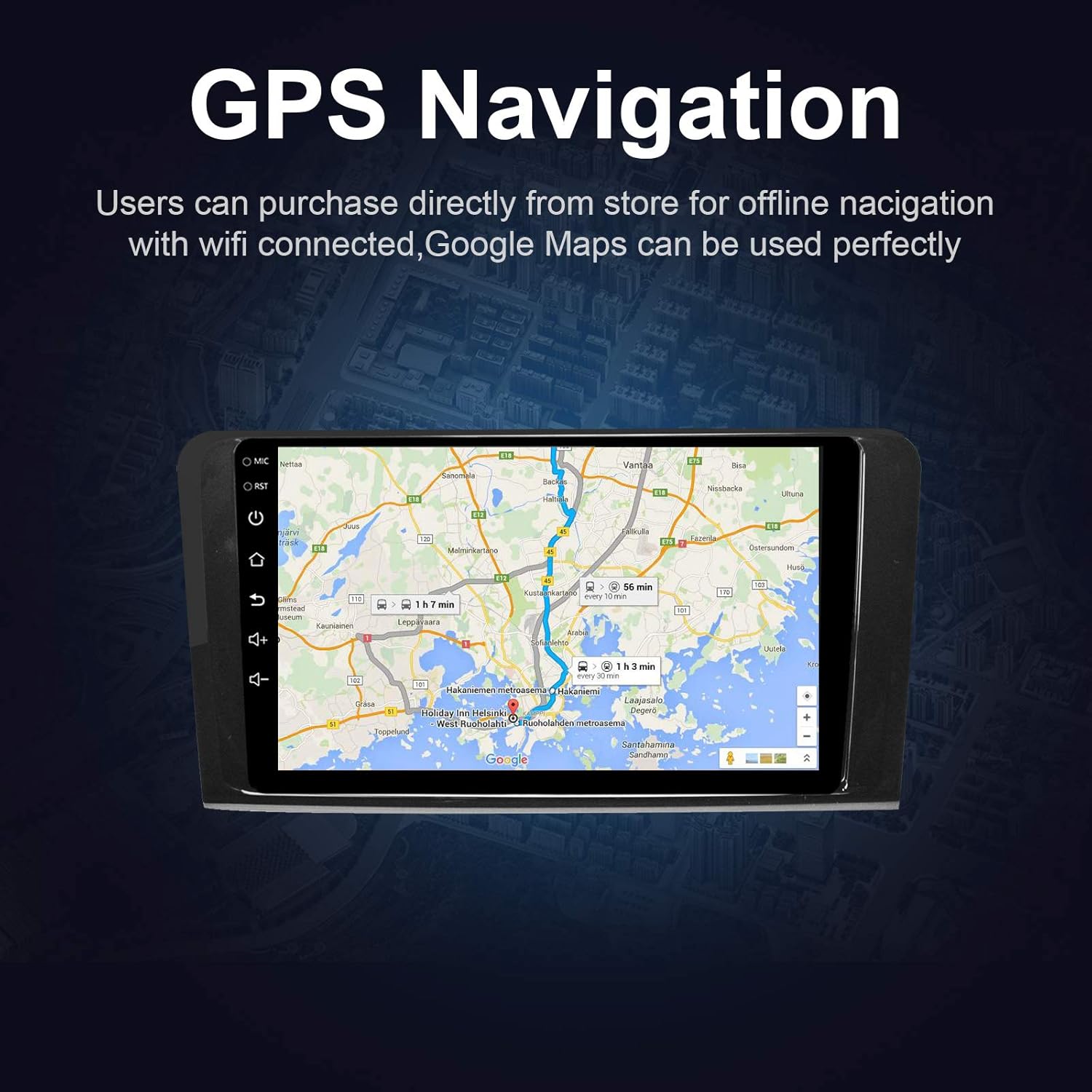
మూర్తి 5.4: The GPS Navigation screen showing a map with a highlighted route and estimated travel time.
5.5 ఆపిల్ కార్ప్లే & ఆండ్రాయిడ్ ఆటో
ఈ యూనిట్ వైర్లెస్ ఆపిల్ కార్ప్లే మరియు వైర్డు ఆండ్రాయిడ్ ఆటో రెండింటికీ మద్దతు ఇస్తుంది, మీ స్మార్ట్ఫోన్తో సజావుగా ఏకీకరణను అనుమతిస్తుంది.
- Apple CarPlay (Wireless): Connect your iPhone via Bluetooth and Wi-Fi. Follow the on-screen prompts to enable CarPlay.
- Android Auto (Wired): Connect your Android phone via a USB cable. Ensure Android Auto is installed on your phone.
- ఫీచర్లు: Access phone calls, messages, music, and navigation apps directly from the car stereo interface, optimized for driving.
5.6 మిర్రర్ లింక్
Mirror Link allows you to display your smartphone's screen directly on the car stereo.
- IOS పరికరాల కోసం: Supports AirPlay mirroring wirelessly.
- Android పరికరాల కోసం: Connect via a USB cable.
- యాక్టివేషన్: Select the 'Mirror Link' app on the stereo and follow the instructions for your specific phone model.

మూర్తి 5.6: The Mirror Link function showing a smartphone screen mirrored onto the car stereo display.
5.7 స్ప్లిట్ స్క్రీన్ ఫంక్షన్
The Android 10.1 system supports multitasking, allowing you to run two applications simultaneously on the screen.
- యాక్టివేషన్: While one app is open, press and hold the recent apps button (or swipe up from the bottom and hold, depending on the Android version) and drag another compatible app to the other half of the screen.
- వాడుక: ఉదాహరణకుample, you can use navigation on one side and play music or radio on the other.

మూర్తి 5.7: The Split Screen function in action, showing a navigation map on one side and a music player on the other, enabling multitasking.
5.8 Digital Sound Processor (DSP) / Equalizer
Customize your audio experience with the built-in 14-band equalizer and sound processor.
- Accessing EQ: Tap the 'Equalizer' or 'Sound Settings' icon from the home screen or audio playback interface.
- సర్దుబాట్లు: Adjust individual frequency bands (bass, treble, mid-range) to your preference.
- ప్రీసెట్లు: Select from various pre-defined sound modes (e.g., Pop, Rock, Classic, Jazz) or create custom profiles.
- Volume/Fader/Balance: Control overall volume, and adjust audio distribution between front/rear and left/right speakers.

మూర్తి 5.8: The Digital Sound Processor (DSP) system interface, showing a 14-band equalizer for precise audio adjustments.
5.9 మల్టీమీడియా ప్లేబ్యాక్ (USB)
ఆడియో మరియు వీడియో ప్లే చేయండి fileUSB నిల్వ పరికరాల నుండి s.
- USB ని కనెక్ట్ చేస్తోంది: అందించిన USB పోర్ట్లలో ఒకదానిలో USB డ్రైవ్ను చొప్పించండి.
- యాక్సెస్ చేస్తోంది Files: The unit will automatically detect the USB device. Navigate to the 'Music' or 'Video' app to browse and play files.
- మద్దతు ఉన్న ఫార్మాట్లు: The unit supports various audio and video formats, including high-definition 1080P video.

మూర్తి 5.9: The car stereo displaying high-definition 1080P video content, demonstrating its multimedia playback capabilities.
6. నిర్వహణ
సరైన నిర్వహణ మీ కారు స్టీరియో యొక్క దీర్ఘాయువు మరియు సరైన పనితీరును నిర్ధారిస్తుంది.
- స్క్రీన్ క్లీనింగ్: కొద్దిగా మెత్తని, మెత్తని బట్టను ఉపయోగించండి dampened with water or a screen cleaner specifically designed for electronics. Do not use abrasive cleaners or solvents.
- సాధారణ శుభ్రపరచడం: Wipe the unit's exterior with a soft, dry cloth. Avoid getting liquids into openings.
- సాఫ్ట్వేర్ అప్డేట్లు: Periodically check for available software updates through the unit's settings menu (requires Wi-Fi connection) to ensure optimal performance and access to new features.
- విపరీతమైన ఉష్ణోగ్రతలను నివారించండి: Do not expose the unit to extreme heat or cold for extended periods, as this can affect performance and lifespan.
7. ట్రబుల్షూటింగ్
If you encounter issues with your EZoneTronics car stereo, refer to the following common problems and solutions:
| సమస్య | సాధ్యమైన కారణం | పరిష్కారం |
|---|---|---|
| యూనిట్ పవర్ ఆన్ చేయదు. | తప్పు వైరింగ్, ఫ్యూజ్ పేలిపోయింది, వాహన బ్యాటరీ డిస్కనెక్ట్ చేయబడింది. | Check power connections and fuses. Ensure battery is connected. Consult a professional installer. |
| శబ్దం లేదు. | Volume too low, mute activated, incorrect speaker wiring, fiber optic box needed. | Increase volume, check mute status. Verify speaker connections. If your car has a premium sound system, ensure a fiber optic decoder box is installed. |
| GPS signal is weak or not found. | GPS యాంటెన్నా సరిగ్గా ఇన్స్టాల్ చేయబడలేదు లేదా అడ్డుపడలేదు. | GPS యాంటెన్నా స్పష్టమైన ప్రదేశంలో ఉంచబడిందని నిర్ధారించుకోండి view ఆకాశం నుండి మరియు సురక్షితంగా అనుసంధానించబడి ఉంది. |
| బ్లూటూత్ కనెక్షన్ సమస్యలు. | Phone not in pairing mode, incorrect pairing code, interference. | Ensure Bluetooth is enabled on both devices and in pairing mode. Re-pair the devices. Restart both the stereo and phone. |
| స్టీరింగ్ వీల్ నియంత్రణలు పనిచేయడం లేదు. | Canbus box not connected or configured correctly. | Verify the Canbus box connection and ensure it is properly configured in the unit's settings. Refer to installation instructions. |
| టచ్స్క్రీన్ స్పందించడం లేదు లేదా నెమ్మదిగా ఉంది. | Temporary software glitch, excessive background apps. | Restart the unit. Close unnecessary background applications. If the issue persists, perform a factory reset (note: this will erase all user data). |
8. స్పెసిఫికేషన్లు
Key technical specifications of the EZoneTronics Android Car Stereo:
| ఫీచర్ | స్పెసిఫికేషన్ |
|---|---|
| మోడల్ సంఖ్య | RMCT-BENZ-ML05-2G16-IP |
| ఆపరేటింగ్ సిస్టమ్ | ఆండ్రాయిడ్ 10.1 |
| స్క్రీన్ పరిమాణం | 9 అంగుళాల LCD |
| స్క్రీన్ రకం | కెపాసిటివ్ టచ్స్క్రీన్ |
| రిజల్యూషన్ | 1024 x 600 పిక్సెల్లు |
| ప్రాసెసర్ | Quad Core 1.3G |
| RAM | 2GB DDR3 |
| అంతర్గత నిల్వ | 32GB ఫ్లాష్ మెమరీ |
| కనెక్టివిటీ | Bluetooth 4.0 (A2DP, Hands-free), Wi-Fi, USB (2 rear inputs) |
| GPS రిసీవర్ | Built-in, compatible with Waze, Google Maps, etc. |
| రేడియో ట్యూనర్ | AM/FM/RDS |
| ఆడియో అవుట్పుట్ | 4 x 45W Power Output, 2.1 Channel RCA/Sub Output |
| వీడియో ఇన్పుట్ | 1 Channel (for rear camera) |
| ఆడియో ఇన్పుట్ | 2 ఛానెల్ |
| ప్రత్యేక లక్షణాలు | Steering Wheel Control, Mirror Link, CarPlay, Android Auto, Multi-EQ Presets, Spotify, Digital Sound Processor |
| ఉత్పత్తి కొలతలు (L x W x H) | 32 x 26 x 13 సెం.మీ |
| బరువు | 1.38 కిలోలు |
9. వారంటీ మరియు మద్దతు
9.1 ఉత్పత్తి వారంటీ
This EZoneTronics car stereo comes with a 1-సంవత్సరం తయారీదారు వారంటీ కొనుగోలు చేసిన తేదీ నుండి. ఈ వారంటీ సాధారణ ఉపయోగంలో మెటీరియల్స్ మరియు పనితనంలో లోపాలను కవర్ చేస్తుంది. సరికాని ఇన్స్టాలేషన్, దుర్వినియోగం, ప్రమాదాలు లేదా అనధికార మార్పుల వల్ల కలిగే నష్టాన్ని ఇది కవర్ చేయదు.
9.2 సాంకేతిక మద్దతు
For technical assistance, troubleshooting beyond this manual, or warranty claims, please contact our support team:
- ఇమెయిల్: sales2@rhythmhk.com
When contacting support, please provide your product model number (RMCT-BENZ-ML05-2G16-IP) and a detailed description of the issue.