
Vanxse BX08
Vanxse CCTV HD 960H 8mm CS Lens Bullet Box Security Camera User Manual
మోడల్: BX08
1. పరిచయం
This manual provides detailed instructions for the installation, operation, and maintenance of your Vanxse CCTV HD 960H 8mm CS Lens Bullet Box Security Camera. Please read this manual thoroughly before use to ensure proper functionality and longevity of the product.
2. ఉత్పత్తి ముగిసిందిview
2.1 ఉత్పత్తి లక్షణాలు
- 1/3 Color Super HAD CCD Effio-E processor with 1000TVL resolution.
- Equipped with an 8mm fixed CS lens for focused surveillance.
- 960H CCTV Bullet Box Camera design.
- Suitable for various environments including stores, homes, offices, and factories.
2.2 కెమెరా భాగాలు
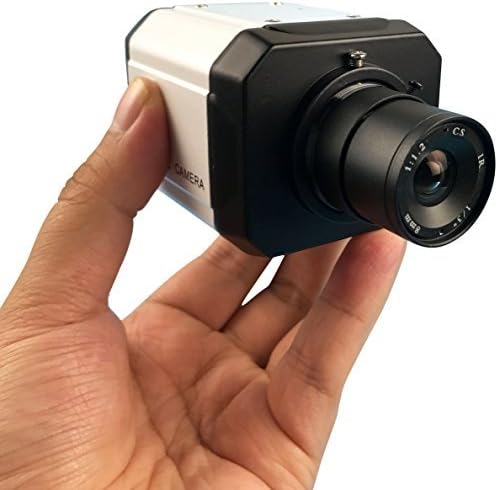
Figure 1: The Vanxse CCTV HD 960H Bullet Box Camera, held in a hand, highlighting its 8mm CS lens and robust casing.
3. సాంకేతిక లక్షణాలు
| ఫీచర్ | స్పెసిఫికేషన్ |
|---|---|
| చిత్రం సెన్సార్ | 1/3 Color Super HAD CCD Effio-E processor |
| TV వ్యవస్థ | NTSC video System |
| Effective Pixels (NTSC) | 976(H)x494(V) |
| లెన్స్ | Built-in 8mm Fixed CS Lens |
| క్షితిజసమాంతర రిజల్యూషన్ | 1000TVL |
| కనిష్ట ప్రకాశం | 1.0Lux F=1.2 (0Lux with IR on) |
| వీడియో అవుట్పుట్ | 1.0Vp-p.75Ω. BNC Connector |
| AGC (ఆటోమేటిక్ గెయిన్ కంట్రోల్) | ఆటో |
| వైట్ బ్యాలెన్స్ | ఆటో |
| బ్యాక్లైట్ పరిహారం | ఆటో |
| ఎక్స్పోజర్ మోడ్ | EE (Electronic Exposure) |
| ఎలక్ట్రానిక్ షట్టర్ | 1/60 - 1/100000 సెకన్లు |
| విద్యుత్ సరఫరా | DC12V2A |
| సమకాలీకరించు. సిస్టమ్ | అంతర్గత సమకాలీకరణ |
| కొలతలు (L x W x H) | 30 x 19.99 x 10.01 సెం.మీ |
| బరువు | 340 గ్రా |
| మోడల్ సంఖ్య | BX08 |
| ఫారమ్ ఫ్యాక్టర్ | బుల్లెట్ |
| వాల్యూమ్tage | 12 వోల్ట్లు |
| వాట్tage | 3 వాట్స్ |
| కనెక్టివిటీ ప్రోటోకాల్ | Wi-Fi (for control, video via BNC) |
4. సెటప్ మరియు ఇన్స్టాలేషన్
4.1 అన్ప్యాకింగ్ మరియు తనిఖీ
- కెమెరాను దాని ప్యాకేజింగ్ నుండి జాగ్రత్తగా తీసివేయండి.
- Inspect the camera for any visible damage.
- Verify that the camera unit is present.
4.2 కెమెరా మౌంటు
- Select a suitable location for surveillance, ensuring a clear and unobstructed field of view.
- Securely mount the camera using appropriate hardware (not included). The bullet form factor is designed for versatile wall or ceiling mounting.
4.3 పవర్ కనెక్షన్
- Connect a DC12V2A power adapter (not included) to the camera's power input port.
- Ensure the power source is stable and matches the camera's voltagఇ మరియు ప్రస్తుత అవసరాలు.
4.4 Video Output Connection
- Connect the camera's BNC video output connector to your DVR (Digital Video Recorder) or monitor using a BNC cable (not included).
- Ensure the connection is secure to prevent signal loss.
4.5 లెన్స్ సర్దుబాటు
This model features a fixed 8mm CS lens, which does not require manual focus or zoom adjustment. The lens is pre-set for optimal performance at its specified focal length.

చిత్రం 2: ఒక వైపు view of the Vanxse CCTV HD 960H Bullet Box Camera, illustrating the lens assembly and the robust housing.
5. ఆపరేటింగ్ సూచనలు
5.1 ప్రాథమిక ఆపరేషన్
- Once properly connected and powered, the camera will automatically begin capturing video.
- The camera features automatic gain control (AGC), white balance, backlight compensation, and electronic exposure (EE) for optimal image quality under varying light conditions without user intervention.
- The video output is in standard NTSC format, compatible with most DVRs and monitors supporting this standard.
6. సాధారణ నిర్వహణ
6.1 లెన్స్ శుభ్రపరచడం
- Periodically clean the camera lens with a soft, lint-free cloth to ensure clear image quality. Avoid using abrasive cleaners or harsh chemicals, which can damage the lens coating.
6.2 Power Supply Check
- Regularly inspect the power adapter and all cable connections to ensure they are secure and free from damage. A stable power supply is crucial for consistent operation.
6.3 పర్యావరణ పరిగణనలు
- Protect the camera from extreme temperatures, direct water exposure (unless specifically rated for outdoor use), and physical impact. Ensure proper ventilation if installed in an enclosed space.
7. ట్రబుల్షూటింగ్
7.1 No Image Display
- శక్తిని తనిఖీ చేయండి: Ensure the DC12V2A power adapter is correctly connected to the camera and a functional power outlet.
- Check Video Connection: Verify that the BNC cable is securely connected between the camera and your DVR/monitor. Try a different cable if available.
- ఇన్పుట్ ఎంపిక: Confirm your DVR or monitor is set to the correct video input channel for the camera.
7.2 పేలవమైన చిత్ర నాణ్యత
- క్లీన్ లెన్స్: Dust, smudges, or condensation on the lens can significantly degrade image quality. Clean the lens as described in the Maintenance section.
- లైటింగ్ పరిస్థితులు: While the camera has auto-adjustments, extremely low light conditions without adequate ambient or IR illumination can result in a grainy or dark image. Excessive backlight can also cause issues.
- కేబుల్ నాణ్యత: A damaged or low-quality BNC cable can introduce noise or interference into the video signal. Consider replacing the cable.
8. వారంటీ మరియు మద్దతు
8.1 వారంటీ సమాచారం
Specific warranty details for your Vanxse CCTV HD 960H camera are typically provided at the point of purchase or included with the product packaging. Please retain your proof of purchase, such as a receipt or invoice, as it is required for any warranty claims.
8.2 కస్టమర్ మద్దతు
For technical assistance, troubleshooting beyond this manual, or further inquiries regarding your product, please contact your retailer or the manufacturer's customer support channels. Refer to the product packaging or the manufacturer's official website for up-to-date contact information.
Ask a question about this manual
Ask about setup, troubleshooting, compatibility, parts, safety, or missing instructions. Manuals+ will review the question and use this page’s manual context to help answer it.