
1. ముఖ్యమైన భద్రతా సమాచారం
ఈ పవర్ టూల్తో అందించబడిన అన్ని భద్రతా హెచ్చరికలు, సూచనలు, దృష్టాంతాలు మరియు స్పెసిఫికేషన్లను ఎల్లప్పుడూ చదివి అర్థం చేసుకోండి. క్రింద జాబితా చేయబడిన అన్ని సూచనలను పాటించడంలో విఫలమైతే విద్యుత్ షాక్, అగ్ని ప్రమాదం మరియు/లేదా తీవ్రమైన గాయం సంభవించవచ్చు.
- పని ప్రాంత భద్రత: పని ప్రదేశాన్ని శుభ్రంగా మరియు బాగా వెలుతురు ఉండేలా చూసుకోండి. చిందరవందరగా లేదా చీకటిగా ఉండే ప్రాంతాలు ప్రమాదాలను ఆహ్వానిస్తాయి. మండే ద్రవాలు, వాయువులు లేదా ధూళి వంటి పేలుడు వాతావరణాలలో విద్యుత్ ఉపకరణాలను ఆపరేట్ చేయవద్దు.
- విద్యుత్ భద్రత: పవర్ టూల్ ప్లగ్లు అవుట్లెట్తో సరిపోలాలి. ప్లగ్ను ఎప్పుడూ ఎట్టి పరిస్థితుల్లోనూ సవరించవద్దు. ఎర్త్డ్ (గ్రౌండెడ్) పవర్ టూల్స్తో ఏ అడాప్టర్ ప్లగ్లను ఉపయోగించవద్దు. ఎర్త్డ్ లేదా గ్రౌండెడ్ ఉపరితలాలతో శరీర సంబంధాన్ని నివారించండి.
- వ్యక్తిగత భద్రత: Always wear eye protection. Use hearing protection when operating the tool for extended periods. Dress properly; do not wear loose clothing or jewelry. Keep hair and clothing away from moving parts.
- పవర్ టూల్ వినియోగం మరియు సంరక్షణ: పవర్ టూల్ను బలవంతంగా వాడకండి. మీ అప్లికేషన్ కోసం సరైన పవర్ టూల్ను ఉపయోగించండి. ఏవైనా సర్దుబాట్లు చేయడానికి, ఉపకరణాలను మార్చడానికి లేదా పవర్ టూల్స్ నిల్వ చేయడానికి ముందు పవర్ సోర్స్ నుండి ప్లగ్ను డిస్కనెక్ట్ చేయండి.
- సేవ: ఒకే రీప్లేస్మెంట్ పార్ట్లను మాత్రమే ఉపయోగించి మీ పవర్ టూల్ను అర్హత కలిగిన రిపేర్ పర్సన్ ద్వారా సర్వీస్ చేయండి. ఇది పవర్ టూల్ యొక్క భద్రత నిర్వహించబడుతుందని నిర్ధారిస్తుంది.
2. ప్యాకేజీ విషయాలు
The Rockwell RK5131K Sonicrafter F30 Kit includes the following items:
- Rockwell RK5131K 3.5A Sonicrafter F30 Oscillating Multi-Tool
- క్యారీయింగ్ కేసు
- Assorted Cutting Blades (e.g., wood, metal, universal)
- స్క్రాపింగ్ బ్లేడ్
- సాండింగ్ ప్యాడ్
- Assorted Sanding Sheets (various grits)

Image 2.1: The Rockwell RK5131K Sonicrafter F30 kit, showing the multi-tool, carrying case, and various accessories including blades and sanding pads.
3. ఉత్పత్తి లక్షణాలు
The Rockwell RK5131K Sonicrafter F30 is designed for versatility and performance. Key features include:
- 3.5 Amp మోటార్: Provides significant power for various applications.
- 4 Degrees of Oscillation: Enables fast cutting and efficient material removal.
- Hyperlock Tool-Less Blade Change: Allows for quick and secure accessory changes with 1 ton of clamping force to prevent blade slippage.
- యూనివర్సల్ ఫిట్ సిస్టమ్: Compatible with accessories from multiple manufacturers.
- స్థిరమైన వేగ నియంత్రణ: Maintains cutting speed under load for consistent performance.
- Vibrafree Counterweight: Reduces vibration for smoother operation and user comfort.
- వేరియబుల్ స్పీడ్ డయల్: Offers precise control over the oscillation speed for different materials and tasks.
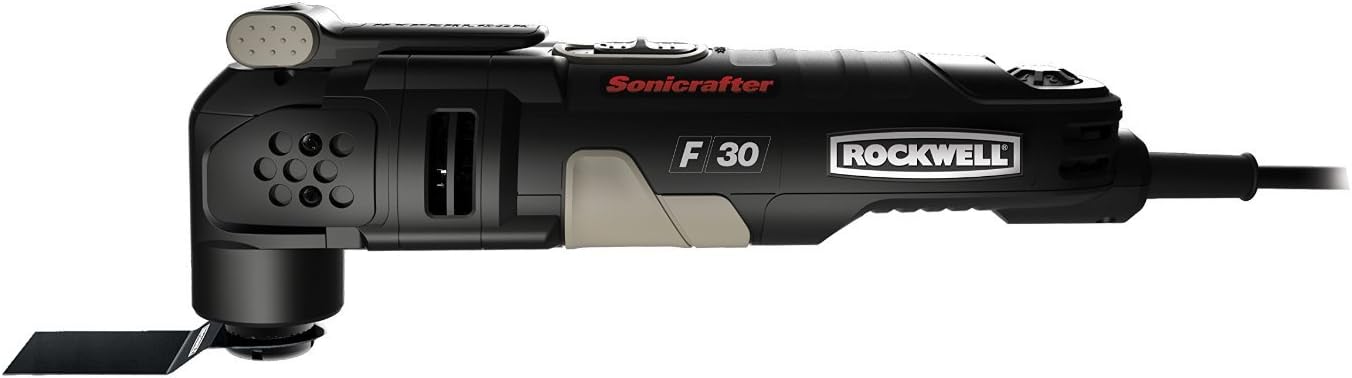
చిత్రం 3.1: వివరణాత్మక వైపు view of the Rockwell Sonicrafter F30, showcasing its design and the 'Sonicrafter F30 Rockwell' branding.
4. Setup and Accessory Installation
4.1 Attaching Accessories (Hyperlock System)
- Ensure the tool is unplugged from the power source before attaching or removing accessories.
- Locate the Hyperlock lever on the top of the tool head.
- Push the Hyperlock lever down firmly to release the accessory clamping యంత్రాంగం.
- Align the desired accessory (blade, sanding pad) with the universal fit system interface on the tool head. The accessory should fit securely onto the spindle.
- Once the accessory is in place, lift the Hyperlock lever back up until it clicks into its locked position. Ensure the accessory is firmly secured and does not wobble.
The Universal Fit System allows for compatibility with a wide range of oscillating tool accessories from various brands.
5. ఆపరేటింగ్ సూచనలు
5.1 పవర్ చేయడం ఆన్/ఆఫ్
- సాధనాన్ని తగిన పవర్ అవుట్లెట్లోకి ప్లగ్ చేయండి.
- To turn the tool ON, slide the power switch to the 'I' (ON) position.
- To turn the tool OFF, slide the power switch to the 'O' (OFF) position.
5.2 వేరియబుల్ స్పీడ్ కంట్రోల్
The variable speed dial is located on the tool body. Rotate the dial to adjust the oscillation speed. Lower settings are suitable for delicate work or softer materials, while higher settings are for faster material removal and harder materials. Always start with a lower speed and increase as needed.
5.3 సాధారణ ఆపరేషన్ మార్గదర్శకాలు
- వర్క్పీస్ను తాకే ముందు సాధనం పూర్తి వేగాన్ని చేరుకోవడానికి అనుమతించండి.
- Apply light, consistent pressure. Do not force the tool, as this can lead to overheating and reduced performance.
- Keep a firm grip on the tool with both hands during operation.
- Periodically check accessories for wear and replace them as necessary.
5.4 నిర్దిష్ట అనువర్తనాలు

Image 5.1: The multi-tool being used to make a precise cut on wooden trim, demonstrating its utility for detailed woodworking tasks.

Image 5.2: The multi-tool cutting a ceramic tile, illustrating its capability for masonry and tiling projects.

Image 5.3: The multi-tool equipped with a grout removal blade, effectively cleaning grout lines between floor tiles.
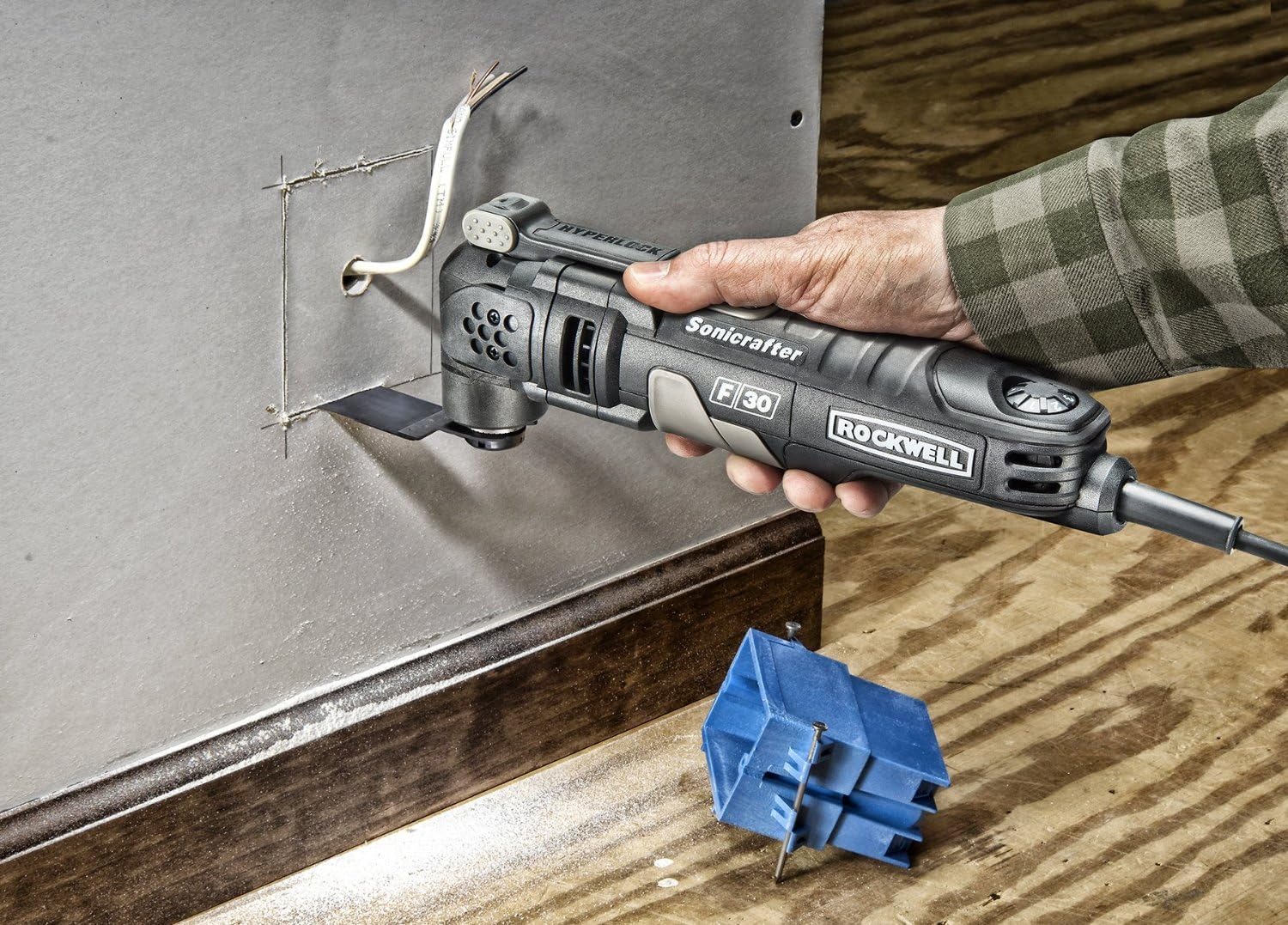
Image 5.4: The multi-tool making a precise cut in drywall to install an electrical box, showcasing its use in renovation tasks.

Image 5.5: The multi-tool cutting a PVC pipe, demonstrating its versatility for plumbing or general construction.

Image 5.6: The multi-tool with a scraping blade, effectively removing old adhesive or material from a surface.

Image 5.7: The multi-tool equipped with a sanding pad, smoothing a wooden chair leg, highlighting its use for finishing tasks.
6. నిర్వహణ
6.1 శుభ్రపరచడం
- శుభ్రపరిచే ముందు ఎల్లప్పుడూ సాధనాన్ని అన్ప్లగ్ చేయండి.
- వెంటిలేషన్ ఓపెనింగ్స్ నుండి దుమ్ము మరియు చెత్తను శుభ్రం చేయడానికి మృదువైన బ్రష్ లేదా కంప్రెస్డ్ ఎయిర్ ఉపయోగించండి.
- టూల్ హౌసింగ్ను ప్రకటనతో తుడవండిamp వస్త్రం. కఠినమైన రసాయనాలు లేదా రాపిడి క్లీనర్లను ఉపయోగించవద్దు.
- Ensure the accessory interface is free of debris to allow for proper accessory attachment.
6.2 నిల్వ
Store the tool and its accessories in the provided carrying case in a dry, secure location, out of reach of children.
7. ట్రబుల్షూటింగ్
- సాధనం ప్రారంభం కాదు:
- Check if the tool is properly plugged into a working power outlet.
- పవర్ స్విచ్ 'ఆన్' స్థానంలో ఉందని నిర్ధారించుకోండి.
- నష్టం కోసం పవర్ కార్డ్ తనిఖీ చేయండి.
- Accessory Slippage:
- Ensure the Hyperlock lever is fully engaged and locked.
- Check if the accessory is correctly seated on the universal fit system interface.
- Clean any debris from the accessory interface and the accessory itself.
- అధిక కంపనం లేదా శబ్దం:
- Verify the accessory is securely attached and not damaged.
- Ensure the workpiece is properly secured.
- సమస్య కొనసాగితే, వినియోగాన్ని ఆపివేసి, కస్టమర్ సపోర్ట్ని సంప్రదించండి.
- సాధనం వేడెక్కడం:
- ఆపరేషన్ సమయంలో అధిక ఒత్తిడిని కలిగించకుండా ఉండండి.
- వెంటిలేషన్ ఓపెనింగ్లు అడ్డంకులు లేకుండా ఉన్నాయని నిర్ధారించుకోండి.
- Allow the tool to cool down between prolonged uses.
8. స్పెసిఫికేషన్లు
| స్పెసిఫికేషన్ | విలువ |
|---|---|
| మోడల్ సంఖ్య | RK5131K |
| మోటార్ Ampఎరేజ్ | 3.5 Amps |
| వాల్యూమ్tage | 120 వోల్ట్లు |
| ఆసిలేషన్ యాంగిల్ | 4 డిగ్రీలు |
| వస్తువు బరువు | 3.31 పౌండ్లు |
| ఉత్పత్తి కొలతలు | 2.5 x 4 x 11.25 అంగుళాలు |
| తయారీదారు | Positec USA |
9. వారంటీ మరియు మద్దతు
For warranty information, technical support, or to order replacement parts, please refer to the warranty card included with your product or visit the official Rockwell Tools webవారంటీ క్లెయిమ్ల కోసం కొనుగోలు రుజువుగా మీ కొనుగోలు రసీదును ఉంచండి.