
Legrand 310187
Mwongozo wa Mtumiaji wa Mfumo wa Legrand Keor SP UPS
Mfano: 310187
Utangulizi
This manual provides essential information for the safe and efficient operation of your Legrand Keor SP Uninterruptible Power Supply (UPS) system. Please read this manual thoroughly before installation and use, and retain it for future reference.
The Legrand Keor SP UPS system is designed to protect your electronic devices from power outages, surges, and fluctuations, ensuring data integrity and continuous operation.
Maagizo ya Usalama
- Usifungue UPS casing. Hakuna sehemu zinazoweza kutumika na mtumiaji ndani. Rejelea huduma zote kwa wahudumu waliohitimu.
- Do not expose the UPS to rain, water, or excessive humidity.
- Hakikisha uingizaji hewa mzuri karibu na UPS. Usizuie nafasi za uingizaji hewa.
- Connect the UPS to a grounded power outlet only.
- Do not connect non-computer related equipment such as medical devices, life support equipment, or household appliances to the UPS.
- Disconnect the UPS from the power outlet before cleaning. Use a dry cloth for cleaning.
- The battery inside the UPS is not user-replaceable. Battery replacement should be performed by qualified personnel.
Yaliyomo kwenye Kifurushi
Thibitisha kuwa vipengee vyote vipo kwenye kifurushi:
- Legrand Keor SP UPS System
- Cable ya Nguvu
- Kebo ya USB
- Mwongozo wa Maagizo (hati hii)

The image above shows the Legrand Keor SP UPS system as it appears in its original packaging, highlighting the product box and its contents.
Bidhaa Imeishaview
Jopo la mbele
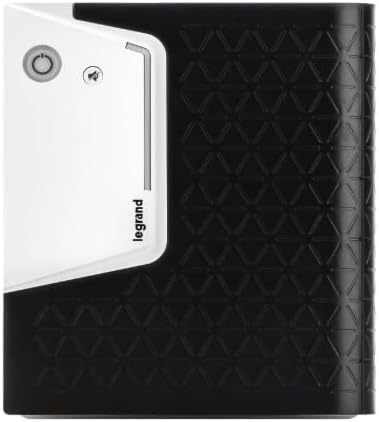
This image displays the front panel of the UPS, featuring the power button and LED indicators for operational status.
Paneli ya nyuma
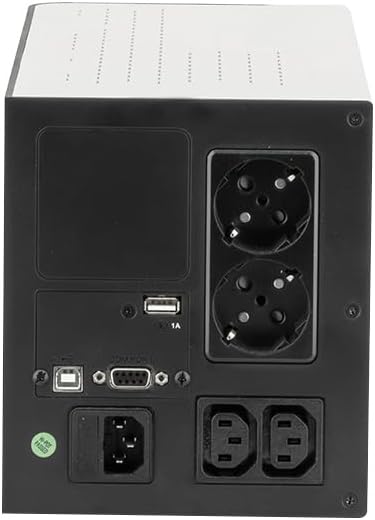
Ya nyuma view illustrates the various connection ports, including AC input, Schuko sockets, IEC sockets, USB, and RS232 communication interfaces.
- Ingizo la Nguvu: Connects to the main AC power supply.
- Schuko Sockets (x2): For connecting devices with Schuko plugs.
- IEC Sockets (x2): For connecting devices with IEC C13 plugs.
- Mlango wa USB: For communication with a computer for UPS monitoring and management.
- Bandari ya RS232: Serial communication interface for advanced monitoring.
Sanidi
- Kufungua: Ondoa UPS kwa uangalifu kutoka kwenye kifungashio chake. Kagua uharibifu wowote wa usafirishaji.
- Uwekaji: Place the UPS in a clean, dry, and well-ventilated area, away from direct sunlight, heat sources, and excessive moisture. Ensure adequate space around the unit for airflow.
- Uchaji wa Awali: Before initial use, connect the UPS to a standard wall outlet using the provided power cable. Allow the unit to charge for at least 8 hours to ensure the battery is fully charged. The UPS will automatically begin charging when connected to AC power.
- Vifaa vya Kuunganisha:
- Connect your computer, monitor, and other critical electronic devices to the output sockets (Schuko or IEC) on the rear panel of the UPS.
- Do not overload the UPS. Refer to the "Specifications" section for the maximum load capacity.
- Mawasiliano ya USB (Hiari): Connect the provided USB cable from the UPS USB port to a USB port on your computer. Install the UPS management software (if provided or available for download from Legrand's website) to enable advanced monitoring and shutdown features.
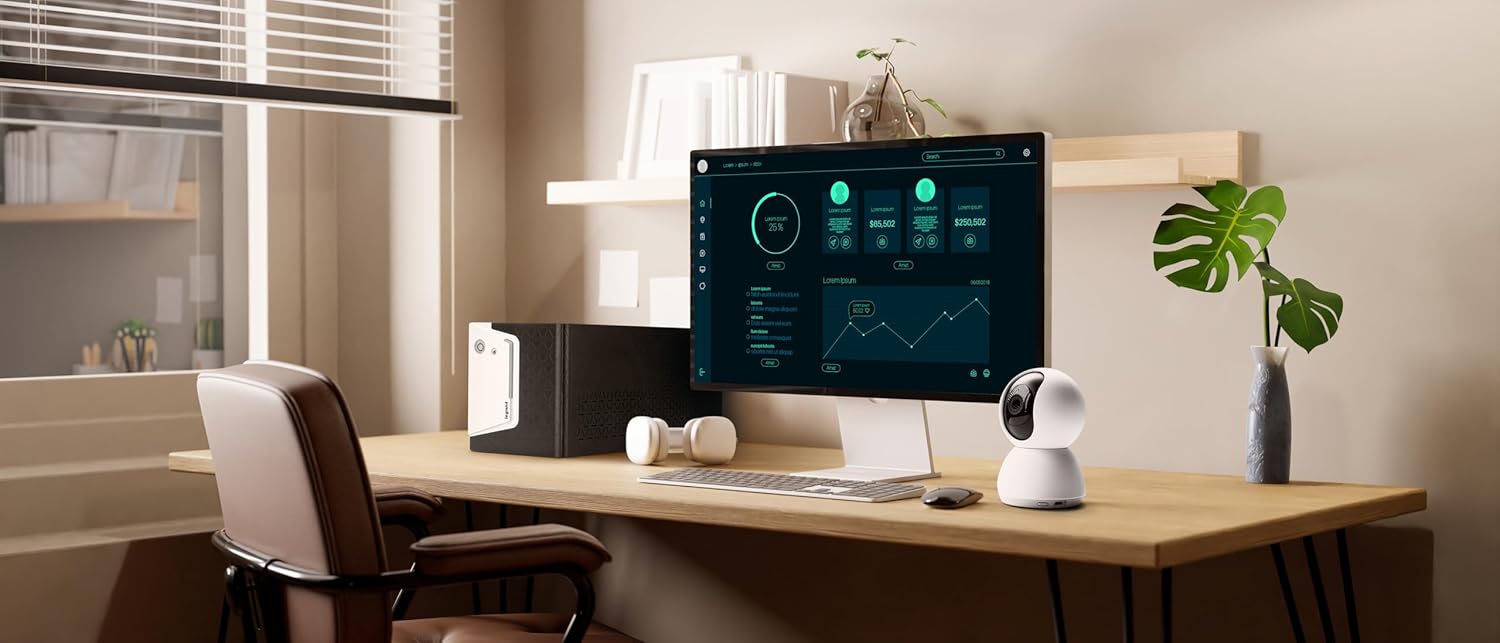
This image shows the Legrand Keor SP UPS system positioned on a desk in an office setting, illustrating a common installation scenario.
Maagizo ya Uendeshaji
Kuwasha UPS
Press and hold the power button on the front panel for approximately 2 seconds until you hear a beep and the LED indicators illuminate. The UPS will perform a self-test and then enter online mode, providing power to connected devices.
Kuzima UPS
Press and hold the power button for approximately 2 seconds until you hear a beep and the LED indicators turn off. This will shut down the UPS and cut power to connected devices.
Viashiria vya LED
The front panel features a 3-color LED status bar that indicates the operational status of the UPS:
- Kijani cha LED: UPS is operating normally in online mode (AC power available).
- Yellow/Orange LED: UPS is operating on battery power (AC power failure).
- LED Nyekundu: Indicates a fault condition or low battery. Refer to the "Troubleshooting" section.
Kitufe cha Kunyamazisha
The UPS may emit audible alarms during certain events (e.g., power failure, low battery). Press the mute button on the front panel to silence these alarms temporarily.
Moja kwa moja Voltage Kanuni (AVR)
The UPS is equipped with an Automatic Voltage Regulation (AVR) function. This feature automatically corrects minor voltage fluctuations (sags and surges) without switching to battery power, thereby extending battery life.

This image depicts a user engaged with a computer setup, where the Legrand Keor SP UPS system is integrated, illustrating its function in a typical work environment.
Matengenezo
- Kusafisha: Regularly clean the exterior of the UPS with a dry, soft cloth. Do not use liquid or aerosol cleaners.
- Uingizaji hewa: Hakikisha kwamba nafasi za uingizaji hewa hazina vumbi na uchafu ili kuzuia joto kupita kiasi.
- Utunzaji wa Betri:
- To maintain optimal battery life, keep the UPS connected to AC power at all times.
- If the UPS is stored for an extended period, recharge the battery every 3 months for at least 8 hours.
- Battery replacement should only be performed by qualified service personnel. The battery type is 12V, 7Ah.
- Kazi ya Kujijaribu: The UPS has a built-in self-diagnosis function. Refer to the software manual for initiating a self-test.
Kutatua matatizo
| Tatizo | Sababu inayowezekana | Suluhisho |
|---|---|---|
| UPS haiwashi. | No AC power; Low battery; UPS fault. | Check power cable connection and wall outlet. Allow UPS to charge for 8 hours. If problem persists, contact support. |
| UPS beeps continuously in online mode. | Kuzidisha mzigo; Hitilafu ya ndani. | Reduce connected load. If alarm continues, contact support. |
| UPS hubadilisha hali ya betri mara kwa mara. | Unstable AC power; High/low voltage. | This is normal operation for AVR. If it happens excessively, check your building's electrical wiring. |
| Red LED is illuminated. | Battery fault; Overload; Internal fault. | Disconnect all loads and restart the UPS. If the red LED persists, contact Legrand support. |
Vipimo
| Kigezo | Thamani |
|---|---|
| Mfano | 310187 |
| Nguvu Iliyokadiriwa | 1000 VA |
| Nominella Active Power | 600 W |
| Kanuni ya Kufanya Kazi | Line interactive VI |
| Pato Voltage Curve Shape | Wimbi la sine iliyoigwa |
| Bypass Time | Hadi dakika 10 |
| Number of Schuko Sockets | 2 |
| Number of IEC Sockets | 2 |
| Kiolesura cha Mawasiliano | RS232, USB HID |
| Uingizaji Voltage | 230 V |
| Masafa ya Kuingiza | 50-60 Hz |
| Uingizaji Voltage Mbalimbali | 170-290 V |
| Pato Voltage (Battery Operation) | 230 V ± 10% |
| Frequency ya nomino | 50/60 Hz ± 1% |
| Betri Voltage/Aina | 12 V, 7 Ah |
| Vipimo (H x W x D) | 148 x 173 x 380 mm (takriban inchi 5.8 x 6.8 x 15) |
| Uzito Net | Kilo 9 (takriban pauni 20.1) |
| Halijoto ya Mazingira | 0-40 °C |
| Unyevu wa Jamaa | 0-90% isiyo ya kufupisha |
| Kiwango cha Kelele (katika 1m) | <40 dBA |
| Vyeti/Viwango | EN 62040-1, EN 62040-2 |
Udhamini na Msaada
Legrand products are manufactured to high standards and are backed by a limited warranty. For specific warranty terms and conditions applicable to your region, please refer to the warranty card included with your product or visit the official Legrand webtovuti.
For technical support, troubleshooting assistance, or service inquiries, please contact Legrand customer service. Contact information can typically be found on the Legrand webtovuti au kwenye ufungaji wa bidhaa.
Rasilimali za Mtandaoni: For the latest drivers, software, and additional documentation, please visit the official Legrand support page: www.legrand.us/support
Nyaraka Zinazohusiana - 310187
 |
Legrand KEOR MOD 25-125 kW UPS: Vipimo na Sifa za Kiufundi Maelezo ya kina ya kiufundi, vipengele, na usanifu wa mfumo wa Ugavi wa Nguvu Usiovunjika wa Legrand KEOR MOD wa 25-125 kW, unaoangazia moduli, uwezo wa kupanuka, na urejeshaji. |
 |
Mwongozo wa Kusakinisha na Manutenzione Legrand UPS KEOR DK R/T 1-2-3 kVA Mwongozo wa kukamilisha usakinishaji, usanidi, usimamizi na utatuzi wa matatizo ya Ugavi wa Nishati usioingiliwa (UPS) Legrand KEOR DK R/T 1-2-3 kVA, inayolengwa kutumika katika biashara na viwanda. |
 |
Mfumo wa UPS wa Moduli wa Legrand KEOR MOD 25-125 kW - Karatasi ya Data ya Kiufundi Maelezo ya kina ya kiufundi na vipengele vya mfumo wa Ugavi wa Nguvu Usiovunjika wa Legrand KEOR MOD wa 25-125 kW, unaoangazia uwezo wake wa kupanuka, urejeshaji wake, na ufanisi mkubwa kwa ulinzi muhimu wa nguvu. |
 |
Vipimo vya Kiufundi vya Mfumo wa UPS wa Awamu Moja wa Legrand Keor DK 3 kVA Vipimo vya kina vya kiufundi, sifa, viwango, na data ya mazingira kwa ajili ya mfumo wa Ugavi wa Nguvu Usiovunjika wa Legrand Keor DK 3 kVA wa awamu moja (UPS). |
 |
Mwongozo wa Uendeshaji wa Legrand KEOR HPE 60-160 kVA UPS Mwongozo wa uendeshaji wa Ugavi wa Umeme Usiovunjika wa Legrand KEOR HPE 60-160 kVA (UPS). Hutoa maelekezo na taarifa za usakinishaji, uendeshaji, na matengenezo. |
 |
Mwongozo wa Mtumiaji wa Legrand Keor MOD+ 420-600 kW Modular UPS User manual for the Legrand Keor MOD+ modular UPS system, covering models from 420 kW to 600 kW. Provides detailed installation, operation, maintenance, and troubleshooting information for this high-power UPS solution. |
Ask a question about this manual
Ask about setup, troubleshooting, compatibility, parts, safety, or missing instructions. Manuals+ will review the question and use this page’s manual context to help answer it.