
1. Utangulizi
Asante kwa ununuziasing the Supersonic IQ-1428BT Bluetooth Active Portable Hi-Fi Speaker. This manual provides essential information for the safe and efficient operation of your device. Please read it thoroughly before use and retain it for future reference.
The IQ-1428BT is a versatile 2.1 channel outdoor Bluetooth speaker designed to deliver clear sound and heavy bass. It features Bluetooth 3.0 connectivity, USB/SD inputs, FM radio, 3.5mm Aux input, and two microphone inputs, all powered by a rechargeable battery.
2. Taarifa Muhimu za Usalama
- Usiweke spika kwenye halijoto kali, unyevunyevu, au jua moja kwa moja.
- Epuka kumwangusha au kumfanya mzungumzaji aathiriwe sana.
- Usijaribu kutenganisha au kurekebisha spika. Hii itabatilisha dhamana.
- Keep the speaker away from water and other liquids. While it is listed as waterproof, prolonged submersion or exposure to high-pressure water jets should be avoided.
- Tumia kebo iliyotolewa tu ya kuchaji au kitu sawia kilichoidhinishwa.
- Weka mbali na watoto.
- Hakikisha uingizaji hewa unaofaa unapoendesha spika.
3. Yaliyomo kwenye Kifurushi
Tafadhali hakikisha kuwa bidhaa zote zipo kwenye kifurushi chako:
- Supersonic IQ-1428BT Bluetooth Active Portable Hi-Fi Speaker
- Kebo Ndogo ya Kuchaji ya USB
- Cable ya Aux 3.5mm
- Mwongozo wa Mtumiaji (hati hii)
4. Bidhaa Imeishaview
Jifahamishe na vipengele na vidhibiti vya mzungumzaji.
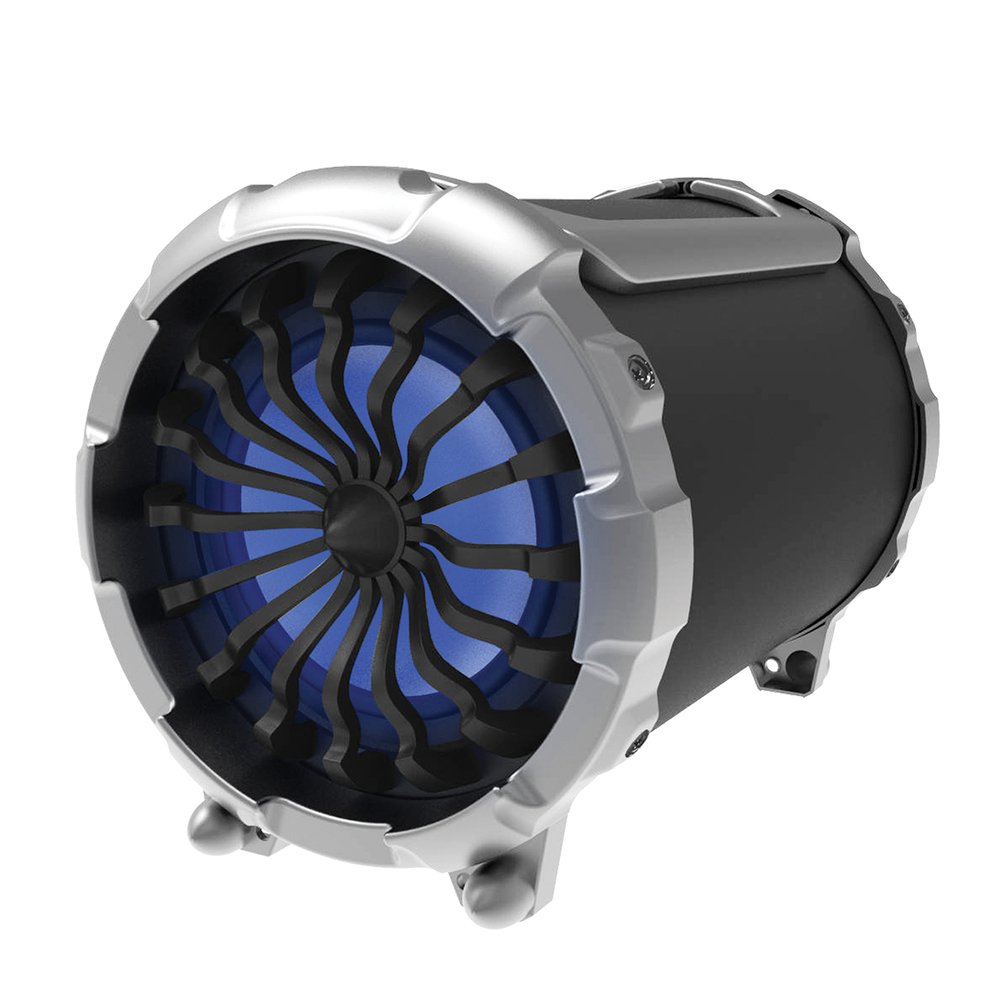
Picha: Mbele view of the Supersonic IQ-1428BT speaker, showing the main speaker grille and control panel.
4.1. Jopo la Kudhibiti na Milango
- Kitufe cha Nguvu: Huwasha au kuzima kipaza sauti.
- Kitufe cha Hali: Switches between Bluetooth, FM Radio, USB, SD, and Aux input modes.
- Kitufe cha Cheza/Sitisha: Hucheza au kusitisha uchezaji wa sauti.
- Vifungo vya Wimbo Uliotangulia/Ufuatao: Skips to the previous or next track. Also used for FM station tuning.
- Udhibiti wa Sauti: Hurekebisha ujazo mkuu.
- Uingizaji wa USB: For playing audio from USB flash drives.
- Nafasi ya Kadi ya SD: For playing audio from SD memory cards.
- Ingizo la AUX (milimita 3.5): Kwa kuunganisha vifaa vya sauti vya nje kupitia kebo ya 3.5mm.
- Microphone Inputs (x2): For connecting wired microphones.
- Bandari ndogo ya kuchaji USB: Kwa kuchaji betri ya ndani.
5. Kuweka
5.1. Uchaji wa Awali
- Kabla ya matumizi ya kwanza, chaji spika kikamilifu.
- Connect the Micro USB charging cable to the speaker's charging port.
- Connect the other end of the cable to a DC5V USB power adapter (not included) or a computer USB port.
- The charging indicator light will illuminate. Charging takes approximately 6 hours.
- Mara tu inapochajiwa kikamilifu, taa ya kiashiria inaweza kubadilika au kuzimwa. Tenganisha kebo ya kuchaji.
5.2. Kuwasha/Kuzima
- Ili kuwasha, bonyeza na ushikilie kitufe cha Kuwasha hadi spika ianze kutumika.
- Ili kuzima, bonyeza na ushikilie kitufe cha Kuwasha tena hadi spika izime.
6. Maagizo ya Uendeshaji
6.1. Njia ya Bluetooth
- Power on the speaker. It will automatically enter Bluetooth pairing mode, indicated by an audible prompt or flashing LED.
- Kwenye kifaa chako kinachotumia Bluetooth (simu mahiri, kompyuta kibao, kompyuta ya mkononi), washa Bluetooth na utafute vifaa vinavyopatikana.
- Select "IQ-1428BT" from the list of devices.
- Once paired, the speaker will confirm with an audible prompt. You can now stream music wirelessly.
- The operating range for Bluetooth is approximately 10 meters (33 feet).
6.2. Uchezaji wa Kadi ya USB/SD
- Insert a USB flash drive or SD card into the corresponding slot.
- Spika itabadilisha kiotomatiki hadi hali ya USB/SD na kuanza kucheza sauti files. If not, press the Mode button to select the correct input.
- Tumia vitufe vya Cheza/Sitisha na Wimbo Uliotangulia/Unaofuata ili kudhibiti uchezaji.
6.3. Redio ya FM
- Bonyeza kitufe cha Hali ili kubadili hadi hali ya Redio ya FM.
- Bonyeza na ushikilie kitufe cha Cheza/Sitisha ili kuchanganua kiotomatiki na kuhifadhi vituo vya FM vinavyopatikana.
- Use the Previous/Next Track buttons to navigate between saved stations.
6.4. Pembejeo ya AUX
- Connect one end of the 3.5mm Aux cable to the speaker's AUX input port.
- Unganisha ncha nyingine kwenye jeki ya kipaza sauti au pato la sauti la kifaa chako cha nje.
- Press the Mode button to switch to AUX input mode.
- Dhibiti uchezaji na sauti kutoka kwa kifaa chako cha nje.
6.5. Matumizi ya Maikrofoni
- Connect up to two wired microphones (not included) to the microphone input jacks.
- Adjust the microphone volume using the dedicated control (if available) or the main volume control.
7. Kumtoza Spika
The speaker is equipped with a 2200mAh rechargeable Lithium Ion battery. Follow these guidelines for charging:
- Mlango wa Kuchaji: USB ndogo
- Kuchaji Voltage: DC5V
- Inachaji ya Sasa: 400mA
- Muda wa Kuchaji: Takriban saa 6 kwa malipo kamili.
- Maisha ya Betri: Approximately 6 hours at 50% volume, or 4 hours at 80% volume.
- Tumia kebo ya Micro USB iliyotolewa kila wakati kwa kuchaji.
8. Matengenezo
- Kusafisha: Tumia kitambaa laini na kikavu kusafisha sehemu ya nje ya mzungumzaji. Usitumie visafishaji vya abrasive au vimumunyisho.
- Hifadhi: When not in use for extended periods, store the speaker in a cool, dry place. It is recommended to charge the battery at least once every three months to maintain its lifespan.
- Upinzani wa Maji: The speaker is waterproof. However, ensure all port covers are securely closed before exposure to water. Do not submerge for long periods or expose to high-pressure water.
9. Utatuzi wa shida
| Tatizo | Sababu inayowezekana | Suluhisho |
|---|---|---|
| Spika hana nguvu. | Betri imeisha. | Chaji spika kwa angalau dakika 30. |
| Hakuna sauti. | Sauti ni ya chini sana au imezimwa. Hali ya kuingiza data si sahihi. | Increase volume. Press the Mode button to select the correct input (Bluetooth, AUX, USB/SD, FM). |
| Haiwezi kuoanisha kupitia Bluetooth. | Speaker is not in pairing mode. Device Bluetooth is off. Too far from speaker. | Ensure speaker is in Bluetooth mode. Turn Bluetooth on your device. Move device closer to speaker (within 10m). |
| Mapokezi ya redio ya FM ni duni. | Ishara dhaifu. | Hamisha spika kwenye eneo lenye upokeaji bora. |
10. Vipimo
| Kipengele | Maelezo |
|---|---|
| Nambari ya Mfano | IQ-1428BT |
| Toleo la Bluetooth | 3.0 |
| Aina ya Uendeshaji wa Bluetooth | Hadi mita 10 (futi 33) |
| Usanidi wa Spika | 2.1 Channel Outdoor HiFi Speaker |
| Wati kwa Idhaa | 15W + 3W*2 |
| Ukubwa wa Dereva | 6.5 inch + 3 inch x 2 |
| Majibu ya Mara kwa mara | 100Hz-20KHz |
| Uzuiaji wa majina | 4 ohm |
| Ingizo | USB, SD, FM Radio, 2x Microphone, 3.5mm Aux |
| Aina ya Betri | Lithium Ion inayoweza kuchajiwa tena |
| Uwezo wa Betri | 2200mAh |
| Kuchaji Voltage | DC5V |
| Muda wa Kuchaji | Takriban. 6 masaa |
| Playback Time (50% volume) | Takriban. 6 masaa |
| Playback Time (80% volume) | Takriban. 4 masaa |
| Vipimo (LxWxH) | Sentimita 30.23 x 25.91 x 36.07 (inchi 11.9 x 10.2 x 14.2) |
| Uzito | Kilo 2.95 (pauni 6.5) |
| Kuzuia maji | Ndiyo |
11. Udhamini na Msaada
Supersonic products are designed and manufactured to the highest quality standards. For detailed warranty information or technical support, please refer to the warranty card included with your purchase or visit the official Supersonic website. Do not attempt to repair the product yourself, as this may void the warranty.
For customer service inquiries, please contact your retailer or the manufacturer directly.