
Bidhaa Imeishaview
The Panasonic Bluetooth Cordless Phone KX-TG7875S Link2Cell system offers advanced communication features for home or small business environments. It integrates seamlessly with up to two smartphones via Bluetooth, allowing users to make and receive cell calls directly from the cordless handsets. Key functionalities include a digital answering machine with message forwarding, a USB charging port for mobile devices, and enhanced noise reduction technology for clearer conversations.
- Link2Cell Connectivity: Connects up to two smartphones via Bluetooth, enabling cell calls to be made and received from any of the 5 portable handsets. No traditional landline is required for this feature.
- Digital Answering Machine with Message Forwarding: Records incoming messages and can forward them to a registered cell phone, ensuring you stay connected even when away from home.
- USB Charge and Power Back-up: Features a convenient USB input on the base unit to charge your smartphone. The system is designed to maintain connectivity during power outages.
- Kitambulisho cha Anayepiga Utilizes text-to-speech technology to announce the caller's information between rings, allowing you to identify callers from across the room.
- Enhanced Noise Reduction Technology: Suppresses background noise and simultaneously enhances your voice for improved call clarity.
- Extensive Phonebook and Call Block: Stores up to 3,000 numbers in the phonebook and allows blocking of up to 250 unwanted numbers.
- Onyesho Wazi la Kioo: Handsets feature a 1.8-inch white backlit display for easy readability.
Ni nini kwenye Sanduku
Upon unpacking your Panasonic KX-TG7875S system, please verify that all the following components are included:
- 1 x Base Unit with Digital Answering Machine
- Simu 5 Zisizotumia Waya
- 4 x Handset Chargers (one handset charges on the base unit)
- 2 x AC Adapters (one for the base unit, one for the chargers)
- 1 x Telephone Line Cord (for landline connection, if desired)
- 10 x AAA Rechargeable Batteries (2 per handset)
- 1 x Mwongozo wa Mtumiaji (hati hii)

Figure 1: Panasonic KX-TG7875S system showing the main base unit with one handset and four additional charging cradles with handsets.
Mwongozo wa Kuweka
- Sakinisha Betri: Open the battery compartment on the back of each cordless handset. Insert the two supplied AAA rechargeable batteries, ensuring correct polarity. Close the compartment cover.
- Kitengo cha Msingi cha Unganisha:
- Connect the AC adapter to the base unit's power jack and plug the other end into a standard electrical outlet.
- (Optional for Landline) Connect the telephone line cord to the base unit's LINE jack and the other end to your telephone wall jack.
- Connect Handset Chargers: Plug the AC adapters for the individual handset chargers into electrical outlets.
- Simu za kuchaji: Place each handset on its respective base unit or charging cradle. The display will indicate "Charging." Allow at least 7 hours for a full charge before initial use.
- Mpangilio wa Awali: Once charged, the handset display will prompt you to set the date, time, and language. Follow the on-screen instructions using the navigation keys.
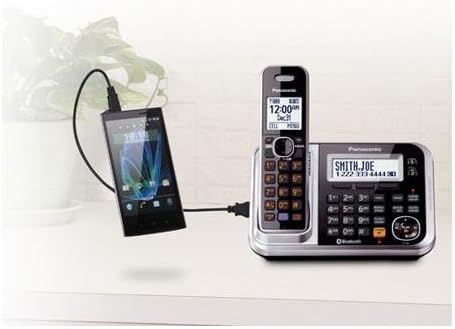
Figure 2: The base unit features a USB port for charging a smartphone, demonstrating its versatile connectivity.
Maagizo ya Uendeshaji
Kupiga na Kupokea Simu
- Ili kupiga simu: Lift a handset from its cradle or press the ONGEA kitufe. Piga nambari ya simu.
- Ili Kupokea Simu: Simu inapolia, inua simu au bonyeza kitufe cha ONGEA kitufe.
- Spika ya simu: Wakati wa simu, bonyeza kitufe cha SP-PHONE button to switch to speakerphone mode. Press again to return to handset mode.
- Marekebisho ya Sauti: Tumia VOL ▲/▼ buttons on the side of the handset during a call to adjust the earpiece or speakerphone volume.
Link2Cell (Bluetooth) Features
- Kuoanisha Simu Mahiri: Access the Bluetooth menu on the base unit or handset. Follow the prompts to search for and pair your smartphone. Up to two smartphones can be paired.
- Making Cell Calls: Once paired, you can select to make calls using your connected cell line directly from the cordless handset.
- Receiving Cell Calls: Incoming calls to your paired smartphone will ring on the cordless handsets, allowing you to answer from anywhere within range.
- Kuchaji USB: Connect your smartphone to the USB port on the base unit for convenient charging.
Mashine ya Kujibu Dijitali
- Kuwasha/Kuzima: Bonyeza kwa JIBU WAKATI / ZIMA button on the base unit to activate or deactivate the answering machine.
- Inacheza Ujumbe: Bonyeza kwa CHEZA/ACHA button on the base unit to listen to messages. Use the skip buttons (◄◄ / ►►) to navigate.
- Ufikiaji wa Mbali: You can access your messages remotely from an outside line by following the instructions in the full user guide.
- Message Forwarding: Set up message forwarding to your registered cell phone through the answering machine settings.
Vipengele vya Juu
- Kitambulisho cha Anayepiga Ensure this feature is enabled in the settings. The handset will announce the caller's name or number.
- Kizuizi cha Simu: Ili kuzuia nambari isiyohitajika, bonyeza kitufe cha PIGA ZUIA button on the handset during or after a call, or add numbers manually through the menu. The system can block up to 250 numbers.
- Kupunguza Kelele: Wakati wa simu, bonyeza kitufe cha KUPUNGUZA KELELE button on the handset to reduce background noise from the other party's end.
- Kitabu cha simu: Store up to 3,000 contacts. Names and numbers entered into one handset are automatically shared with all other registered handsets.
- Intercom: Use the intercom feature to communicate between handsets within your home.
- Tone Equalizer: Adjust the audio quality (treble/bass) during a call for a more comfortable listening experience.
Matengenezo
- Kusafisha: Wipe the phone and base unit with a soft, dry cloth. Avoid using abrasive cleaners, benzene, thinner, or any other solvents.
- Utunzaji wa Betri: Use only the specified rechargeable batteries. If the phone will not be used for an extended period, remove the batteries to prevent leakage.
- Masharti ya Mazingira: Epuka kuweka kifaa kwenye moshi mwingi, vumbi, unyevu au jua moja kwa moja.
Kutatua matatizo
If you experience issues with your Panasonic KX-TG7875S system, please refer to the following common solutions before contacting support:
- No Dial Tone / Cannot Make or Receive Calls:
- Ensure the base unit's AC adapter is securely plugged into both the unit and a working electrical outlet.
- If using a landline, check that the telephone line cord is properly connected to both the base unit and the wall jack.
- Verify that the handset batteries are fully charged.
- Ubora Mbaya wa Sauti / Tuli:
- Sogeza karibu na kitengo cha msingi.
- Hakikisha betri za simu zimechajiwa kikamilifu.
- Angalia kama vifaa vingine vya kielektroniki vinaingilia kati (km, maikrowevi, ruta za Wi-Fi).
- Answering Machine Not Recording Messages:
- Confirm the answering machine is turned ON (indicator light on base unit).
- Check if the memory is full. Erase old messages if necessary.
- Handset Display is Blank or Not Working:
- Place the handset on the charger to ensure it is receiving power.
- Hakikisha betri zimewekwa na kuchajiwa kwa usahihi.
For more detailed troubleshooting or issues not listed here, please consult the comprehensive user manual or visit the Panasonic support webtovuti.
Vipimo
| Kipengele | Maelezo |
|---|---|
| Nambari ya Mfano | KX-TG7875S |
| Chapa | Panasonic |
| Aina ya Simu | Bila kamba |
| Rangi | Nyeusi/Fedha |
| Idadi ya Simu za Mkononi | 5 |
| Kujibu Aina ya Mfumo | Dijitali |
| Chanzo cha Nguvu | Umeme wa Cord |
| Betri | Betri 10 za AAA zinahitajika (pamoja na) |
| Vipimo vya Bidhaa | Inchi 4.6 x 7.1 x 6.7 |
| Uzito wa Kipengee | Pauni 2.9 |
| Nyenzo | Plastiki |
| Aina ya Kipigaji | Keypad mbili |
| Tarehe ya Kwanza Inapatikana | Machi 30, 2013 |
Udhamini na Msaada
Kwa habari kuhusu udhamini wa bidhaa, tafadhali rejelea kadi ya udhamini iliyojumuishwa na ununuzi wako au tembelea Panasonic rasmi. webtovuti. Udhamini kwa kawaida hufunika kasoro za utengenezaji kwa muda maalum kuanzia tarehe ya ununuzi.
For technical support, frequently asked questions, or to download the full comprehensive user manual, please visit the Panasonic support section on their official website. You may also find contact information for customer service there.
Rasilimali za Mtandaoni: www.panasonic.com