
Introduktion
This user manual provides detailed instructions for the installation, operation, maintenance, and troubleshooting of your LongPlus 8MP 4K UHD PoE Wired Security Camera Outdoor, Model LP8MEF8. This camera is designed to deliver high-quality surveillance with advanced features for enhanced security. Please read this manual thoroughly before using the product to ensure proper setup and functionality.
Vad finns i lådan
Carefully unpack the box and ensure all items are present and in good condition. If any items are missing or damaged, please contact LongPlus customer support.
- 1 x LongPlus Dome Camera
- 1 x färglåda
- 1 x varningsklistermärken
- 1 x Positioneringsdekaler
- 1 x Foam Bag/1 x Protective Film
Produkt överview
Nyckelfunktioner
- 4K UHD-upplösning: Captures video at 3840x2160 pixels with a 132° wide viewing angle and HDR for clear, detailed footage.
- AI-rörelsedetektering: Advanced object detection for humans and vehicles, with customizable activity zones and privacy masks to reduce false alerts.
- Triple Night Vision Modes: Offers IR Night Vision, Color Night Vision, and Smart Night Vision for clear visibility up to 100ft (30m) in various lighting conditions.
- Two-Way Audio & Strobe Light Alarm: Communicate with visitors or deter intruders using the built-in speaker and microphone, complemented by an automatic strobe light and siren alarm.
- Hållbar design: IP67 weatherproof metal housing ensures reliable operation in extreme weather conditions (-30°C to 60°C / -22°F to 140°F).
- Fjärråtkomst: Övervaka live footage and recordings via the Longvision app, compatible with iOS, Mac, Windows, and Android devices. Supports up to 32 users.
- Effektiv förvaring: Utilizes H.265 High Efficiency Video Coding to optimize storage space. Supports local storage (via NVR, up to 10TB expandable) and cloud storage options.
- PoE-anslutning: Power over Ethernet (PoE) simplifies installation by delivering power, audio, and video through a single Ethernet cable.
Kamerakomponenter
The LongPlus LP8MEF8 camera features a robust dome design with integrated LED spotlights for color night vision, an infrared sensor for IR night vision, a lens, and a microphone/speaker for two-way audio. The durable metal housing provides protection against environmental elements.

Image: The LongPlus LP8MEF8 camera highlighting its IP67 weatherproof rating for all-season security and durable metal housing for efficient heat dissipation.

Image: Illustration of the camera's 132-degree wide field of view, capturing a broad area in 4K UHD resolution.
Inställning
1. Planning Installation Location
Choose a suitable location for your camera, considering the desired viewing area, proximity to an NVR or PoE switch, and protection from direct impact. The camera is IP67 weatherproof, making it suitable for outdoor use in various conditions.
2. Montering av kameran
- Use the provided positioning sticker to mark the drill holes on the mounting surface.
- Drill holes according to the marks. Insert wall anchors if mounting on masonry.
- Secure the camera base to the mounting surface using the screws.
- Adjust the camera angle to cover the desired area.
3. Ansluta kameran
The LP8MEF8 camera uses Power over Ethernet (PoE) for simplified connectivity.
- Connect one end of an Ethernet cable to the camera's PoE port.
- Anslut den andra änden av Ethernet-kabeln till en PoE-aktiverad NVR (nätverksvideoinspelare) eller en PoE-switch.
- Ensure the NVR/PoE switch is powered on. The camera will receive power and transmit data through this single cable.

Image: Diagram showing the easy plug-and-play PoE connection between the LongPlus camera and an NVR, supporting distances up to 660ft.
4. Initial Configuration (via NVR or App)
Refer to your NVR's manual for specific camera addition procedures. Generally, the NVR will automatically detect PoE cameras. For app-based setup:
- Ladda ner Longvision app från App Store (iOS) eller Google Play Store (Android).
- Registrera ett konto och logga in.
- Follow the in-app instructions to add your camera. This typically involves scanning a QR code on the camera or manually entering its device ID.
- När du har lagt till kan du view leva footage och konfigurera inställningar.
Bruksanvisning
1. Lev View och uppspelning
- Open the Longvision app or access your NVR interface.
- Välj önskad kamera för att view leva footage.
- Use the playback function to review inspelad video.
2. Nattseendelägen
The camera supports three night vision modes:
- IR Natt Vision: Provides black and white video using infrared LEDs in low-light conditions.
- Färg Night Vision: Utilizes built-in spotlights to provide full-color video in low light.
- Smart Night Vision: Automatically switches between IR and color modes based on detected motion or light conditions.
You can switch between these modes via the Longvision app or NVR settings.

Image: Visual representation of the three night vision modes (Full-Color, AI, IR) available on the LongPlus camera, adapting to various lighting scenarios.
3. AI-rörelsedetektering och varningar
- Aktivera detektering: In the app/NVR settings, enable AI motion detection for humans and/or vehicles.
- Aktivitetszoner: Definiera specifika områden inom kamerans view where motion detection should be active. This helps filter out irrelevant alerts.
- Sekretessmask: Configure privacy zones to block out sensitive areas from being recorded.
- Aviseringar: Set up push notifications to receive real-time alerts on your mobile device when motion is detected.

Image: The camera's smart AI motion detection feature, capable of distinguishing between persons and vehicles to provide more accurate alerts.
4. Two-Way Audio and Alarm Functions
- Tvåvägs ljud: Use the microphone and speaker in the Longvision app to communicate with individuals near the camera.
- Strobe Light & Siren Alarm: When motion is detected, the camera can automatically trigger a strobe light and siren to deter intruders. This can also be manually activated via the app.

Image: A scenario depicting the camera's two-way audio and strobe light alarm features, allowing interaction and deterrence.
5. Inspelningslägen
The camera supports various recording options when connected to a compatible NVR:
- Rörelseutlöst inspelning: Records only when motion is detected (default).
- Scheduled recording: Records during specific times of the day.
- 24/7 continuous recording: Spelar in kontinuerligt.
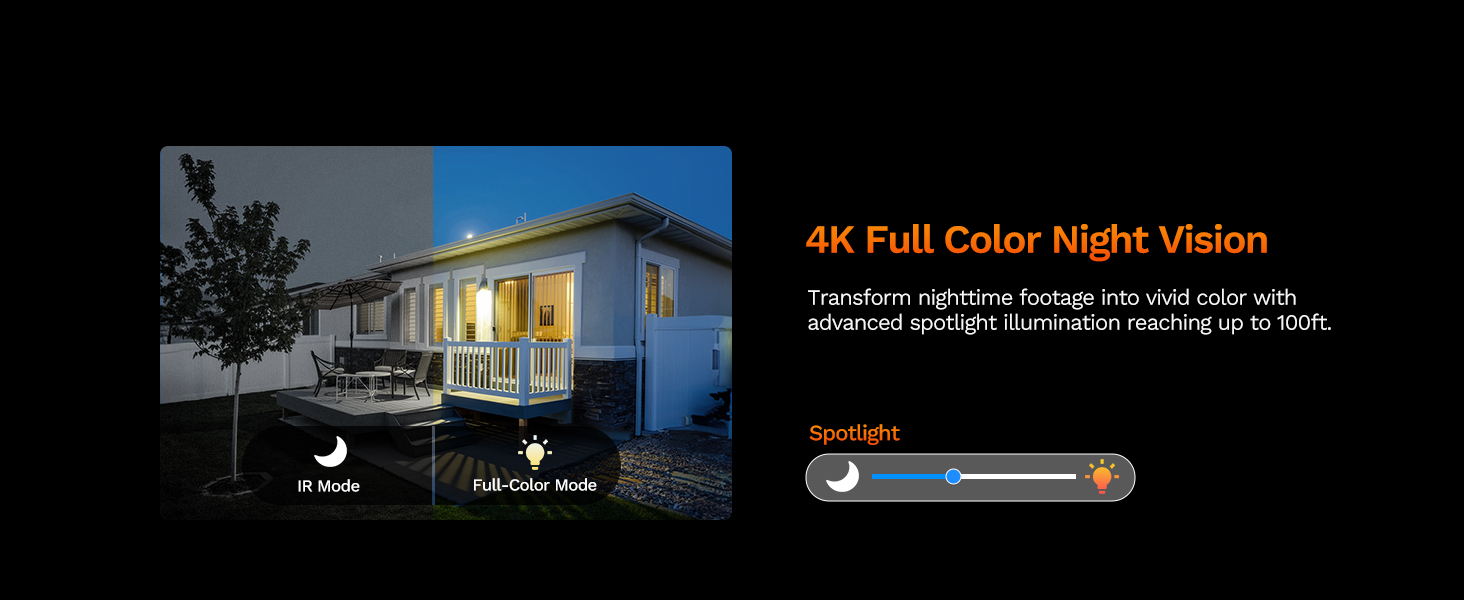
Image: The LongPlus NVR illustrating the benefits of H.265 (HEVC) video compression for saving storage space while maintaining video quality.
Underhåll
- Rengöring: Rengör kameralinsen och höljet regelbundet med en mjuk, damp trasa. Undvik slipande rengöringsmedel som kan repa linsen.
- Firmware -uppdateringar: Check the Longvision app or LongPlus website periodically for firmware updates. Keeping your camera's firmware updated ensures optimal performance and security.
- Kabelinspektion: Periodically inspect the Ethernet cable for any signs of wear or damage, especially in outdoor installations. Ensure connections are secure.
- Miljökontroller: Se till att inga hinder blockerar kamerans view or interfering with its sensors.
Felsökning
If you encounter issues with your LongPlus camera, refer to the following common problems and solutions:
| Problem | Möjlig orsak | Lösning |
|---|---|---|
| Inget videoflöde | No power; Loose cable connection; Network issue. | Check PoE connection to NVR/switch. Ensure NVR/switch is powered on. Verify Ethernet cable integrity. |
| Dålig bildkvalitet | Smutsig lins; Otillräcklig belysning; Problem med nätverksbandbredden. | Clean the camera lens. Ensure adequate lighting for color night vision or switch to IR mode. Check network speed. |
| Rörelsedetektering fungerar inte | Detection disabled; Incorrect sensitivity; Activity zone not set correctly. | Enable motion detection in app/NVR settings. Adjust sensitivity. Verify activity zone configuration. |
| Det går inte att ansluta till appen | Incorrect network settings; App issues; Camera not online. | Ensure camera is connected to the network. Restart camera and router. Re-add camera to the app. Check app permissions. |
| Tvåvägsljud fungerar inte | Microphone/speaker disabled; Volume too low; Network latency. | Check audio settings in the app. Adjust volume levels. Ensure stable network connection. |
If the problem persists after trying these solutions, please contact LongPlus customer support for further assistance.
Specifikationer
| Särdrag | Beskrivning |
|---|---|
| Stämpla | LongPlus |
| Modellnummer | LP8MEF8 |
| Anslutningsteknik | Wired (Power over Ethernet - PoE) |
| Videoinspelningsupplösning | 4K UHD (3840x2160) |
| Optisk sensorteknik | CMOS |
| Linstyp | Fast |
| Viewing vinkel | 132 grader |
| Nattseende | Yes, up to 100 Feet (30m) range (IR, Color, Smart modes) |
| Bildhastighet | 30 fps |
| Inspelningslägen | Motion-triggered, Scheduled, 24/7 (via NVR) |
| Specialfunktioner | H.265 Video Coding, Siren Alarm, Strobe Light Alarm, Two-Way Audio, Vehicle/Person Detection, Activity Zones, Privacy Mask, IP67 Waterproof |
| Strömkälla | Kabelansluten el (PoE) |
| Driftstemperatur | -30°C till 60°C (-22°F till 140°F) |
| Kompatibla enheter | Cameras, Laptops, Personal Computers, Smartphones |
| Support för operativsystem | Android, Mac OS, Windows, iOS |
| Objektets mått | 3.3 x 3.3 x 3.5 tum |
| Färg | Vit |
Garanti och support
Garantiinformation
LongPlus provides a 2 års garanti for this product from the date of purchase. This warranty covers manufacturing defects and ensures the product meets its specified performance standards under normal use.
Teknisk support
LongPlus offers livstids teknisk support for its customers. If you have any questions, require assistance with setup, operation, or troubleshooting, or encounter any issues not covered in this manual, please do not hesitate to contact our professional technical team. We are committed to responding to your inquiries within 24 hours.
For support, please visit the official LongPlus webwebbplatsen eller se kontaktinformationen som medföljer produktförpackningen.