
1. Introduktion
Thank you for choosing the Oasser Dash Cam U1. This manual provides detailed instructions for the proper installation, operation, and maintenance of your dash camera. Please read this manual thoroughly before using the device to ensure optimal performance and longevity. The Oasser Dash Cam U1 is designed to record your driving journey in Full HD 1080p, offering features like a wide viewing angle, G-Sensor for emergency recording, loop recording, and smart parking monitoring.
2. Paketets innehåll
Kontrollera att alla artiklar som listas nedan ingår i ditt paket. Om några artiklar saknas eller är skadade, vänligen kontakta kundsupport.
- Oasser Dash Cam U1 Unit
- Billaddarkabel
- Sugkoppmontering
- USB datakabel
- Användarmanual
- Paketlåda

Image 2.1: Contents of the Oasser Dash Cam U1 package, including the dash cam, car charger, suction cup mount, USB cable, and user manual.
3. Produkt överview
The Oasser Dash Cam U1 features a compact design with a 1.5-inch LCD screen for easy navigation and playback. It is equipped with a high-resolution lens and various ports for connectivity.

Bild 3.1: Framsidan view of the Oasser Dash Cam U1 with the suction cup mount attached, showcasing the lens and main body.

Bild 3.2: Uppifrån och ner view of the Oasser Dash Cam U1 showing both the front lens and the rear LCD screen with control buttons.
3.1. Enhetskomponenter
- Främre lins: Fångar video footage.
- LCD-skärm: Visar live view, menu, and playback.
- Kontrollknappar: For navigation and function selection.
- USB-port: For power and data transfer.
- HDMI-port: För videoutgång.
- MicroSD-kortplats: För isättning av minneskort.
- Högtalare/mikrofon: För ljudinspelning och uppspelning.
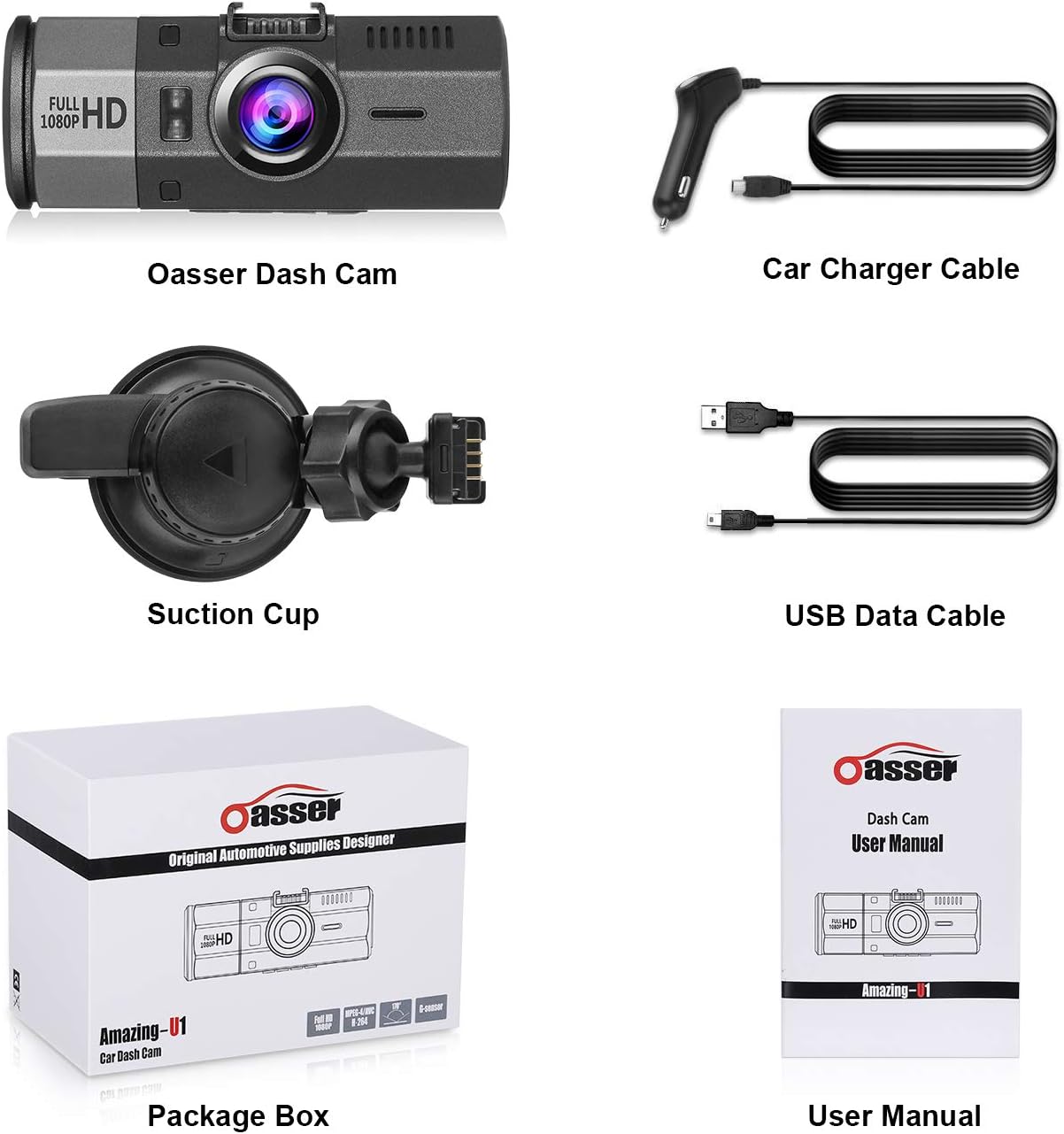
Bild 3.3: Närbild view of the Oasser Dash Cam U1's side, showing the USB port, HDMI port, and the slot for a MicroSD card. Note that the SD card is not included with the product.
4. Inställning
Follow these steps to properly set up your Oasser Dash Cam U1.
4.1. Sätta i MicroSD -kortet
- Se till att dashcamen är avstängd.
- Leta reda på MicroSD-kortplatsen på sidan av enheten.
- Insert a Class 10 or higher MicroSD card (not included) into the slot until it clicks into place.
- För att ta ut, tryck försiktigt in kortet tills det fjädrar ut.
Viktig: For optimal performance, it is recommended to format the MicroSD card within the dash cam's settings before first use and periodically thereafter.
4.2. Montering av Dash Cam
- Rengör det önskade området på vindrutan noggrant.
- Fäst sugkoppsfästet på dashcamen.
- Press the suction cup firmly against the windshield and rotate the locking mechanism clockwise to secure it.
- Justera vinkeln på instrumentbrädan för att säkerställa frigång view av vägen framåt.

Image 4.1: Diagram illustrating the attachment of the suction cup mount to the windshield and the connection of the car charger cable to the dash cam.
4.3. Ansluta ström
- Connect the car charger cable to the dash cam's USB port.
- Anslut den andra änden av billaddaren till bilens cigarettändaruttag.
- Dashcamen slås på automatiskt och börjar spela in när fordonets tändning slås på.
5. Bruksanvisning
Understand the various functions and modes of your Oasser Dash Cam U1.
5.1. Videoinspelning
The dash cam records video in Full HD 1080p resolution at 30 frames per second, capturing a wide 170-degree viewing vinkel.

Image 5.1: Comparison of video recording quality during day and night conditions, demonstrating the FHD 1080P capability of the Oasser Dash Cam U1.

Image 5.2: Illustration of the 170-degree ultra-wide viewing angle, showing how it captures a broader perspective of the road.
5.2. Slinginspelning
The dash cam continuously records video in segments (e.g., 1, 3, or 5 minutes). When the MicroSD card is full, the oldest unlocked video segments are automatically overwritten by new recordings. This ensures continuous recording without manual intervention.
5.3. G-sensor (gravitationssensor)
The built-in G-Sensor detects sudden movements or impacts, such as collisions. When an event is detected, the current video segment is automatically locked and saved to prevent it from being overwritten by loop recording. This ensures critical footage är bevarad.

Image 5.3: Visual representation of the G-Sensor automatically locking video files during an impact event, indicated by a padlock icon on the screen.
5.4. Smart Parking Monitoring
When enabled, the parking monitor feature uses motion detection to record any moving objects close to your parked car. It can also utilize time-lapse recording, taking photos at set intervals to record changes, which are then compiled into a video clip. This provides surveillance when your vehicle is stationary.

Image 5.4: The Oasser Dash Cam U1 mounted in a vehicle, demonstrating its smart parking monitoring feature in a parking garage setting.
5.5. Night Vision
The dash cam is equipped with night vision capabilities to enhance video clarity in low-light conditions. While it improves visibility, it is not military-grade night vision and relies on available ambient light sources.
5.6. Mute -funktion
The dash cam includes a mute function, allowing you to disable audio recording when desired. This can be useful for privacy or to reduce file storlek.
6. Underhåll
Proper maintenance ensures the longevity and reliable operation of your dash cam.
- Rengöring: Use a soft, dry cloth to clean the lens and screen. Avoid abrasive cleaners or solvents.
- SD-kortformatering: Regularly format your MicroSD card (at least once a month) through the dash cam's settings. This helps prevent data corruption and ensures smooth recording.
- Firmware -uppdateringar: Check the official Oasser website periodically for firmware updates. Updating the firmware can improve performance and address known issues. Follow the instructions provided with the firmware update carefully.
- Temperatur: Avoid exposing the dash cam to extreme temperatures for extended periods, especially direct sunlight in a parked car, as this can affect battery life and internal components.
7. Felsökning
If you encounter issues with your Oasser Dash Cam U1, refer to the following common problems and solutions.
| Problem | Möjlig orsak/lösning |
|---|---|
| Dashcam slås inte på. | Check the car charger connection and ensure the vehicle's cigarette lighter socket is functional. The dash cam requires continuous power from the car charger to operate. |
| Inspelningen stoppar eller fryser. | Ensure you are using a Class 10 or higher MicroSD card. Format the MicroSD card regularly. The card may be full or corrupted. Try a different MicroSD card. |
| Video segments have gaps or transitions issues. | Ensure the latest firmware is installed. Formatting the MicroSD card can also resolve this. |
| G-Sensor is too sensitive or not sensitive enough. | Adjust the G-Sensor sensitivity setting in the dash cam's menu. A lower setting will trigger less frequently, while a higher setting will trigger more easily. |
| Suction cup mount does not stay in place. | Ensure the windshield surface is clean and dry. Apply firm pressure and rotate the locking mechanism fully. If the mount is old, the suction cup material may have degraded and require replacement. |
| Night vision quality is poor. | Night vision enhances low-light recording but does not create light. Performance depends on ambient light. Ensure the windshield is clean and free of obstructions. |
| License plates are difficult to read in recordings. | While the dash cam records in 1080p, factors like speed, distance, lighting conditions, and reflections can affect license plate readability. Ensure the lens is clean. |
| Camera reboots or shuts down unexpectedly. | This can occur if the power supply is unstable or if the internal battery is low. Ensure a stable power connection. If the issue persists, the internal battery may need service. |
8. Specifikationer
Key technical specifications for the Oasser Dash Cam U1.
| Särdrag | Specifikation |
|---|---|
| Modell | Amazing-U1 |
| Visningstyp | LCD |
| Visible Screen Area Size | 1.5 tum / 4 cm |
| Videoinspelningsupplösning | 1080p (Full HD) |
| Verklig View Vinkel | 170 grader |
| Specialfunktioner | G-Sensor, Loop Recording, Mute Function, Night Vision, Parking Monitoring |
| Anslutningsteknik | HDMI, USB |
| Batteriets sammansättning | Litiumjon |
| Produktens mått | 9.5 x 3.91 x 3.91 cm |
| Produktens vikt | 520 g |
9. Garanti och support
Oasser products are designed for reliability and performance. For warranty information, technical support, or any inquiries regarding your Oasser Dash Cam U1, please refer to the contact details provided in your product packaging or visit the official Oasser webwebbplats. Vänligen spara ditt inköpsbevis för garantianspråk.