
1. Introduktion
This manual provides detailed instructions for the installation, operation, and maintenance of your ASUS X99-DELUXE motherboard. The ASUS X99-DELUXE is an ATX motherboard designed for high-performance computing, supporting Intel LGA 2011-3 processors and DDR4 memory.

Figur 1: Uppifrån och ner view of the ASUS X99-DELUXE Motherboard, showing the CPU socket, RAM slots, and heatsinks.
2. Nyckelfunktioner
- ASUS OC Socket: Designed to enhance 8-core CPU and DDR4 performance beyond standard X99 expectations.
- DDR4 minnesstöd: Features a special memory overclocking design, supporting DDR4 memory speeds up to 3200MHz (O.C.).
- Dual M.2 X4 Support: Provides two M.2 slots with PCIe 3.0 x4 interface, enabling data transfer speeds up to 32Gb/s for compatible NVMe SSDs.
- Fan Extension Card: Includes an extension card for advanced PC cooling management.
- 5-vägsoptimering: Utilizes Dual Intelligent Processors 5 for system optimization, including performance tuning, power saving, digital power control, and fan control.
- UEFI BIOS: Features a media-acclaimed Unified Extensible Firmware Interface (UEFI) BIOS for intuitive system configuration.
- SATA Express: Supports SATA Express for storage speeds up to 10Gb/s.
3. Installation och installation
Innan du påbörjar installationen, se till att systemet är avstängt och bortkopplat från strömkällan. Håll moderkortet i kanterna för att undvika statisk elektricitet.
3.1. CPU Installation (LGA 2011-3 Socket)
- Carefully open the CPU socket retention mechanism.
- Rikta in det triangulära märket på processorn med motsvarande märke på sockeln.
- Placera försiktigt processorn i sockeln utan att tvinga den.
- Close the retention mechanism to secure the CPU. Ensure no pins are bent during this process.

Figur 2: Vinklad view of the ASUS X99-DELUXE Motherboard, highlighting the LGA 2011-3 CPU socket.
3.2. Installation av minne (DDR4)
The motherboard supports DDR4 memory modules. Refer to the motherboard manual for specific memory configurations and supported speeds.
- Öppna klämmorna i båda ändar av DIMM-kortplatsen.
- Rikta in skåran på DDR4-minnesmodulen med nyckeln i DIMM-kortplatsen.
- Insert the module firmly into the slot until the clips snap into place.
3.3. Storage Device Installation (M.2, SATA)
Install M.2 SSDs into the dedicated M.2 slots and SATA drives to the SATA ports. The motherboard supports SATA 3 (6Gb/s) and SATA Express.
3.4. Ansluta kringutrustning
Connect your display, keyboard, mouse, and other peripherals to the rear I/O panel. The motherboard provides various USB ports, Ethernet ports, and audio jacks.
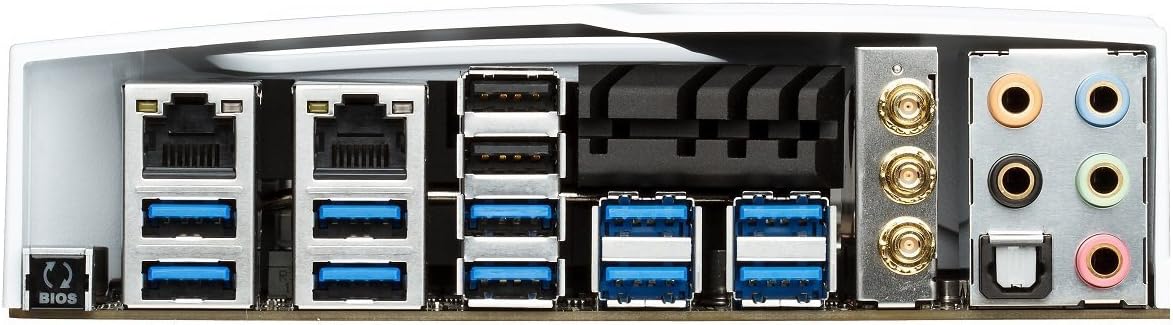
Figure 3: Rear I/O panel of the ASUS X99-DELUXE Motherboard, showing USB ports, Ethernet, and audio jacks.
4. Bruksanvisning
4.1. UEFI BIOS-konfiguration
The UEFI BIOS allows you to configure system settings, boot options, and hardware parameters. To enter the BIOS, press the DEL tangenten under systemstart.
- EZ-läge: Provides a simplified interface for basic settings.
- Avancerat läge: Offers comprehensive control over all motherboard features, including overclocking and fan control.
4.2. Installation av drivrutiner
After installing your operating system (e.g., Windows XP, as listed in specifications, and newer OS versions), install the necessary drivers for the motherboard chipset, audio, network, and other integrated components. These are typically provided on a support DVD or available for download from the ASUS webplats.
4.3. 5-Way Optimization
The 5-Way Optimization feature, accessible through ASUS software, automatically tunes your system for optimal performance, power efficiency, digital power delivery, and fan acoustics based on your usage. It is recommended to manage overclocking and fan settings directly within the BIOS for more precise control.
5. Underhåll
Regelbundet underhåll hjälper till att säkerställa moderkortets långa livslängd och stabila drift.
- Dammborttagning: Rengör regelbundet moderkortet och kylkomponenterna med tryckluft. Se till att systemet är avstängt och urkopplat innan rengöring.
- Anslutningskontroller: Verify that all cables and components are securely seated.
- BIOS-uppdateringar: Kolla ASUS-supporten website for the latest BIOS updates to improve compatibility and performance. Follow update instructions carefully.
6. Felsökning
If you encounter issues with your ASUS X99-DELUXE motherboard, consider the following troubleshooting steps:
- Ingen ström/Ingen start:
- Se till att alla strömkablar (24-pins ATX, 8-pins CPU) är ordentligt anslutna.
- Verify the power supply unit (PSU) is functioning correctly.
- Kontrollera strömbrytarens anslutning till moderkortet på frontpanelen.
- Ingen skärm:
- Confirm the graphics card is properly seated in its PCIe slot and has adequate power.
- Ensure the monitor cable is securely connected to the graphics card.
- Testa med en annan skärmkabel eller kabel om möjligt.
- Systeminstabilitet/krascher:
- Check RAM modules for proper seating; try reseating them or testing one module at a time.
- Ensure CPU cooler is correctly installed and making good contact with the CPU. Monitor CPU temperatures.
- Återställ BIOS-inställningarna till standardinställningarna.
- Bent CPU Socket Pins:
Bent pins in the CPU socket can cause severe system malfunctions or prevent booting. This type of damage is typically not covered under warranty. Exercise extreme caution during CPU installation to avoid bending pins.
7. Specifikationer
| Kategori | Specifikation |
|---|---|
| Stämpla | ASUS |
| Modellnamn | X99-DELUXE |
| CPU-uttag | LGA 2011-3 |
| Kompatibla processorer | Intel Core i7 (LGA 2011-3) |
| Chipsettyp | Intel X99 |
| RAM-minnesteknik | DDR4 |
| Minnes klockhastighet | Up to 3200 MHz (O.C.) |
| Minnesplatser tillgängliga | 8 |
| RAM-minnes maximal storlek | 64 GB |
| Gränssnitt för grafikkort | PCI Express |
| Total PCIe Ports | 5 |
| Totalt antal SATA-portar | 8 |
| Systembussstandard som stöds | SATA 3 |
| USB 2.0-portar | 2 (internal headers, total ports may vary) |
| Totalt antal USB-portar | Various (including USB 3.0 on rear I/O) |
| Antal Ethernet-portar | 1 (Dual Gigabit LAN) |
| Typ av huvudströmkontakt | 24-pin ATX |
| Kompatibla enheter | Persondator |
| Plattform | Windows XP (and newer OS versions) |
| Objektets vikt | 4.44 pund (ca 2.01 kg) |
8. Garanti och support
För garantiinformation och teknisk support, vänligen se den officiella ASUS-leverantören. webwebbplatsen eller kontakta ASUS kundtjänst. Spara ditt inköpsbevis för garantiärenden.
ASUS Support Webplats: https://www.asus.com/support/
Note: Damage resulting from improper installation, misuse, or unauthorized modifications may void your product warranty.