
Introduktion
This instruction manual provides essential information for the proper use and care of your Minolta Hi-Matic AF2 Auto Focus 35mm Film Camera. Please read this manual thoroughly before operating the camera to ensure optimal performance and longevity.
Produkt överview
Familiarize yourself with the main components of your Minolta Hi-Matic AF2 camera.

Bild 1: Framsidan View. This image displays the front of the Minolta Hi-Matic AF2 camera, highlighting the Minolta Lens 38mm 1:2.8, the auto-focus mechanism, and the built-in flash unit with its ON/OFF switch.

Bild 2: Överst View. This image shows the top of the Minolta Hi-Matic AF2 camera, featuring the film advance lever, shutter button, and the camera's model name.
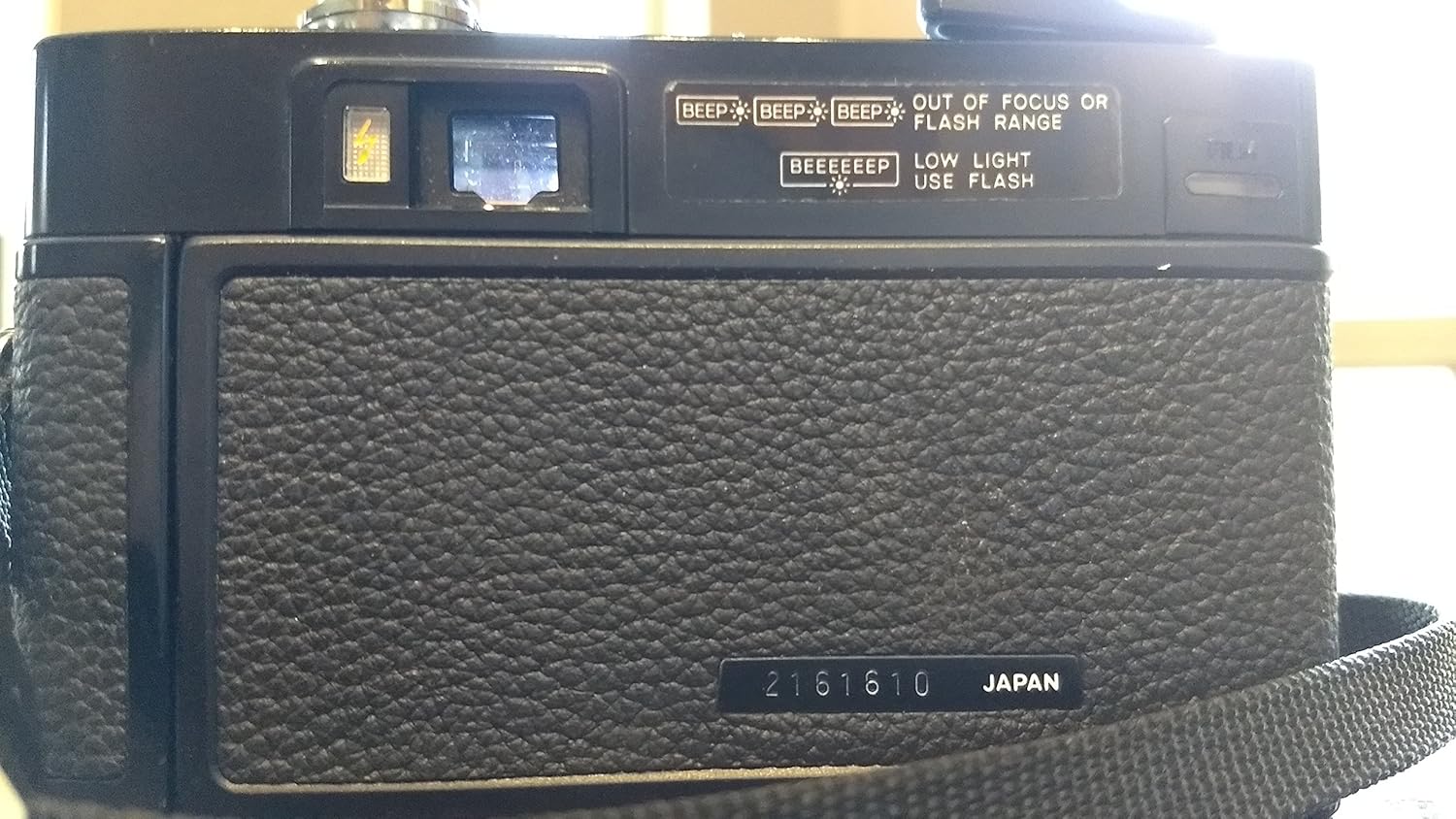
Bild 3: Baksida View. This image illustrates the back of the Minolta Hi-Matic AF2 camera, including the viewfinder, film counter, and indicators for out-of-focus/flash range and low light conditions.
Nyckelkomponenter:
- Lins: Minolta Lens 38mm 1:2.8 (46mm filter thread).
- Autofokussystem: Automatically adjusts focus for sharp images.
- Inbyggd blixt: For low-light conditions, with an ON/OFF switch.
- Viewupphittare: För att komponera dina bilder.
- Filmmatningsspak: Manually advances film after each shot.
- Avtryckare: To capture photographs.
- ISO-ratt: Manually set film speed (up to 400 ISO).
Inställning
1. Batteriinstallation
- Locate the battery compartment, typically on the bottom or side of the camera.
- Öppna batterifackets lock.
- Insert the required AA batteries, ensuring correct polarity (+/-) as indicated inside the compartment.
- Stäng batterifacket ordentligt.
- Notera: Ensure the battery contacts are clean to prevent corrosion and ensure proper function.
2. Filmladdning
- Öppna kamerans baksida genom att skjuta spärren (vanligtvis på sidan).
- Placera en 35 mm filmkassett i filmfacket på vänster sida.
- Dra filmledaren över till upprullningsspolen på höger sida och för in den i ett av spåren.
- Advance the film slightly using the film advance lever until the sprocket holes engage with the take-up spool teeth.
- Stäng kameran ordentligt tills den klickar fast.
- Advance the film two or three times, pressing the shutter button each time, until the film counter shows "1". This ensures the film is properly loaded and ready for the first exposure.
3. Ställa in filmhastighet (ISO/ASA)
- Locate the ISO/ASA dial on the camera lens barrel.
- Rotate the dial to match the ISO speed of the film you have loaded (e.g., 100, 200, 400). This setting is crucial for accurate exposure.
Användning av kameran
1. Taking a Photograph
- Titta igenom viewsökaren för att komponera din bild.
- Gently press the shutter button halfway down. The camera's autofocus system will engage and set the focus.
- If the focus is achieved and lighting is adequate, fully press the shutter button to take the picture.
- After taking a picture, advance the film using the film advance lever until it stops, preparing for the next shot.
2. Använda den inbyggda blixten
- The Minolta Hi-Matic AF2 features a built-in flash for low-light conditions.
- Locate the flash ON/OFF switch, typically near the flash unit on the front of the camera.
- Slide the switch to "ON" to activate the flash. Allow a few seconds for the flash to charge. A ready light (if present) will illuminate when charged.
- Slide the switch to "OFF" when flash is not required to conserve battery power.
3. Filmåterspolning
- Once you have taken all exposures on the roll of film (the film advance lever will no longer advance), it's time to rewind the film.
- Locate the film rewind button (usually on the bottom of the camera) and press it.
- Rotate the film rewind crank (usually on the top left of the camera) clockwise until you feel the tension release, indicating the film is fully rewound into its cartridge.
- Öppna kamerans baksida och ta ut filmkassetten.
Underhåll
- Rengöring av linsen: Use a soft, lint-free cloth or lens brush to gently clean the lens surface. Avoid harsh chemicals.
- Batterifack: Regularly check the battery compartment for any signs of corrosion. Clean contacts with a cotton swab and rubbing alcohol if necessary. Remove batteries during long periods of non-use.
- Kamerahus: Wipe the camera body with a soft, dry cloth. Avoid exposing the camera to excessive dust, moisture, or extreme temperatures.
- Lagring: Store the camera in a cool, dry place, preferably in a camera bag or case to protect it from impacts and dust.
Felsökning
| Problem | Möjlig orsak | Lösning |
|---|---|---|
| Camera does not power on / Flash does not fire. | Dead or incorrectly inserted batteries. Corroded battery contacts. | Replace batteries with fresh AA batteries. Ensure correct polarity. Clean battery contacts. |
| Filmmatningsspaken har fastnat. | Film not properly loaded. End of film roll reached. | Check film loading. If at end of roll, rewind film. |
| "BEEP BEEP BEEP" sound. | Subject is out of focus range or too close/far for autofocus. | Adjust distance to subject. Ensure subject is within the camera's focusing capabilities. |
| "BEEEEEEP" sound. | Low light conditions detected. | Activate the built-in flash for proper exposure. |
| Film door is difficult to open. | Mechanism might be stiff due to age or lack of use. | Apply gentle, even pressure. Avoid forcing it to prevent damage. |
| Underexposed photos (especially with bright sky). | Camera's metering system may be influenced by bright backgrounds. | Try to frame shots to minimize large areas of bright sky, or use flash as a fill light if possible. |
Specifikationer
| Särdrag | Detalj |
|---|---|
| Modellnamn | Hi-Matic AF2 |
| Lins | Minolta Lens 38mm 1:2.8 |
| Typ av film | 35mm film |
| Typ av fokus | Auto Focus (Phase Detection) |
| Exponeringskontroll | Automatisk |
| Flash | Built-In, Automatic Flash Modes |
| ISO-inställning | Manual (up to 400) |
| Viewupphittare | Optisk |
| Strömkälla | AA Batteries (Based on user reviews, not official specs) |
| Objektets vikt | 476 gram |
Garanti och support
Information regarding warranty coverage and customer support for the Minolta Hi-Matic AF2 camera is not available in the provided product data. For assistance, please refer to the original purchase documentation or contact the seller directly.


