1. Bubuka
Thank you for choosing the Dalton 2000VA Uninterruptible Power Supply (UPS). This device is designed to provide reliable power backup and protection for your electronic equipment against power outages, surges, and fluctuations. Please read this manual thoroughly before installation and operation to ensure optimal performance and safety.
2. Parentah Kasalametan penting
Salawasna tuturkeun pancegahan kaamanan dasar ieu pikeun ngirangan résiko seuneu, kejutan listrik, sareng tatu:
- Ulah muka UPS casing. There are no user-serviceable parts inside. Refer servicing to qualified service personnel.
- Do not use the UPS in environments with excessive dust, humidity, or extreme temperatures.
- Pastikeun UPS disambungkeun ka stop kontak anu di-ground.
- Do not connect non-computer related items like medical equipment, life support equipment, or household appliances to the UPS.
- Position the UPS in a well-ventilated area, away from direct sunlight or heat sources.
- In case of emergency, press the power button to turn off the UPS and disconnect it from the AC power source.
3. Eusi Paket
Pastikeun yén sadaya item aya dina pakét anjeun:
- Dalton 2000VA UPS Unit
- Kabel listrik
- USB Communication Cable (if applicable)
- Manual pangguna (dokumén ieu)

Gambar 3.1: Hareupeun view of the Dalton 2000VA UPS unit, showing the display screen and power button.
4. Setup jeung Instalasi
Follow these steps to set up your UPS:
- Ngabongkar bungkusan: Taliti miceun UPS tina bungkusan na. Pariksa karusakan pengiriman barang.
- panempatan: Place the UPS on a flat, stable surface in a cool, dry, and well-ventilated area. Ensure there is adequate space around the unit for airflow.
- Muatan Awal: Before connecting any devices, plug the UPS power cord into a grounded wall outlet. Allow the unit to charge for at least 8 hours to ensure the battery is fully charged. The display will indicate charging status.
- Alat Nyambungkeun:
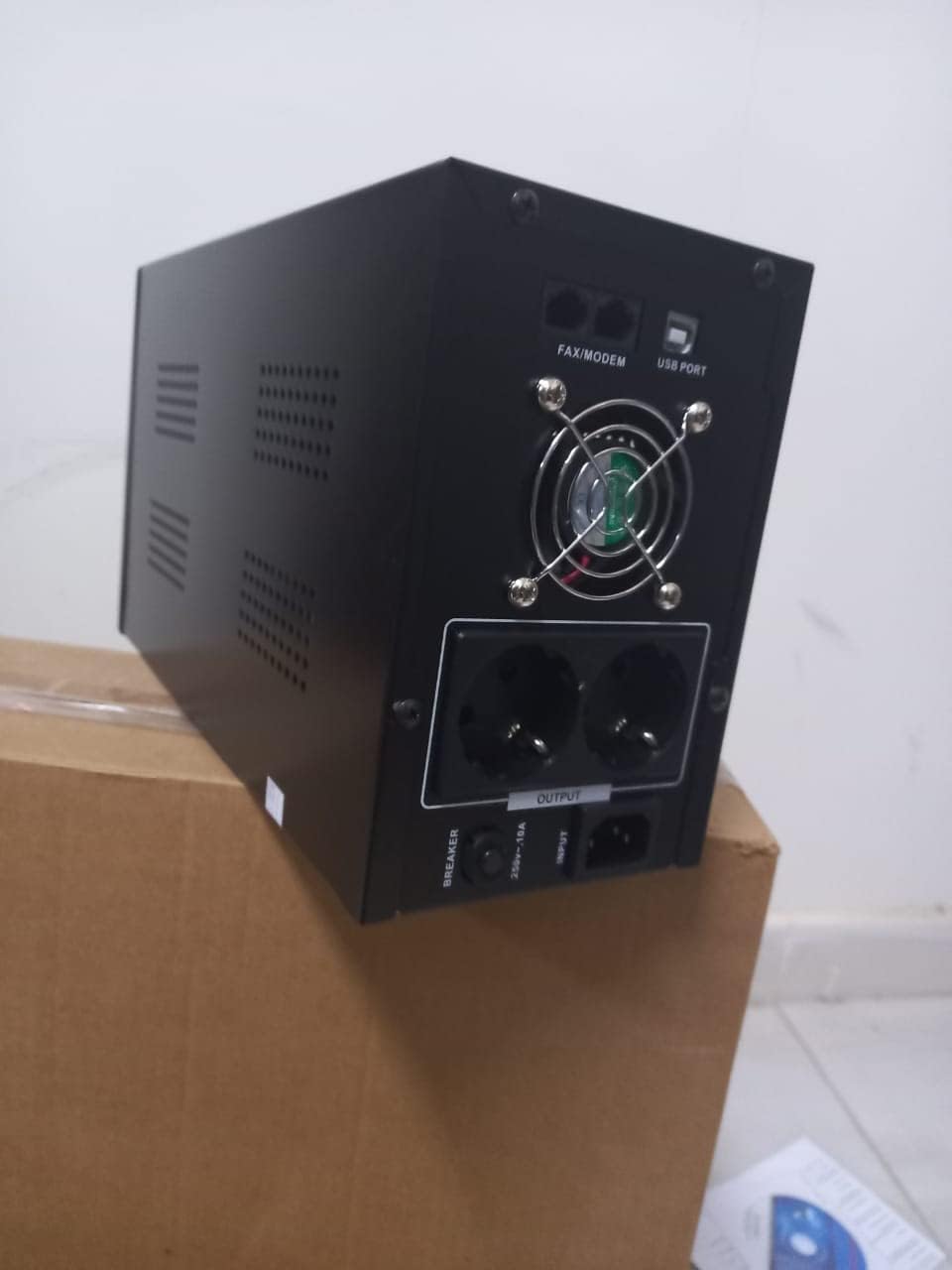
Gambar 4.1: Tukangeun view of the Dalton 2000VA UPS, highlighting the input power port, output sockets, and USB/Modem ports.
- Once the battery is charged, connect your computer, monitor, and other critical electronic devices to the UPS output sockets.
- Do not overload the UPS. Refer to the specifications section for maximum load capacity.
- If applicable, connect the USB communication cable from the UPS to your computer for monitoring software (software not included, check manufacturer's websitus).
5. Ngoperasikeun UPS
5.1 Powering on / Pareum
- Pikeun Ngahurungkeun: After connecting to AC power and charging, press and hold the power button on the front panel for approximately 3 seconds until you hear a beep and the display illuminates.
- Pikeun mareuman: Press and hold the power button for approximately 3 seconds until you hear a beep and the display turns off. If the UPS is running on battery, it will shut down immediately. If connected to AC, it will switch to bypass mode before shutting down.
5.2 Ngartos Tampilan
The front panel LCD display provides real-time status information:
- DI: Némbongkeun input voltage tina listrik.
- KALUAR: Mintonkeun kaluaran voltage provided by the UPS to connected devices.
- NORMAL: Indicates the UPS is operating on utility power.
- Bat: Némbongkeun tingkat muatan batré ayeuna.
- Beban: Nunjukkeun persentagkapasitas UPS anu dianggo ku alat-alat anu nyambung.
- Battery Mode Icon: Appears when the UPS is running on battery power during an outage.

Gambar 5.1: Sisi view of the UPS, showing the illuminated display with power status indicators.
5.3 Battery Backup Function
Dina acara kakuatan outage, the UPS will automatically switch to battery power, providing continuous power to your connected devices. The duration of backup power depends on the load connected and the battery's charge level. The UPS will emit an audible alarm during battery operation.
When utility power returns, the UPS will automatically switch back to AC power and begin recharging its battery.
6. Pangropéa
- Perawatan batré: To maximize battery life, ensure the UPS is always connected to an AC outlet to keep the battery charged. If the UPS is stored for an extended period, recharge it every three months for at least 8 hours.
- beberesih: Disconnect the UPS from all power sources before cleaning. Use a soft, dry cloth to wipe the exterior. Do not use liquid or aerosol cleaners.
- Ventilasi: Regularly check that the ventilation openings are not blocked by dust or debris to prevent overheating.
7. Cara ngungkulan
Tingali tabel di handap pikeun masalah umum sareng solusina:
| Masalah | Mungkin Cukang lantaranana | Solusi |
|---|---|---|
| UPS teu hurung. | Battery not charged or power cord disconnected. | Ensure power cord is securely plugged in and allow battery to charge for 8 hours. |
| UPS ngageplak terus-terusan dina modeu normal. | kaayaan overload. | Disconnect non-essential equipment until the alarm stops. Check total load. |
| Short backup time. | Battery not fully charged or battery nearing end of life. | Allow UPS to charge for 8 hours. If issue persists, battery may need replacement (contact service center). |
| UPS does not provide power during outage. | Battery discharged or internal fault. | Ensure UPS was fully charged. If problem persists, contact authorized service center. |
8. Spésifikasi Téknis
| Fitur | Rincian |
|---|---|
| Dimensi produk | 12.5 x 22.5 x 38 cm |
| Produsén | Dalton |
| Ngaran Brand | Generik |
| Warna | Hideung |
| Bahan | logam |
| ayeuna | 5 Ampenya |
| Faktor Bentuk | Rak |
| Rentang Frékuénsi | 50-60 Hz |
| Kaluaran Voltage | 220 volt |
| Tipe Panyambung | AC |
9. Garansi jeung Rojongan
Dalton provides an authorized maintenance center for all Uninterruptible Power Supply units. For warranty claims, technical support, or service inquiries, please contact your local Dalton authorized distributor or service center. Keep your purchase receipt as proof of purchase for warranty validation.
For further assistance, please visit the official Dalton websitus atanapi ngahubungan rojongan customer.


