1. Bubuka
Thank you for choosing the Xiaomi Mi 55-inch 4K UHD Smart Android TV. This manual provides essential information for the safe and efficient use of your television. Please read it thoroughly before operating the device and retain it for future reference.

Gambar 1.1: Hareupeun view of the Xiaomi Mi 55-inch 4K UHD Smart Android TV.
2. Émbaran Kasalametan
Pikeun mastikeun operasi anu aman sareng nyegah karusakan, perhatikeun pancegahan ieu:
- Ulah ngalaan TV ka hujan atawa beueus.
- Entong meungpeung lawang angin.
- Pastikeun grounding anu pas pikeun colokan listrik.
- Hindarkeun nempatkeun TV dina permukaan anu teu stabil.
- Jauhkeun TV tina sinar panonpoé langsung, sumber panas, sareng seuneu kabuka.
- Cabut colokan TV nalika badai kilat atanapi nalika henteu dianggo kanggo waktos anu lami.
- Rujuk sadayana jasa ka tanaga jasa anu mumpuni.
3. Eusi Paket
Pastikeun yén sadaya item aya dina bungkusan:
- 1 × Xiaomi Mi 55-inch TV
- 1 × Remote control with voice control
- 1 × Remote control batteries
- 1 × kabel kakuatan
- 1 × User manual (this document)
- 1 × Support legs
- 4 × Screws for support legs
4. Setélan
4.1. Instalasi fisik
Your TV can be installed on a stand or wall-mounted. The TV is VESA mounting standard compatible.
4.1.1. Instalasi nangtung
- Teundeun TV sacara saksama dina tempat anu lemes sareng datar pikeun nyegah karusakan layar.
- Attach the support legs to the designated slots at the bottom of the TV using the provided screws. Ensure they are securely fastened.
- Tempatkeun TV dina tempat anu stabil sareng rata.
4.1.2. Pamasangan Tembok (Opsional)
If you choose to wall-mount your TV, use a VESA-compatible wall mount kit (sold separately) and follow the instructions provided with the wall mount. Ensure the wall can support the weight of the TV.
4.2. Nyambungkeun périferal
Sambungkeun alat éksternal anjeun ka port TV:
- HDMI: Connect Blu-ray players, game consoles, or set-top boxes to the HDMI ports (3 available). HDMI ARC is supported for audio return channel functionality.
- USB: Connect USB storage devices for media playback (2 available).
- LAN: Pikeun sambungan internét kabel, sambungkeun kabel Ethernet ka port LAN.
- Digital Audio Out (Optik): Connect to an external audio system for high-quality digital sound.
4.3. Daya Awal Hurung
- Sambungkeun kabel listrik ka TV teras ka stopkontak.
- Pencét tombol daya dina kadali jauh atanapi dina TV.
- Turutan parentah dina-layar pikeun ngarengsekeun setelan awal, kaasup pilihan basa, sambungan jaringan (Wi-Fi atawa Ethernet), jeung akun Google asup.
5. Parentah Operasi
5.1. Kadali jauh
The included remote control allows you to navigate the TV's features. It supports voice control for convenient interaction with Google Assistant.
- Tombol Daya: Ngahurungkeun atawa mareuman TV.
- Pad Navigasi (Kaluhur/Turun/Kénca/Katuhu/OK): Navigates ménu tur pilih pilihan.
- Tombol Volume: Nyaluyukeun tingkat sora.
- Tombol Saluran: Robah saluran TV.
- Tombol Asisten Google: Ngaktipkeun kadali sora.
- Tombol imah: Balik deui ka layar utama Android TV.
- Tombol Balik: Mulih ka layar saméméhna.
- Tombol Aplikasi: Dedicated buttons for popular apps like Netflix and YouTube.
5.2. Fitur Smart TV (Android TV)
Your TV runs on Android TV (version 9), providing access to a wide range of smart features:
- Asisten Google: Anggo paréntah sora pikeun milarian eusi, ngontrol alat home pinter, sareng kéngingkeun inpormasi.
- Google Play Store: Download and install various apps, games, and streaming services.
- Chromecast internal: Matak eusi tina smartphone, tablet, atawa komputer anjeun langsung ka TV.
- Aplikasi anu tos dipasang: Access Netflix, YouTube, and a web browser langsung.
- SmartThings App Support: Integrate with other compatible smart home devices.
5.3. Gambar jeung Sora Setélan
Saluyukeun setelan gambar sareng sora pikeun ngaoptimalkeun anjeun viewpangalaman:
- Modeu Gambar: Select from various presets (e.g., Standard, Vivid, Movie, Game) or customize brightness, contrast, color, and sharpness.
- HDR: The TV supports HDR for enhanced contrast and color with compatible content.
- Modeu sora: Pilih tina prasetél sapertos Standar, Musik, Pilem, atanapi sesuaikan setélan equalizer.
- DTS/Dolby Audio: The TV supports DTS and Dolby audio technologies for immersive sound.
6. Pangropéa
6.1. beberesih
Pikeun ngabersihkeun TV anjeun:
- Sok cabut TV samemeh beberesih.
- Anggo lawon anu garing sareng lemes pikeun ngusap layar sareng kabinet.
- Pikeun tanda pengkuh, enteng dampen lawon jeung cai atawa cleaner layar husus. Ulah nyemprot cleaner langsung kana layar.
- Ulah make cleaners abrasive atawa pangleyur.
6.2. Apdet parangkat lunak
Periodically check for software updates to ensure your TV has the latest features and performance improvements. Updates can usually be found in the TV's settings menu under 'About' or 'System Update'.
7. Cara ngungkulan
Upami anjeun mendakan masalah, tingal masalah sareng solusi umum ieu:
| Masalah | Solusi anu mungkin |
|---|---|
| Taya kakuatan | Check if the power cable is securely connected and the power outlet is working. Try a different outlet. |
| Henteu aya gambar, tapi aya sora | Pastikeun sumber input anu bener dipilih. Pariksa sambungan kabel ka alat éksternal. |
| Henteu aya sora, tapi aya gambar | Check volume level and mute settings. Verify audio cable connections. If using external audio, ensure it's powered on and correctly configured. |
| Kadali jauh teu jalan | Replace batteries. Ensure there are no obstructions between the remote and the TV. Re-pair the remote if it's a Bluetooth remote. |
| Teu bisa nyambung ka Wi-Fi | Check if the Wi-Fi router is on and working. Re-enter the Wi-Fi password. Try restarting the TV and router. |
| Aplikasi ngalambatkeun atanapi ngadat | Close unused apps. Clear app cache. Restart the TV. Ensure sufficient internet speed. |
Lamun masalah persists, kontak rojongan customer.
8. Spésifikasi
| Fitur | Rincian |
|---|---|
| Nomer modél | L55M5-5ASP |
| Ukuran layar | 55 inci |
| Téknologi tampilan | LED |
| Resolusi | 3840 x 2160 (4K UHD) |
| Refresh Laju | 60Hz |
| Viewdina Angle | 178 derajat |
| Fitur Video | rojongan HDR |
| Sistem operasi | Android TV (Android 9) |
| Ram | 2GB |
| Kapasitas Panyimpenan | 8GB |
| Kaluaran Audio | 2 x 10W spiker |
| Téhnologi Audio | DTS/Dolby Audio |
| Fitur pinter | Google Assistant, Google Play, Web Browser, SmartThings app support, YouTube, Netflix (subscription not included), Chromecast built-in, DVB-T2 + DVB-C tuner |
| Konektipitas | 3 x HDMI (with ARC), 2 x USB, 1 x LAN (Ethernet 100Mbps), 1 x Digital Optical Audio Out, Built-in Wi-Fi (2.4G/5G), Bluetooth 4.2 |
| Rasio Aspék | 16:9 |
| Pamasangan Standar | VESA cocog |
| Diménsi Produk (W x D x H) | 124.2 x 24.5 x 78 cm (kalayan nangtung) |
| Beurat produk | 13 kg |
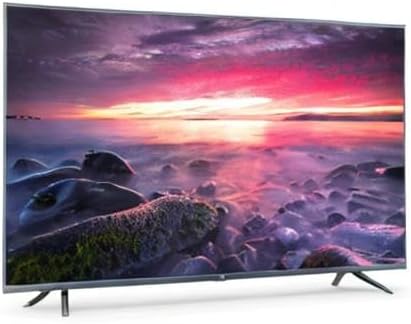
Image 8.1: Energy efficiency label for the Xiaomi Mi 55-inch TV.
9. Garansi jeung Rojongan
Kanggo inpormasi jaminan, mangga tingal kartu garansi anu kalebet dina produk anjeun atanapi kunjungan ka Xiaomi resmi websitus pikeun wewengkon Anjeun. Simpen resi pameseran anjeun salaku bukti pameseran.
For technical support, troubleshooting assistance beyond this manual, or service inquiries, please contact Xiaomi customer service through their official channels.


