
1. Selelekela
The MOVA Z60 Ultra Roller Complete Robot Vacuum and Mop is an advanced cleaning device designed to automate floor maintenance. It features powerful suction, intelligent mopping, and comprehensive self-care capabilities. This manual provides essential information for the safe and efficient operation, setup, and maintenance of your device.
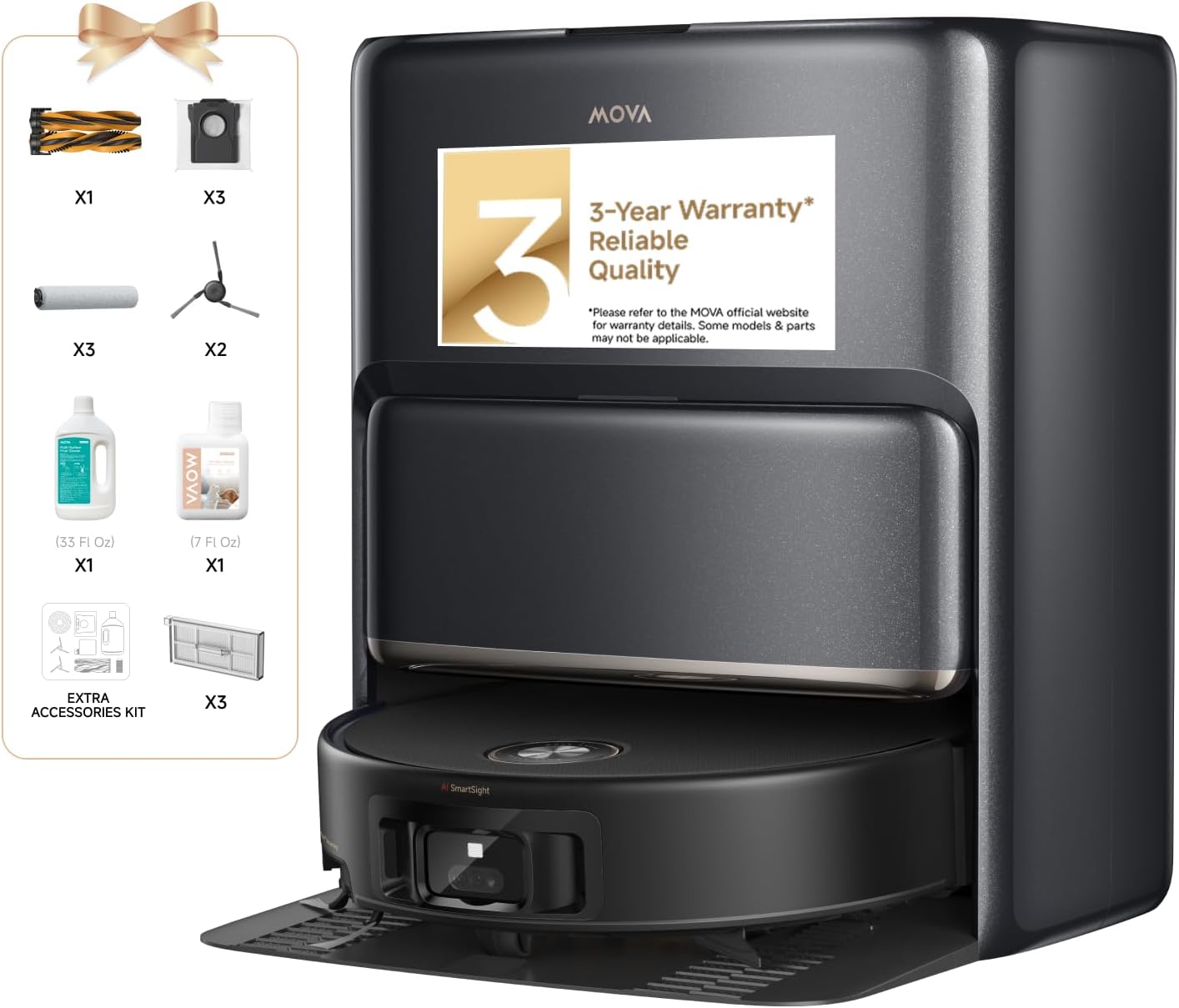
Tlhaloso ea setšoantšo: This image displays the MOVA Z60 Ultra Roller Complete Robot Vacuum and Mop alongside its self-care base station. Various accessories are shown on the left, including brushes, filters, cleaning solutions, and a user manual, indicating a comprehensive package.
2. Likahare tsa Sephutheloana
Please verify that all items listed below are included in your package. If any components are missing or damaged, contact customer support.

Tlhaloso ea setšoantšo: This image provides a visual breakdown of all items included in the MOVA Z60 Ultra Roller Complete package. It shows the robot vacuum, base station, ramp extension plate, user manual, auto solution dispenser, dust bag, roller mop, side brush, washboard, main brush, dust box, dust box filter, and scale inhibitor.
- Robot Vacuum (x1)
- Seteishene sa Motheo (x1)
- Base Station Ramp Extension Plate (x1)
- Buka ea mosebelisi (x1)
- Auto Solution Dispenser Module - Dual Compartment (pre-installed) (x1)
- Dust Bag (pre-installed) (x1)
- Roller Mop (pre-installed) (x1)
- Side Brush (pre-installed) (x1)
- Washboard (pre-installed) (x1)
- Main Brush (pre-installed) (x1)
- Dust Box (pre-installed) (x1)
- Dust Box Filter (pre-installed) (x1)
- Scale Inhibitor (pre-installed) (x1)
- Note: An extra accessory kit is included, containing additional main brush, side brush, dust box filters, dust bag, roller mop, 1L Cleaning Solution, and 200ml Pet Odor Solution.
3. Seta
3.1 Sebaka sa Setsi sa Motheo
- Place the base station on a hard, level surface against a wall.
- Ensure there is at least 0.5 meters (1.6 feet) of clear space on either side and 1.5 meters (4.9 feet) in front of the base station.
- Keep the area free from obstacles, direct sunlight, and heat sources.
- Connect the power cord to the base station and plug it into a wall outlet.
3.2 Tefiso ea Pele
- Place the robot onto the base station. Ensure the charging contacts align.
- The robot will automatically begin charging. Allow for a full charge before first use (approximately 3.5 hours).
3.3 Filling Solution Tanks
The base station features a DuoSolution System for specialized cleaning.

Tlhaloso ea setšoantšo: This image shows the base station's dual-compartment solution system. Compartment A holds 400ml of general-purpose cleaning solution, and Compartment B holds 200ml of pet odor elimination solution, allowing for specialized cleaning.
- Open the top cover of the base station to access the solution tanks.
- Fill Compartment A (400ml) with general-purpose cleaning solution.
- Fill Compartment B (200ml) with pet odor elimination solution, if desired.
- Koala sekoahelo ka mokhoa o sireletsehileng.
3.4 Khokahano ea App
- Download the MOVA app from your device's app store.
- Follow the in-app instructions to connect your MOVA Z60 Ultra to your home Wi-Fi network.
- The app allows for advanced control, scheduling, and monitoring of cleaning tasks.
4. Litaelo tsa Ts'ebetso
4.1 Ho Qala ho Hloekisa
- Qala ka letsoho: Press the power button on the robot to begin a standard cleaning cycle.
- Taolo ea App: Use the MOVA app to start, stop, schedule, and customize cleaning tasks. The app provides tailored cleaning recommendations based on floor types and room layouts.
- Taolo ea Lentsoe: The MOVA Z60 Ultra supports voice commands. Simply say "Hey, MOVA" followed by your command to initiate cleaning or adjust settings.

Tlhaloso ea setšoantšo: This image depicts a floor plan with the MOVA Z60 Ultra navigating, controlled via a smartphone app. The app interface shows room segmentation and cleaning recommendations, demonstrating tailored cleaning capabilities.

Tlhaloso ea setšoantšo: A person is shown sitting on a couch, reading a book, and speaking a voice command "Hey, MOVA..." to the robot vacuum, illustrating the voice control feature for starting cleaning tasks.
4.2 Mekhoa ea ho hloekisa
- The robot can perform vacuuming, mopping, or a combined cleaning cycle. Select your preferred mode via the MOVA app.
4.3 AutoShield Carpet Protection
The Z60 Ultra automatically detects carpets. When a carpet is detected during mopping, the robot lifts the mop and deploys a shield to prevent moisture transfer, ensuring carpets remain dry.

Tlhaloso ea setšoantšo: This image illustrates the AutoShield feature, where the robot detects carpet, retracts its mop, and deploys a shield to protect the carpet from moisture, ensuring dry and clean carpets during mopping.
4.4 MaxiReach Edge-to-Edge Cleaning
The extended roller mop and smart side brush are designed to reach close to walls and into corners, providing thorough edge cleaning.

Tlhaloso ea setšoantšo: This image highlights the MaxiReach Brush's ability to extend and clean edges and corners effectively, showing measurements of 10 inches for the roller and 1.7 inches for the extension, achieving 100% corner coverage.
4.5 Obstacle Navigation
The StepMaster 2.0 system allows the robot to climb thresholds up to 8cm. FlexScope Navigation enables the ultra-slim 96mm design to glide under low-clearance furniture.

Tlhaloso ea setšoantšo: This image shows the robot vacuum overcoming a 3-inch (8cm) threshold, illustrating its StepMaster 2.0 system for navigating multi-step obstacles and hurdles.

Tlhaloso ea setšoantšo: The image shows the robot vacuum's slim 3.46-inch profile allowing it to clean under beds and sofas, demonstrating its FlexScope Navigation for thorough cleaning in tight spaces.
Onboard Binocular AI detects and avoids over 200 common obstacles like cables and toys, minimizing interruptions.

Tlhaloso ea setšoantšo: This image illustrates the robot's Binocular AI system detecting over 200 obstacles, such as power cords and toys, to prevent interruptions during cleaning.
5. Tlhokomelo
Regular maintenance ensures optimal performance and extends the lifespan of your MOVA Z60 Ultra.
5.1 All-in-One Self-Care Base Station
The base station automates several maintenance tasks:

Tlhaloso ea setšoantšo: This diagram highlights the automated features of the base station, including auto solution refill with DuoSolution System, auto-empty for up to 100 days, UV sterilization on the washboard, auto 80°C (176°F) hot water mop wash, and auto mop drying with hot air.
- Auto-Emptying: The base station automatically empties the robot's dustbin into a 3.2L dust bag, providing up to 100 days of hands-free cleaning. Replace the dust bag when full.
- Hot Water Mop Washing: The 12-nozzle HydroForce system continuously rinses the roller mop with 80°C (176°F) hot water, removing dirt and preventing cross-contamination.
- Hot-Air Drying: After washing, the mop is dried with hot air to prevent odors and mildew.
- Ho Tlatsa Tharollo: The base station automatically refills the robot's water tank with cleaning solution from the DuoSolution System.
- Ho senya UV: The washboard within the base station features UV sterilization to remove up to 99.99% of bacteria.

Tlhaloso ea setšoantšo: This diagram shows the HydroForce Mopping system, which uses a 12-nozzle spray to continuously rinse the roller mop with clean water and remove dirty water, ensuring the mop remains fresh for streak-free cleaning.
5.2 DuoBrush Cleaning
The Anti-tangle DuoBrush (rubber + bristle) is designed to minimize hair wrap. Periodically check and clean the brush to remove any accumulated hair or debris.

Tlhaloso ea setšoantšo: This image details the DuoBrush, combining rubber and bristle brushes with an anti-tangle design for efficient hair pickup across various surfaces, minimizing hair wrap.
- Remove the main brush cover and lift out the DuoBrush.
- Use the cleaning tool (if provided) to cut and remove any tangled hair.
- Reinstall the brush, ensuring it clicks into place.
5.3 Filter Cleaning/Replacement
- The HEPA filter in the dust box should be cleaned regularly (e.g., weekly) by tapping out debris.
- Replace the filter every 3-6 months, or as needed, to maintain suction performance.
5.4 Roller Mop Cleaning/Replacement
- While the base station performs automatic cleaning, it is recommended to periodically remove and hand-wash the roller mop for a deeper clean.
- Replace the roller mop every 6-12 months, or if it shows signs of wear.
6. Ho rarolla mathata
If you encounter issues with your MOVA Z60 Ultra, refer to the following common problems and solutions:
| Bothata | Lebaka le ka khonehang | Tharollo |
|---|---|---|
| Robot does not start or charge. | Not properly docked; power cord disconnected; battery depleted. | Ensure robot is correctly on base station; check power connections; allow for full charge. |
| Ts'ebetso e mpe ea ho hloekisa. | Dustbin full; brushes tangled; filter clogged; mop dirty. | Empty dustbin; clean main brush and side brush; clean/replace filter; clean/replace roller mop. |
| Roboto e qabelloa khafetsa. | Too many obstacles; sensors dirty. | Clear floor of cables, toys, and small items; clean all sensors on the robot. |
| Mop leaves streaks or is too wet. | Mop not properly cleaned by base station; incorrect solution ratio. | Manually clean roller mop; ensure solution tanks are filled correctly; check base station wash cycle settings. |
| Mathata a khokahano ea app. | Wi-Fi signal weak; incorrect password; robot offline. | Ensure strong 2.4GHz Wi-Fi signal; re-enter Wi-Fi password; restart robot and router. |
For further assistance, please contact MOVA customer support.
7. Litlhaloso
| Sebopeho | Tlhaloso |
|---|---|
| Brand | Mova |
| Lebitso la Mohlala | Z60 Ultra Roller Complete |
| Ntho Nomoro ea Mohlala | R9540K |
| UPC | 850073660614 |
| Likarolo Tse Khethehileng | Auto Mop Washing, Auto-Docking, Automatic Height Adjustment, Dirt Detection Sensor, Edge Cleaning |
| Mmala | Ntsho |
| Litekanyo tsa Sehlahisoa | 22"L x 19"W x 22"H |
| Boima ba Ntho | 30.3 liponto |
| Kenyellelitsoe Likaroloana | Brush ea mokatong |
| Mofuta oa Sefe | HEPA |
| Bophelo ba Battery | Lihora tse 3.5 |
| Mohloli oa Matla | Matla a Battery |
| Libetri li kenyelelitsoe | Yes (1 x 12V battery) |
8. Tiisetso le Tšehetso
8.1 Boitsebiso ba Tiisetso
The MOVA Z60 Ultra Roller Complete Robot Vacuum and Mop comes with a 3-year warranty, ensuring reliable quality. Please refer to the official MOVA website for complete warranty details, as some models and parts may have specific conditions.
8.2 Leano la Litšebeletso
- 24/7 Rapid Responding Service Team: Dedicated support available around the clock.
- 30-Day Money Back Service: For initial product satisfaction.
- Up to 36-Month Warranty: Extended coverage for peace of mind.
- Fast Shipping from Local Warehouses: Efficient delivery for parts and replacements.
For customer support, visit the MOVA Store on Amazon or contact MOVA directly through their official websebaka.


