
Selelekela
The AURAFIT AI Smart Watch F39C is an advanced wearable device designed to enhance your daily life with intelligent features. It integrates AI technology for voice interaction, offers comprehensive health monitoring, supports Bluetooth calling, and provides a personalized visual experience. This manual provides detailed instructions for setting up, operating, and maintaining your smart watch.
Litaba tsa Sephutheloana
Pele o qala, ka kopo etsa bonnete ba hore lintho tsohle li teng ka har'a sephutheloana sa hau:
- AURAFIT AI Smart Watch F39C
- Matla a khoheli tjhaja Cable
- Bukana ea mosebelisi (tokomane ena)
- Additional Watch Strap (if included in your specific package)

Image: The AURAFIT AI Smart Watch F39C, magnetic charging cable, and two watch straps are displayed on a white background, illustrating the package contents.
Tlhophiso
1. Ho tjhaja Sesebelisoa
Before first use, fully charge your AURAFIT AI Smart Watch. Connect the magnetic charging cable to the charging points on the back of the watch and plug the USB end into a power adapter (not included) or a computer's USB port. A full charge typically takes approximately 2 hours.
2. Installing the Aurafit App
To unlock the full functionality of your smart watch, download and install the official "Aurafit" app on your smartphone. The app is compatible with both iOS (version 9.0 and above) and Android (version 5.0 and above) devices. Batla "Aurafit" in your device's app store.
3. Ho kopanya le Smartphone ea Hao
- Netefatsa hore Bluetooth e kenelletse ho smartphone ea hau.
- Open the Aurafit app and follow the on-screen instructions to create an account or log in.
- In the app, navigate to the device pairing section and select your AURAFIT F39C smart watch from the list of available devices.
- Netefatsa kopo ea ho para oache ea hau le smartphone.
For optimal performance of AI features, ensure the Aurafit app remains open and running in the background on your phone.
Litaelo tsa Ts'ebetso
Navigation ea Motheo
The AURAFIT F39C features a 2.01-inch HD full-touch display. Swipe across the screen to navigate through menus, access different functions, and view notifications. Use the side button for power on/off, returning to the home screen, or accessing specific features as configured.
AI Assistant (ChatGPT Integration)
Your smart watch includes an integrated AI assistant. Connect via Bluetooth to your phone and launch the companion app to utilize intelligent voice interaction for queries, information, and daily assistance. Long press the interface button to start speaking to the AI assistant.
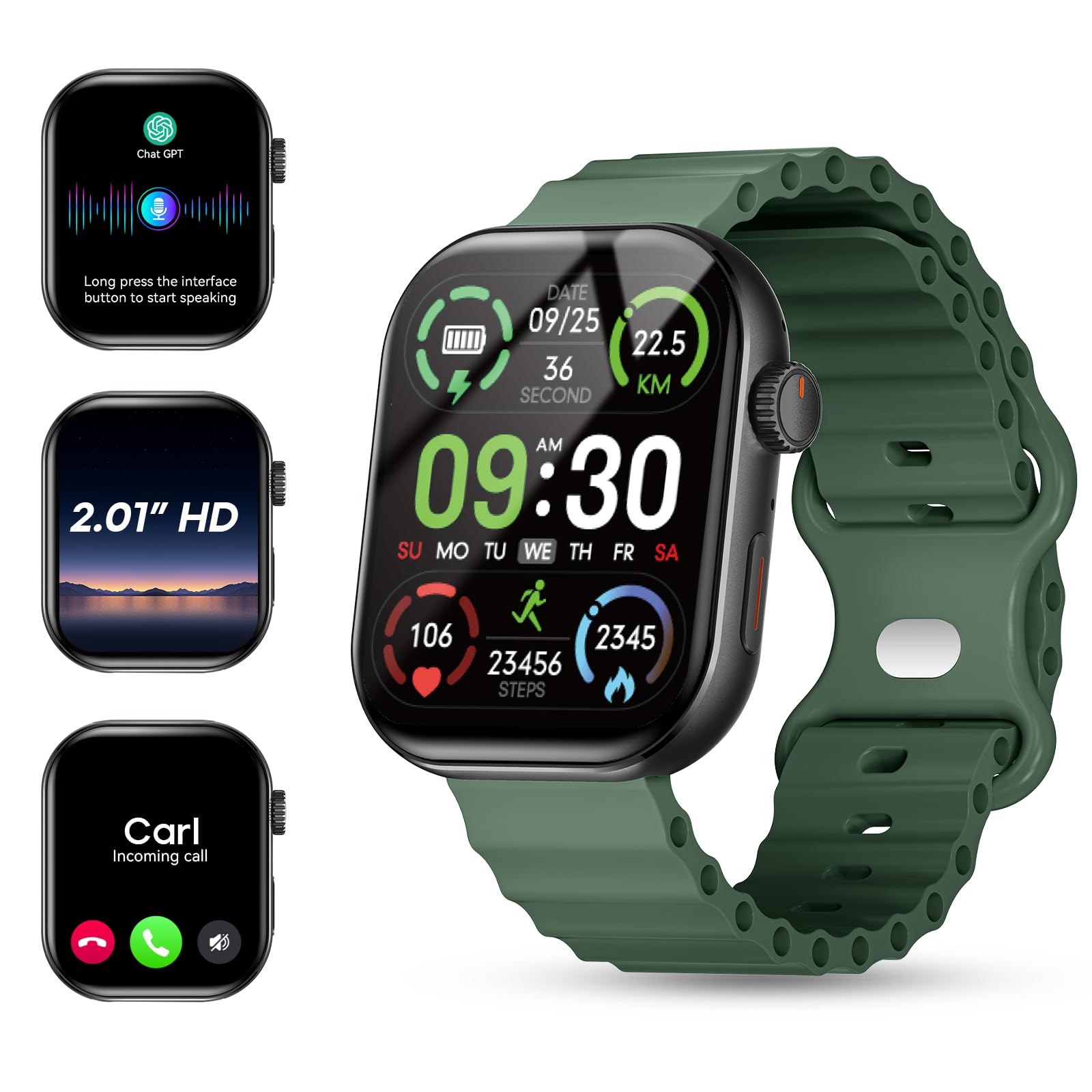
Image: The AURAFIT AI Smart Watch F39C screen shows an AI assistant conversation, a list of smart notifications from various apps, and options for answering or making calls, including call history and a dialpad.
Ho Itloaetsa Lifahleho Tsa Ho shebella
Personalize your watch with a variety of watch faces. The Aurafit app allows you to input keywords to automatically generate uniquely styled faces or choose from over 100 pre-designed options.

Image: The AURAFIT AI Smart Watch F39C displays various customized watch faces, including one generated from a photo and another with a cat design. The image also highlights the 2.01-inch HD screen.
Bluetooth Calling and Notifications
With built-in HD speakers and noise-canceling microphones, the watch supports Bluetooth calls and contact synchronization. You can answer or make calls directly from your wrist. The 2.01-inch HD color display also shows real-time notifications from various apps like SMS, WhatsApp, Facebook, Instagpheleu, le Twitter.
Video: This video demonstrates the Bluetooth calling feature of the AURAFIT AI Smart Watch F39C, showing how to answer calls directly from the watch and manage notifications.
Ho Tsamaisa Bophelo bo Botle
The AURAFIT F39C is equipped with a multidimensional health monitoring system to track key health metrics:
- Sekhahla sa Pelo: Tlhokomelo e tsoelang pele ea sekhahla sa pelo ea hau.
- Blood Oxygen Levels (SpO2): Measures oxygen saturation in your blood.
- Stress Indices: E fana ka leseli mabapi le maemo a khatello ea maikutlo.
- Sleep Cycles: Tracks light sleep, deep sleep, and REM stages for comprehensive sleep analysis.
The innovative AI health assessment system within the app generates personalized wellness improvement plans based on your data, helping you adjust your lifestyle for better health outcomes.

Image: The AURAFIT AI Smart Watch F39C shows various health tracking screens, including heart rate graphs, sleep patterns, stress detection, and SpO2 levels. An accompanying phone screen displays an AI health analysis report.
Mekhoa ea Lipapali
For fitness enthusiasts, the watch offers over 100 professional sports modes, including running, cycling, and various ball sports. It tracks key metrics such as workout duration, calories burned, and heart rate zones to help optimize your training effectiveness.

Image: The AURAFIT AI Smart Watch F39C shows a grid of icons representing over 100 sports modes. The watch screen displays real-time activity data like steps, speed, heart rate, calories, and distance, with a phone showing GPS tracking.
Likarolo tse ling tsa Smart
The AURAFIT F39C includes a range of additional smart functionalities:
- Alamo Clock: Beha lialamo ka kotloloho ho tsoa oacheng ea hau.
- Taolo ea Khamera: Laola khamera ea smartphone ea hau u le hole.
- Taolo ya Mmino: Manage music playback on your connected device.
- Meteo Weather: Fumana lintlha tsa boemo ba leholimo ka nako ea nnete.
- Sebala nako: Utilize a built-in timer function.
- Fumana Mohala oa Hao: Fumana smartphone ea hau e kopantsoeng.
- Boikoetliso ba ho phefumoloha: Likopano tsa ho phefumoloha tse tataisoang bakeng sa ho phomola.
- Calculator: Basic calculator functionality.
- Stock Market: View stock information.

Image: The AURAFIT AI Smart Watch F39C shows multiple screens demonstrating its diverse functions, including an alarm clock, remote camera control, music playback, weather forecast, and a timer.
Tlhokomelo
Ho hloekisa
Hlakola oache le marapo khafetsa ka lesela le bonolo, le omileng. Haeba ho hlokahala, sebelisa lesela le lesesaane hanyane.amp lesela le sesepa se bonolo, ebe o omisa hantle. Qoba lik'hemik'hale tse bohale kapa thepa e khorofo.
Ho hanyetsa Metsi
The AURAFIT F39C has an IP68 rating, meaning it is resistant to dust and can withstand immersion in water up to 1 meter for 30 minutes. Note: It is not recommended for swimming, showering, or exposure to hot water or steam, as this can compromise the water resistance.
Tlhokomelo ea Battery
To prolong battery life, avoid extreme temperatures. Charge the watch using the provided magnetic cable. The watch features magnetic fast charging and offers up to 7 days of battery life with typical use.
Ho batle phoso
- Sheba ha e laetsoe: Ensure the watch is fully charged. Connect it to the magnetic charger and wait a few minutes before attempting to power it on.
- Ha e khone ho hokahanya le mohala:
- Netefatsa hore Bluetooth e butswe fonong ya hao le watjheng.
- Make sure the Aurafit app is installed and running.
- Qala fono ea hau le oache bocha.
- Check if the watch is already paired with another device. Disconnect if necessary.
- Lintlha tse fosahetseng tsa bophelo bo botle: Ensure the watch is worn snugly on your wrist, not too tight or too loose. Clean the sensors on the back of the watch. Environmental factors and individual physiology can affect readings.
- Bophelo bo bokhuts'oane ba betri:
- Fokotsa khanya ea skrine.
- Limit frequent use of power-intensive features like continuous heart rate monitoring or extensive Bluetooth calls.
- Ensure the Aurafit app is updated to the latest version.
- Litsebiso ha li hlahe:
- Netefatsa hore oache e hokahantsoe hantle le fono ea hau ka Bluetooth.
- Check notification settings within the Aurafit app and your phone's system settings to ensure permissions are granted.
- Ensure the Aurafit app is running in the background.
Litlhaloso
| Sebopeho | Lintlha |
|---|---|
| Nomoro ea Mohlala | F39C |
| Brand | AURAFIT |
| Boholo ba skrine | 2.01 lisenthimithara |
| Mofuta oa Pontšo | LED |
| Qeto | 240*296 |
| Thetsa | Tšoara ka botlalo skrineng |
| Theknoloji ea Khokahano | Bluetooth 5.3 |
| Bokhoni ba Battery | 260 mAh |
| Nako ea ho tjhaja Betri | Lihora tse 2 |
| Bophelo ba Betri (Tšebeliso e Tloaelehileng) | Ho fihlela ho matsatsi a 7 |
| Tekanyetso ea ho hanyetsa Metsi | IP68 |
| Tšebelisano ea Tsamaiso ea Ts'ebetso | Android 5.0+, iOS 9.0+ |
| Tšebeliso e Tšehetsoeng | Aurafit Apps |
| Metrics e lekantsoeng | Heart Rate, Blood Oxygen, Sleep, Stress, Steps, Calories, Distance |
| Boima ba Ntho | Li-ounces tse 6 (hoo e ka bang 170g) |
| Nyeoe ea Nyeoe | Ts'epe e sa beng le mabali |
| Lisebelisoa tsa Band | Synthetic |
| GPS | Ha ho GPS |
Warranty le Tšehetso
Boitsebiso ba Warranty
The AURAFIT AI Smart Watch F39C comes with a 1-year manufacturer's warranty from the date of purchase. This warranty covers manufacturing defects under normal use. It does not cover damage caused by misuse, accidents, unauthorized modifications, or failure to follow the instructions in this manual.
Tšehetso ea Bareki
For technical assistance, warranty claims, or further inquiries, please contact AURAFIT customer support through the official Aurafit app or visit the AURAFIT brand store online. Please have your model number (F39C) and proof of purchase ready when contacting support.