
Sehlahisoa se Felletseview
The Jugbow BTC801 Dog Training Collar is designed to assist in effective and humane dog training. It features a remote control with a long range and multiple training modes suitable for various dog sizes and temperaments. This system provides tools for teaching basic commands and correcting unwanted behaviors.

Image: The Jugbow BTC801 Dog Training Collar system, featuring a green remote control and a matching green collar unit with a black and white striped strap. A golden retriever is visible in the background wearing the collar.
Se Kenyellelitsoeng
Pakete e na le lintho tse latelang:
- 1x Collar Receiver (assembled with 2 short metal prongs & 2 short silicone covers)
- 1x Remote Transmitter
- 2x Long Metal Prongs
- 2x Long Silicone Covers
- 1x Buka ea Mosebelisi
- 1x Cable ea ho tjhaja
- 1x Remote Strap
- 1x Test Tool
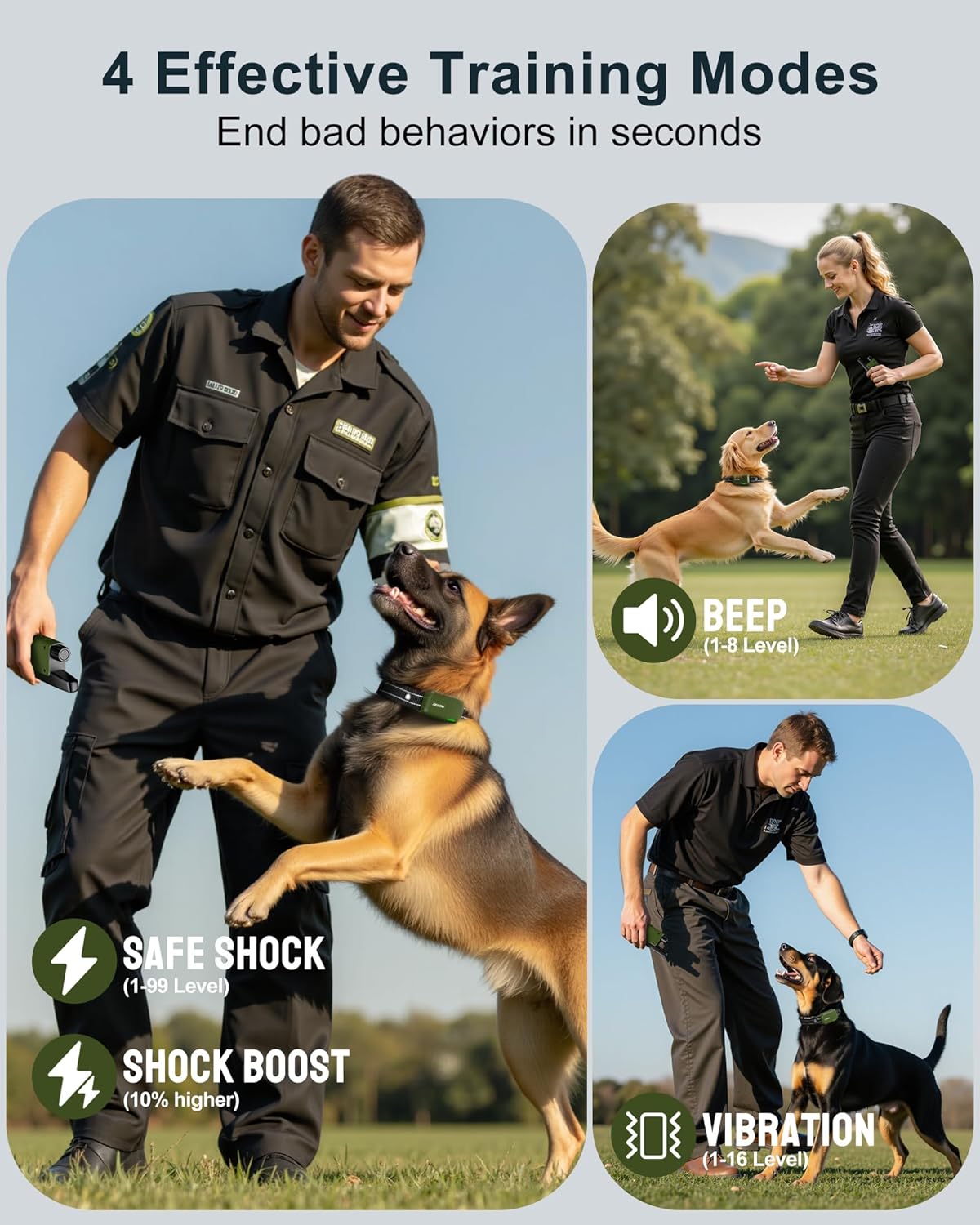
Image: A visual representation of the Jugbow BTC801 Dog Training Collar components, including the remote, collar, charging cable, prongs, and user manual.
Litaelo tsa Bohlokoa tsa Tšireletseho
- This collar is suitable for dogs over 6 months old.
- Proper skin contact is crucial for the static stimulation function. Ensure the metal prongs touch the dog's skin directly. Adjust the collar to fit snugly, allowing a 1-2 thumb gap between the collar and the dog's neck.
- Do not leave the collar on your dog for more than 12 hours per day to prevent skin irritation.
- If the device does not turn on, check if it is charged.
- When charging, keep the magnetic charger away from all metal objects (e.g., keys, tools) to avoid breaking the magnetic connection and stopping the charge.
Tlhophiso
Ho tjhaja Sesebediswa
Both the collar receiver and the remote transmitter are rechargeable. Use the provided charging cable to charge both units simultaneously. A full charge typically takes 2 hours.
The collar receiver has LED indicators to show battery level. The remote transmitter displays battery status on its screen.

Image: A woman and her dog outdoors, with an infographic showing the collar and remote charging, highlighting 2-hour fast charging and battery display.
Attaching/Adjusting Prongs
The collar comes with short metal prongs and silicone covers pre-installed. For dogs with longer or thicker coats, use the longer metal prongs and silicone covers provided to ensure proper skin contact.
Use the included tool to securely attach or remove the prongs.

Image: A golden retriever and a woman walking, with an inset showing the detachable metal prongs and silicone covers for the collar, illustrating options for 'With Shock' and 'No Shock' modes.
Ho lekana Molala
Adjust the collar strap to ensure a snug but comfortable fit. The prongs must make direct contact with your dog's skin. You should be able to fit one to two fingers comfortably between the collar and your dog's neck.
Trim any excess strap length and use a lighter to seal the edge to prevent fraying.

Image: A 3-step safety guide for fitting the Jugbow BTC801 Dog Training Collar, showing ensuring gentle contact with silicone caps, checking fit with two fingers, and removing the collar for rest and sleep.
Mekhoa ea ho sebetsa
The Jugbow BTC801 offers 4 effective training modes: Beep, Vibration, Static Shock, and Emergency Shock.
Taolo ea Remoutuview
The remote features a clear LCD display and intuitive buttons for mode selection and intensity adjustment.

Setšoantšo: Haufi views of the Jugbow BTC801 remote control, highlighting its 1.2-inch color LCD display, clear control layout, and rotate button design for easy level adjustment.
Mode Selection and Intensity Adjustment
To select a training mode (Beep, Vibration, or Static Shock), press the top button on the remote.
To adjust the intensity level for the selected mode, rotate the knob at the top of the remote.
- Mokhoa oa Beep: Levels 1-8. Used for attention and basic commands.
- Mokhoa oa Vibration: Levels 1-16. Used for behavior correction.
- Static Shock Mode: Levels 1-99. Used for more serious behavior correction.
- Emergency Shock Mode: This button provides a 10% higher stimulation than the set static shock level for urgent situations.
Image: An illustration of the four effective training modes of the Jugbow BTC801 Dog Training Collar: Beep (1-8 levels), Vibration (1-16 levels), Safe Shock (1-99 levels), and Shock Boost (10% higher).
Security Lock Feature
The remote control includes a one-touch Safe-Lock button on the side. Slide this button to lock the controls and prevent accidental activation, ensuring safe carrying in your pocket or bag.

Image: A close-up of the Jugbow BTC801 remote control showing the side-mounted security lock feature, designed to prevent accidental button presses.
Koetliso ea Lintja tse ngata
The remote supports training up to two dogs with a single remote. It remembers each dog's settings for seamless switching.
Tlhokomelo
Ho hloekisa
Spot clean the collar and receiver unit as needed. Ensure the charging port is dry before charging.
Tlhokomelo ea Battery
Recharge the collar and remote when the battery indicator shows low power. Avoid overcharging for extended periods.
Ho thibela metsi
The collar receiver has an IPX8 waterproof rating, making it suitable for use in rain, mud, or during swimming. Ensure the charging port is sealed when not charging.

Image: A French Bulldog walking in the rain, illustrating the IPX8 waterproof feature of the Jugbow BTC801 Dog Training Collar, suitable for raining, swimming, and bathing.
Ho batle phoso
Collar Not Turning On
Check if the collar is charged. Press the power button on the receiver to confirm it's on (green light).
No Static Stimulation
Ensure the metal prongs are making proper contact with your dog's skin. Adjust the collar fit or switch to longer prongs if necessary.
Use the provided test tool to verify the static shock function. Place the tool over the prongs and activate the static shock mode on the remote; the tool's light should illuminate.
Remoutu Ha e Arabe
Check if the remote's battery is charged.
Ensure the remote is not in "lock" mode.
Verify that the remote and collar are paired correctly. Refer to the "Pairing Instructions" in the full user manual for detailed steps.
Litlhaloso
| Sebopeho | Lintlha |
|---|---|
| Lebitso la Mohlala | BTC801 |
| Brand | Jugbow |
| Mekhoa ea Koetliso | Beep (1-8 levels), Vibration (1-16 levels), Static Shock (1-99 levels), Emergency Shock |
| Range e hole | Ho fihla ho limithara tse 4500 |
| Lintlha tse sa keneleng metsi | IPX8 (Collar Receiver) |
| Bophelo ba Betri (E eme) | Up to 35 days (Collar), Up to 45 days (Remote) |
| Nako ea ho tjhaja | Hoo e ka bang lihora tse 2 |
| Dog Weight Suitability | 10-120 lik'hilograma |
| Neck Size Suitability | 7.8" - 24.4" |
| Lintho tse bonahalang | Nylon, Plastiki |
| Boima ba Ntho | 9.9 lik'hilograma |

Image: A visual guide showing various dog breeds and sizes, illustrating the adjustable nature of the Jugbow BTC801 Dog Training Collar to fit dogs from 10-120 lbs.
Official Video Guide: How to Use
Video Description: An official video from Jugbow Direct demonstrating the setup and basic operation of the Jugbow dog training collar, including turning on the devices, testing functions, and adjusting levels.
Warranty & Support
The Jugbow BTC801 Dog Training Collar comes with a 1-year warranty. For warranty claims or technical support, please contact Jugbow customer service.
For additional resources and video guides, please refer to the official Jugbow website or the QR code provided in the Quick Operation Guide.