
Hisense 65E6KT
Hisense 65E6KT 4K UHD Smart TV User Manual
Model: 65E6KT | Brand: Hisense
1. Selelekela
Thank you for choosing the Hisense 65E6KT 4K UHD Smart TV. This television is designed to provide an immersive viewing experience with stunning picture quality and smart features. This manual will guide you through the setup, operation, and maintenance of your new TV, ensuring you get the most out of its capabilities.
Lintlha tsa bohlokoa li kenyelletsa:
- Qeto ea 4K UHD: Delivers four times the resolution of Full HD TVs for incredible detail and clarity.
- Dolby Vision HDR: Provides amazing brightness, contrast, and color depth, inspired by cinema technology.
- DTS Virtual X: Offers an immersive audio experience without the need for additional speakers.
- VIDAA U6 Smart TV: An intuitive operating system with access to popular streaming apps like YouTube, Netflix, Prime Video, and Disney+.
- Alexa e hahiloeng ka hare: Control your TV and smart home devices using voice commands.
- Game Mode Plus: Reduces input lag for a smoother gaming experience.
- Smooth Motion with MEMC: Ensures fluid and clear motion, especially in fast-paced scenes.
2. Se ka Lebokoseng
Ka kopo hlahloba dikahare tsa sephutheloana sa hao. Haeba dintho dife kapa dife di le siyo kapa di senyehile, ikopanye le morekisi wa hao.
- 1x Hisense 65E6KT TV
- 1x Taolo ea Remoutu
- Libetri tsa AAA tse 2x (bakeng sa taolo ea remoutu)
- 1x Buka ea Mosebelisi (tokomane ena)
- 1x Tataiso ea ho qala ka potlako

Setšoantšo: Ho felileview of the Hisense 65E6KT TV, showing its dimensions and the typical contents included in the packaging, such as the remote control and user manual.
3. Tataiso ea ho seta
3.1 Ho phutholla le ho bea
Carefully remove the TV from its packaging. It is recommended to have two people for this process due to the size and weight of the television. Place the TV on a stable, flat surface or mount it on a wall using a compatible VESA mount (sold separately).
3.2 Ho kengoa ha Stand
If you are not wall-mounting, attach the included stands to the bottom of the TV. Ensure the stands are securely fastened with the provided screws. Refer to the quick start guide for detailed diagrams.

Setšoantšo: Ea angled view of the Hisense 65E6KT TV, showcasing its slim design and the attached stand, ready for placement on a TV unit.
3.3 Lisebelisoa tse hokelang
Connect your external devices such as cable boxes, gaming consoles, or Blu-ray players to the appropriate ports on the back of the TV.
- HDMI: For high-definition video and audio. The Hisense 65E6KT features multiple HDMI ports.
- USB: Bakeng sa ho hokela lisebelisoa tsa polokelo ea USB ho bapala media.
- Ethernet (LAN): Bakeng sa khokahanyo ea marang-rang ea marang-rang.
- Antenna/Cable In: Bakeng sa ho hokela lenakana kapa lets'oao la thapo la TV.
- Digital Audio Out (Optical): Bakeng sa ho hokela ho bara ea molumo kapa moamoheli oa molumo.

Image: A detailed close-up of the rear panel of the Hisense 65E6KT TV, highlighting the various input and output ports available for connecting external devices.
3.4 Bulela
Once all connections are made, plug the power cord into the TV and then into a wall outlet. Press the power button on the remote control or on the TV itself to turn it on. Follow the on-screen instructions for initial setup, including language selection, network connection, and channel scanning.
4. Litaelo tsa Ts'ebetso
4.1 Taolo ea Remote
The included remote control allows you to navigate the TV's menus, adjust volume, change channels, and access smart features. Insert the two AAA batteries into the remote control, ensuring correct polarity.
4.2 Smart TV (VIDAA U6)
The Hisense 65E6KT runs on the VIDAA U6 operating system, providing a user-friendly interface for accessing a wide range of content and applications. Connect your TV to the internet via Wi-Fi or Ethernet to enjoy streaming services like Netflix, YouTube, Prime Video, and Disney+.
4.3 Likarolo tsa Boleng ba Litšoantšo
Natefeloa ke litšoantšo tse ntle ka mahlale a tsoetseng pele a litšoantšo a TV:
- 4K UHD: Enjoy incredibly sharp and detailed images.
- Dolby Vision HDR: Enhances brightness, contrast, and color for a more lifelike picture.
- Pixel Tuning: Fine-tunes each pixel for optimal image quality.
- Sehlopha se felletseng sa Direct: Provides precise control over brightness and contrast, leading to deeper blacks and vibrant colors.

Image: A graphic illustrating the concept of 4K UHD resolution, emphasizing its high detail and vibrant color capabilities.

Image: A visual representation of Dolby Vision HDR technology, showing how it enhances detail and color in content compared to standard display.
4.4 Likarolo tsa Molumo
The Hisense 65E6KT offers enhanced audio with:
- DTS Virtual X: Provides an immersive, multi-dimensional audio experience, making you feel like you're in the center of the action.

Image: A graphic illustrating the immersive sound field created by DTS:X audio technology, showing sound waves emanating from the TV.
4.5 Likarolo tsa Papali
- Game Mode Plus: Significantly reduces input lag, providing a more responsive and competitive gaming experience.

Image: A graphic depicting a car racing game, illustrating how Game Mode Plus ensures ultra-smooth gaming and incredible reaction times by reducing latency.
4.6 Taolo ea Lentsoe (E kentsoe ka Alexa)
With Alexa Built-in, you can control your TV using just your voice. Press the microphone button on your remote and speak commands to change channels, adjust volume, search for content, or control compatible smart home devices.
4.7 Smooth Motion with MEMC
MEMC (Motion Estimation, Motion Compensation) technology ensures that even the most dynamic objects appear fluid and crystal clear, providing a seamless viewing experience without motion blur.

Image: A graphic showing a car in motion, illustrating the Smooth Motion MEMC technology that ensures clear and fluid movement on screen.
4.8 Video ea Sehlahisoa sa Semmuso
Video: Pontšo ea semmuso ea video ea sehlahisoaasing the key features and visual capabilities of the Hisense E6 series television, including its design, picture quality, and smart functions.
5. Tlhokomelo
5.1 Ho hloekisa skrine
Hlakola skrine ka bonolo ka lesela le bonolo le se nang letlapa. Bakeng sa matšoao a manganga, ha bobebe damptn lesela le nang le metsi kapa mochini o hloekisang skrineng. Qoba ho sebelisa lik'hemik'hale tse bohale kapa lintho tse senyang.
5.2 Ho hloekisa Kabinete
Hlakola khabinete ea TV ka lesela le bonolo, le omeletseng. U se ke ua sebelisa lisebelisoa life kapa life tse hloekisang metsi ka kotloloho holim'a khabinete.
5.3 Power Cord Care
Always handle the power cord by the plug. Do not pull on the cord itself. Ensure the cord is not pinched or walked on.
6. Ho rarolla mathata
If you encounter any issues with your TV, please refer to the following common solutions before contacting customer support.
| Bothata | Tharollo e ka khonehang |
|---|---|
| Ha ho Matla | Sheba hore na thapo ea motlakase e hoketsoe ka mokhoa o sireletsehileng ho TV le leboteng. Leka mokhoa o mong. |
| Ha ho Senepe, empa Molumo o teng | Netefatsa hore mohloli o nepahetseng oa ho kenya o khethiloe. Sheba likhokahano tsa lithapo ho lisebelisoa tsa kantle. |
| Ha ho Molumo, empa Setšoantšo se teng | Check volume level and mute status. Verify audio cable connections. If using external audio, ensure TV speakers are not disabled. |
| Remote Control Ha e sebetse | Replace batteries. Ensure there are no obstructions between the remote and the TV's IR sensor. |
| Ha e khone ho hokela ho Wi-Fi | Check your router and modem. Re-enter Wi-Fi password. Try restarting the TV and router. |
7. Litlhaloso
Below are the technical specifications for the Hisense 65E6KT TV:
- Nomoro ea Mohlala: 65E6KT
- Boholo ba skrini: 164cm (65 inches)
- Bontša Theknoloji: LED
- Qeto: 4K UHD (3840 x 2160)
- Sekhahla sa ho Nchafatsa: 60 Hz
- Litekanyo (ka sethala): 145.2 x 30 x 89.6 cm (W x D x H)
- Boima ba 'mele: 24.5 lik'hilograma
- Khokahano: Bluetooth, USB, Ethernet, HDMI, WLAN
- Litšebeletso tsa Marang-rang tse Tšehetsoeng: YouTube, Amazon Instant Video, Netflix
- Sehlopha sa Tšebeliso ea Matla: F (SDR), G (HDR)

Image: The official product data sheet for the Hisense 65E6KT, detailing technical specifications and energy efficiency information. For more details, visit the Setsi sa database sa EPREL.
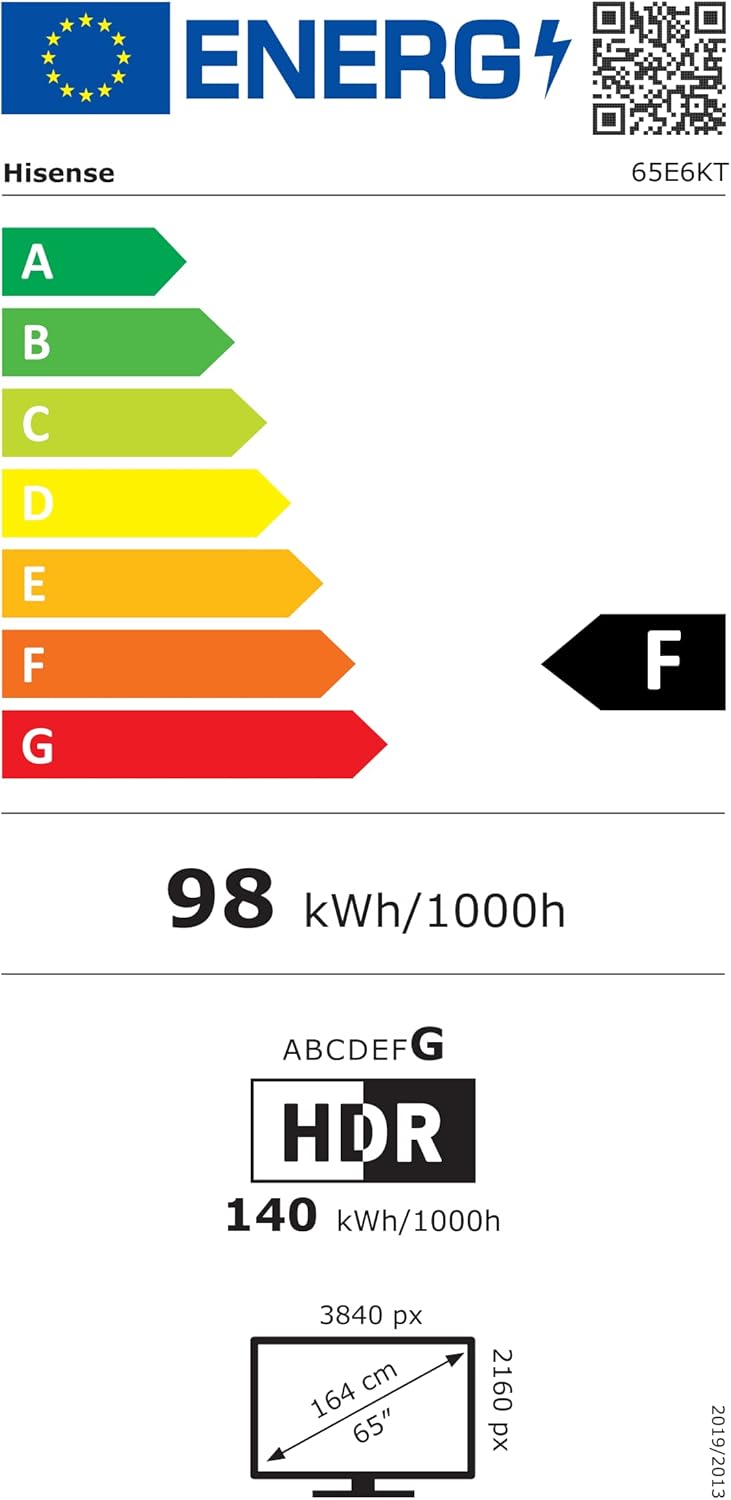
Image: The energy efficiency label for the Hisense 65E6KT, indicating its energy consumption and class ratings for both SDR and HDR content.
8. Tiisetso le Tšehetso
Your Hisense 65E6KT TV comes with a standard manufacturer's warranty. Please refer to the warranty card included in your package for specific terms and conditions. For technical support, service, or further inquiries, please visit the official Hisense support webwebosaeteng kapa ikopanye le mohala oa bona oa tšebeletso ea bareki.
For additional information and resources, you can visit the Hisense Brand Store on Amazon.
Ask a question about this manual
Ask about setup, troubleshooting, compatibility, parts, safety, or missing instructions. Manuals+ will review the question and use this page’s manual context to help answer it.