
1. Selelekela
The IDANCE CRAZY301 headphones are designed to deliver a unique audio experience with a focus on comfort and portability. These over-ear headphones feature an in-line microphone for smartphone compatibility and a foldable design for easy transport. This manual provides essential information for the proper setup, operation, and maintenance of your CRAZY301 headphones.
Litaba tsa Sephutheloana:
- IDANCE CRAZY301 Over-Ear Headphones
- Software voucher for PCDJ 3DEX LE and Magix Mufin (where applicable)
2. Boitsebiso ba Tšireletseho
Please read and follow these safety guidelines to ensure safe and optimal use of your headphones:
- Tšireletso ea ho Utloa: Qoba ho mamela ka lentsoe le phahameng ka nako e telele ho thibela tšenyo ea kutlo.
- Tlhokomeliso ka Tikoloho: Do not use headphones in situations where the inability to hear ambient sounds could be dangerous, such as while driving, cycling, or walking in traffic.
- Ho hloekisa: Sebelisa lesela le bonolo, le omileng bakeng sa ho hlwekisa. Qoba ho sebelisa lik'hemik'hale tse bohale kapa thepa e khorofo.
- Khahlamelo ea Metsi: Li-headphone tsena ha li kenelle metsi. Qoba ho pepesehela metsi kapa mongobo o feteletseng.
- Ho qhaqha: U se ke ua leka ho qhaqha kapa ho fetola li-headphone. Sena se tla hlakola tiisetso 'me se ka baka tšenyo.
3. Seta
Follow these steps to set up your IDANCE CRAZY301 headphones:
- Unfold Headphones: Gently unfold the headphones from their compact position until the earcups are fully extended and comfortable for wear.
- Hokela Cable ea Audio: Locate the 3.5mm audio jack on your headphones and the corresponding port on your audio device (smartphone, tablet, computer, etc.). Insert the 3.5mm plug firmly into the device's audio output port.
- Fetola Fit: Place the headphones over your ears and adjust the headband for a secure and comfortable fit. The earcups are designed to provide a comfortable seal.
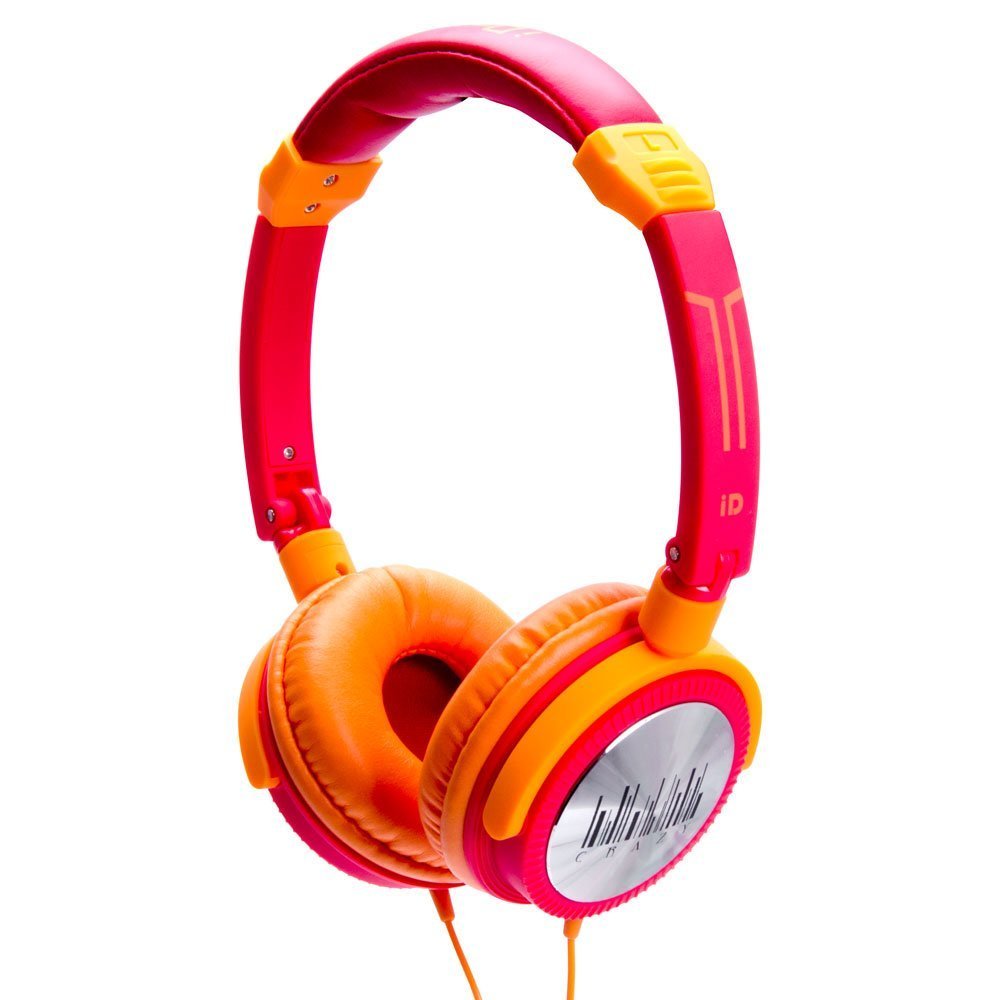
Image 1: IDANCE CRAZY301 Over-Ear Headphones. This image shows the headphones in their orange color, highlighting the over-ear design and the attached cable.
4. Litaelo tsa Ts'ebetso
The IDANCE CRAZY301 headphones are designed for straightforward operation:
- Ho Bapala Molumo: Once connected to your audio device, simply start playing audio. Adjust the volume using your device's controls.
- Maekerofouno e hokahaneng: The integrated in-line microphone allows for hands-free communication when connected to a compatible smartphone. For calls, ensure your device recognizes the headphone's microphone as the input source.
- Ho nkeha: The headphones feature a foldable design, allowing for compact storage and easy transport. Gently fold the earcups inward towards the headband when not in use.
- Software Voucher: If included, redeem your software voucher for PCDJ 3DEX LE and Magix Mufin by following the instructions provided with the voucher. This software can be used for creating DJ mixes.
5. Tlhokomelo
Proper maintenance will extend the life and performance of your headphones:
- Ho hloekisa: Wipe the earcups and headband with a soft, slightly damp cloth. Do not use liquid cleaners directly on the headphones.
- Polokelo: When not in use, fold the headphones and store them in a clean, dry place away from extreme temperatures and direct sunlight.
- Tlhokomelo ea Lithapo: Avoid sharply bending or twisting the audio cable. Do not pull the cable to disconnect; always grasp the plug.
6. Ho rarolla mathata
If you encounter issues with your IDANCE CRAZY301 headphones, refer to the following common solutions:
- Ha ho Molumo:
- Ensure the 3.5mm audio plug is fully inserted into your device's audio jack.
- Check the volume level on your audio device and ensure it is not muted.
- Lekola li-headphone ka sesebediswa se fapaneng sa mamelwang ho thibela bothata bo ikgethang ka sesebediswa.
- Maekerofounu ha e sebetse:
- Ensure the 3.5mm plug is fully inserted.
- Verify that your device's settings are configured to use the external microphone.
- Test the microphone functionality with another compatible device or application.
- Molumo o sothehileng:
- Theola molumo sesebelisoa sa hau sa molumo.
- Netefatsa hore thapo ea molumo ha ea senyeha kapa ha ea honyela.
- Leka ka mohlodi kapa sesebediswa se fapaneng sa modumo.
7. Litlhaloso
| Sebopeho | Lintlha |
|---|---|
| Nomoro ea Mohlala | CRAZY301 |
| Yuniti ea Bakhanni | 44 limilimithara |
| Mofuta oa Mokhanni | Neodymium |
| Tšitiso | 32 ohm |
| Kutloelo-bohloko | 108dB+/-3dB |
| Karabelo ea Khafetsa | 15Hz ~ 20KHz |
| Bolelele ba Mohala | Hoo e ka bang. 1.5m |
| Mofuta oa Cable | PVC |
| Mofuta oa plug | 3.5mm, gold chrome |
| Theknoloji ea Khokahano | Tse thapo |
| Likarolo Tse Khethehileng | Foldable, Microphone Included |
| Boima ba Ntho | 0.8 ounces (22.68 g) |
| Litekanyo tsa Sehlahisoa | 2 x 6 x 6 lisenthimithara |
| Lintho tse bonahalang | PVC |
| Sethala sa Hardware | Smartphone |
8. Tiisetso le Tšehetso
IDANCE products are manufactured to high-quality standards. For specific warranty information, please refer to the warranty card included with your purchase or visit the official IDANCE website. For technical support or further assistance, please contact IDANCE customer service through the contact information provided on the official websephuthelo sa sebaka kapa sehlahiswa.