
1. Увод
Хвала вам на куповиниasing the OXS Thunder Duo Speaker System. This manual provides essential information for the safe and efficient use of your new speaker system. Please read this manual thoroughly before operating the device and retain it for future reference.
The OXS Thunder Duo is a 3.1.2 channel bookshelf speaker system designed for an immersive audio experience, compatible with various devices including TVs, PCs, gaming consoles, and mobile devices.
2. Безбедносне информације
- Извор напајања: Користите само приложени адаптер за напајање. Уверите се да је јачина звукаtagе одговара вашем локалном извору напајања.
- Пласман: Place the speakers on a stable, flat surface. Avoid placing near heat sources, direct sunlight, or in areas with high humidity or dust.
- вентилација: Do not block any ventilation openings. Ensure adequate space around the speakers for proper airflow.
- Вода и влага: Do not expose the device to water, rain, or moisture. This product is not waterproof.
- Чишћење: Disconnect from power before cleaning. Use a soft, dry cloth. Do not use liquid cleaners or aerosols.
- Сервисирање: Do not attempt to repair or disassemble the unit yourself. Refer all servicing to qualified personnel.
- батерије: The remote control uses AAA batteries. Ensure correct polarity when inserting. Do not mix old and new batteries.
3. Садржај пакета
Проверите да ли су све ставке наведене у наставку укључене у ваш пакет:
- OXS Thunder Duo Speakers (2 units)
- Даљински управљач (са 2 ААА батерије укључене)
- ХДМИ кабл
- Оптицал Цабле
- Повер Адаптер
- Кориснички приручник (овај документ)
4. Производ је готовview
The OXS Thunder Duo speaker system consists of two bookshelf speakers designed for tabletop placement. Below is a general representation of the product and its typical components.
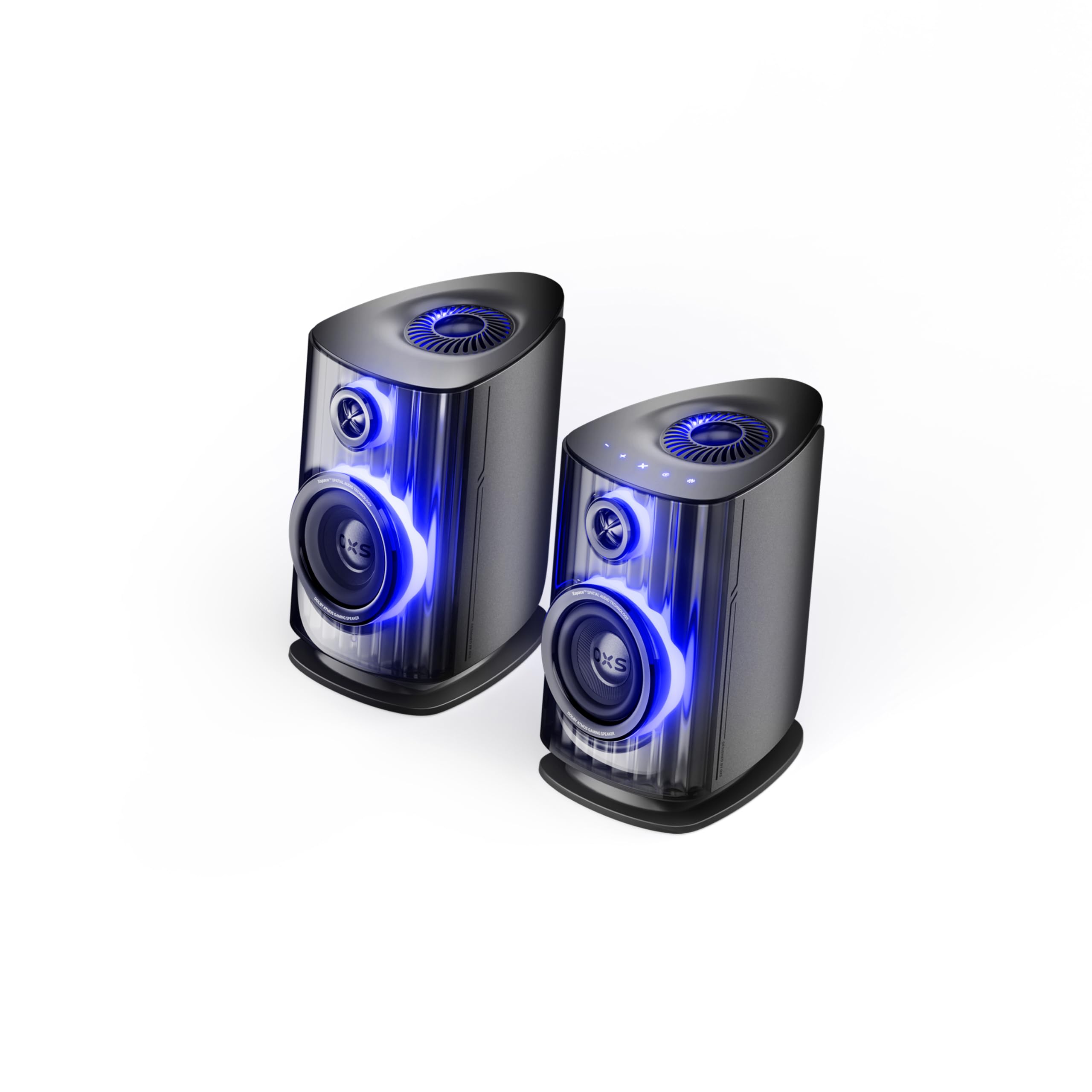
Image: OXS Thunder Duo Speaker System. This image shows the two main speaker units, typically placed on a tabletop. The design features a sleek, modern aesthetic with speaker grilles visible on the front.
4.1. Компоненте звучника
- Главна звучничка јединица: Houses the primary audio drivers and control circuitry.
- Satellite Speaker Unit: Connects to the main unit to provide a wider soundstage.
- Улазна снага: За повезивање адаптера за напајање.
- Аудио улази: HDMI IN, USB-C, eARC, Optical for various source connections.
4.2. Даљински управљач
The included remote control allows for convenient operation of the speaker system from a distance. It typically includes buttons for:
- Укључивање/искључивање
- Појачавање/утишавање јачине звука
- Input Source Selection (HDMI, USB-C, eARC, Optical)
- Муте
- Audio Mode Selection (e.g., Surround)
5. Подешавање
5.1. Постављање звучника
Place the OXS Thunder Duo speakers on a stable, flat tabletop surface. For optimal sound, position them equidistant from your listening position and at ear level. Ensure there are no obstructions between the speakers and your listening area.
5.2. Прикључак за напајање
- Connect the power adapter to the power input port on the main speaker unit.
- Укључите адаптер за напајање у зидну утичницу.
- The power indicator on the speaker will illuminate, indicating it is in standby mode.
5.3. Повезивање аудио извора
The OXS Thunder Duo offers multiple connectivity options:
- ХДМИ (еАРЦ): For connecting to TVs with an HDMI eARC/ARC port. Use the provided HDMI cable. This connection supports high-quality audio and allows TV remote control of speaker volume.
- ХДМИ ИН: For connecting other HDMI-enabled devices like gaming consoles or Blu-ray players.
- Оптички: For connecting to TVs or other devices with an optical audio output. Use the provided optical cable.
- УСБ-Ц: For connecting to PCs, laptops, or compatible mobile devices.
Connect your desired audio source to the corresponding input port on the main speaker unit.
6. Упутство за употребу
6.1. Укључивање/искључивање
Press the Power button on the remote control or the main speaker unit to turn the system on or off. The power indicator will change status accordingly.
6.2. Избор улазног извора
Press the 'Input' or dedicated source buttons (e.g., HDMI, Optical, USB-C) on the remote control to switch between connected audio sources. The current input source will typically be indicated by an LED or display on the main speaker unit.
6.3. Контрола јачине звука
Use the 'Volume Up' (+) and 'Volume Down' (-) buttons on the remote control to adjust the audio level. Press the 'Mute' button to temporarily silence the audio.
6.4. Audio Modes
The OXS Thunder Duo supports surround sound audio output. Use the 'Mode' button on the remote control to cycle through available audio modes, if applicable, to optimize your listening experience for different content types.
7. Повезивање
The OXS Thunder Duo offers versatile connectivity for a wide range of devices:
- ХДМИ ИН: Connects to various HDMI-enabled devices.
- УСБ-Ц: Ideal for direct digital audio connection to computers (PC), laptops, and mobile devices running Windows, Android, or iOS.
- eARC (Побољшани канал за поврат звука): Connects to compatible TVs for high-fidelity audio transmission and simplified control.
- Оптички: Provides a digital audio connection for TVs, game consoles (PlayStation, XBOX, Switch), and other devices with an optical output.
8. Одржавање
Proper maintenance ensures the longevity and performance of your OXS Thunder Duo speaker system.
- Чишћење: Редовно бришите површине звучника меком, сувом крпом која не оставља влакна. Не користите абразивна средства за чишћење, воскове или раствараче.
- прашина: Keep the speaker grilles free from dust accumulation. Use a soft brush or a vacuum cleaner with a brush attachment on a low setting.
- Складиштење: Ако складиштите звучнике дуже време, искључите их из напајања и чувајте их на хладном и сувом месту, по могућству у оригиналном паковању.
КСНУМКС. Решавање проблема
If you encounter issues with your OXS Thunder Duo, refer to the following common problems and solutions:
| Проблем | Могући узрок | Решење |
|---|---|---|
| Нема струје | Power cable not connected; Power outlet not active; Speaker is off. | Ensure power cable is securely connected. Test the outlet with another device. Press the Power button on the remote or speaker. |
| Нема звука | Incorrect input source selected; Volume too low or muted; Audio cable not connected properly; Source device not outputting audio. | Select the correct input source. Increase volume and check if muted. Reconnect audio cables. Check audio settings on your source device. |
| Даљински управљач не ради | Batteries are dead or incorrectly inserted; Obstruction between remote and speaker. | Replace batteries, ensuring correct polarity. Remove any obstructions. Ensure remote is pointed at the main speaker unit. |
| Изобличен звук | Volume too high; Poor audio source quality; Loose cable connection. | Lower the volume. Check the audio quality from the source. Ensure all cables are securely connected. |
If the problem persists after trying these solutions, please contact OXS customer support.
10. Спецификације
| Феатуре | Спецификација |
|---|---|
| Бранд | ОКСС |
| Број модела | Thunder DUO |
| Максимални излаз звучника | 220 Ваттс |
| Фреквенцијски одзив | 20 КХз |
| Технологија повезивања | HDMI IN, USB-C, eARC, Optical |
| Режим аудио излаза | Сурроунд |
| Тип монтаже | Таблетоп Моунт |
| Product Exterior Material | ABS & PVC |
| Спеакер Типе | Полица за књиге |
| Препоручена употреба | Computer, TV, Gaming Consoles |
| Боја | Титан |
| Водоотпоран | Фалсе |
| Врста гаранције | Ограничена гаранција |
| Величина звучника | 1.5 инча |
| Speaker Channel Configuration | 3.1.2 |
| С/Н однос | 96 дБ |
| Батерије | 2 ААА батерије (укључене за даљински управљач) |
| Димензије артикла (Д к Ш к В) | 17.8 к 21.5 к 27.6 цм |
| Тежина артикла | 11.02 фунти |
| Компатибилни уређаји | TV, PC, PlayStation, XBOX, Mobile devices (Windows, Android, iOS), Switch |
| УПЦ | 199284067936 |
| ASIN | B0GDFVBVB3 |
11. Гаранција и подршка
The OXS Thunder Duo Speaker System comes with a Limited Warranty. Please refer to the warranty card included in your package for specific terms and conditions, including the duration and coverage details.
For technical support, troubleshooting assistance, or warranty claims, please contact OXS customer service through the contact information provided on the official OXS website or your purchase documentation. Please have your model number (Thunder DUO) and proof of purchase ready when contacting support.