1. Увод
This manual provides essential information for the safe and efficient operation of your TCL 65P8K 65-inch 4K QLED Smart Google TV. Please read it thoroughly before using the product and retain it for future reference.
2. Безбедносне информације
Увек се придржавајте основних мера предострожности како бисте смањили ризик од пожара, струјног удара и повреда. Не излажите телевизор киши или влази. Не отварајте поклопац телевизора.asing; refer all servicing to qualified personnel. Ensure proper ventilation and avoid placing the TV near heat sources. Use only the power cord and accessories supplied by the manufacturer.
3. Шта је у кутији
Проверите да ли су све компоненте присутне у паковању:
- TCL 65P8K 65-inch 4K QLED Smart Google TV
- Даљински управљач (са батеријама)
- Повер Цорд
- ТВ сталак (ако је применљиво)
- Вијци за постоље за ТВ
- Гарантни лист
- Кориснички приручник (овај документ)
4. Подешавање
4.1 Физичка инсталација
Before installation, ensure the TV is placed on a stable, level surface or securely mounted to a wall using a compatible VESA mount (sold separately). When installing the stand, align the stand with the mounting holes on the TV and secure with the provided screws.
Фронт view of the TCL 65P8K 65-inch 4K QLED Smart Google TV. This image shows the slim bezel design and the overall aesthetic of the television.
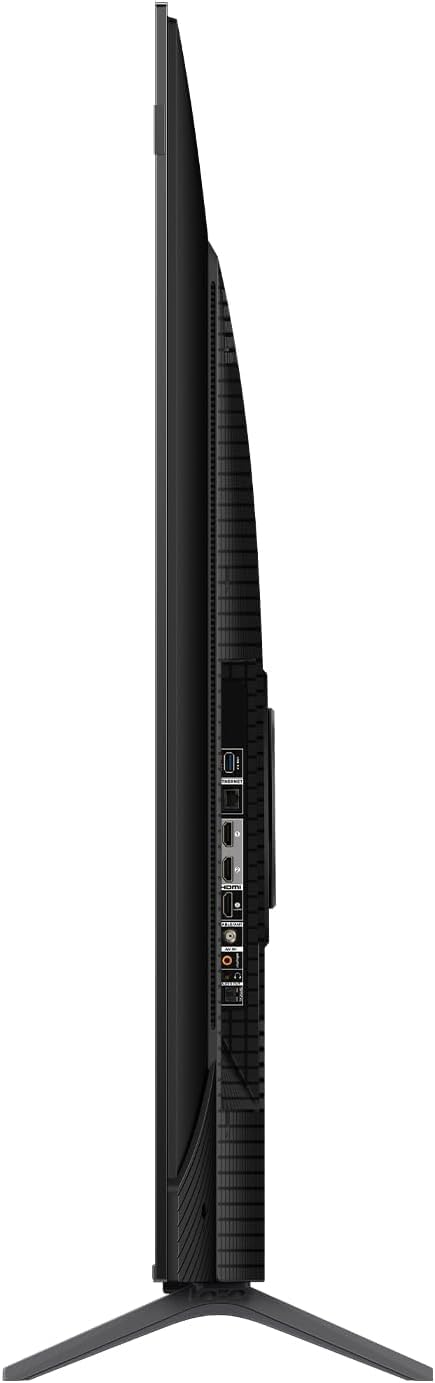
Сиде view of the TCL 65P8K TV, highlighting the various input ports available on the side panel for easy access.
Позади view of the TCL 65P8K TV, showing the textured back panel and additional connection points.
4.2 Почетно укључивање
- Прикључите кабл за напајање на телевизор, а затим на утичницу.
- Притисните дугме за напајање на телевизору или даљинском управљачу да бисте укључили телевизор.
- Follow the on-screen instructions to complete the initial setup, including language selection, network connection, and Google TV account setup.
4.3 Мрежна веза
Your TV supports both Wi-Fi (5G compatible) and wired LAN connections.
- Ви-Фи: Дођите до Подешавања> Мрежа и Интернет, select your Wi-Fi network, and enter the password.
- ЛАН: Connect an Ethernet cable from your router to the LAN port on the TV. The TV will automatically detect the connection.
4.4 Улазне везе
Connect external devices such as gaming consoles, Blu-ray players, or sound systems to the TV using the appropriate ports.
- ХДМИ (2.1): 4 ports available, supporting eARC/ARC for enhanced audio return.
- УСБ (3.0): 1 port for media playback (video, photos, music).
- РФ улаз: 1 digital input for antenna/cable connection.
- Оптички аудио излаз: 1 port for digital audio to external sound systems.
5. Управљање телевизором
5.1 Даљински управљач прекоview
The remote control allows you to navigate the Google TV interface, adjust settings, and access various features. Familiarize yourself with the buttons for power, volume, channel, input selection, and smart assistant activation.
5.2 Интерфејс Google TV-а
Your TCL 65P8K operates on the Google TV platform, providing a personalized experience with access to a wide range of apps and content. Use the remote to browse recommendations, search for titles, and manage your installed applications from the Google Play Store.
5.3 Подешавања слике
Оптимизујте своје viewискуство подешавањем подешавања слике. Приступите им преко менија подешавања телевизора.
- Режими слике: Standard, Sports, Movie, Game.
- Температура боје: Normal, Cool, Warm.
- ХДР подршка: Dolby Vision, HDR10+, HDR10, HLG for enhanced contrast and color.
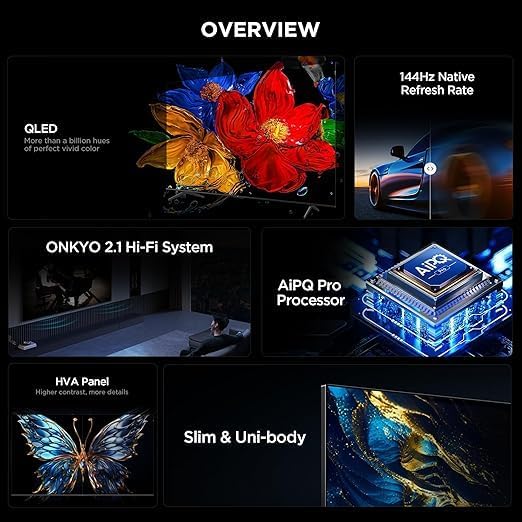
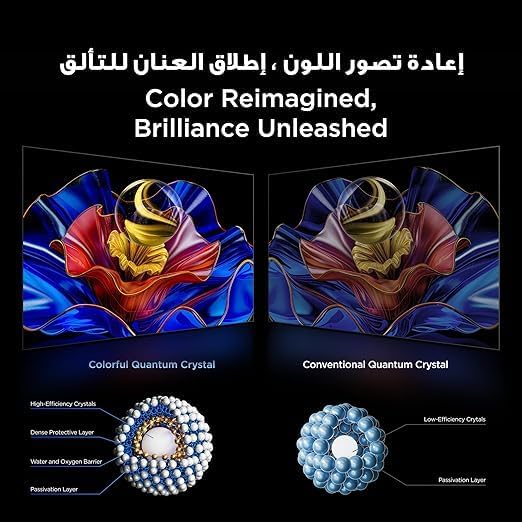
- КЛЕД технологија: Delivers 93% DCI-P3 color gamut for vibrant and accurate colors.

This image demonstrates the 'Color Reimagined, Brilliance Unleashed' feature, showcasing the superior color reproduction of Colorful Quantum Crystals compared to conventional ones.
5.4 Подешавања звука
The TV features an Onkyo 2.1 Hi-Fi Sound System for rich audio. Adjust sound settings to your preference.
- Аудио излазна снага: 10W x 2 speakers + 15W Onkyo subwoofer.
- Режими звука: Dynamic, Standard, Sports, Movies, Music.
- Аудио технологије: Dolby Atmos, Dolby Digital, DTS Studio Sound, DTS Virtual: X for immersive surround sound.

An image depicting the Onkyo 2.1 Sound System, illustrating its role in defining the standard for home theater audio with immersive sound waves.
5.5 Функције за игре
The TCL 65P8K is optimized for gaming with advanced features:
- Нативна брзина освежавања од 144Hz: Provides ultra-smooth motion for fast-paced gaming and action scenes.
- Game Master Features: Includes FreeSync, VRR (Variable Refresh Rate), and ALLM (Auto Low Latency Mode) for a responsive gaming experience.

A visual comparison demonstrating the 'Smoother and clearer' motion provided by a 144Hz refresh rate versus a 60Hz refresh rate, ideal for gaming and fast-action content.
5.6 Паметне карактеристике
Leverage the smart capabilities of your Google TV:
- Гоогле помоћник: Use voice commands for search, control smart home devices, and more.
- Уграђен Цхромецаст: Преносите садржај са свог паметног телефона или таблета директно на телевизор.
- АирПлаи 2: Стримујте садржај са Apple уређаја.
- Унапред инсталиране апликације: Netflix, YouTube, Prime Video, Disney+, and access to the Google Play Store for more applications.
- AiPQ Pro Processor: AI-powered image processing enhances picture quality, ensuring realistic images with optimal contrast and color accuracy.

Изложба сликаasing the AiPQ Pro Processor, highlighting its advanced capabilities in perceiving, thinking, and producing optimized visual content.

This image illustrates the smart way to control your TCL devices, showing the TV as a central hub for managing various smart home appliances.
6. Одржавање
6.1 Чишћење
To clean the screen, gently wipe it with a soft, lint-free cloth. For the TV casing, use a soft, dry cloth. Avoid using abrasive cleaners, waxes, or solvents as they can damage the finish. Always unplug the TV before cleaning.
6.2 Ажурирања софтвера
Your TV may receive software updates periodically to improve performance and add new features. Ensure your TV is connected to the internet to receive these updates. You can check for updates manually in Подешавања > Систем > О нама > Ажурирање система.
КСНУМКС. Решавање проблема
Ако наиђете на проблеме са телевизором, погледајте следећа уобичајена решења:
- Нема напајања: Check if the power cord is securely connected and the power outlet is working.
- Нема слике/звука: Проверите да ли је изабран исправан улазни извор. Проверите кабловске везе са спољним уређајима.
- Лош квалитет слике: Adjust picture settings. Ensure the input source is providing a high-quality signal.
- Даљински не ради: Замените батерије. Уверите се да нема препрека између даљинског управљача и инфрацрвеног сензора телевизора.
- Проблеми са мрежном везом: Restart your router and TV. Re-enter Wi-Fi password or check LAN cable.
For more complex issues, consult the TCL support webсајту или контактирајте корисничку подршку.
8. Спецификације
| Феатуре | Спецификација |
|---|---|
| Бранд | ТЦЛ |
| Број модела | 65П8К |
| Величина екрана | 65 инча |
| Дисплаи Тецхнологи | КЛЕД |
| Резолуција | 3840 x 2160 (4K Ultra HD) |
| Рефресх Рате | Изворни 144Хз |
| Аспецт Ратио | 16:9 |
| Viewинг Англе | 178 степени |
| Интерна меморија | 32 ГБ |
| Оперативни систем | Гоогле ТВ |
| Процесор | AiPQ Pro процесор |
| ХДР подршка | Долби Вижн, HDR10+, HDR10, HLG |
| Аудио систем | Onkyo 2.1 Hi-Fi Sound System (10W x 2 + 15W Subwoofer) |
| Аудио технологије | Dolby Atmos, Dolby Digital, DTS Studio Sound, DTS Virtual: X |
| ХДМИ портови | 4 (HDMI 2.1, eARC/ARC compatible) |
| УСБ портови | 1 (УСБ 3.0) |
| Повезивање | Wi-Fi (5G), Bluetooth v5.4, LAN, RF Input, Optical Audio Output |
| Потрошња енергије | 180 Watts (Operating), <0.5 Watts (Standby) |
| Димензије (Ш к В к Д) без постоља | 1444 к 831 к 69.5 мм |
| Димензије (Ш к В к Д) са постољем | 1444 к 893 к 295 мм |
| Нето тежина | 17.4 кг |
| Земља порекла | Египат |
9. Гаранција и подршка
Your TCL 65P8K TV comes with a full 2-year warranty from the date of purchase. Please retain your proof of purchase and the warranty card included in the box. For technical support, service requests, or warranty claims, please contact TCL customer service or visit the official TCL support webсајт. Не покушавајте сами да поправите производ, јер то може поништити вашу гаранцију.


