
Увод
Thank you for choosing the Philips Solar Security Light. This manual provides essential information for the safe and efficient operation of your solar-powered, wall-mounted flood light with PIR motion sensor. Please read these instructions carefully before installation and use, and retain them for future reference.
Безбедносне информације
- Ensure the mounting surface is stable and can support the weight of the light fixture.
- Не покушавајте да растављате или модификујете производ. То може поништити гаранцију и представљати безбедносне ризике.
- Keep the solar panel clean to ensure optimal charging performance.
- Avoid looking directly into the light source when it is active, as it may cause eye strain.
- Одложите производ и његове компоненте одговорно у складу са локалним прописима на крају његовог животног века.
Садржај пакета
Пре инсталације проверите да ли су све компоненте присутне:
- Philips Solar Security Light (1 unit)
- Даљински управљач (1 јединица)
- Mounting Bracket (1 unit)
- Вијци (2 јединице)
- Wall Plugs (2 units)
Производ је завршенview
The Philips Solar Security Light is an outdoor, solar-powered flood light designed for enhanced security and illumination. It features a PIR motion sensor, high-brightness LEDs, and multiple lighting modes.

Слика: Прекоview of the Philips Solar Security Light, highlighting its durable design with a solar panel, three LED light heads, and an integrated motion sensor.
Кључне карактеристике:
- Висока осветљеност: 800 lumens with 6500K cool daylight color temperature.
- ПИР сензор покрета: Detects motion up to 49.2 feet with a 180-degree detection angle.
- 3 режима осветљења: Customizable illumination settings for various needs.
- Соларни погон: Equipped with an upgraded polycrystalline solar panel and a 2000 mAh high-capacity battery for efficient charging and extended use.
- Отпоран на временске услове: IP65 rated for resistance against heavy rain, humidity, and extreme temperatures.
- даљински управљач: Allows convenient adjustment of light modes without manual interaction.
Подешавање и инсталација
The Philips Solar Security Light is designed for easy wall-mounted installation with no wiring required. It comes pre-assembled.
Кораци инсталације:
- Изаберите локацију: Select an outdoor location that receives direct sunlight for most of the day to ensure optimal charging of the solar panel. The light should be mounted on a wall.
- Означите тачке бушења: Hold the mounting bracket against the desired wall location and mark the positions for the two screws.
- Избушене рупе: Drill two holes at the marked points. Insert the wall plugs into the drilled holes.
- Причврстите носач за монтажу: Причврстите носач за монтажу на зид помоћу приложених вијака.
- Монтирајте светло: Slide the solar security light onto the mounting bracket until it clicks securely into place.
- Подесите главе светла и сензор: Adjust the three light heads and the PIR motion sensor to cover the desired area. The motion sensor has an adjustable angle of 180 degrees.
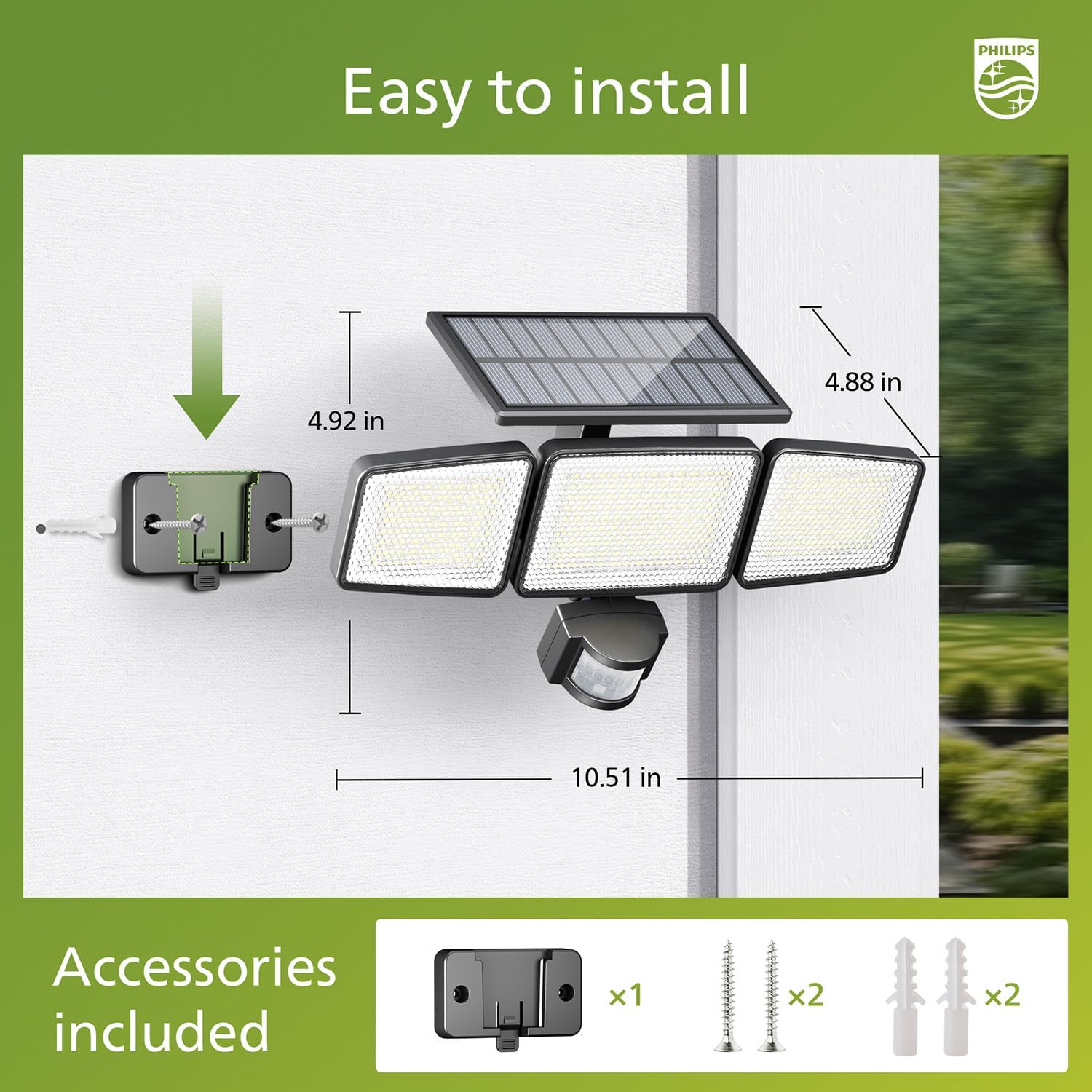
Image: Visual guide for installing the Philips Solar Security Light, including dimensions and the accessories provided for wall mounting.
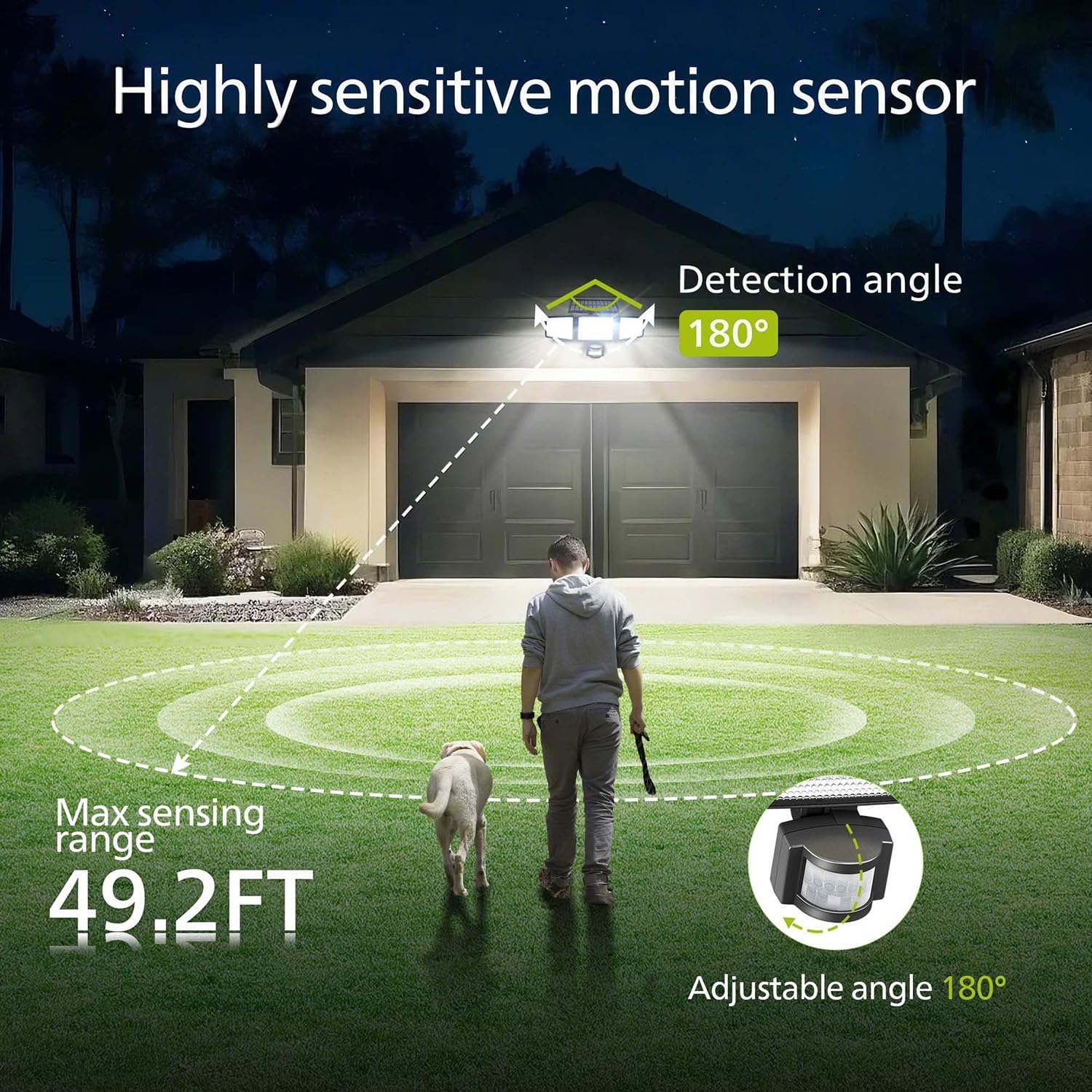
Image: Illustration of the motion sensor's coverage, showing a 180-degree detection angle and a maximum sensing range of 49.2 feet.
Упутство за употребу
The Philips Solar Security Light features three distinct lighting modes, controllable via the included remote control.
Режими осветљења:
- Режим сензора: The light remains off until motion is detected. Upon detection, it illuminates at 100% brightness (800 lumens) for approximately 25 seconds, then turns off.
- Затамњени режим: The light stays on continuously at a low brightness of 10% (80 lumens) throughout the night.
- Режим затамњивања + сензора: The light stays on continuously at a very low brightness of 2-3% (16-24 lumens). When motion is detected, it brightens to 100% (800 lumens) for approximately 25 seconds, then returns to the dim state.

Image: Detailed explanation of the three operational modes, showing how the light behaves in Sensor, Dim, and Dim + Sensor modes based on motion detection and ambient light.
Use the remote control to switch between these modes as needed. Ensure the remote control has a clear line of sight to the light fixture for proper function.
Одржавање
Regular maintenance ensures optimal performance and longevity of your Philips Solar Security Light.
- Чишћење соларних панела: Периодично обришите соларни панел меком крпомamp крпом да бисте уклонили прашину, прљавштину или остатке. Чист соларни панел обезбеђује максималну апсорпцију сунчеве светлости и ефикасност пуњења.
- Чишћење уређаја: Clean the light fixture with a soft, dry cloth. Avoid using abrasive cleaners or solvents that could damage the finish or electronic components.
- батерија: The integrated high-capacity 2000 mAh battery is designed for long-term use. No user maintenance or replacement is required for the battery.
- Отпорност на временске услове: The IP65 rating ensures the light is protected against dust and water jets. However, avoid submerging the unit in water.

Image: Focus on the high-quality solar panel, illustrating its role in providing power for 8-10 hours of operation and its 1800mAh high-capacity battery.
Решавање проблема
If you encounter issues with your Philips Solar Security Light, refer to the following common problems and solutions:
- Светло се не пали ноћу:
- Ensure the solar panel is receiving adequate direct sunlight during the day.
- Check if the light is in the correct operating mode (e.g., not in 'off' state if the remote has an off button).
- Проверите да ли је батерија даљинског управљача функционална.
- Светло је слабо или остаје упаљено само кратко време:
- The solar panel may not be fully charged. Ensure it is clean and exposed to direct sunlight for at least 6-8 hours.
- Ambient temperature can affect battery performance; extreme cold may reduce operating time.
- Сензор покрета не детектује кретање:
- Ensure the sensor lens is clean and unobstructed.
- Verify the light is in a motion-activated mode (Sensor Mode or Dim + Sensor Mode).
- Adjust the angle of the motion sensor to cover the desired detection area.
If problems persist, please contact Philips customer support for further assistance.
Спецификације
| Феатуре | Спецификација |
|---|---|
| Бранд | ПХИЛИПС |
| Модел | 929004621403 |
| Боја | Црно |
| Материјал | Алуминијум |
| Форма расветног тела | Флоодлигхт |
| Унутрашња/спољна употреба | Оутдоор |
| Извор напајања | Солар Поверед |
| Контролни метод | Ремоте |
| Извор светлости | ЛЕД |
| Број извора светлости | 4 |
| Волtage | 3.7 волти ДЦ |
| Лигхт Цолор | хладно бела (6500К) |
| Осветљеност | 800 лумена (макс.) |
| Ниво отпорности на воду | ИП65 водоотпоран |
| Тип монтаже | Валл Моунт |
| Капацитет батерије | 2000 мАх |
| Сенсинг Англе | 180 степени |
| Сенсинг Ранге | До 49.2 стопа |

Image: A comparison table highlighting key specifications of the Philips solar security light, such as brightness, lighting modes, battery capacity, and waterproof rating.
Гаранција и подршка
За информације о гаранцији и корисничку подршку, обратите се званичном Philips-овом webсајт или контактирајте њихову службу за кориснике. Сачувајте рачун као доказ о куповини.
За додатну помоћ посетите: ввв.пхилипс.цом/суппорт