
1. Увод
Thank you for choosing the INFINMIND Wireless Bluetooth Mouse. This manual provides detailed instructions for the Y670G (rechargeable green mouse) and D890 (battery-powered black mouse) models, designed for multi-device connectivity and enhanced productivity. Please read this manual carefully before use to ensure optimal performance and longevity of your device.
2. Садржај пакета
- 1 x INFINMIND Wireless Bluetooth Green Mouse (Y670G)
- 1 x INFINMIND Wireless Bluetooth Black Mouse (D890)
- 2 x 2.4GHz USB Receivers (one for each mouse)
- 1 x USB Charging Cable (for Y670G mouse)
- 2 x AA Batteries (pre-installed in D890 mouse)
- 1 к Упутство за употребу
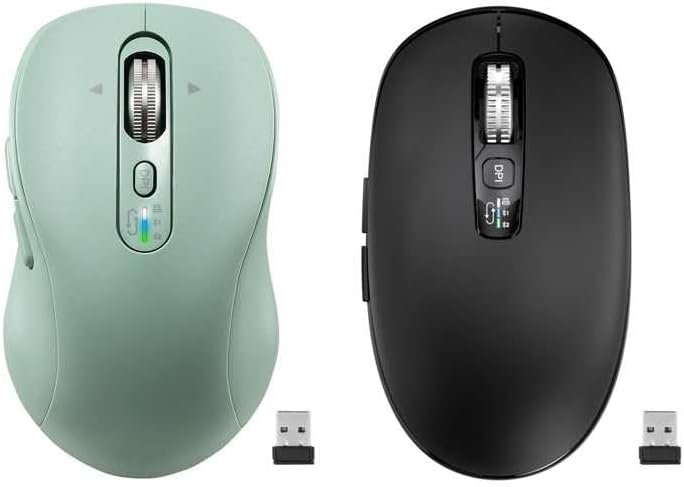
Image: The package includes both the green rechargeable mouse and the black battery-powered mouse, along with their respective USB receivers.
3. Производ је готовview
Familiarize yourself with the buttons and features of your INFINMIND wireless mice.
3.1 Green Rechargeable Mouse (Y670G)

Слика: Детаљна view of the green mouse with labels for each button and indicator.
- Лево дугме: Стандардна функција левог клика.
- Десно дугме: Стандардна функција десног клика.
- Smart Flying Scroll Wheel: For vertical and horizontal scrolling.
- Дугме за укључивање/искључивање: Power switch for the mouse.
- Дугме ДПИ: Подешава осетљивост курсора (1000/1600/2400/3200 DPI).
- Индикатори уређаја: LED lights (White, Blue, Green) to show active connection mode (2.4G USB, Bluetooth 1, Bluetooth 2).
- Devices Switch Button: Cycles between 2.4G USB, Bluetooth 1, and Bluetooth 2 connections.
- Дугме за напред: Навигација напред у web претраживачи или file истраживачи.
- Дугме за назад: Навигација уназад web претраживачи или file истраживачи.
- Windows/Mac System Switch Button: Optimizes mouse functions for Windows or macOS.
3.2 Black Battery-Powered Mouse (D890)

Image: The black mouse features a similar ergonomic design and button layout to the green model, with a DPI button and scroll wheel.
The black D890 mouse shares most functionalities with the Y670G, including Left/Right buttons, Scroll Wheel, DPI button, Forward/Back buttons, and multi-device switching. The primary difference is its power source (AA batteries) and the specific indicator lights for connection modes.
4. Подешавање
Your INFINMIND mice support three connection modes: 2.4GHz wireless via USB receiver, and two independent Bluetooth channels (BT1 and BT2).

Image: The mouse can connect to a tablet via Bluetooth 2, a monitor via Bluetooth 1, and a laptop via 2.4GHz wireless, switching between them with a single click.
4.1 Бежична веза од 2.4 GHz
- Locate the USB receiver. For the Y670G, it is typically stored in a slot on the bottom of the mouse. For the D890, it is also stored in a similar slot.
- Укључите УСБ пријемник у слободан УСБ порт на рачунару.
- Укључите миш помоћу прекидача УКЉУЧЕНО/ИСКЉУЧЕНО на дну.
- Press the Devices Switch Button until the White LED indicator lights up, indicating 2.4G mode. The mouse should connect automatically.
4.2 Bluetooth Connection (BT1 & BT2)
- Turn on the mouse using the ON/OFF switch.
- Press the Devices Switch Button to select either Bluetooth Mode 1 (Blue LED) or Bluetooth Mode 2 (Green LED).
- Да бисте ушли у режим упаривања: Press and hold the Devices Switch Button for 3-5 seconds until the corresponding LED (Blue or Green) starts flashing rapidly.
- На свом уређају (рачунару, таблету, телефону) отворите подешавања за Bluetooth.
- Тражи new devices and select "INFINMIND Mouse" (or similar name) from the list.
- Once paired, the LED indicator will stop flashing and remain solid for a few seconds before turning off, confirming the connection.
4.3 Пребацивање између повезаних уређаја
To switch between your connected devices (2.4G, BT1, BT2), simply press the Devices Switch Button. The LED indicator will briefly light up in White, Blue, or Green to show which mode is currently active.
5. Упутство за употребу
5.1 ДПИ подешавање
Притисните тастер Дугме ДПИ (located below the scroll wheel) to cycle through the available DPI settings: 1000, 1600, 2400, and 3200 DPI. A higher DPI setting increases cursor sensitivity, making the cursor move faster across the screen with less physical mouse movement.
5.2 4-Way Hyper-Fast Scrolling
The scroll wheel supports both vertical and horizontal scrolling.
- Вертикално скроловање: Roll the scroll wheel up or down.
- Horizontal Scrolling: Tilt the scroll wheel to the left or right. This allows for seamless navigation across wide documents or web странице.

Image: The scroll wheel can be moved Upward, Downward, Left, and Right for comprehensive navigation.
5.3 Дугмад за напред/назад
Користите Напред и Назад buttons (located on the side of the mouse) to quickly navigate through web pages, documents, or folders.
5.4 System Switch (Windows/Mac)
The Y670G mouse includes a dedicated Дугме за пребацивање система Виндовс/Мац on its underside. Toggle this switch to optimize mouse functionality and gestures for your operating system.
5.5 Дизајн тихог клика
Both mice feature a silent click design, reducing click noise for a quieter working environment, ideal for offices and shared spaces.

Image: The mouse is designed for quiet operation, minimizing click sounds.
6. Управљање напајањем
6.1 Charging the Y670G (Rechargeable Green Mouse)
The Y670G mouse is equipped with a built-in rechargeable battery.
- Connect the provided USB charging cable to the charging port on the front of the mouse and to a USB power source (e.g., computer USB port, USB wall adapter).
- Потпуно пуњење обично траје отприлике 2 сата.
- A single full charge can provide up to 60 days of use, depending on usage patterns.
- Напомена: Fast charging is not supported. Please use standard USB charging.
6.2 Battery Installation for D890 (Battery-Powered Black Mouse)
The D890 mouse operates on 2 AA batteries, which are pre-installed.
- To replace batteries, open the battery compartment cover on the underside of the mouse.
- Insert two new AA batteries, ensuring correct polarity (+/-).
- Добро затворите поклопац одељка за батерије.
- Battery life can extend up to 40 months, varying based on usage and environmental factors.
6.3 Функција аутоматског спавања
Both mice feature an intelligent auto-sleep function to conserve power. If inactive for 5 minutes, the mouse will enter sleep mode. To wake it up, simply click any button or move the mouse.
7. Одржавање
- Одржавајте миш чистим брисањем меком, сувом крпом. Избегавајте употребу јаких хемикалија или абразивних материјала.
- Do not expose the mouse to extreme temperatures, direct sunlight, or moisture.
- Store the USB receiver in its designated slot on the mouse when not in use to prevent loss.
КСНУМКС. Решавање проблема
| Проблем | Могући узрок | Решење |
|---|---|---|
| Миш не реагује | Low battery (Y670G) / Dead batteries (D890) Mouse is off Incorrect connection mode selected USB receiver not plugged in (2.4G) Bluetooth not paired or disconnected | Charge the Y670G mouse or replace AA batteries in D890. Укључите миша. Press the Devices Switch Button to select the correct mode (White for 2.4G, Blue for BT1, Green for BT2). Уверите се да је УСБ пријемник безбедно прикључен у исправан УСБ порт. Re-pair the mouse via Bluetooth settings on your device. |
| Курсор је неправилан или скаче | Прљави сензор Using mouse on unsuitable surface Интерференција | Clean the optical sensor on the bottom of the mouse with a soft cloth. Користите миш на чистој, нерефлектујућој, непрозирној површини или подлози за миш. Move the mouse closer to the receiver/device or away from other wireless devices. |
| Не могу да прелазим између уређаја | Devices not properly paired/connected | Ensure all desired devices are correctly paired (Bluetooth) or connected (2.4G). Follow setup instructions for each connection mode. |
9. Спецификације
- Повезивање: 2.4GHz Wireless, Bluetooth 5.0 (BT1, BT2)
- ДПИ подешавања: 1000 / 1600 / 2400 / 3200 ДПИ
- Дугмад: 10 (Left, Right, Scroll Wheel, DPI, Forward, Back, Devices Switch, System Switch, ON/OFF)
- Померање: 4-Way Hyper-Fast Scrolling (Vertical & Horizontal)
- Извор напајања:
- Y670G: Rechargeable Lithium Battery (USB-C charging)
- D890: 2 x AA Batteries
- Трајање батерије:
- Y670G: Up to 60 days on a 2-hour charge
- D890: Up to 40 months (varies with usage)
- Компатибилност: Windows, macOS, Chrome OS, Linux, iPadOS, Android (with Bluetooth)
- Ергономија: Designed for Small to Medium-sized hands (Y670G), Medium to Large hands (D890)
- Посебне карактеристике: Silent Click, Auto Sleep Function
10. Гаранција и подршка
INFINMIND products are designed for reliability and performance. For any questions, technical support, or warranty inquiries, please refer to the contact information provided with your purchase or visit the official INFINMIND webсајт. Молимо вас да сачувате доказ о куповини за потребе гаранције.