
1. Увод
Thank you for choosing the TONGVEO PTZ HDMI Camera. This manual provides essential information for the proper installation, operation, and maintenance of your camera. Please read this manual thoroughly before using the product to ensure optimal performance and to prevent damage. This camera is designed for high-quality video capture in various settings, including live streaming, video conferencing, education, and worship services.
2. Производ је готовview
2.1 Кључне карактеристике
- Видео високе дефиниције: 1080p resolution at 60 frames per second (fps) for clear and smooth video.
- Оптички зум: 3x optical zoom lens with a 55.8° field of view, allowing for detailed close-ups without loss of quality.
- Pan/Tilt/Zoom (PTZ) Functionality: Silent movement with 350° pan and 180° tilt capabilities, controllable remotely.
- Вишеструки излази: HDMI and USB 3.0 for versatile connectivity.
- Лако подешавање: Plug and Play functionality, automatically recognized by computers without driver installation.
- Широка компатибилност: Compatible with Windows, Mac, and popular conferencing software like Zoom, Skype, OBS, Google Hangouts, Cisco WebEx, and Microsoft Teams.
- Напредна обрада слике: Superior white balance and exposure modes, supporting YUV, MJPG, and H.264 video compression formats.
- даљински управљач: Includes an infrared (IR) remote control with 10 presets for quick camera positioning.
- Контрола џојстика: Supports external joystick control via RS485 or RS232 interfaces.
2.2 Садржај пакета
Проверите да ли су све ставке присутне у пакету:
- TONGVEO USB PTZ Camera
- 9.8фт УСБ 3.0 кабл
- ДЦ 12В адаптер за напајање
- ИР даљински управљач
- Wall Mount with Screws
- Кориснички приручник (овај документ)

Image: Package contents including the camera, USB cable, power adapter, remote, wall mount, and user manual.
3. Подешавање
3.1 Физичка инсталација
The TONGVEO PTZ camera offers flexible mounting options to suit various environments:
- Положај на радној површини: Поставите камеру на стабилну, равну површину.
- Монтажа монитора: Безбедно причврстите на врх монитора.
- Монтажа на зид: Use the provided wall mount and screws to fix the camera to a wall.
- Монтажа статива: Attach the camera to a standard tripod using the tripod screw hole at the base.
- Монтажа на плафон: Install the camera upside down on the ceiling using a compatible mount (sold separately or included if specified).
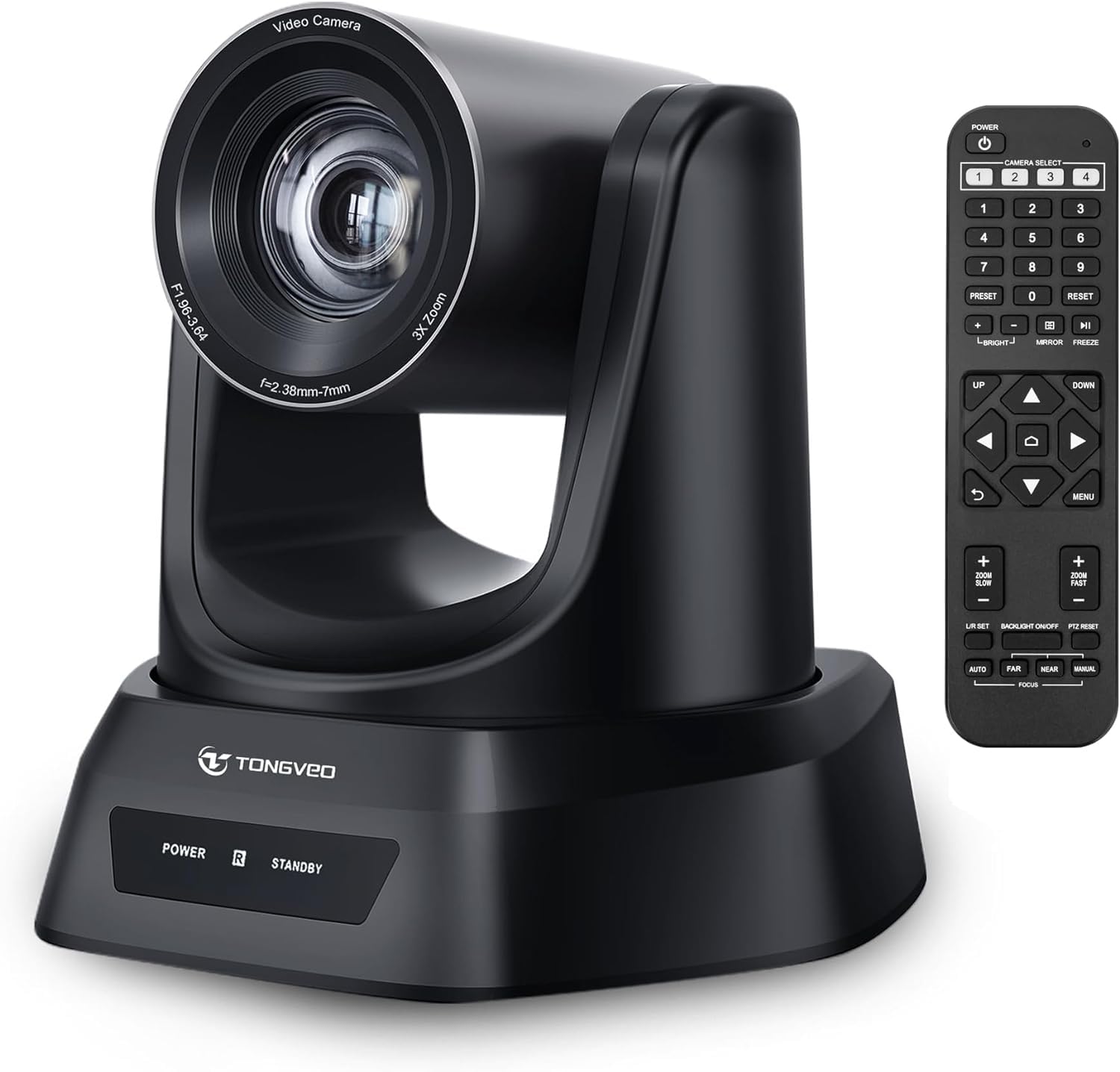
Слика: Прекоview of the TONGVEO PTZ camera highlighting 3x optical zoom, 1080p 60fps, and pan/tilt capabilities.
3.2 Везе
Connect the camera to your devices using the ports on the rear panel:
- Напајање једносмерном струјом од 12V: Connect the included power adapter to the DC 12V port and then to a power outlet.
- УСБ 3.0: Connect the USB 3.0 cable from the camera to your computer (PC/Mac) for video and control.
- ДВИ: Connect an HDMI cable from the camera to a display (TV/Monitor) or a video switcher (e.g., Blackmagic ATEM) for video output.
- РС232/РС485: These ports are for connecting an external joystick controller for advanced PTZ control. RS485 supports daisy-chaining multiple cameras.

Image: Rear panel of the TONGVEO PTZ camera showing DC 12V, RS485, RS232, USB, and HDMI ports.
3.3 Инсталација софтвера
The TONGVEO PTZ camera is a Plug and Play device. No specific drivers are required for most operating systems. Your computer should automatically recognize the camera when connected via USB. It supports the UVC1.1 standard.
4. Операција
4.1 Даљински управљач
Use the included IR remote control to manage camera functions:
- PTZ Movement: Use the directional buttons to pan (left/right) and tilt (up/down) the camera.
- Зумирање: Adjust the optical zoom in and out. The remote typically offers fast and slow zoom options.
- Пресетс: The remote allows you to save and recall up to 10 preset positions. To save a preset, move the camera to the desired position, then press the 'SET' button followed by a number (1-10). To recall a preset, press the corresponding number button.
- Camera Select: If multiple TONGVEO cameras are connected, use the camera select buttons to control a specific unit.
4.2 Подешавања слике
Access the On-Screen Display (OSD) menu via the remote control to adjust image parameters:
- Фокус: The camera features auto-focus by default. Manual focus adjustment is available through the OSD menu.
- Баланс белог: Adjust for accurate color reproduction under different lighting conditions.
- Изложеност: Control brightness and contrast to optimize image visibility.
4.3 Компатибилност софтвера
The camera is compatible with a wide range of operating systems and video conferencing applications:
- Оперативни системи: Windows XP, Vista, 7, 8, 8.1, 10, 11; Mac 10.4 or higher.
- Пријаве: Zoom, Skype, Google Hangouts, Cisco WebEx, Microsoft Teams, GoToMeeting, BlueJeans, OBS, and other UVC-compliant software.

Image: Diagram illustrating the TONGVEO PTZ camera's compatibility with various devices and software platforms.
5. Одржавање
To ensure the longevity and optimal performance of your TONGVEO PTZ camera, follow these maintenance guidelines:
- Чишћење: Користите меку, суву крпу за чишћење кућишта фотоапарата. За објектив користите специјализовану крпу и раствор за чишћење објектива. Избегавајте абразивна средства за чишћење или раствараче.
- Складиштење: Када се камера не користи дуже време, чувајте је на хладном и сувом месту, даље од директне сунчеве светлости и екстремних температура.
- Руковање: Handle the camera with care. Avoid dropping or subjecting it to strong vibrations.
- Снага: Disconnect the power adapter when the camera is not in use or during electrical storms.
КСНУМКС. Решавање проблема
If you encounter issues with your TONGVEO PTZ camera, refer to the following common problems and solutions:
- Нема напајања:
- Уверите се да је адаптер за напајање безбедно повезан са камером и исправном утичницом.
- Проверите да ли је утичница функционална.
- Нема видео излаза:
- Check all cable connections (USB, HDMI) are secure.
- Ensure the correct input source is selected on your display or video switcher.
- Verify the camera is selected as the video input device in your software (e.g., Zoom, OBS).
- Слика је мутна/ван фокуса:
- Allow the camera's auto-focus to adjust.
- Access the OSD menu to manually adjust the focus if needed.
- Уверите се да је сочиво чисто и да нема мрља.
- Даљински управљач не ради:
- Проверите батерије у даљинском управљачу и замените их ако је потребно.
- Уверите се да нема препрека између даљинског управљача и ИР пријемника камере.
- PTZ Movement is Unresponsive:
- Verify the camera is powered on and the remote control is functioning.
- If using a joystick, ensure it is correctly connected via RS232/RS485.
7. Спецификације
Detailed technical specifications for the TONGVEO PTZ HDMI Camera (Model TV-NV3H-UK):
| Феатуре | Спецификација |
|---|---|
| Број модела | TV-NV3H-UK (819988df-b012-4f6a-b3ce-5c96af8001c3) |
| Бранд | ТОНГВЕО |
| Оптицал Зоом | 3x |
| Ефективна видео резолуција | 1080 Pixels (1080p 60fps) |
| Технологија фото сензора | ЦМОС |
| Величина оптичког сензора | 1/2.7 инча |
| Максимална жижна даљина | 10 милиметара |
| Минимална жижна даљина | 5 милиметара |
| Формат видео снимања | MP4 (Supports YUV, MJPG, H.264) |
| Пан Мовемент | 350° |
| Тилт Мовемент | 180° |
| Повезивање | HDMI, USB 3.0, RS232, RS485 |
| Извор напајања | ДЦ 12В |
| Стабилизација слике | бр |
| Радна температура | -10°Ц до +50°Ц |
| Димензије пакета | 28 к 21 к 19 цм |
| Тежина | 2 килограма |

Слика: Доња страна view of the TONGVEO PTZ camera showing model number (TV-V3H) and other regulatory information.
8. Гаранција и подршка
The TONGVEO PTZ HDMI Camera comes with a 3 година гаранције. For any questions, technical assistance, or warranty claims, please contact TONGVEO customer service. Our support team is available to respond to your inquiries within 24 hours.
Please refer to the contact information provided on the TONGVEO official webсајт или вашу документацију о куповини за најновије канале подршке.