
1. Увод
This manual provides essential information for the safe and efficient operation, maintenance, and troubleshooting of your SAMSUNG Jet 90 + Clean Station Bundle Cordless Stick Vacuum. Please read this manual thoroughly before using the appliance and retain it for future reference.
2. Безбедносне информације
Always follow basic safety precautions when using electrical appliances to reduce the risk of fire, electric shock, or injury. This appliance is for household use only.
- Не користите усисивач са оштећеним каблом или утикачем.
- Не користите усисивач на влажним површинама или за усисавање течности.
- Држите косу, широку одећу, прсте и све делове тела даље од отвора и покретних делова.
- Не узимајте ништа што гори или дими, као што су цигарете, шибице или врући пепео.
- Користите само онако како је описано у овом упутству. Користите само додатке које препоручује произвођач.
- Искључите све контроле пре искључивања.
3. Садржај пакета
Проверите да ли су све компоненте присутне у вашем пакету:
- SAMSUNG Jet 90 Cordless Stick Vacuum Main Unit
- Цлеан Статион
- Четка за меку акцију
- Мини моторизирани алат
- Лонг Цревице Тоол
- Алат за комбиновање
- Флексибилан алат
- Пуњива батерија
- Сталак за пуњење

Image: All components included in the SAMSUNG Jet 90 + Clean Station Bundle.
4. Подешавање
4.1 Склапање усисивача
Attach the desired cleaning tool or pipe to the main vacuum unit. Ensure it clicks securely into place.
4.2 Пуњење батерије
The removable/reusable battery can be charged directly on the vacuum when docked on the charging stand, or separately on the dual charging station. A full charge takes approximately 3 hours.
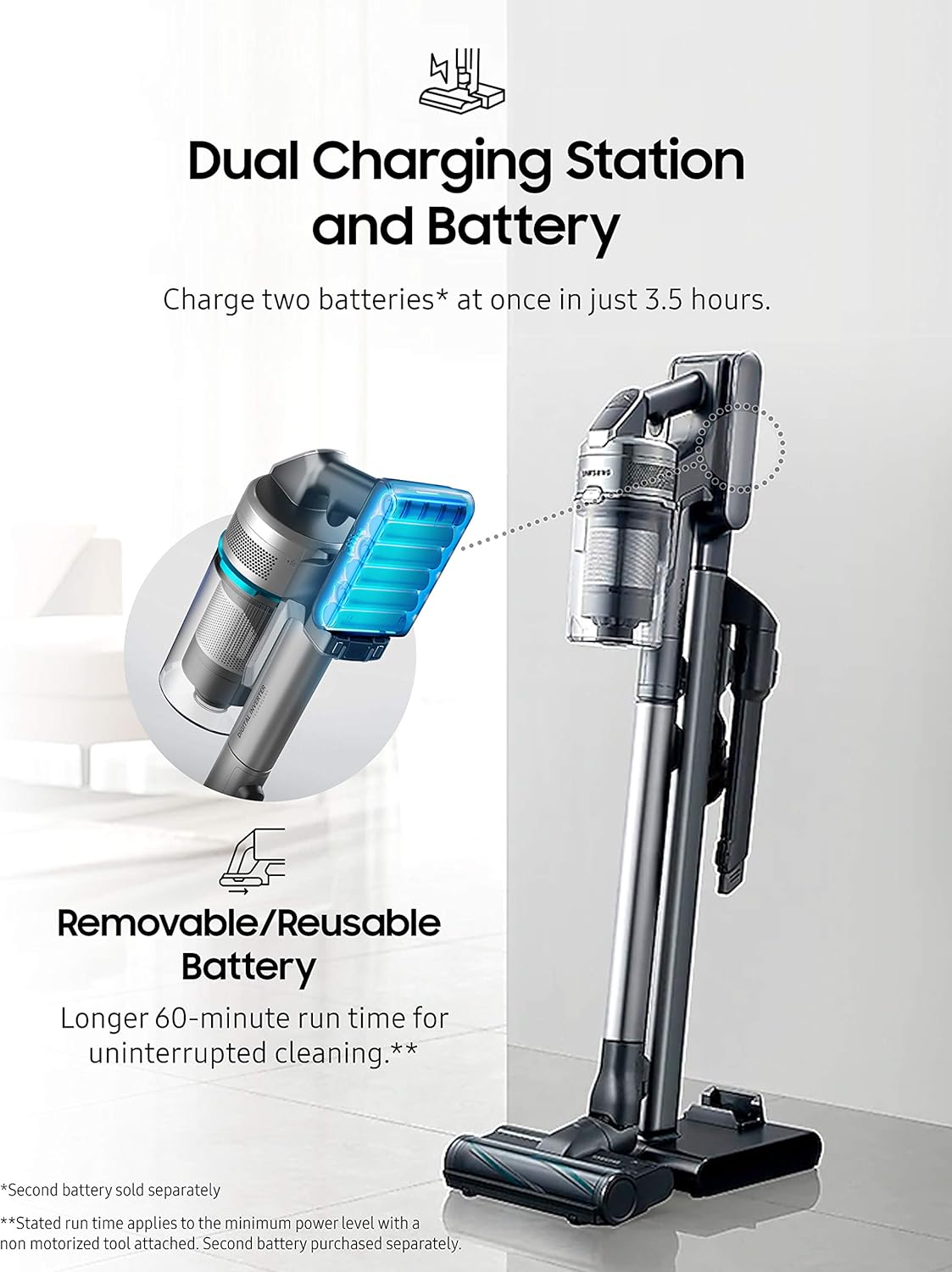
Image: The dual charging station allows for charging two batteries simultaneously.
4.3 Setting up the Clean Station
Place the Clean Station in a convenient location near a power outlet. It is designed to automatically empty the vacuum's dustbin.

Image: The Clean Station automatically empties the dust from your Jet Cordless Vacuum.
5. Оперативни
5.1 Powering On and Adjusting Suction
Press the power button to turn on the vacuum. Use the control buttons to adjust the suction power according to your cleaning needs. The vacuum offers up to 200 Air Watts of cleaning performance.

Image: The vacuum provides powerful suction for various floor types.
5.2 Adjusting Telescopic Pipe Length
The telescopic pipe features four available length adjustments for comfortable use, allowing you to reach high or low areas with ease.

Image: The telescopic pipe can be adjusted to four different lengths for ergonomic cleaning.
5.3 Using the Soft Action Brush
The Soft Action Brush is ideal for delicate hard floors like parquet, effectively picking up dust and debris without scratching surfaces.

Image: The lightweight design allows for easy maneuverability under furniture and on stairs.
5.4 Using the Spinning Sweeper Mop Attachment (Optional)
If you have the Spinning Sweeper mop attachment, attach it to the main vacuum unit. Ensure the reusable wet pads or disposable wet pads are securely attached to the spinning discs. Fill the water tank on the attachment with water or a suitable cleaning solution. The spinning action of the pads will clean hard floors. Remember to remove and clean the pads after use.
6. Одржавање
6.1 Emptying the Dustbin with Clean Station
Place the vacuum's dustbin into the Clean Station. The Clean Station will automatically extract dust and debris into a disposable bag, ensuring a hygienic emptying process.
6.2 Cleaning the 5-Layer Filtration System
The vacuum features a 5-layer filtration system designed to capture pet dander, pollen, and other non-living allergens, trapping 99.999% of microdust. Regularly clean or replace the filters as recommended to maintain optimal performance and air quality.

Image: Diagram illustrating the 5-layer filtration system for enhanced air purification.
6.3 Cleaning Brush Heads and Mop Pads
Periodically inspect and clean the brush heads to remove tangled hair or debris. For the Spinning Sweeper mop attachment, remove and wash the reusable mop pads after each use. Replace disposable pads as needed.
КСНУМКС. Решавање проблема
If you encounter issues with your SAMSUNG Jet 90 + Clean Station Bundle, refer to the following common solutions:
- Нема напајања: Уверите се да је батерија потпуно напуњена и правилно уметнута. Проверите да ли је постоље за пуњење правилно повезано са електричном утичницом.
- Смањено усисавање: Check the dustbin for fullness and empty it if necessary. Inspect the filters for clogs and clean them. Ensure there are no blockages in the brush head, pipe, or hose.
- Необична бука: Turn off the vacuum immediately. Check for any foreign objects caught in the brush head or air pathways.
- Clean Station Not Emptying: Ensure the vacuum's dustbin is correctly seated in the Clean Station. Check if the Clean Station's disposable bag is full and needs replacement.
For persistent issues, please contact SAMSUNG customer support.
8. Спецификације
| Феатуре | Детаљ |
|---|---|
| Бранд | САМСУНГ |
| Назив модела | Jet 90 + CS |
| Број модела ставке | VS20R9046P3 |
| УПЦ | 887276523088 |
| Боја | Греи |
| Посебна карактеристика | Без врећице |
| Тип филтера | Disk (5-Layer Filtration System) |
| Укључене компоненте | Цлеан Статион |
| Да ли је бежично? | Да |
| Ватtage | 500 вати |
| Време пуњења | 3 сата |
| Форм Фацтор | Стицк |
| Димензије производа | 8.5 cm D x 9.8 cm Š x 44.7 cm V |
| Опис батерије | Литијум-јонски |
| Ниво буке | 78 дБ |
| Тежина артикла | 40.2 фунти |
| Унутрашња/спољна употреба | Индоор |
9. Гаранција и подршка
For warranty information, product registration, or technical support, please refer to the official SAMSUNG webсајт или директно контактирајте њихову корисничку службу. Сачувајте доказ о куповини за потребе гаранције.