
Увод
This manual provides essential information for the safe and effective use of your ProForm City L6 Folding Treadmill. Please read all instructions carefully before operating the equipment. Retain this manual for future reference.

Image: The ProForm City L6 Folding Treadmill, showcasing its compact design and console.
Важне информације о безбедности
To reduce the risk of serious injury, read all important precautions and instructions in this manual before using the treadmill. ProForm assumes no responsibility for personal injury or property damage sustained by or through the use of this product.
- Консултујте се са лекаром пре него што започнете било који програм вежбања.
- Држите децу и кућне љубимце даље од траке за трчање.
- Поставите траку за трчање на равну површину са најмање 2 метра (6.5 стопа) слободног простора иза ње и 0.5 метара (1.6 стопе) са сваке стране.
- Носите одговарајућу одећу за вежбање и спортске ципеле.
- Немојте користити траку за трчање ако су кабл за напајање или утикач оштећени.
- Увек се држите за рукохвате када покрећете или заустављате траку за трчање.
- Не прекорачујте максималну дозвољену тежину корисника од 113 кг (250 фунти).
Сетуп
Распакивање и постављање
Carefully remove all components from the packaging. Place the treadmill on a flat, stable surface. Ensure adequate clearance around the unit for safe operation and maintenance.
Assembly (Folding Mechanism)
The ProForm City L6 features a SpaceSaver Design for compact storage. To prepare for use, carefully unfold the treadmill deck until it locks into place. To fold for storage, lift the deck until it secures in the upright position.
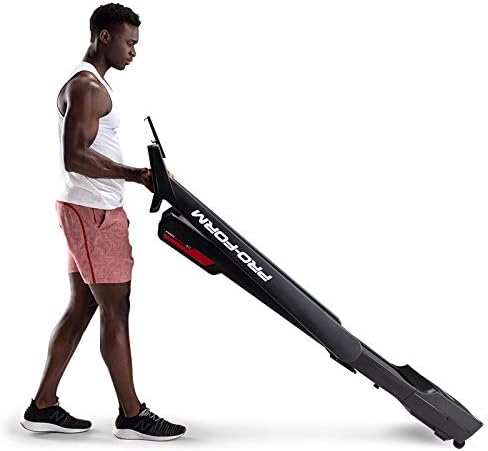
Image: A user demonstrating the folding mechanism of the ProForm City L6 Treadmill for compact storage.
Повер Цоннецтион
Connect the power cord to a grounded outlet. Ensure the safety key is properly inserted into the console before attempting to power on the treadmill.
iFIT Activation
Your treadmill includes a 30-day iFIT membership. To activate, download the iFIT app on your tablet or smartphone. Connect your device to the treadmill via Bluetooth. Follow the on-screen instructions in the iFIT app to set up your account and access workouts.

Image: The treadmill console with a tablet mounted, showing the iFIT application interface.
Упутство за употребу
Покретање траке за трчање
- Ensure the safety key is in place.
- Станите на траку за трчање, стављајући стопала на бочне ограде.
- Притисните тастер СТАРТ button. The belt will begin to move at a low speed.
- Gradually increase speed using the СПЕЕД + buttons or Digital QuickSpeed controls.

Image: A user engaged in a running workout on the ProForm City L6 Treadmill.
Подешавање брзине
Користите СПЕЕД + и БРЗИНА - buttons on the console to adjust the treadmill's speed. The treadmill offers speeds from 0 to 8 MPH. For iFIT workouts, the trainer may automatically adjust your speed.
Stopping the Treadmill
Притисните тастер СТОП button to gradually slow down and stop the treadmill belt. For an emergency stop, pull the safety key from the console.
Коришћење екрана
The 5-inch high-contrast display shows your workout metrics, including distance, speed, estimated calorie burn, and time. When connected to iFIT, enhanced metrics are available through the app.
Одржавање
Чишћење
Редовно чистите траку за трчање са огласомamp cloth and mild soap. Avoid using abrasive cleaners or solvents. Wipe down the console and handrails after each use to remove sweat and debris.
Белт Царе
Inspect the walking belt periodically for wear and tear. Ensure the belt is properly centered and tensioned. Refer to the full product manual (if available from manufacturer) for detailed instructions on belt adjustment and lubrication, if required.
Општа инспекција
Check all bolts and nuts for tightness regularly. Replace any worn components immediately. Unplug the treadmill before performing any maintenance or cleaning.
Решавање проблема
| Проблем | Могући узрок | Решење |
|---|---|---|
| Трака за трчање се не укључује. | Power cord not plugged in; safety key not inserted; circuit breaker tripped. | Уверите се да је кабл за напајање безбедно прикључен. Уметните сигурносни кључ у потпуности. Проверите осигурач у домаћинству. |
| Трака за ходање клизи или оклева. | Затегнутост каиша је превише лабава; каиш захтева подмазивање. | Adjust belt tension (refer to manufacturer's detailed guide). Lubricate belt if necessary (use approved silicone lubricant). |
| Екран конзоле је празан или неправилан. | Loose cable connection; power issue. | Check all cable connections to the console. Unplug and re-plug the treadmill. |
If you encounter issues not listed here, or if solutions do not resolve the problem, contact customer support.
Спецификације
- Модел: ПФТЛ28820
- Бренд: ПроФорм
- Димензије производа: КСНУМКС к КСНУМКС к КСНУМКС цм (КСНУМКС к КСНУМКС к КСНУМКС инча)
- Тежина артикла: 65.77 кг (145 лбс)
- Максимална тежина корисника: 250 фунти (113 кг)
- Опсег брзине: 0-8 MPH Digital QuickSpeed Controls
- Трака за газење: 18 cm x 47 cm
- Приказ: 5-inch High-Contrast LCD
- Снага мотора: 2 ХП
- Посебне карактеристике: SpaceSaver Design (Foldable), iFIT Bluetooth Connectivity
- Извор напајања: Цордед Елецтриц

Image: The ProForm City L6 Treadmill with its physical dimensions indicated.
Гаранција
The ProForm City L6 Folding Treadmill is protected by the following warranties:
- оквир: 10-годишња ограничена гаранција
- Делови и рад: 1-годишња ограничена гаранција
This warranty applies to the original owner and is valid only in the country where the product was purchased. For full warranty terms and conditions, please refer to the warranty card included with your product or visit the official ProForm webсајту.
Подршка
For technical assistance, parts inquiries, or warranty claims, please contact ProForm Customer Service. Have your model number (PFTL28820) and serial number ready when contacting support.
Visit the official ProForm website for additional resources, FAQs, and contact information: ввв.проформ.цом