
1. Производ је готовview
The Cimetech Wireless Ergonomic Mouse (Model TM-004) is designed for comfortable and efficient computer navigation. It features 2.4G wireless connectivity, adjustable DPI settings, and a silent click design.

Слика 1.1: Врх view of the Cimetech Wireless Ergonomic Mouse, showing the scroll wheel and DPI button.
2. Садржај пакета
Молимо вас да проверите да ли су све ставке присутне у пакету:
- Бежични миш
- УСБ пријемник
- Упутство за употребу
3. Упутства за подешавање
3.1 Инсталација батерије
- Пронађите одељак за батерију на доњој страни миша.
- Отворите поклопац одељка за батерије.
- Уметните једну АА батерију (није укључена) у одељак, водећи рачуна о исправном поларитету (+/-).
- Добро затворите поклопац одељка за батерије.
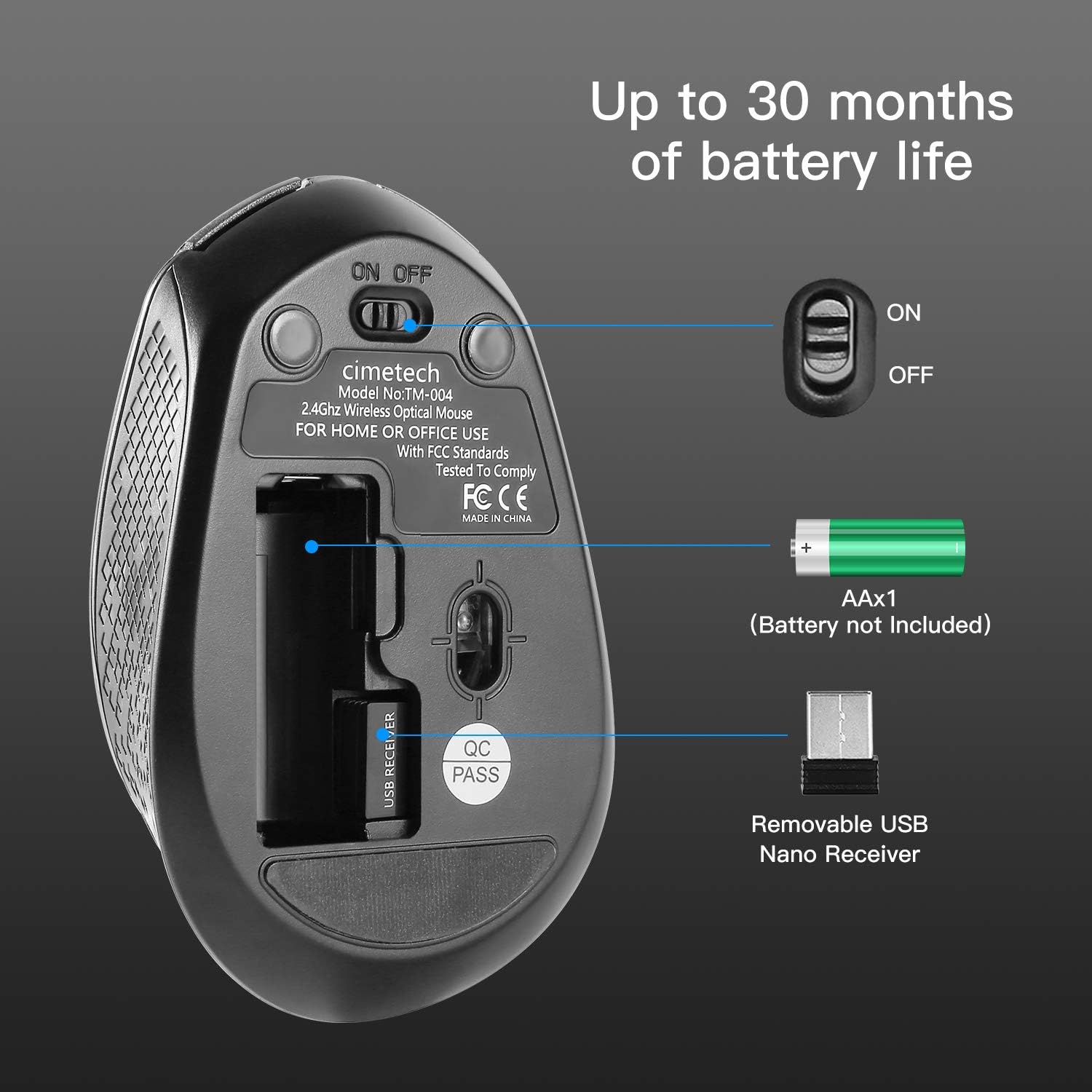
Image 3.1: Underside of the mouse, illustrating the battery compartment, ON/OFF switch, and USB receiver storage.
3.2 Повезивање USB пријемника
- Извадите УСБ пријемник из његовог отвора за складиштење на доњој страни миша.
- Plug the USB receiver into an available USB port on your computer (laptop, desktop, Mac, or PC).
- The mouse is plug-and-play; no additional drivers are typically required.
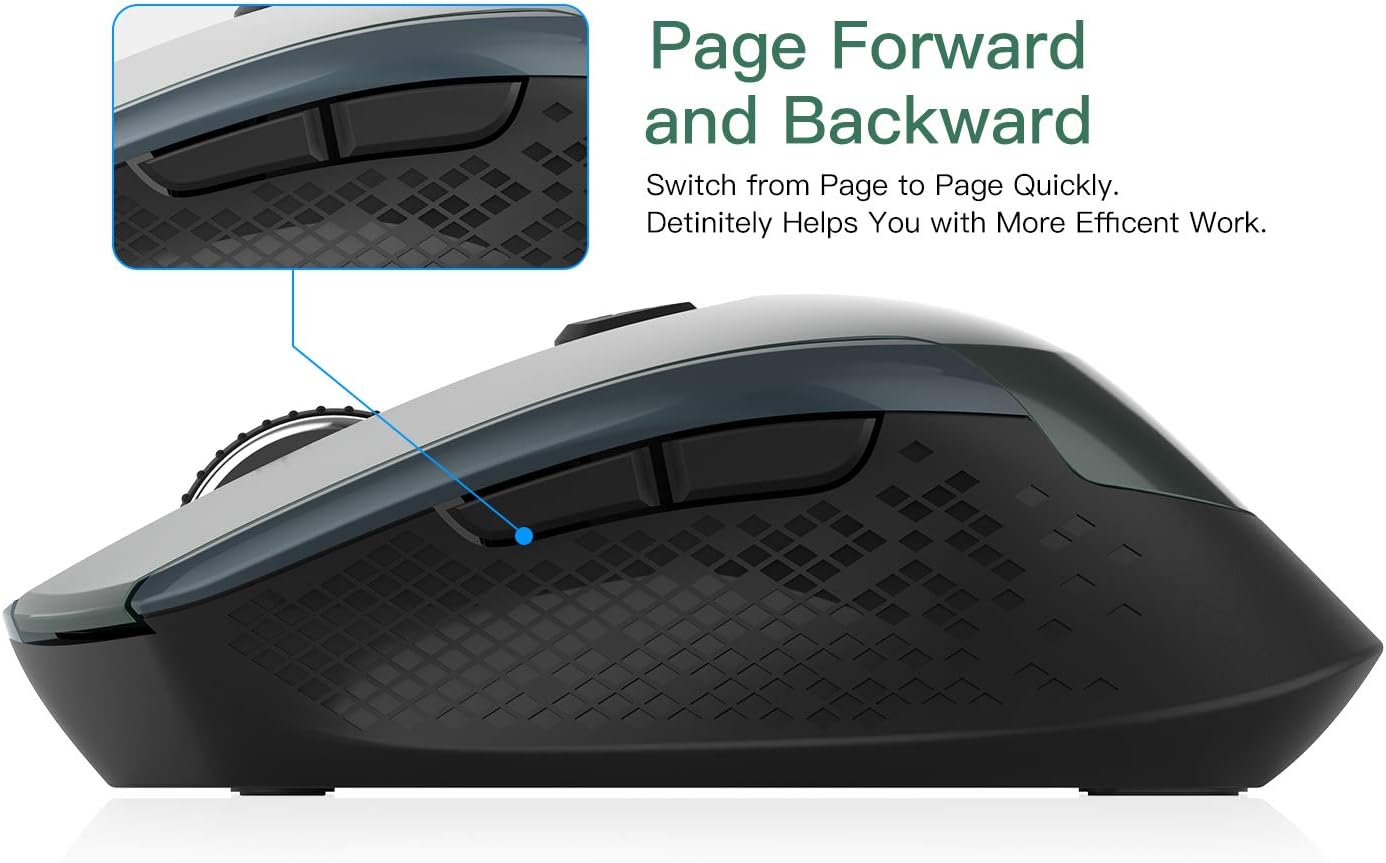
Image 3.2: The USB receiver connected to a laptop, demonstrating the wireless setup.
4. Упутство за употребу
4.1 Укључивање/искључивање
Locate the ON/OFF switch on the underside of the mouse (refer to Image 3.1). Slide the switch to the 'ON' position to power on the mouse. Slide it to 'OFF' when not in use to conserve battery life.
4.2 Подешавање осетљивости DPI
The mouse features 3 adjustable DPI levels (800/1200/1600). To change the DPI, press the DPI button located behind the scroll wheel. Each press cycles through the available DPI settings, allowing for real-time adjustment of cursor speed and precision.
4.3 Функције дугмета
The mouse is equipped with 6 buttons:
- Леви клик: Стандардни избор и активација.
- Десни клик: Accesses context menus.
- Точак за померање: Помера садржај вертикално. Може се притиснути и за функцију клика средњим тастером миша.
- Дугме ДПИ: Подешава осетљивост курсора (DPI).
- Дугме за напред: Навигација напред у web претраживачи или file истраживачи.
- Дугме за назад: Навигација уназад web претраживачи или file истраживачи.

Слика 4.1: Бочна страна view of the mouse, indicating the location of the page forward and backward buttons.
4.4 Ergonomic Design and Silent Clicking
The mouse features an ergonomic design with a soft rubber grip, shaped to fit comfortably in your hand for extended use. Its silent click mechanism reduces operational noise, making it suitable for quiet environments.
4.5 Функција аутоматског спавања
To conserve battery power, the mouse will automatically enter a sleep mode after 15 minutes of inactivity. To wake the mouse, simply move it or click any button.
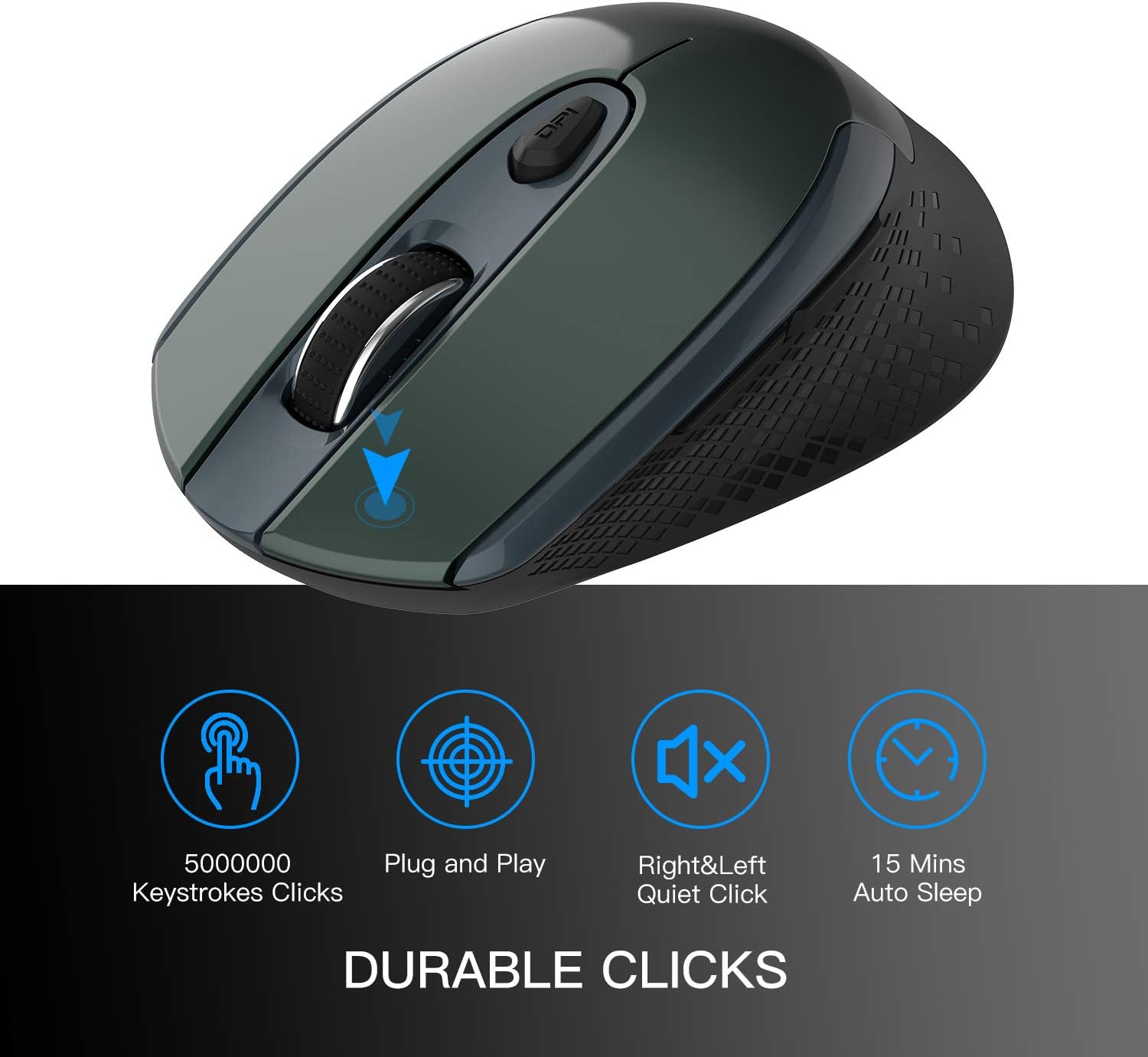
Image 4.2: Visual representation of key features including durable clicks, plug and play, quiet operation, and auto sleep.
5. Одржавање
5.1 Чишћење
To clean the mouse, gently wipe its surface with a soft, dry cloth. Avoid using harsh chemicals or abrasive materials, as these can damage the finish.
5.2 Замена батерије
When the mouse's performance degrades or the cursor becomes erratic, it may indicate a low battery. Replace the AA battery as described in Section 3.1. The mouse is designed for up to 30 months of battery life, depending on usage.
КСНУМКС. Решавање проблема
- Миш не реагује:
- Уверите се да је миш укључен.
- Проверите да ли је батерија правилно инсталирана и да ли је довољно напуњена. Замените је ако је потребно.
- Проверите да ли је УСБ пријемник безбедно прикључен на исправан УСБ порт на рачунару.
- Покушајте да прикључите УСБ пријемник у други УСБ порт.
- Move the mouse closer to the USB receiver to ensure it is within the 50-foot wireless range.
- Неправилно кретање курсора:
- Уверите се да је оптички сензор на дну миша чист и без препрека.
- Use the mouse on a suitable surface; highly reflective or transparent surfaces may affect tracking. A mouse pad is recommended.
- Замените батерију ако је празна.
- Buttons not functioning:
- Ensure the mouse is powered on and connected.
- Test the mouse on a different computer to rule out software or system issues.
If you encounter issues not covered here, please contact customer support for assistance.
7. Спецификације
| Феатуре | Опис |
|---|---|
| Број модела | ТМ-004 |
| Повезивање | 2.4G бежични (USB пријемник) |
| ДПИ подешавања | 800 / 1200 / 1600 (Adjustable) |
| Дугмад | 6 (лево, десно, точкић за скроловање, DPI, напред, назад) |
| Откривање покрета | Оптицал |
| Посебне карактеристике | Ergonomic Design, Portable, Silent Click, Auto Sleep |
| Домет | До 50 стопа |
| Тип батерије | 1 к АА (није укључено) |
| Трајање батерије | Up to 30 months (approximate) |
| Компатибилност | Windows 7/8/10/XP, Vista 7/8, Linux, Mac OS (Desktop, Laptop, PC, MacBook) |
| Тежина артикла | 2.89 унци |
| Димензије (Д к Ш к В) | 4.1 к 2.6 к 1.2 инча (приближно) |

Image 7.1: Approximate dimensions of the mouse.
8. Гаранција и подршка
За информације о гаранцији или техничку подршку, погледајте контакт податке које сте добили уз куповину или посетите званичну веб страницу компаније Cimetech. webсајт. Молимо вас да сачувате доказ о куповини за евентуалне рекламације по гаранцији.