
Увод
This manual provides comprehensive instructions for the setup, operation, maintenance, and troubleshooting of your Avaya 9508 Digital Phone. The Avaya 9508 is designed to deliver reliable, high-quality communication for business environments, offering functionality similar to the Avaya 9600 Series IP Deskphones in a digital telephony setting.
Производ је завршенview
The Avaya 9508 Digital Phone is a robust communication device featuring a sleek design suitable for various business users. It integrates essential telephony functions with an intuitive interface.

Слика 1: Предња страна view of the Avaya 9508 Digital Phone, showing the handset, display, and keypad.

Слика 2: Страна view of the Avaya 9508 Digital Phone, illustrating its ergonomic design with the desk stand.
Упутства за подешавање
1. Распакивање уређаја
Пажљиво извадите све компоненте из паковања. Уверите се да су присутне следеће ставке:
- Avaya 9508 Digital Phone unit
- Слушалица
- Кабл за слушалицу
- Линијски кабл
- Стони сто
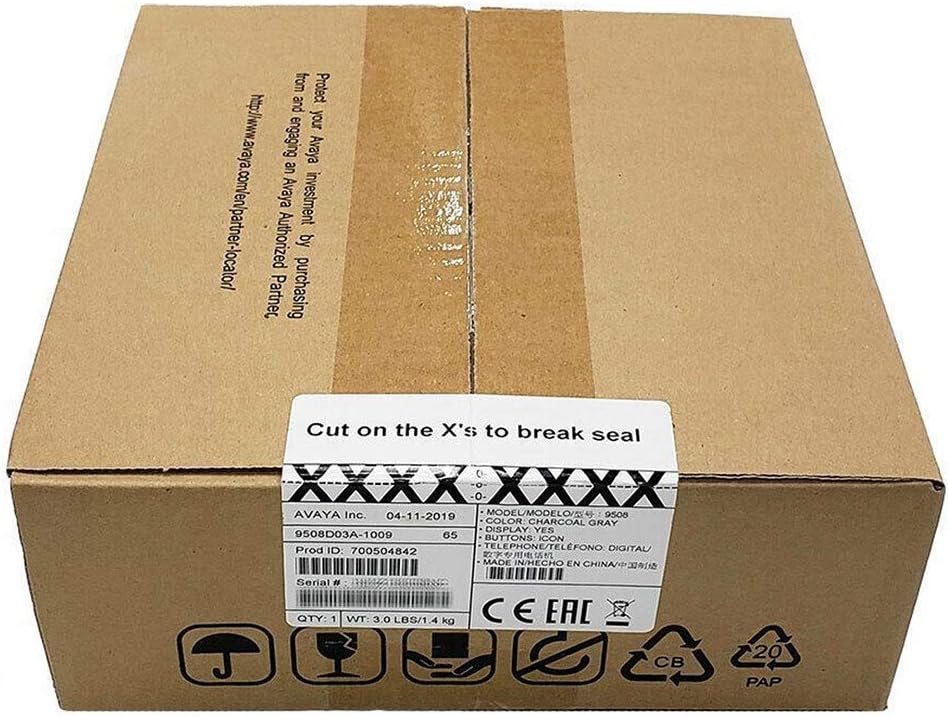
Figure 3: The Avaya 9508 Digital Phone packaging box, indicating product details and sealing instructions.
2. Attaching the Desk Stand
- Locate the slots on the back of the phone unit.
- Align the tabs on the desk stand with these slots.
- Slide the stand into place until it clicks securely.
3. Connecting the Handset
- Plug one end of the coiled handset cord into the handset.
- Plug the other end into the designated handset port on the phone unit (usually marked with a handset icon).
4. Connecting to the Phone System
The Avaya 9508 is a digital phone and requires connection to a compatible Avaya phone system. It cannot be directly connected to a standard analog phone line or a modem/router for VoIP services without the appropriate system infrastructure.
- Connect one end of the line cord to the port labeled "LINE" or "DIGITAL" on the back of the phone.
- Connect the other end of the line cord to the digital station port on your Avaya communication system.
- Ensure the phone receives power from the system or an external power adapter (if required and not included).
Упутство за употребу
Основне функције позива
- Позивање: Lift the handset or press the Speaker button, then dial the number.
- Одговарање на позив: Lift the handset or press the Speaker button when the phone rings.
- Завршавање позива: Replace the handset or press the Speaker button again.
- Поновно бирање: Press the Redial button to call the last dialed number.
Напредне функције
- Задржите: During a call, press the Hold button.
- Трансфер: During a call, press the Transfer button, dial the new extension or number, and then press Transfer again.
- Конференција: During a call, press the Conference button, dial the next participant, and then press Conference again to join all parties.
- Говорна пошта: Press the Voicemail button (often represented by an envelope icon) to access your messages. Follow the audio prompts for setup and retrieval.
- Подешавање јачине звука: Use the volume up/down buttons on the side of the phone to adjust handset, speaker, or ringer volume.
Одржавање
Чишћење
Да бисте одржали изглед и функционалност телефона:
- Користите меку, дamp cloth to wipe the phone's surface.
- Avoid using abrasive cleaners, solvents, or strong chemicals, as these can damage the plastic and electronic components.
- Ensure the phone is disconnected from the power source before cleaning.
Складиштење
If storing the phone for an extended period, disconnect all cables and store it in a cool, dry place away from direct sunlight and extreme temperatures.
Решавање проблема
| Проблем | Могући узрок | Решење |
|---|---|---|
| Нема тона за бирање | Phone not properly connected to the system. | Check all cable connections, especially the line cord to the phone system. Ensure the phone system is operational. |
| Не чујем позиваоца / Позивалац не чује мене | Handset or speaker volume too low; faulty cord. | Adjust volume. Check handset cord connection. Test with another handset if available. |
| Екран је празан | No power; phone system issue. | Verify power connection. Contact your system administrator if other phones are also affected. |
| Дугмад не реагују | Привремени софтверски квар. | Disconnect and reconnect the phone from the system (power cycle). |
If issues persist after attempting these solutions, please contact your system administrator or Avaya support.
Спецификације
- Модел: Avaya 9508 Digital Phone
- Број дела: 700504842
- Димензије (Д к Ш к В): 1.97 x 1.97 x 1.97 инча (приближно, на основу података о производу)
- Тежина артикла: 7.1 унци (200 грама)
- Боја: Црно
- Материјал: Пластика
- Тип телефона: Digital Landline
- Извор напајања: Corded Electric (typically powered by the Avaya communication system)
- Компатибилни уређаји: Requires connection to a compatible Avaya digital communication system.
- Прво доступно: 3. маја 2013. године
Гаранција и подршка
For warranty information, please refer to the documentation provided at the time of purchase or contact your Avaya reseller. Technical support is typically provided by your organization's IT department or the Avaya certified partner who installed your communication system.
For general information about Avaya products, visit the official Avaya webсајт: ввв.аваиа.цом