
1. Kupfuuraview
The Philips TAZ2200 is a versatile portable sound machine designed for enjoying various audio formats. It features a top-loading CD player, a front-loading cassette player, FM radio, Bluetooth 6.0 connectivity, USB playback, and a 3.5mm audio input. Equipped with dynamic bass boost and 6W stereo speakers, it delivers rich sound. The unit can be powered by AC mains or batteries and includes a carrying handle for portability.
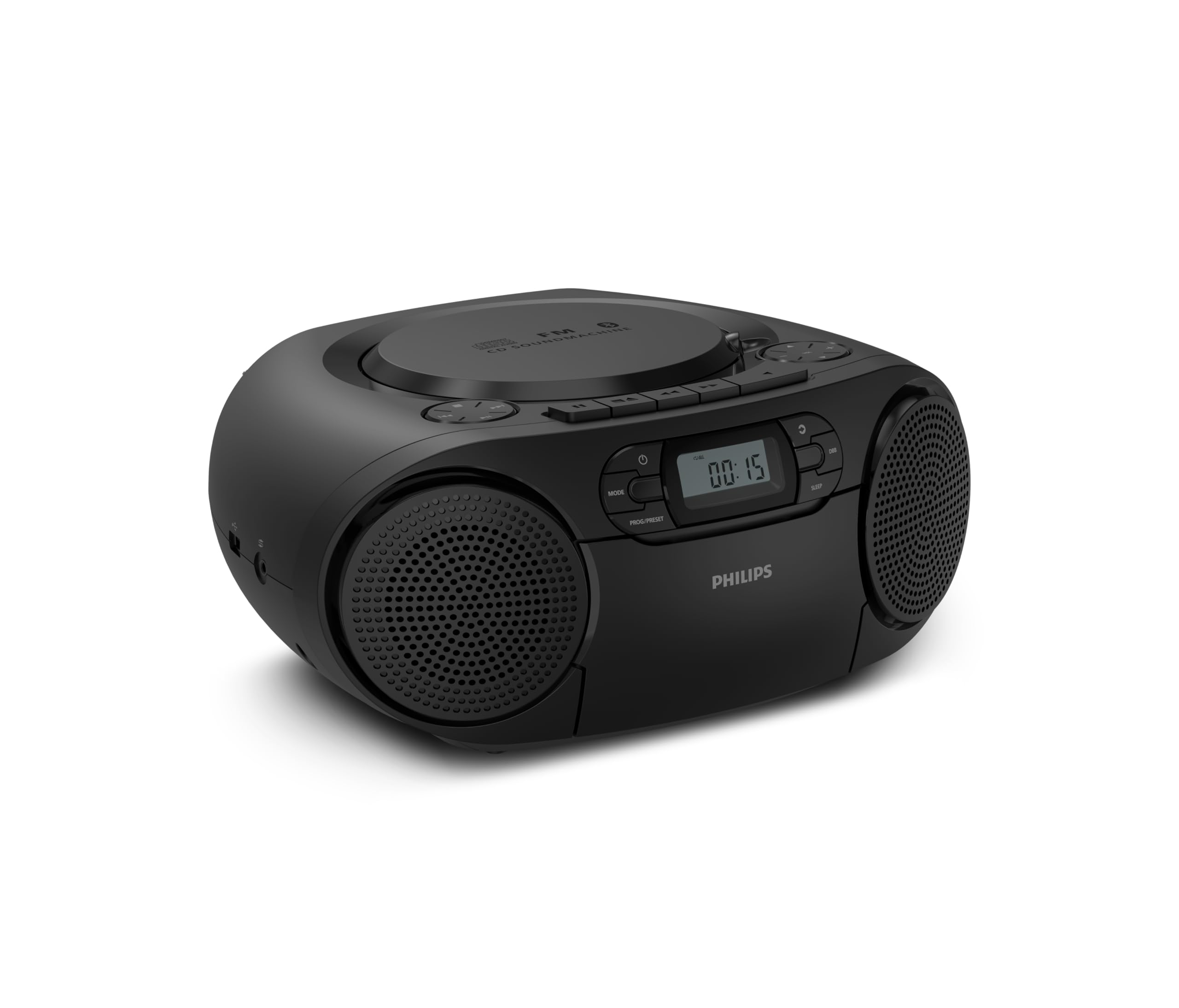
Mberi view of the Philips TAZ2200 CD Soundmachine, showing the main display and control buttons.
2. Safety Information
Please read these safety instructions carefully before using your device and keep them for future reference. Incorrect use may result in hazards.
- Kunobva Simba: Shandisa adapta yemagetsi kana mabhatiri akatarwa chete. Iva nechokwadi chekuti volttage inopindirana nezvinodiwa zvechikwata.
- Mvura uye Unyoro: Usafumure iyo unit kunaya, hunyoro, kudonha, kana kudonha. Usaise zvinhu zvakazadzwa nezvinwiwa, senge mavhasi, payuniti.
- Kufefetedza Ensure adequate ventilation. Do not block any ventilation openings. Maintain a minimum distance around the unit for sufficient ventilation.
- Kupisa: Usaise yuniti padhuze nekupisa sosi semaradiator, marejita ekupisa, zvitofu, kana zvimwe midziyo (kusanganisira amplifiers) zvinoburitsa kupisa.
- Mabhatiri: Follow correct polarity when inserting batteries. Do not mix old and new batteries, or different types of batteries. Remove batteries if the unit is not used for a long period.
- Kuchenesa: Bvisa mudziyo kubva pamagetsi usati wageza. Shandisa jira rakapfava, rakaoma. Usashandise mishonga yekuchenesa mvura kana mishonga yekuchenesa mweya.
- Sevhisi: Usaedze kushandira chigadzirwa ichi iwe pachako. Tumira masevhisi ese kuvashandi vanokwanisa.
3. Chii chiri muBhokisi
Pakuburitsa zvinhu, ndapota iva nechokwadi chekuti zvinhu zvese zvakanyorwa pazasi zviripo:
- Philips TAZ2200 CD Soundmachine
- Simba tambo
- Kurumidza kutanga gwara
- Warranty kabhuku
- Safety sheet
4. Kudzora uye Kubatana
Front Panel Controls
The front panel features the main display, power button, mode selection, program/preset buttons, and dynamic bass boost (DBB) control. Playback controls for CD and USB are also located here.

Detailed pamberi view showing the display, power, mode, program/preset, and DBB buttons.
Side and Rear Connections
The side of the unit provides a USB port for digital audio playback and a 3.5mm audio input jack for connecting external devices.

Side view illustrating the USB port and Audio Input jack.
The top of the unit houses the CD compartment and additional playback controls, while the rear features the AC power input and the FM antenna.

Top view showing the CD compartment and associated controls.

Rear view displaying the AC power input and the telescopic FM antenna.
5. Setup
5.1 Simba rekupa
AC Simba
- Ita shuwa kuti unit yakadzimwa.
- Connect the supplied power cable to the AC IN socket on the rear of the sound machine.
- Plug the other end of the power cable into a wall power outlet.
Battery Power
For portable use, the unit can operate on 6 x C-type batteries (not included).
- Vhura bhatiri repamhepo chivharo chiri pasi peiyo unit.
- Insert 6 C-type batteries, ensuring correct polarity (+/-) as indicated inside the compartment.
- Vhara chivharo chebhatiri zvakachengeteka.
5.2 Antenna Kugadziriswa
For optimal FM radio reception, fully extend the telescopic antenna located at the rear of the unit. Adjust its position and angle to achieve the clearest signal.
6. Operating Instructions
6.1 General Operation
- Batidza/Kudzima: Press the SIMBA bhatani rekubatidza kana kudzima unit.
- Kudzora inzwi: Shandisa iyo VOL+ or VOL - mabhatani ekugadzirisa vhoriyamu danho.
- Dynamic Bass Boost (DBB): Press the DBB button to activate or deactivate the dynamic bass boost feature for enhanced bass sound.
- Sarudzo yeModhi: Press the MODE button repeatedly to switch between CD, Cassette, FM Radio, Bluetooth, USB, and Audio Input modes.
6.2 Kutamba kweCD
- Open the CD compartment cover on top of the unit.
- Place a CD (CD, CD-R, or CD-RW) with the label side facing up onto the spindle.
- Vhara iyo CD compartment cover.
- Press the MODE bhatani kusarudza CD modhi.
- Press the TAMBA/KUMIRA bhatani kutanga kutamba.
- Shandisa iyo SKIP mabhatani (|< or >> |) kusvetuka makwara.
- Dzvanya uye ubate |< or >> | to search within a track.
- Press the MIRA bhatani kumisa kutamba.
6.3 Kutamba Makaseti
- Open the cassette compartment door on the front of the unit.
- Isa tepi yekaseti yakavhurika mupendero wakatarisa kumusoro.
- Vhara gonhi rekaseti.
- Press the MODE bhatani rekusarudza Cassette mode.
- Press the ITAMBA bhatani kutanga kutamba.
- Shandisa iyo KUSIRIRA MBERI or REWIND buttons to quickly advance or rewind the tape.
- Press the MIRA bhatani kumisa kutamba.
6.4 FM Radio
- Press the MODE bhatani rekusarudza FM Radio mode.
- Auto Ongororo: Dzvanya uye ubate iyo PROG/PRESET bhatani rekuti uskene otomatiki uye uchengete zviteshi zveFM zviripo.
- Chinyorwa Kugadziridza: Press the TUNING mabhatani (|< or >> |) kuti ugadzirise nemaoko kuti zvienderane nefrequency yaunoda.
- Kuchengeta Presets: After tuning to a station, press PROG/PRESET once, then use |< or >> | to select a preset number, and press PROG/PRESET zvakare kusimbisa.
- Kuyeuka Presets: Mune FM modhi, tinya PROG/PRESET repeatedly to cycle through saved preset stations.
6.5 Kutamba kweBluetooth
- Press the MODE button to select Bluetooth mode. The display will show 'BT' and flash, indicating it's in pairing mode.
- Pamudziyo wako unogoneswa neBluetooth (smartphone, piritsi), gonesa Bluetooth uye tsvaga zvishandiso zviripo.
- Select "Philips TAZ2200" from the list of devices.
- Once paired, the unit will emit a confirmation sound, and 'BT' will stop flashing.
- Start playing audio on your connected device. The sound will be streamed to the sound machine.
6.6 USB Playback
- Insert a USB flash drive into the USB port on the side of the unit.
- Press the MODE bhatani kusarudza USB mode.
- Iyo unit ichaona otomatiki uye yotanga kutamba inowirirana odhiyo files (MP3, WAV, WMA).
- Use the playback controls (TAMBA/KUMIRA, SKIP, MIRA) as you would for CD playback.
6.7 Audio Input (AUX)
- Connect one end of a 3.5mm audio cable (not included) to the AUDIO IN jack on the side of the sound machine.
- Connect the other end of the audio cable to the headphone jack or audio output of your external device (e.g., MP3 player, turntable).
- Press the MODE button to select Audio Input mode.
- Start playing audio on your external device. The sound will be played through the sound machine.
7. Kuchengeta
- Kuchenesa Chikamu: Pukuta kunze kwechinhu ne d yakapfava, zvishomaamp jira. Usashandise abrasive cleaners kana solvents.
- CD Player Care: Keep the CD compartment clean. If the lens is dirty, use a specialized CD lens cleaner. Avoid touching the lens.
- Cassette Player Care: Periodically clean the tape heads and pinch rollers with a cotton swab lightly dampyakasanganiswa ne isopropyl doro.
- Kutsiva Bhatiri: If using batteries, replace all 6 C-type batteries when the unit's performance diminishes or if the unit will not be used for an extended period.
- Kuchengeta: Kana isiri kushandiswa, chengetai mudziyo uyu munzvimbo yakachena, yakaoma kure nezuva rakananga uye tembiricha yakanyanya.
8. Kugadzirisa matambudziko
If you encounter any issues with your Philips TAZ2200, please refer to the table below for common problems and solutions.
| Dambudziko | Zvinogona Kukonzera | Solution |
|---|---|---|
| Hapana simba | Waya yemagetsi haina kubatana; Mabhatiri apera kana kuti akaiswa zvisiri izvo. | Tarisa kubatana kwemagetsi eAC; Tsiva mabhatiri kana kuti simbisa kuti polarity yacho yakarurama. |
| Hapana ruzha | Vhoriyamu yakadzikira zvakanyanya; Modhi isiriyo yakasarudzwa; Mahedhifoni akabatana. | Increase volume; Select the correct source mode (CD, FM, BT, etc.); Disconnect headphones. |
| CD haisi kutamba | CD yakaiswa zvisizvo; CD yakasviba kana kuti yakakwenywa; fomati yeCD haitsigirwi. | Insert CD with label side up; Clean or replace CD; Ensure CD is CD-R/RW compatible. |
| Cassette not playing | Cassette inserted incorrectly; Tape is damaged. | Insert cassette correctly; Try a different cassette. |
| Kugamuchira FM kwakashata | Antena haina kutambanudza kana kuiswa zvakanaka; Chiratidzo chisina kusimba. | Tambanudza uye gadzirisa antenna ye telescopic zvizere; Edza kufambisa antenna kuenda kune imwe nzvimbo. |
| Bluetooth haina kubatana | Unit not in pairing mode; Bluetooth device too far; Device already paired with another unit. | Ensure unit is in Bluetooth mode and flashing; Move device closer; Disconnect from other devices. |
| USB yekutamba nyaya | Dhiraivha yeUSB haina kuiswa nemazvo; Haienderane file format; USB drive corrupted. | Reinsert USB drive; Ensure files are MP3, WAV, or WMA; Try a different USB drive. |
9. Zvinotsanangurwa
| Feature | Tsanangudzo |
|---|---|
| Brand | FILIPS |
| Model Number | TAZ2200/10 |
| Kubatana Technology | Bluetooth 6.0, USB, Audio Input (3.5mm) |
| Mutauri Rudzi | Stereo (2 speakers) |
| Output Power | 6 Watts (max) |
| Inotsigirwa Media | CD, CD-R, CD-RW, Cassette, USB (MP3, WAV, WMA) |
| Radio Tuner | Digital FM with 20 presets |
| Simba Source | AC (wired), 6 x C-type batteries (not included) |
| Dimensions (LxWxH) | 24.5 x 28.5 x 12.5 cm |
| Kurema | 1.35 makirogiramu |
| Color | Sirivha |
10. Warranty uye Tsigiro
10.1 Chigadzirwa Chivimbiso
This Philips TAZ2200 CD Soundmachine comes with a 2-makore waranti kubva pazuva rekutenga. Ndapota chengetedza humbowo hwako hwekutenga kwezvichemo zvewaranti. Iyo waranti inovhara kukanganisa kwekugadzira uye kusashanda pasi pemamiriro ekushandiswa akajairwa.
10.2 Mutengi Tsigiro
For technical assistance, troubleshooting beyond this manual, or warranty service, please refer to the contact information provided in the warranty booklet included with your product. You can also visit the official Philips support website for your region for further assistance and FAQs.