1. Nhanganyaya
The Audizio Desio is a versatile digital radio that combines classic aesthetics with modern audio technology. It features DAB, DAB+, and FM tuning for clear radio reception, along with Bluetooth 5.0 for wireless streaming, a USB port for media playback, and a 3.5mm AUX input for wired connections. The radio is equipped with a 2.4-inch color LCD display and integrated stereo speakers, making it suitable for various environments such as living rooms, kitchens, or bedrooms.
This manual provides detailed instructions for setting up, operating, and maintaining your Audizio Desio radio. Please read it thoroughly before use to ensure proper functionality and to maximize your listening experience.
2. Safety Information
- Ita shuwa kuti adapta yemagetsi voltage inoenderana nemagetsi emunharaunda yako usati wabatanidza.
- Usaise mudziyo wacho pamvura, hunyoro, kana tembiricha yakanyanya.
- Dzivisa kuisa chikwata pedyo nezvinopisa kana muzuva rakananga.
- Usavhura casing; endesa masevhisi ese kuvashandi vanokwanisa.
- Chengetedza chikwata kure nemasimba ane magineti.
- Chenesa chikwata chete nemucheka wakapfava, wakaoma.
3. Package Zviri mukati
Ndapota tarisai kuti zvinhu zvese zviripo pakuburitsa zvinhu:
- Audizio Desio DAB/DAB+/FM Radio
- Adapter yemagetsi (DC 5V)
- Remote Control
- User Manual
4. Kudzora uye Kubatana
Front Panel Controls
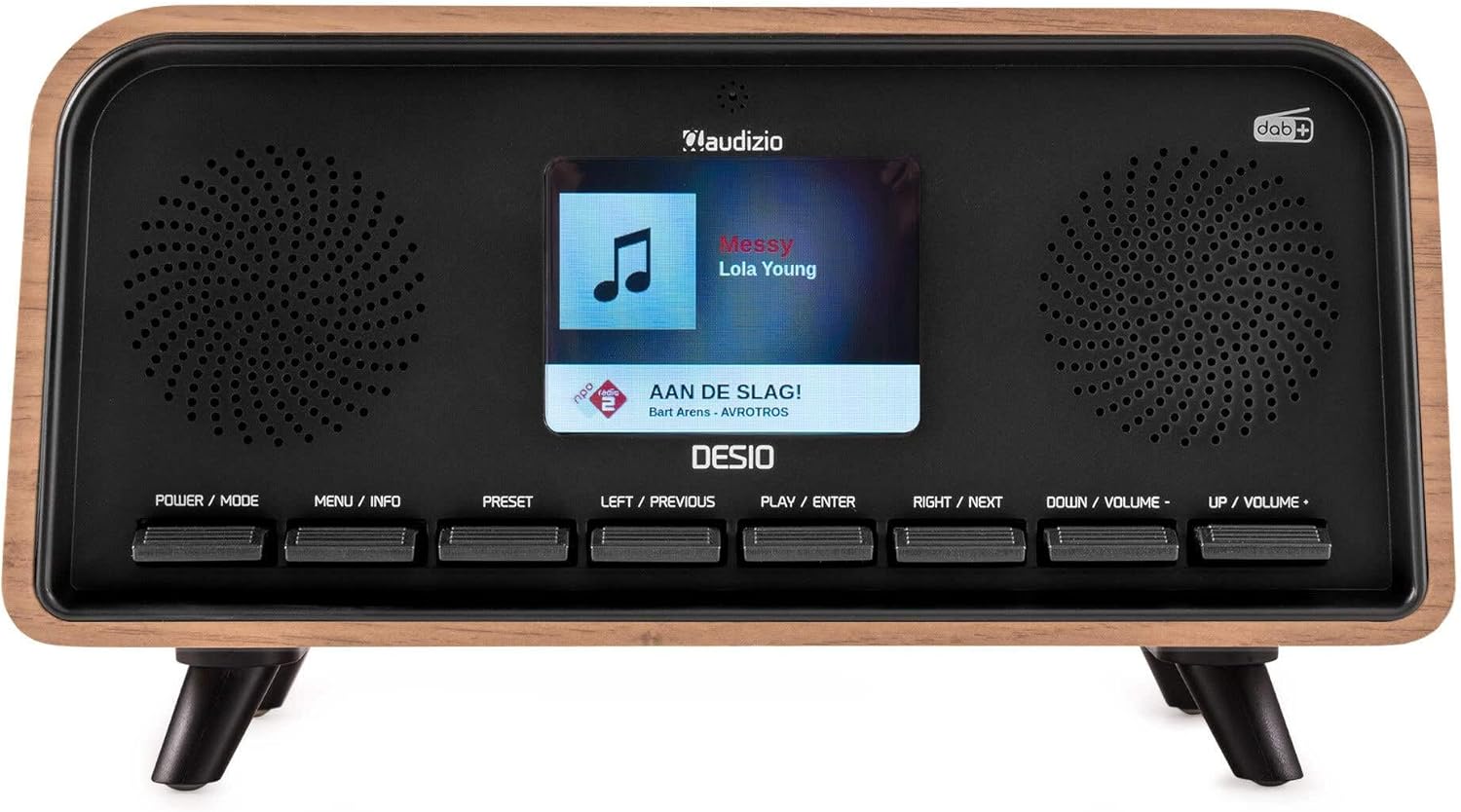
Mberi view of the Audizio Desio radio, showing the display playing music with artist and track information. The control buttons are visible below the screen.
- POWER / MODE: Press to turn on/off. Press and hold to switch between DAB, FM, Bluetooth, USB, and AUX modes.
- MENU / INFO: Press to access menu options. In playback mode, press to cycle through information display.
- PRESET: Press to recall saved stations. Press and hold to save current station.
- LEFT / PREVIOUS: Navigate left in menus, or skip to previous track/station.
- PLAY / ENTER: Confirm selection in menus, or play/pause media.
- RIGHT / NEXT: Navigate right in menus, or skip to next track/station.
- DOWN / VOLUME -: Decrease volume, or navigate down in menus.
- UP / VOLUME +: Increase volume, or navigate up in menus.
Rear Panel Connections
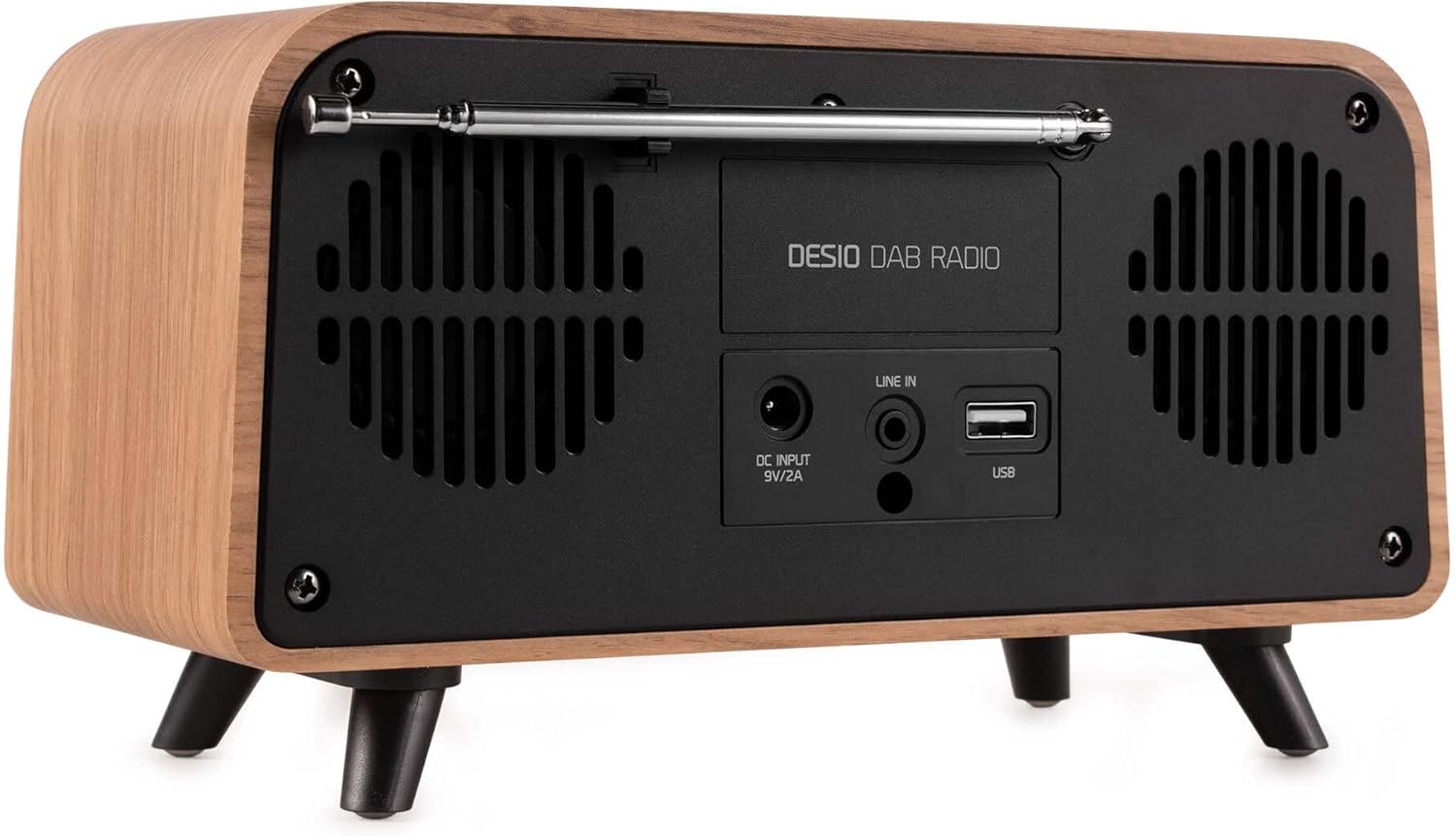
Rear view of the Audizio Desio radio, highlighting the DC INPUT 9V/2A, LINE IN (3.5mm AUX), and USB ports. The telescopic antenna is extended.
- DC INPUT 9V/2A: Batanidza adapta yemagetsi yakapihwa pano.
- LINE IN (3.5mm AUX): Batanidza ekunze ekuteerera midziyo uchishandisa 3.5mm yekuteerera tambo.
- USB: Insert a USB flash drive for MP3 playback.
- Telescopic Antenna: Extend fully for optimal DAB/DAB+ and FM reception.
5. Kutanga Setup
- Batanidza Simba: Plug the provided DC 5V power adapter into the DC INPUT port on the rear of the radio, then plug the adapter into a wall outlet.
- Wedzera Antenna: Fully extend the telescopic antenna located on the rear of the unit for best reception.
- Power On: Press the SIMBA/MODE bhatani rekubatidza redhiyo.
- First-time DAB Scan: Upon first power-on, the radio will automatically perform a full scan for DAB/DAB+ stations. This may take a few minutes. The display will show the scanning progress.
- Seta Nguva/Zuva: The time and date will usually be set automatically via DAB signal. If not, you can manually set them via the menu.
6. Operating Instructions
6.1 Kushanda kweDAB/DAB+ Redhiyo

Mberi view of the Audizio Desio radio, displaying a DAB radio station ('NPO Klassiek') and current time.
- Select DAB Mode: Press the SIMBA/MODE button repeatedly until 'DAB' is displayed.
- Skena Zviteshi: If no stations are found or you wish to rescan, press MENU / INFO, wobva washandisa LEFT / PREVIOUS or KURUDZO / ZVINOTEVERA to select 'Full Scan' and press PLAY / ENTER.
- Select Station: Shandisa iyo LEFT / PREVIOUS or KURUDZO / ZVINOTEVERA buttons to browse available stations. Press PLAY / ENTER kusarudza chiteshi.
- Sevha Preset: Kuti uchengetedze chiteshi, tinya wobata bhatani rekuti PRESET bhatani. Shandisa LEFT / PREVIOUS or KURUDZO / ZVINOTEVERA to choose a preset number (1-50), then press PLAY / ENTER kusimbisa.
- Recall Preset: To recall a saved station, press the PRESET button (do not hold). Use LEFT / PREVIOUS or KURUDZO / ZVINOTEVERA kuti usarudze preset yaunoda, wobva wadzvanya PLAY / ENTER.

Mberi view of the Audizio Desio radio, showing the 'Preset Recall' menu on the display, indicating empty preset slots.
6.2 FM Radio Kushanda
- Sarudza Modhi yeFM: Press the SIMBA/MODE button repeatedly until 'FM' is displayed.
- Auto Ongororo: Dzvanya uye ubate PLAY / ENTER to automatically scan for and save available FM stations.
- Chinyorwa Kugadziridza: Shandisa LEFT / PREVIOUS or KURUDZO / ZVINOTEVERA to fine-tune the frequency.
- Save/Recall Presets: Follow the same procedure as for DAB radio (Section 6.1).
6.3 Bluetooth (BT) Operation

Mberi view of the Audizio Desio radio, with the display showing 'BT' (Bluetooth) mode and 'Connected' status.
- Select BT Mode: Press the SIMBA/MODE button repeatedly until 'BT' is displayed. The radio will enter pairing mode, indicated by a flashing Bluetooth icon.
- Paya Chishandiso: On your smartphone, tablet, or laptop, enable Bluetooth and search for available devices. Select 'Audizio Desio' from the list.
- Batanidza: Once paired, the display will show 'Connected'. You can now stream audio from your device to the radio.
- Playback Control: Use your connected device or the radio's PLAY / ENTER, LEFT / PREVIOUS,uye KURUDZO / ZVINOTEVERA mabhatani ekudzora kutamba.
6.4 USB Playback

Mberi view of the Audizio Desio radio, with the display showing 'USB' mode, current time, and details of an MP3 file iri kuridzwa.
- Isa USB Drive: Isa USB flash drive (yakarongwa kuita FAT32) ine MP3 files into the USB port on the rear of the radio.
- Sarudza USB Mode: Press the SIMBA/MODE button repeatedly until 'USB' is displayed. The radio will automatically start playing the first compatible audio file.
- Navigate Files: Shandisa LEFT / PREVIOUS or KURUDZO / ZVINOTEVERA to skip tracks. Press PLAY / ENTER kumbomira/kutangisazve kutamba.
6.5 AUX Input
- Batanidza mudziyo: Connect an external audio device (e.g., MP3 player, smartphone) to the 'LINE IN' (3.5mm AUX) port on the rear of the radio using a 3.5mm audio cable (not included).
- Sarudza AUX Mode: Press the SIMBA/MODE button repeatedly until 'AUX' is displayed.
- Dzora Kutamba Playback is controlled directly from your connected external device. Adjust volume using the radio's volume controls.
6.6 Mabasa eAlarm neTimer
- Kuseta maAlarms: Wana marongero eararm uchishandisa MENU / INFO button. You can set multiple alarms with customizable sources (DAB, FM, Buzzer), volume, and recurrence (daily, weekdays, weekends).
- Kurara Nguva: The sleep timer allows the radio to turn off automatically after a set period. Access this function via the MENU / INFO button and select the desired duration.
- Snooze Basa: When an alarm sounds, press any button (except Power) to activate the snooze function for a short period.
7. Kuchengeta
- Kuchenesa: Use a soft, dry, lint-free cloth to clean the radio's surface. Do not use abrasive cleaners, waxes, or solvents.
- Antenna Care: Handle the telescopic antenna carefully to avoid bending or breaking.
- Kuchengeta: If storing the radio for an extended period, disconnect it from the power supply and store it in a cool, dry place.
8. Kugadzirisa matambudziko
| Dambudziko | Zvinogona Kukonzera | Solution |
|---|---|---|
| Hapana simba | Power adapta haina kubatana kana kukanganisa kubuda. | Check power adapter connection and try a different outlet. |
| Kusagamuchirwa zvakanaka kweDAB/FM | Antena haina kureba zvakakwana kana kuti nzvimbo isina kusimba yechiratidzo. | Fully extend the antenna. Try repositioning the radio. Perform a full scan. |
| Bluetooth haina kubatana | Radio not in BT mode, device not in pairing mode, or too far away. | Ensure radio is in BT mode. Put your device in pairing mode. Move device closer to the radio (within 10m). |
| Kutamba kwe USB hakusi kushanda | USB drive not inserted correctly, unsupported file format, or drive not FAT32. | Isazve USB drive. Iva nechokwadi chekuti files are MP3. Check USB drive format (FAT32). |
| No sound from AUX | Radio not in AUX mode, cable faulty, or external device volume low. | Select AUX mode. Check 3.5mm cable. Increase volume on both radio and external device. |
9. Zvinyorwa zveUnyanzvi
- Brand: Audizio
- Muenzaniso: Desio
- Tuner Technology: FM, DAB+
- Bluetooth: Version 5.0 (Range: 10m)
- Playback Options Bluetooth, USB, 3.5mm AUX input
- Preset Stations: 50
- Ratidza: 2.4 padiki Ruvara LCD
- Mabasa: Alarm, Sleep Timer, Snooze, Dimming, Week/Weekend Alarm
- Max Speaker Power: 30 Watt
- Magetsi: DC 5V (Power Adapter)
- Zviyero zveChigadzirwa (H x W x D): 32 x 16 x 18 cm
- Kurema 1.66 kg
10. Warranty uye Tsigiro
This product comes with a standard manufacturer's warranty. For detailed warranty terms and conditions, please refer to the documentation provided at the time of purchase or contact your retailer.
For technical support, troubleshooting assistance, or service inquiries, please contact the Audizio customer support team or your local dealer. Please have your product model number (Desio) and purchase information ready when contacting support.