
1. Kupfuuraview
The GetPairr Vista 11-inch Portable Display Audio Android Navigation System is designed to enhance your in-car entertainment and navigation experience. Featuring a built-in Android system, it supports wireless connectivity for popular smartphone integration platforms and offers versatile audio output options.
Zvinokosha:
- Integrated Android System: Equipped with a 4-core CPU, 2GB RAM, and 32GB ROM, allowing direct access to streaming applications like YouTube, Netflix, and Spotify via Wi-Fi tethering.
- CarPlay isina waya/Android Auto: Seamlessly connect your smartphone via Bluetooth for wireless access to navigation, music, messaging, and calls, eliminating cable clutter.
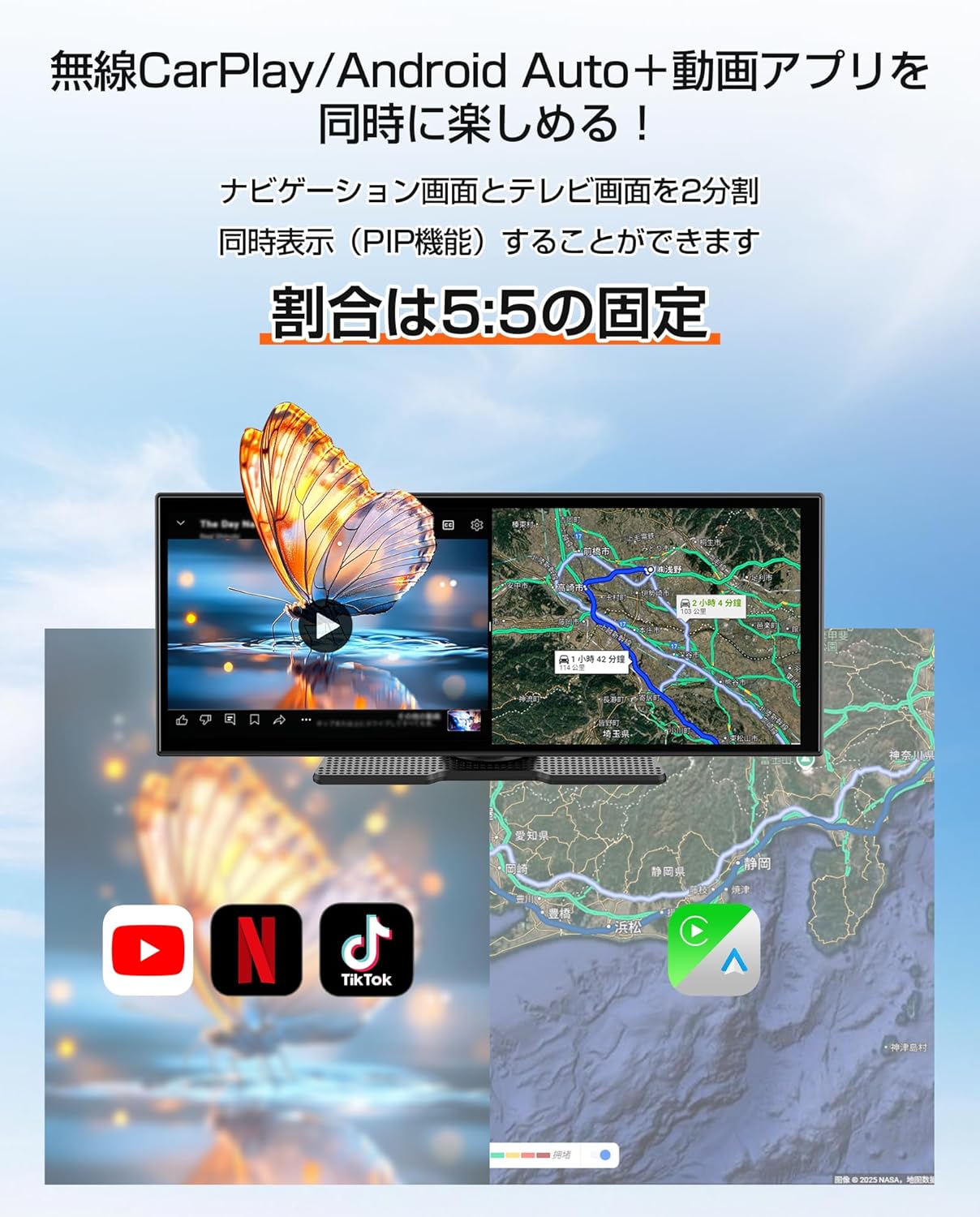
- Smart Split Screen (PIP Function): The 11-inch wide display supports a 5:5 split-screen ratio, enabling simultaneous viewing of navigation and other Android applications.
- Dual Bluetooth Connectivity: Allows simultaneous connection to your smartphone for input and your car's audio system for wireless output to car speakers.
- High-Resolution Display: An 11-inch screen with 1920x720 resolution provides clear visuals for maps, videos, and applications, improving visibility and operational ease while driving.

2. Setup
2.1 Package Zviri mukati
Tarisa uone kuti zvinhu zvese zviripo mupakeji:
- Portable Display Audio Main Unit
- Mira
- AUX Cable
- Cigarette Lighter Plug Adapter
- Mushandisi Chinyorwa (gwaro iri)

2.2 Kuiswa
- Kuisa iyo Unit: Attach the provided stand to the main unit. Secure the stand to your dashboard using the 3M tape. Ensure the unit is placed in a location that does not obstruct your view or interfere with driving.
- Power Connection: Connect the cigarette lighter plug adapter to the main unit's 5V power cable. Insert the cigarette lighter plug into your vehicle's accessory socket. The unit supports both 12V and 24V vehicle systems.
- Kutanga Kubatidza Once connected, the unit will power on automatically when the vehicle's ignition is turned on.


3. Operating Instructions
3.1 Android System and App Usage
The GetPairr Vista unit runs on an Android operating system, allowing you to install and use various applications.
- Kubatanidza Wi-Fi: To access online services and download apps, connect the unit to a Wi-Fi network. This can be done via your smartphone's tethering function or an in-car Wi-Fi hotspot.
- Kuiswa kweApp: Use the pre-installed app store or other compatible methods to download and install applications like YouTube, Netflix, Spotify, etc.
- Navigation Utilize navigation apps directly on the unit or through connected CarPlay/Android Auto.

3.2 Wireless CarPlay / Android Auto Connection
Connect your smartphone wirelessly to access CarPlay or Android Auto features.
- Kubatanidza: On your smartphone, enable Bluetooth and search for the GetPairr Vista unit. Pair the devices.
- Automatic Connection: Once paired, CarPlay or Android Auto will automatically connect when the unit powers on.
- Kushanda Access your phone's navigation, music, messages, and make calls directly from the unit's display.
3.3 Split Screen Function (PIP)
The 11-inch display supports a 5:5 split-screen mode, allowing two applications to run side-by-side.
- Activation: Refer to the on-screen interface for activating split-screen mode.
- Kushandisa: For example, display navigation on one half (via CarPlay/Android Auto) and a video streaming app (via the built-in Android system) on the other.

3.4 Audio Output Sarudzo
The unit offers multiple ways to output audio to your car's speakers.
- Dual Bluetooth: The unit can receive audio from your smartphone via Bluetooth and transmit it to your car's audio system (if it supports Bluetooth audio input).
- AUX Cable: Connect the provided AUX cable from the unit to your car's AUX input for a wired audio connection.
- FM Rinofambisa: The unit can transmit audio via an FM frequency, which you can tune into on your car's radio.
- Mutauri Akavakirwa-mukati: The unit has a small built-in speaker for basic audio output. For optimal sound quality, connecting to your car's audio system is recommended.

4. Kuchengeta
4.1 Kuchenesa
To maintain the display's clarity and unit's appearance:
- pukuta skrini zvinyoro nyoro nemucheka wakapfava, usina lint. Pakuoma musoro, zvishoma damppukuta jira nemvura kana muchina wekuchenesa usingakuvadzi skrini.
- Avoid using abrasive cleaners, solvents, or aerosol sprays directly on the unit.
- Chengetedza zviteshi zvisina guruva nemarara.
4.2 Kuchengeta
Kana isingashandiswe kwenguva yakareba:
- Bvisa chikwata kubva pamagetsi.
- Chengetedza chikwata munzvimbo inotonhorera, yakaoma, kure nechiedza chezuva uye kupisa kwakanyanya.
5. Kugadzirisa matambudziko
If you encounter issues with your GetPairr Vista unit, refer to the following common solutions:
- Hapana Simba: Ensure the cigarette lighter adapter is securely plugged into both the unit and the vehicle's accessory socket. Check if the vehicle's accessory socket is receiving power.
- Hapana Inzwi: Verify the audio output method selected (Bluetooth, AUX, FM). Ensure your car's audio system is set to the correct input source. Adjust volume on both the unit and your car's audio system.
- CarPlay/Android Auto Haisi Kubatana: Ensure Bluetooth is enabled on your smartphone and the unit. Try unpairing and re-pairing the devices. Check for any software updates for your smartphone or the unit.
- Slow Performance/App Freezing: Close unused applications. Ensure a stable Wi-Fi connection for online activities. Restart the unit if necessary.
- Sikirini haina kupindura: Perform a soft reset by holding the power button (if available) or disconnecting and reconnecting power.
Kana matambudziko akaramba, tapota taura nerutsigiro rwevatengi.
6. Zvinotsanangurwa
| Feature | Detail |
|---|---|
| Screen Size | 11 inches |
| Display Type | LCD |
| Resolution | 1920x720 |
| Operating System | Android, Wireless Apple CarPlay, Wireless Android Auto |
| CPU | 4-core |
| RAM | 2GB |
| ROM | 32GB |
| Kubatana | Bluetooth, USB, Wi-Fi |
| Audio Output Mode | Stereo |
| Mounting Type | 3M Tepi |
| Product Dimensions | 26 masendimita (L) x 2.7 masendimita (W) x 10.5 masendimita (H) |
| Kurema | 1 kg |
| Power Input | DC 12V/24V (via cigarette lighter adapter) |
| Inosanganisirwa Zvikamu | AUX Cable, Cigarette Plug Adapter, Portable Display Audio Main Unit, User Manual |
7. Warranty & Tsigiro
7.1 Ruzivo rweWaranti
The GetPairr Vista unit comes with a 1-year mugadziri waranti from the date of purchase. In the event of any defects or malfunctions, the manufacturer offers exchange or refund services.
7.2 Mutengi Tsigiro
For inquiries or support, please contact us via the official LINE account: @getpairr.