1. Nhanganyaya
Welcome to the Ergomotion ErgoSportive Smart Adjustable Bed Frame user manual. This guide provides essential information for the safe and efficient operation, setup, and maintenance of your new adjustable bed frame. The ErgoSportive combines advanced sleep technology with customizable comfort to enhance your sleep experience.
Please read this manual thoroughly before assembly and use, and retain it for future reference.
2. Ruzivo Rwakakosha Chekuchengetedza
Kuti uderedze njodzi yekubatwa nemagetsi, kutsva, moto, kana kukuvara, gara uchitevera matanho ekutanga ekuchengetedza:
- Read all instructions before using the bed frame.
- Unplug the bed frame from the power outlet before cleaning or servicing.
- Chengetedza tambo yemagetsi kure nenzvimbo dzinopisa.
- Do not operate the bed frame if the cord or plug is damaged.
- Usashandise kunze.
- Do not allow children or individuals with reduced physical, sensory, or mental capabilities to operate the bed frame without supervision.
- Ita shuwa kuti zvikamu zvese zvakasungirirwa zvakachengeteka zvisati zvashandiswa.
3. Package Zviri mukati
Iva nechokwadi chekuti zvikamu zvese zviripo usati watanga kusangana:
- Adjustable Bed Frame (Platform Frame)
- Legs (Quantity: Varies by model, typically 6-9)
- Remote Control
- Power Cord uye Adapter
- Mattress Retainer Bar(s)
- Mushandisi Manual (Gwaro iri)

Figure 1: Ergomotion ErgoSportive Smart Adjustable Bed Frame (Twin XL) in a partially elevated position. This image illustrates the main components of the bed frame.
4. Setup Instructions
Assembly is required for this product. Please follow these steps carefully:
- Unpack Components: Bvisa zvinhu zvose nokungwarira kubva mupakeji wozviisa panzvimbo yakachena, yakati sandara.
- Batanidza Makumbo: Screw the bed legs into the designated threaded holes on the underside of the bed frame. Ensure they are tightened securely.
- Install Mattress Retainer Bar: Insert the mattress retainer bar(s) into the holes at the foot of the bed frame.
- Batanidza Simba: Plug the power cord into the control box on the bed frame, then plug the adapter into a grounded electrical outlet.
- Muedzo wekutanga: Use the remote control to test the head and foot articulation to ensure proper function.
- Matiresi enzvimbo: Carefully place your mattress onto the adjustable bed frame.
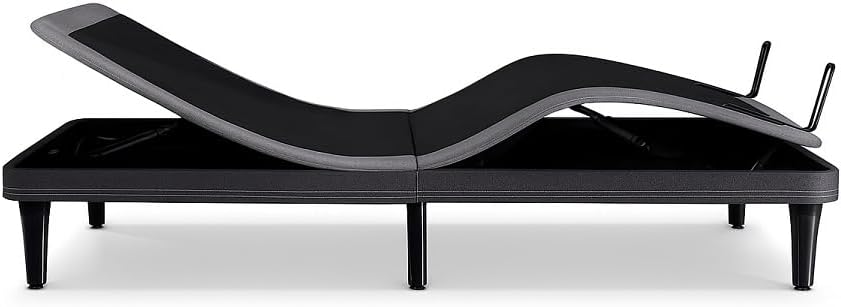
Mufananidzo 2: Rutivi view of the Ergomotion ErgoSportive bed frame demonstrating its adjustable articulation points. This view highlights the mechanical components responsible for head and foot elevation.
5. Operating Instructions
5.1. Remote Control Mabasa
Your ErgoSportive bed frame comes with a wireless remote control for easy adjustment. Common functions include:
- Musoro Musoro/Muzasi: Adjusts the head section of the bed.
- Tsoka Kukwira/Kudzika: Adjusts the foot section of the bed.
- Flat: Inodzosera mubhedha panzvimbo yakati sandara zvachose.
- Zero-G: Activates the Zero Gravity preset position, designed to relieve pressure on the back and improve circulation.
- Memory Presets: Program and recall your favorite positions. (Refer to remote control manual for specific programming instructions).
- Massage (if applicable): Activates and adjusts the intensity of the massage function.
- Under-bed Lighting (if applicable): Turns the dimmable LED lighting on/off.
5.2. Smart Sleep Tracking
The ErgoSportive features non-contact sensors to monitor your sleep. These sensors track sleep stages and various health metrics without requiring you to wear any device. Data is typically accessible via a dedicated mobile application.

Figure 3: A smartphone screen showing detailed sleep tracking data, including total sleep time, sleep scores, and anti-snore events. This illustrates the data provided by the bed's smart sensors.
5.3. Garmin Integration
For enhanced health insights, the ErgoSportive can seamlessly connect with Garmin wearables. This integration provides comprehensive recovery advice by combining data from your bed frame and your Garmin device.

Figure 4: A person adjusting a Garmin smartwatch on their wrist. This image represents the integration capability of the ErgoSportive bed frame with Garmin wearable devices for comprehensive health tracking.
5.4. Auto Anti-Snore Technology
The bed frame is equipped with technology that automatically detects snoring. Upon detection, it gently adjusts the head position to help reduce snoring, promoting a more peaceful sleep environment.

Figure 5: A man sleeping soundly in an adjustable bed, with the head section slightly elevated. This illustrates the potential benefit of the auto anti-snore feature.
5.5. Adjustable Comfort Features
Beyond the Zero-G mode, the bed offers multiple position settings to promote circulation and reduce joint pain. For Split King sizes, independent controls allow personalized comfort for each sleeper.

Figure 6: A man comfortably reclined in an adjustable bed, demonstrating an elevated head and foot position. This highlights the customizable comfort settings of the ErgoSportive.

Figure 7: A person comfortably working on a laptop while reclined in an adjustable bed. This illustrates the versatility of the adjustable positions for various activities.
5.6. Zvinakire Zvimiro
- USB kuchaja Ports: Located on both sides of the bed frame for convenient device charging.
- Dimmable LED Mwenje: Under-bed lighting can be adjusted for ambiance or as a night light.
- Programmable Vibration: Two intensity levels for gentle wake-up or relaxation.

Figure 8: A woman sleeping in a bed with an illuminated headboard, showcasing the integrated LED lighting feature. This provides soft ambient light.
6. Kuchengeta
Proper maintenance ensures the longevity and optimal performance of your ErgoSportive bed frame.
- Kuchenesa: Pukuta furemu nechishambadzoamp jira. Dzivisa makemikari ane hasha kana abrasive cleaners.
- Kuongorora: Periodically check all connections and fasteners to ensure they are secure.
- Power Cord: Inspect the power cord for any damage. If damaged, discontinue use and contact customer support.
- Kufambisa Mubhedha: When moving the bed, ensure it is in the flat position and unplugged. Lift, do not drag, to prevent damage to the legs or frame.
7. Kugadzirisa matambudziko
If you encounter issues with your ErgoSportive bed frame, refer to the following common problems and solutions:
| Dambudziko | Zvinogona Kukonzera | Solution |
|---|---|---|
| Bed does not operate. | No power, loose connection, remote battery low. | Check power cord connection to outlet and bed. Ensure outlet is functional. Replace remote batteries. |
| Motor runs but bed does not move. | Obstruction under bed, mechanism jammed. | Inspect under the bed for obstructions. Ensure no bedding or objects are interfering with the moving parts. |
| Remote control not pairing. | Pairing sequence not followed, interference. | Refer to the remote control pairing instructions in the separate remote manual or contact support. |
| Smart features not tracking/connecting. | App issue, Wi-Fi connectivity, sensor obstruction. | Ensure the mobile app is updated. Check Wi-Fi connection. Ensure nothing is obstructing the bed's sensors. |
If the problem persists after attempting these solutions, please contact Ergomotion customer support.
8. Zvinotsanangurwa
| Feature | Detail |
|---|---|
| Model | ErgoSportive |
| Size | Twin XL (80"L x 38"W x 12"H) |
| Special Features | Anti-Snore, Smart Sensors, USB Charging Ports, Zero-G Positioning |
| Color | Nhema |
| Upholstery Fabric Type | Microfiber |
| Inosanganisirwa Zvikamu | Platform Frame |
| Item Weight | 217 Pondo |
| Gungano Rinodiwa | Ehe |
| Kureba Kwechinhu Kubva Pasi Kuenda Kuchinhu | 12 inches |
9. Warranty uye Tsigiro
For detailed warranty information, please refer to the warranty card included with your product or visit the official Ergomotion website. Ergomotion provides customer support for any questions, technical assistance, or service requests.
Contact Information:
- Websaiti: www.chemeworld.com (Exampiyi link, ndapota simbisa zviri pamutemo website)
- Runhare: Refer to the product packaging or websaiti yenhamba dzedunhu.
Please have your model number (ErgoSportive) and purchase date ready when contacting support.