
T300
Generic T300 LED Mini Projector User Manual
Muenzaniso: T300
1. Nhanganyaya
Ndatenda nekutengaasing the Generic T300 LED Mini Projector. This compact and portable projector is designed for home theater use, offering a clear viewing experience with its short-focus optical lens and diffuse reflection imaging technology, which helps reduce eye strain. This manual provides essential information for setting up, operating, maintaining, and troubleshooting your projector.

Mufananidzo 1.1: The T300 Mini Projector's compact size allows for easy portability, fitting conveniently into a bag.
2. Package Zviri mukati
Ndokumbira utarise zviri mukati mepakeji pane unboxing kuti uone kuti zvinhu zvese zviripo:
- 1x T300 Projector
- 1x Power Adapter (EU Plug)
- 1x Remote Control
- 1x AV Cable
- 1x Chinyorwa cheMushandisi (gwaro iri)
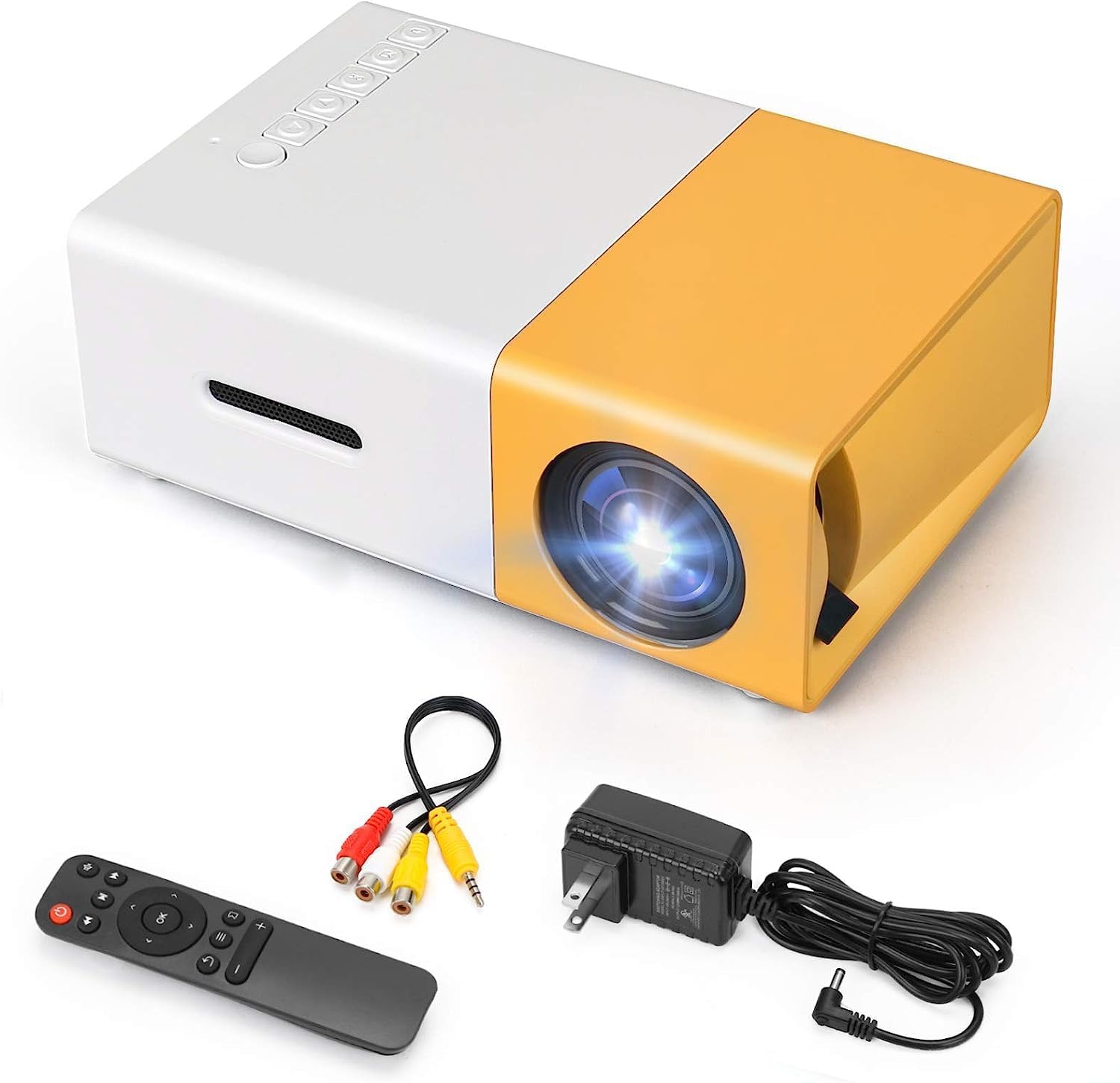
Mufananidzo 2.1: The T300 Mini Projector and its included accessories.
3. Chigadzirwa Pamusoroview
Familiarize yourself with the various ports and controls on your T300 Mini Projector:

Mufananidzo 3.1: Kumberi nekumashure views of the T300 Mini Projector, detailing its input/output ports and control buttons.
3.1. Ports uye Interfaces
- HDMI Inzwa Zvinotaurwa: Connect to laptops, TV boxes, gaming consoles, and other HDMI-enabled devices.
- USB Inzwa Zvinotaurwa: For playing media directly from USB drives.
- Micro SD Kadhi Slot: For playing media directly from Micro SD cards.
- AV Input: Connect to older devices using the included AV cable.
- Micro USB (5V/2A): Power input option, compatible with power banks or car chargers.
- Earphone Slot: Zvekubatanidza mahedhifoni ekunze kana vatauri.
- DC Power Input: Main power input using the provided power adapter.
3.2. Zvidzoro
- Simba Chinja: To turn the projector on or off.
- Navigation Buttons (Left, Right, OK): Yekutenderera menyu uye kusarudza.
- Bhatani rekupinda: Kusarudza sosi yekuisa.
- Return Button: To go back in menus.
4. Setup
4.1. Simba Connection
- Connect the provided power adapter to the DC Power Input port on the projector.
- Batanidza adapta yemagetsi mudura repamadziro.
- Alternatively, for portable use, connect a 5V/2A power bank or car charger to the Micro USB (5V/2A) port.
4.2. Device Connection
The T300 projector supports various input sources:
- HDMI: Connect your laptop, TV box, gaming console (PS4/PS3), or other HDMI devices using an HDMI cable (not included).
- USB: Isa USB flash drive mu USB port kuti utambe media files zvakananga.
- Micro SD Kadhi: Insert a Micro SD card into the Micro SD card slot to play media files.
- YE: Use the included AV cable to connect to devices with AV output (e.g., DVD players).

Mufananidzo 4.1: Multimedia connectivity options for the T300 Mini Projector.
4.3. Placement and Focus
- Isa purojekita panzvimbo yakatsiga, yakati sandara.
- Position the projector at a distance between 2 to 5 meters from the projection surface to achieve an optimal image size of 60 to 150 inches.
- Adjust the focus ring on the projector lens until the image appears clear and sharp. The short-focus optical lens allows focusing at a distance of 50cm.
5. Operating Instructions
5.1. Powering On / Off
Press the Power Switch on the projector or the power button on the remote control to turn the projector on or off.
5.2. Kusarudza Input Source
After powering on, use the 'Input' button on the projector or the remote control to cycle through available input sources (HDMI, USB, TF Card, AV) until your desired source is displayed.
5.3. Multimedia Playback
The projector supports multi-format video, audio, picture, and e-book playback. Navigate through your media files using the navigation buttons on the projector or remote control and press 'OK' to select.
5.4. Kubuditsa Audio
The projector has a built-in miniature speaker. For enhanced audio, connect external speakers or headphones to the Earphone Slot.

Mufananidzo 5.1: Versatile applications of the T300 Mini Projector for entertainment.
6. Kuchengeta
6.1. Kuchenesa Lens
Use a soft, lint-free cloth or lens cleaning paper to gently wipe the projector lens. Avoid using abrasive materials or harsh chemicals that could scratch the lens.
6.2. Kufefetedza
Ensure the projector's ventilation openings are not blocked during operation to prevent overheating. Keep the projector in a well-ventilated area.
6.3. Kuchengeta
When not in use, store the projector in a cool, dry place, away from direct sunlight and excessive dust. It is recommended to use the original packaging or a protective case.
6.4. Lamp Hupenyu
Iyo LED lamp in your T300 projector has an estimated life of 20,000 hours, providing long-term use without frequent lamp kutsiva.
7. Kugadzirisa matambudziko
Kana ukasangana nematambudziko nepurojekita yako, tarisa kune anotevera akajairika matambudziko uye mhinduro:
- Hapana Mufananidzo Waratidzwa:
- Iva nechokwadi chekuti purojekita yakabatidzwa uye adapta yemagetsi yakabatana zvakachengeteka.
- Verify the input source is correctly selected (HDMI, USB, AV, etc.).
- Tarisa tambo yekubatanidza pakati pepurojekita nemudziyo unobva.
- Mufananidzo hauna kujeka:
- Gadzirisa mhete yekutarisa pane lenzi yepurojekita kusvika mufananidzo wanyatsojeka.
- Ensure the projection distance is within the recommended range (2-5 meters).
- Hapana Inzwi:
- Tarisa marongero evhoriyamu papurojekita nepamudziyo unobva ruzha.
- If using external speakers/headphones, ensure they are properly connected to the Earphone Slot.
- Verify the audio output settings on your source device.
- Remote Control Haisi Kushanda:
- Iva nechokwadi chekuti hapana zvipingamupinyi pakati pe remote ne IR receiver yeprojekita.
- Replace the batteries in the remote control if necessary.
8. Zvinotsanangurwa
| Feature | Tsanangudzo |
|---|---|
| Model | T300 |
| Support Resolution | 1920 x 1080 (Full HD) |
| Native Resolution | 1920 x 1080 |
| Display Type | LCD, DLP |
| Interfaces | HDMI, USB, TF Card Slot, AV, Micro USB (5V-2A) |
| Yakavakwa-mukati Mutauri | Ehe |
| Lamp Hupenyu | 20,000 maawa |
| Kukura Kwechigadzirwa | 114 x 87 x 50 mm |
| Inokurudzirwa Zvishandiso | Home Cinema |
| Special Feature | Portable |
| Maximum Image Size | 150 inches |
| Minimum Image Size | 60 inches |
| Yakanyanya Kukanda Distance | 5 Mamita |
| Minimum Kukanda Distance | 2 Mamita |
| Power Input | 5V/2A |
9. Warranty uye Tsigiro
9.1. Ruzivo rweWaranti
Ichi chigadzirwa kazhinji chinouya ne 10-day replacement policy from the date of purchase. Please refer to your retailer's specific warranty terms and conditions for detailed information. The LED lamp is designed for a long life of 20,000 hours, which is not typically covered by short-term replacement policies.
9.2. Mutengi Tsigiro
For technical assistance, troubleshooting beyond this manual, or warranty claims, please contact your original retailer or the manufacturer, SHUBH LABH ENTERPRISES. Keep your purchase receipt or proof of purchase handy when contacting support.
Ask a question about this manual
Ask about setup, troubleshooting, compatibility, parts, safety, or missing instructions. Manuals+ will review the question and use this page’s manual context to help answer it.