
1. Uvod
This manual provides essential information for the safe and efficient use of your HP 17.3 Inch FHD Business Laptop. Please read this guide thoroughly before operating your device to ensure optimal performance and longevity. This laptop is designed for business and everyday computing tasks, offering a large display, robust performance, and portability.
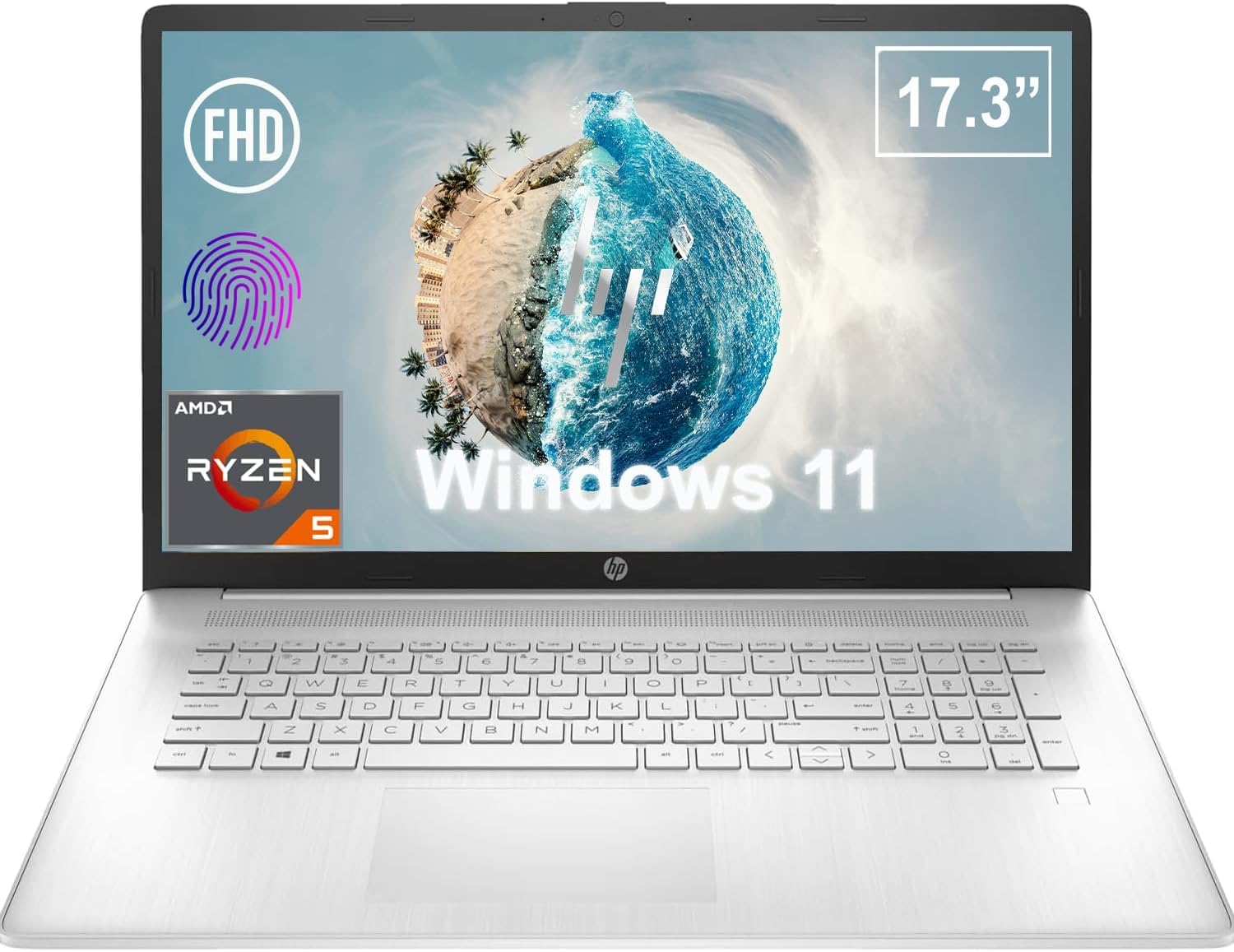
Slika 1.1: Spredaj view of the HP 17.3 Inch FHD Business Laptop, showcasing the large display and keyboard.
2. Nastavitev
2.1 Razpakiranje in začetni pregled
Previdno vzemite vse komponente iz embalaže. Preverite, ali so prisotni naslednji elementi:
- HP 17.3 Inch FHD Business Laptop
- Power Adapter (45 W Smart AC Power Adapter)
- Dokumentacija (ta priročnik, garancijske informacije)
Inspect the laptop and accessories for any signs of damage. If any items are missing or damaged, contact your retailer or HP support immediately.
2.2 Priključitev napajalnika
Before first use, ensure the laptop is fully charged. Connect the power adapter to the AC smart pin port on the side of the laptop and then plug the adapter into a power outlet.
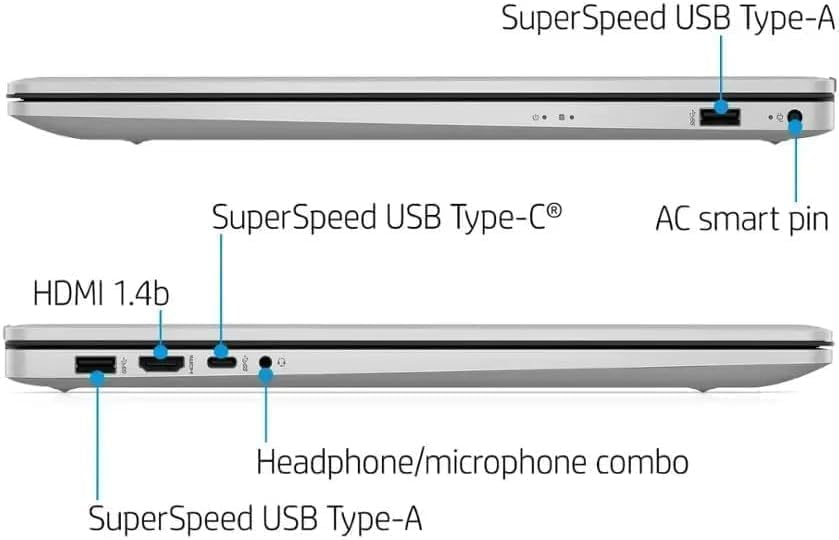
Slika 2.1: stran view illustrating the location of the AC smart pin and other ports.
2.3 Začetni vklop in namestitev sistema Windows
Press the power button to turn on the laptop. Follow the on-screen instructions to complete the Windows 11 Home setup process. This includes setting up your user account, network connection, and initial preferences.
3. Upravljanje prenosnika
3.1 Tipkovnica in sledilna ploščica
The laptop features a full-size QWERTY keyboard with a 10-key number pad for efficient data entry. The integrated touchpad provides precise cursor control. Refer to the operating system's settings for customizing touchpad gestures and keyboard shortcuts.
3.2 Čitalnik prstnih odtisov
For enhanced security and convenient login, utilize the integrated fingerprint reader. Set up your fingerprints through Windows Hello in the Windows 11 settings.
3.3 Webkamera in mikrofoni
The HP True Vision 720p HD Camera and integrated dual array digital microphones are located at the top of the display. These are suitable for video conferencing and online communication.
3.4 Povezljivost
- Wi-Fi: The laptop supports 802.11a/b/g/n/ac Wi-Fi for wireless internet access. Connect to available networks via the Windows network settings.
- Bluetooth: Bluetooth 5 allows for wireless connection to compatible devices such as headphones, mice, and keyboards. Enable and manage Bluetooth devices through Windows settings.
3.5 Ports and External Devices
Prenosnik je opremljen z različnimi priključki za priključitev zunanjih naprav:
- 1 x USB Type-C (5Gbps, Data Only): For connecting USB-C compatible devices and data transfer.
- 2 x USB Type-A (5Gbps): For connecting standard USB devices like external drives, mice, or keyboards.
- 1 x HDMI 1.4b: For connecting to external displays or projectors.
- 1 x Headphone/Microphone Combo: For connecting a headset with a single 3.5mm jack.
- 1 x AC Smart Pin: For connecting the power adapter.

Slika 3.1: Odprto view of the laptop, highlighting the keyboard and touchpad area.
3.6 Upravljanje baterije
The laptop is powered by a 3-Cell, 41 Wh Li-ion battery, offering up to 8 hours and 30 minutes of video playback. Use the provided 45 W Smart AC Power Adapter for charging. HP Fast Charge technology allows for quicker charging times.
4. Vzdrževanje
4.1 Čiščenje prenosnika
Za ohranitev videza in funkcionalnosti prenosnika:
- Uporabite mehko krpo, ki ne pušča vlaken dampz vodo ali specializiranim čistilom za zaslone.
- Za tipkovnico in ohišje uporabite mehko, suho krpo. Izogibajte se agresivnim kemikalijam ali abrazivnim materialom.
- Pred čiščenjem se prepričajte, da je prenosnik izklopljen in izklopljen iz električnega omrežja.
4.2 Posodobitve programske opreme
Redno posodabljajte operacijski sistem Windows in gonilnike, da zagotovite optimalno delovanje, varnost in združljivost. Do storitve Windows Update lahko dostopate prek menija Nastavitve.
4.3 Security Software
The laptop comes preloaded with McAfee LiveSafe for security. Ensure this software is active and updated to protect against viruses and other threats.
5. Odpravljanje težav
This section addresses common issues you might encounter with your HP laptop.
5.1 Težave z napajanjem
- Prenosnik se ne vklopi: Prepričajte se, da je napajalnik varno priključen na prenosnik in delujočo električno vtičnico. Preverite, ali je baterija napolnjena.
- Baterija se ne polni: Preverite, ali sta napajalnik in kabel poškodovana. Poskusite z drugo vtičnico.
5.2 Težave z zaslonom
- Ni slike na zaslonu: Priključite zunanji monitor, da preverite, ali je težava v zaslonu prenosnika. Znova zaženite prenosnik.
- Utripajoča ali popačena slika: Posodobite grafične gonilnike. Prilagodite ločljivost zaslona in hitrost osveževanja v nastavitvah sistema Windows.
5.3 Težave s povezljivostjo
- Brezžična povezava se ne vzpostavi: Ensure Wi-Fi is enabled. Restart your router and the laptop. Check network settings for correct password and configuration.
- Naprava Bluetooth se ne more seznaniti: Ensure Bluetooth is enabled on both devices. Make sure the device is in pairing mode and within range.
Za bolj zapletene težave se obrnite na HP-jevo podporo webspletno mesto ali se obrnite na službo za stranke.
6. Specifikacije
| Funkcija | Podrobnost |
|---|---|
| Znamka | HP |
| Ime modela | HP17 |
| Številka modela | i5-1135G7 |
| Velikost zaslona | 17.3 palcev |
| Vrsta zaslona | IPS, Anti-Glare, LED |
| Resolucija | 1920 x 1080 (FHD) |
| Hitrost osveževanja | 60 Hz |
| Procesor | AMD Ryzen 5 5500U (6 Cores, 12 Threads, up to 4.0 GHz Max Boost Clock) |
| Grafika | Integrirana grafika AMD Radeon |
| RAM pomnilnik | 32 GB DDR4-3200 MHz (Max 64 GB) |
| Shranjevanje | 1 TB PCIe NVMe M.2 SSD |
| Operacijski sistem | Windows 11 Home, 64-bitni, angleški |
| Brezžična povezljivost | 802.11a/b/g/n/ac Wi-Fi, Bluetooth 5 |
| Pristanišča | 1x USB Type-C (5Gbps), 2x USB Type-A (5Gbps), 1x HDMI 1.4b, 1x Headphone/Microphone Combo, 1x AC Smart Pin |
| Webcam | HP True Vision 720p HD Camera |
| Avdio | Dual Speakers, Integrated Dual Array Digital Microphones |
| Baterija | 3-Cell, 41 Wh Li-ion (Up to 8.5 hours video playback) |
| Napajalni adapter | 45 W Smart AC Power Adapter |
| Dimenzije (Š x G x V) | 40.07 x 25.78 x 2.06 cm (14.14"D x 9.31"Š x 0.78"G) |
| Teža | Od 2.07 kg |
| Posebne lastnosti | Fingerprint Reader, Lightweight Design, HP Fast Charge |
7. Garancija in podpora
7.1 Informacije o garanciji
This HP laptop comes with a 1-year manufacturer's limited warranty. For detailed terms and conditions, please refer to the warranty documentation included with your product or visit the official HP support webmesto.
7.2 Podpora strankam
If you encounter issues that cannot be resolved using the troubleshooting steps in this manual, please contact HP customer support. You can find contact information and additional resources on the official HP webspletno mesto:
- HP-jeva podpora Webspletno mesto: support.hp.com
- HP Store: Trgovina HP na Amazonu