
Ameta S20 Pro
Ameta S20 Pro GPS Drone User Manual
Model: S20 Pro
1. Uvod
This manual provides essential instructions for the safe operation, setup, and maintenance of your Ameta S20 Pro GPS Drone. Please read this manual thoroughly before operating the drone to ensure proper function and to prevent damage or injury.

Image 1.1: The Ameta S20 Pro drone in flight, showcasing its design and operational context.
2. Varnostne smernice
Adherence to these safety guidelines is crucial for safe operation and to avoid potential hazards.
- Predletni pregled: Always inspect the drone, remote control, and batteries for any damage before each flight.
- Okoljski pogoji: Avoid flying in strong winds, rain, snow, or fog. Maintain a clear line of sight to the drone.
- Območje letenja: Operate the drone in open areas, away from people, animals, buildings, and power lines. Do not fly over crowds.
- Varnost baterije: Use only approved batteries and chargers. Do not overcharge or puncture batteries. Discontinue use if batteries show signs of swelling or damage.
- Upoštevajte lokalne predpise: Be aware of and comply with all local aviation laws and regulations regarding drone operation. The Ameta S20 Pro weighs under 249g, which may exempt it from registration requirements in some regions. Always verify local laws.

Image 2.1: The Ameta S20 Pro drone, highlighting its lightweight design (under 249g) and potential exemption from registration in certain jurisdictions. Users should always check local regulations.
3. Vsebina paketa
Preverite, ali so v vašem paketu priloženi vsi spodaj navedeni elementi:
- GPS dron s 4K kamero
- Daljinski upravljalnik
- 2 x Batteries (3000mAh)
- Uporabniški priročnik
- Torbica za prenašanje
- Rezervni propelerji (8 kosi)
- USB polnilni kabel
- Izvijač

Image 3.1: All components included in the Ameta S20 Pro drone package.
4. Izdelek je končanview
4.1 Komponente drona
Familiarize yourself with the various parts of the Ameta S20 Pro drone.

Image 4.1: The Ameta S20 Pro drone with its arms extended.
- Propelerji: Štirje propelerji za vzgon in pogon.
- Brezkrtačni motorji: Zagotavljajo učinkovit in stabilen let.
- 4K kamera: Integrated camera with 13MP Sony IMX258 sensor for high-resolution photo and video capture.
- Predal za baterije: Houses the flight battery.
- LED indikatorji: Provide status information during flight and operation.
4.2 Daljinski upravljalnik
The remote control allows for precise manipulation of the drone's flight and camera functions.
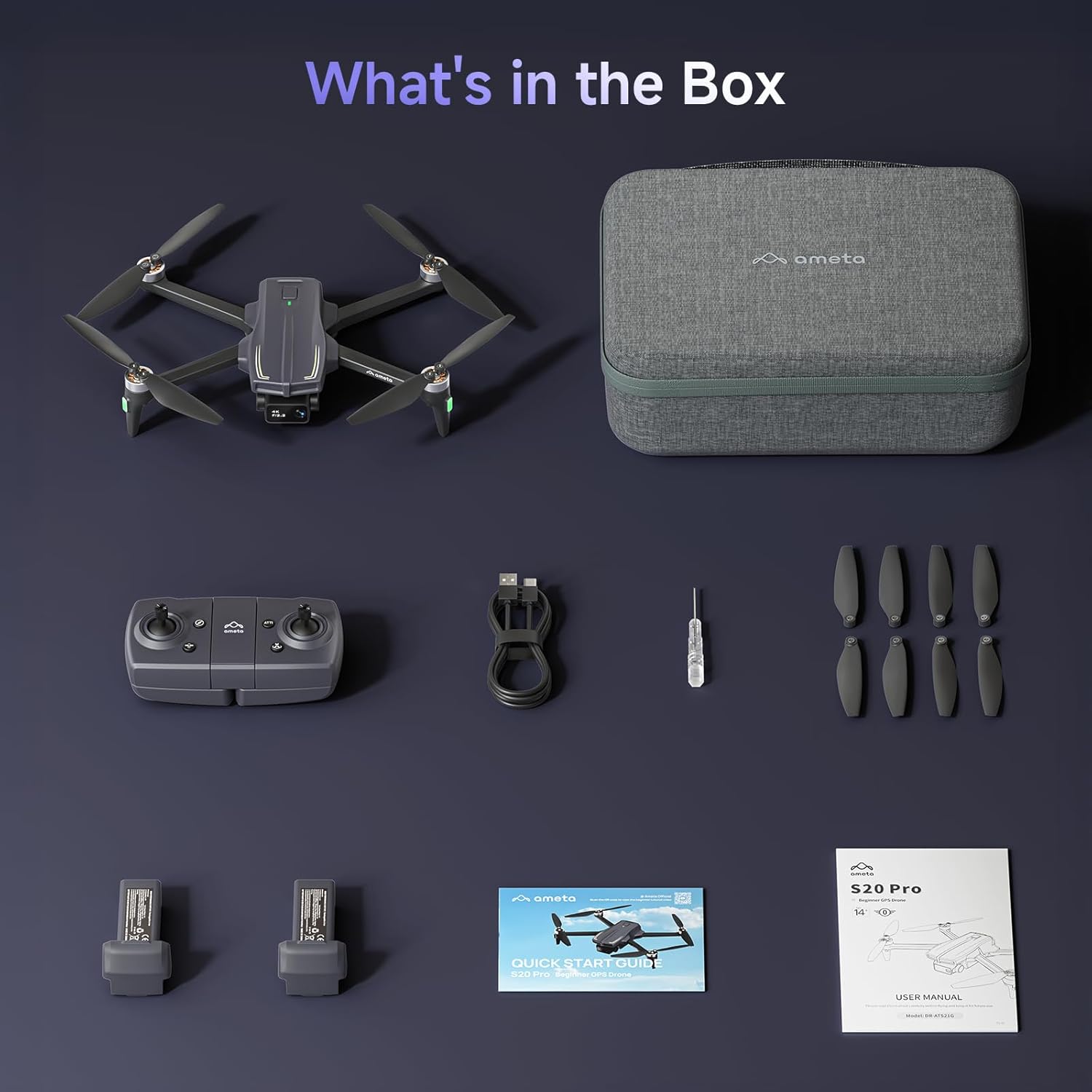
Image 4.2: The remote control with a smartphone holder.
- Kontrolne palice: For directional flight and altitude control.
- Držalo za pametni telefon: Varno drži vaš pametni telefon za FPV viewin nadzor aplikacije.
- Funkcijski gumbi: Dedicated buttons for takeoff/landing, Return-to-Home, photo/video capture, and speed adjustment.
5. Nastavitev
5.1 Polnjenje baterije
- Insert the flight battery into the drone's battery compartment.
- Connect the USB charging cable to the drone's charging port and a USB power adapter (not included).
- The LED indicator on the drone will show charging status. A full charge typically takes approximately 2 hours for each 3000mAh battery.
- The drone cannot be flown while the battery is charging.

Image 5.1: Illustration of the drone battery and its extended flight duration.
5.2 Namestitev propelerja
Ensure propellers are correctly installed before flight. Match propellers with corresponding motor arms (A and B markings).
- Prepoznajte propelerja, označena z 'A' in 'B'.
- Attach 'A' propellers to motor arms marked 'A', and 'B' propellers to motor arms marked 'B'.
- Secure each propeller with the provided screws using the screwdriver.
5.3 Daljinski upravljalnik in nastavitev aplikacije
- Install 3 AAA batteries (not included) into the remote control.
- Download the Ameta flight app from your device's app store.
- Vklopite dron in nato vklopite daljinski upravljalnik.
- Connect your smartphone to the drone's Wi-Fi network (usually named 'Ameta-S20Pro-XXXX').
- Open the Ameta flight app to establish a connection.
5.4 Kalibracija
Perform compass and gyroscope calibration before the first flight and whenever flying in a new location.
- Follow the on-screen instructions in the Ameta app for compass calibration. This typically involves rotating the drone horizontally and vertically.
- Place the drone on a flat, level surface for gyroscope calibration.
6. Navodila za uporabo
6.1 Predpoletni pregledi
- Ensure batteries are fully charged in both drone and remote control.
- Propellers are securely attached and undamaged.
- Drone is placed on a flat, open surface.
- GPS signal is acquired (indicated by solid green lights on the drone).
6.2 Vzlet in pristanek
- One-Button Takeoff: Press the one-button takeoff icon on the remote control or in the app. The drone will automatically ascend to a safe altitude and hover.
- Ročni vzlet: Push both control sticks down and outwards to start the motors. Slowly push the left stick up to ascend.
- Pristanek z enim gumbom: Press the one-button landing icon. The drone will descend and land automatically.
- Ročno pristajanje: Slowly pull the left stick down to descend. Once landed, push both sticks down and inwards to stop the motors.

Image 6.1: Key beginner-friendly features of the Ameta S20 Pro drone.
6.3 Krmilniki leta
Use the control sticks on the remote for basic flight maneuvers:
- Leva palica (plin/zasuk): Up/Down for altitude, Left/Right for rotation.
- Desna palica (nagib/kot): Up/Down for forward/backward movement, Left/Right for left/right movement.
6.4 Inteligentni načini letenja
The Ameta S20 Pro features several intelligent flight modes for enhanced control and creative shots. Note: GPS features are only available when GPS mode is enabled and a strong GPS signal is acquired.
- Vrnitev domov (RTH): Automatically brings the drone back to its takeoff point. Activated by a button press, low battery, or signal loss.

Image 6.2: Visual representation of the Return-to-Home function.
- Let z določeno točko poti: Set custom points on a map, and the drone will follow the designated path.

Image 6.3: The drone executing a Waypoint Flight path.
- Krožna muha: The drone orbits around a selected point, capturing circular footage.

Image 6.4: The drone performing a Circle Fly maneuver.
- Sledi mi z GPS-om: The drone automatically follows the remote control (and thus the user), keeping them in the frame.

Image 6.5: The drone utilizing GPS Follow Me mode.
- Other Creative Modes: Rocket, Orbit, Dolly Zoom, Panorama, Time-lapse, and Gesture Selfie are available via the app for diverse shooting options.

Slika 6.6: Konecview of creative shooting modes.
6.5 Delovanje kamere
The Ameta S20 Pro is equipped with a 4K camera for high-quality imaging.

Image 6.7: Details of the 4K camera with 13MP sensor.
- Zajem fotografije/videoposnetka: Use the dedicated buttons on the remote control or the app interface to take photos or start/stop video recording.
- FPV (First-Person View): The 5G WiFi transmission provides real-time video feed to your connected smartphone.
- Nastavljiva leča: The camera lens can be adjusted 90 degrees for varied shooting angles.
- Shranjevanje: Photos and videos are saved to a microSD card (not included) inserted into the drone.
7. Vzdrževanje
7.1 Čiščenje
- Po vsaki uporabi obrišite dron in daljinski upravljalnik z mehko, suho krpo.
- Ne uporabljajte kemikalij ali topil.
- Ensure no dust or debris obstructs the camera lens or motor vents.
7.2 Zamenjava propelerja
Replace damaged or bent propellers immediately to ensure stable flight.
- Izklopite dron.
- Use the provided screwdriver to remove the screws securing the damaged propeller.
- Carefully remove the damaged propeller.
- Install a new propeller, ensuring it matches the 'A' or 'B' marking of the motor arm.
- Secure the new propeller with screws.
7.3 Nega in shranjevanje baterije
- Baterije shranjujte na hladnem in suhem mestu, stran od neposredne sončne svetlobe in ekstremnih temperatur.
- Za dolgotrajno shranjevanje napolnite baterije do približno 50–60 % kapacitete.
- Popolnoma napolnjenih ali popolnoma izpraznjenih baterij ne shranjujte dlje časa.
8. Odpravljanje težav
| Težava | Možen vzrok | rešitev |
|---|---|---|
| Dron se ne vklopi | Prazna baterija; Baterija ni pravilno vstavljena | Napolnite baterijo; baterijo ponovno varno vstavite |
| No connection to remote control | Remote control battery low; Pairing failed | Replace remote control batteries; Re-pair drone and remote control |
| Nestabilen let/Drifting | Improper calibration; Damaged propellers; Strong winds | Perform gyroscope and compass calibration; Replace damaged propellers; Fly in calm conditions |
| No FPV video feed | Phone not connected to drone Wi-Fi; App not open; Weak Wi-Fi signal | Connect to drone Wi-Fi; Open app; Fly closer to drone |
| GPS features not working | Weak GPS signal; GPS mode not enabled | Fly in an open area with clear sky; Ensure GPS mode is enabled in app |
| Drone lost during flight | Out of range; RTH not activated | Use the 'Find Your Drone' feature in the app (if available and GPS was active). Always fly within visual line of sight. |

Image 8.1: The 'Find Your Drone' feature on the app, useful for locating a lost drone if GPS was active.
9. Specifikacije
| Funkcija | Podrobnost |
|---|---|
| Znamka | Ameta |
| Ime modela | S20 Pro |
| Ločljivost zajema videa | 4K |
| Učinkovita še vedno ločljivost | 13 MP |
| Tehnologija povezljivosti | Wi-Fi (5G) |
| Posebne lastnosti | 13MP Sensor, 50-Min Flight Time, GPS Drone, One Button Return, Speed Adjustment |
| Stopnja spretnosti | Začetnik |
| Teža predmeta | 20.14 unč (približno 571 g) |
| Kapaciteta baterije | 3000 milliamp Ure (na baterijo) |
| Dimenzije izdelka (zložen) | 8.27 cm D x 10.43 cm Š x 3.15 cm V |
| Material | ABS |

Image 9.1: Product dimensions of the Ameta S20 Pro drone.
10. Garancija in podpora
The Ameta S20 Pro GPS Drone comes with a standard manufacturer's warranty. For specific warranty terms, duration, and conditions, please refer to the warranty card included in your package or contact Ameta customer support.
For technical assistance, troubleshooting not covered in this manual, or to inquire about replacement parts, please contact Ameta customer support through the contact information provided on the official Ameta webspletno mesto ali vašo nakupovalno platformo.
Ask a question about this manual
Ask about setup, troubleshooting, compatibility, parts, safety, or missing instructions. Manuals+ will review the question and use this page’s manual context to help answer it.