
1. Uvod
The LEOBOG HI75C Pro is a 75% TKL mechanical wireless keyboard designed for versatility and performance. It features an aluminum alloy case, tri-mode connectivity (Bluetooth 5.0, 2.4GHz wireless, and USB-C wired), RGB backlighting, a multi-functional knob, and hot-swappable switches. This manual provides detailed instructions for setting up, operating, and maintaining your keyboard.

Figure 1: LEOBOG HI75C Pro Mechanical Wireless Keyboard Overview
2. Vsebina paketa
Preverite, ali so v paketu vsi elementi:
- LEOBOG HI75C Pro Mechanical Wireless Keyboard
- Izvleček za ključe
- Kabel USB (vrsta C)
- Replace Switch (Spare Switches)
3. Značilnosti izdelka
The LEOBOG HI75C Pro keyboard incorporates several advanced features for an enhanced user experience:
- Aluminium Alloy Cover: Provides superior heat dissipation, robustness, and durability. Features an exquisite powder coating process for a luxurious feel and fingerprint resistance.
- Zasnova tesnila: Significantly reduces cavity noise and improves typing sound for a satisfying low-noise experience.
- 3-načinska povezava: Supports Bluetooth 5.0, 2.4GHz wireless, and USB wired connections, allowing connection to up to five devices simultaneously.
- 75 % postavitev: An 81-key layout that balances concise design with full functionality, saving desk space.
- RGB osvetlitev ozadja: Features 16.8 million RGB lighting colors with 17 lighting effects and 10 music rhythm modes.
- Dual-Mode Knob: A multi-functional knob for precise control over volume (office mode) and lighting brightness (game mode).
- High Speed Response: Equipped with an advanced gaming keyboard chip for a response speed of up to 2.8ms.
- Stikala z možnostjo vroče menjave: Omogoča enostavno zamenjavo stikal brez spajkanja.
- 4000mAh baterija: Provides extended usage time, approximately one month without backlighting.

Figure 2: Key features of the LEOBOG HI75C Pro keyboard.

Figure 3: Diagram illustrating the multi-layered gasket structure for sound dampening.

Figure 4: Ergonomic keycap height design for comfortable typing.
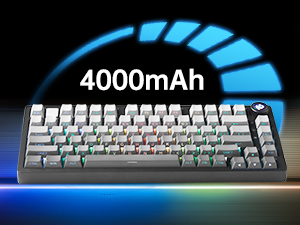
Figure 5: The keyboard is equipped with a 4000mAh battery.
4. Nastavitev in povezljivost
The LEOBOG HI75C Pro offers three connection modes: wired, 2.4GHz wireless, and Bluetooth. Use the switch on the side of the keyboard to select your desired mode.
4.1 žična povezava
- Ensure the mode switch on the side of the keyboard is set to the wired (USB-C) position.
- Connect the provided USB-C cable to the keyboard and to an available USB port on your computer.
- Tipkovnica bo samodejno prepoznana in pripravljena za uporabo.
4.2 Brezžična povezava 2.4 GHz
- Ensure the mode switch on the side of the keyboard is set to the 2.4GHz wireless position.
- Priključite sprejemnik USB 2.4 GHz v razpoložljiva vrata USB na vašem računalniku.
- Tipkovnica bi se morala povezati samodejno. Če se ne, pritisnite FN + ~ za začetek seznanjanja.
4.3 Povezava Bluetooth 5.0
- Ensure the mode switch on the side of the keyboard is set to the Bluetooth position.
- On your device (PC, Mac, Android, iOS), enable Bluetooth and search for new devices.
- Pritisnite in držite FN + 1, FN + 2, oz FN + 3 for 3-5 seconds to enter pairing mode for BT1, BT2, or BT3 respectively. The indicator light will flash.
- Select "LEOBOG HI75C Pro" from the list of available Bluetooth devices on your device.
- Once connected, the indicator light will stop flashing. You can switch between paired Bluetooth devices using FN + 1/2/3.

Figure 6: The keyboard supports Type-C wired, 2.4GHz wireless, and Bluetooth connections.
Video 1: Official LEOBOG overview of the HI75C Pro Mechanical Gaming Keyboard, showcasinnjegovo zasnovo in lastnosti.
5. Delovanje
5.1 RGB osvetlitev ozadja
The keyboard features extensive RGB backlighting with 17 preset lighting effects. Additionally, it offers 10 music rhythm RGB lighting modes that synchronize with audio output. You can adjust lighting effects and brightness using the multi-functional knob or dedicated key combinations. To turn off the lights, use the knob in game mode.
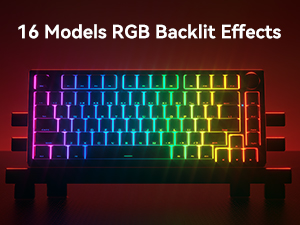
Figure 7: The keyboard offers 16 models of RGB backlit effects.
5.2 Dual-Mode Knob Control
The multi-functional knob allows for quick adjustments based on the selected mode:
- Preklopni načini: Press and hold the knob to toggle between Office Mode and Game Mode.
- Pisarniški način: When the indicator light is continuously on, the keyboard is in office mode. Rotate the knob to adjust the system volume.
- Igralni način: When the indicator light is breathing, the keyboard is in game mode. Rotate the knob to adjust the lighting brightness.

Figure 8: The multi-functional knob for volume and lighting control.
5.3 Stikala z možnostjo vroče menjave
The LEOBOG HI75C Pro supports hot-swappable 3-pin/5-pin mechanical switches, allowing you to easily change switches without soldering. This feature enables customization of typing feel and sound.

Figure 9: The keyboard features hot-swappable switches for customization.
6. Vzdrževanje
6.1 Čiščenje
Za ohranjanje optimalne zmogljivosti in videza redno čistite tipkovnico:
- Pred čiščenjem tipkovnico izključite iz vseh virov napajanja.
- Uporabite mehko krpo, ki ne pušča vlaken, dampTipke in ohišje obrišite z vodo ali blago čistilno raztopino.
- Za temeljitejše čiščenje uporabite priloženi izvleček za tipke, da odstranite tipke, in spodnjo stran očistite s stisnjenim zrakom ali majhno krtačko.
- Ensure the keyboard is completely dry before reconnecting.
6.2 Zamenjava tipk in stikal
The hot-swappable design allows for easy replacement of keycaps and switches:
- Za nežno odstranitev tipk uporabite priloženo orodje za odstranjevanje tipk.
- Use a switch puller (not included, but often comes with replacement switches) to carefully remove switches. Grip the switch firmly and pull straight up.
- Align the pins of the new switch with the holes on the PCB and press down gently until it clicks into place. Ensure pins are not bent.
- Želeno tipko namestite na novo stikalo.
7. Odpravljanje težav
7.1 Težave s povezljivostjo
- Ni povezave: Ensure the mode switch on the side of the keyboard is set correctly for wired, 2.4GHz, or Bluetooth.
- 2.4GHz Disconnection: Re-plug the USB receiver. Try pairing again by pressing FN + ~.
- Prekinitev povezave Bluetooth: Ensure Bluetooth is enabled on your device. Re-enter pairing mode on the keyboard (FN + 1/2/3) and re-select the keyboard on your device.
- Motnje: Move the keyboard closer to the receiver/device or away from other wireless devices that might cause interference.
7.2 Software and Firmware
For advanced customization, macro programming, and firmware updates, please visit the official LEOBOG website or authorized distributors' websites. Ensure you download the correct software/firmware version specifically for the LEOBOG HI75C Pro model to avoid compatibility issues.
7.3 RGB osvetlitev ne deluje
- Check if the keyboard is in Game Mode, where the knob controls brightness. Rotate the knob to increase brightness.
- Ensure the battery is sufficiently charged if using wireless mode.
- If using software, verify that lighting effects are enabled and configured correctly.
8. Specifikacije
| Funkcija | Podrobnost |
|---|---|
| Številka modela | HI75C PRO |
| Dimenzije izdelka | 12.97 x 5.35 x 1.74 palcev |
| Teža predmeta | 3.41 funtov |
| Tehnologija povezljivosti | Bluetooth, USB-C, 2.4 GHz brezžično |
| Opis tipkovnice | Mehanski |
| Združljive naprave | Igralna konzola, prenosnik, računalnik, pametni telefon, tablica |
| Posebne lastnosti | Customizable Display Keys, Ergonomic, Hot-Swappable, Hotkeys and Media Keys, Programmable Keys |
| Osvetlitev tipkovnice | RGB |
| Baterija | 1 A battery required (included), 4000mAh |
9. Garancija in podpora
LEOBOG provides a 2-letna garancija for the HI75C Pro Mechanical Wireless Keyboard, covering manufacturing defects from the date of purchase. For warranty claims, technical assistance, or product inquiries, please contact LEOBOG customer support through their official webspletno mesto ali prodajalec, kjer je bil izdelek kupljen.

Figure 10: LEOBOG customer service is available for support.