
1. Uvod
This manual provides comprehensive instructions for the TCNOUMT RC802N YU14 Replacement Remote Control. This remote is designed to be compatible with various TCL Smart 4K TV models, offering a direct replacement for your original remote. It features an ergonomic design and operates using infrared signals.
2. Izdelek je končanview
The TCNOUMT RC802N YU14 remote control is engineered for ease of use and durability. Its ergonomic shape ensures a comfortable grip, and the buttons are logically arranged for intuitive operation. It is constructed from ABS material with soft plastic buttons for a tactile experience.

Slika 2.1: Sprednji in stranski view of the TCNOUMT RC802N YU14 remote control, highlighting its ergonomic design.
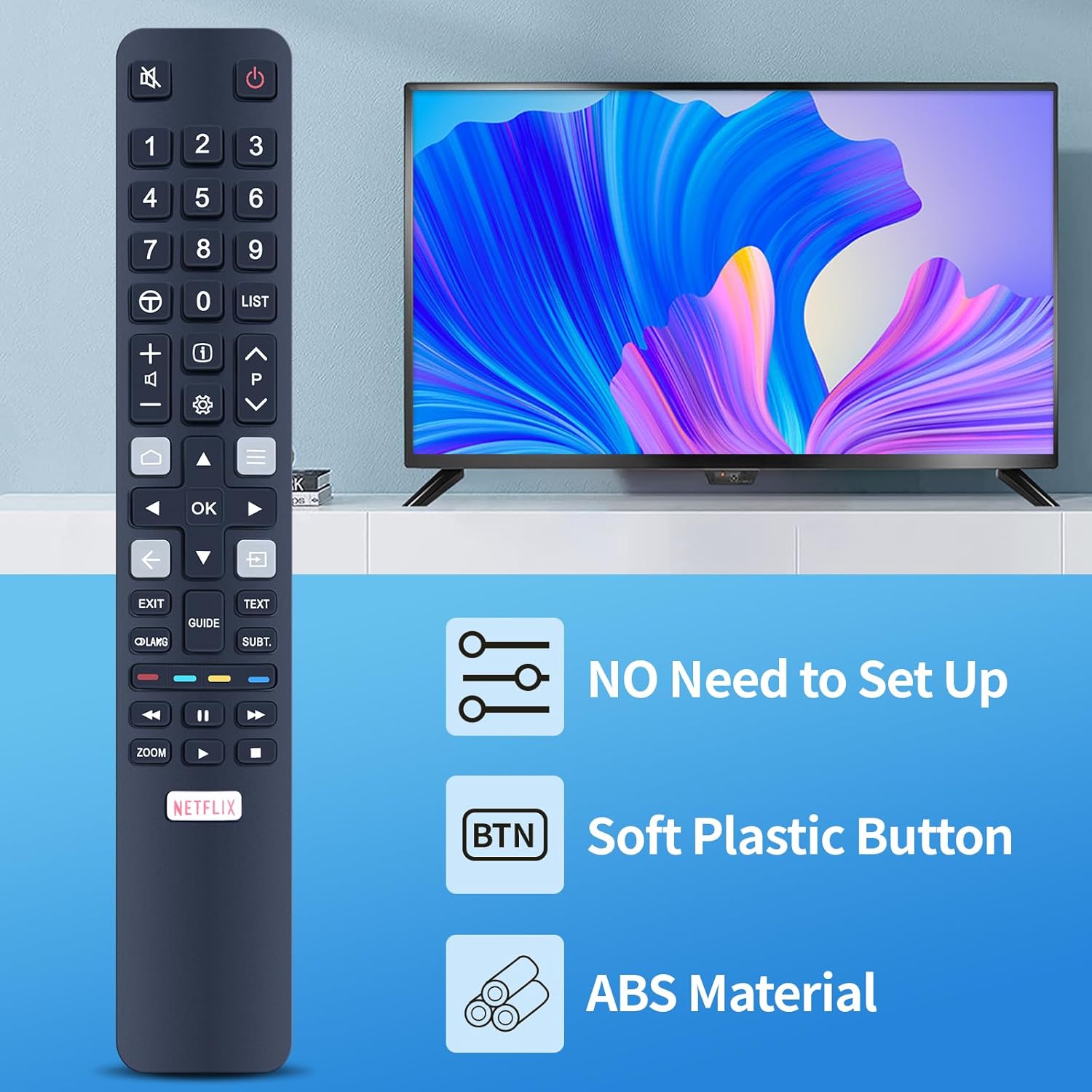
Slika 2.2: The remote control displayed with key features: no setup required, soft plastic buttons, and durable ABS material construction.
3. Nastavitev
The TCNOUMT RC802N YU14 remote control is designed for immediate use without complex programming. Simply install the batteries, and it will be ready to operate your compatible TCL Smart 4K TV.
3.1 Namestitev baterije
- Poiščite predal za baterije na zadnji strani daljinskega upravljalnika.
- Pokrov baterije potisnite navzdol ali v smeri, ki jo kaže puščica, da ga odprete.
- Insert two (2) 1.5V AAA alkaline batteries, ensuring the positive (+) and negative (-) terminals match the markings inside the compartment.
- Pokrov baterije namestite nazaj tako, da ga potisnete nazaj na svoje mesto, dokler se ne zaskoči.
Opomba: Baterije niso priložene daljinskemu upravljalniku.

Slika 3.1: Illustration of the battery compartment, indicating the correct orientation for AAA battery insertion.
4. Navodila za uporabo
This remote control utilizes infrared technology to communicate with your television. Ensure a clear line of sight between the remote and your TV's infrared receiver for optimal performance. The maximum effective range is approximately 10 meters (33 feet).
4.1 Osnovne funkcije
- Gumb za prižig (⏻): Vklopi ali izklopi TV.
- Številski gumbi (0-9): Neposredna izbira kanalov.
- Povečanje/zmanjšanje glasnosti (🔊 +/-): Prilagodi raven glasnosti.
- Kanal gor/dol (⏶ ⏷): Zaporedno preklaplja kanale.
- Gumb za izklop zvoka (🔇): Izklopi ali vklopi zvok televizorja.
- Navigacijski gumbi (gor, dol, levo, desno, V redu): Uporablja se za navigacijo po menijih in potrditev izbir.
- Gumb za nazaj (←): Vrne se na prejšnji zaslon ali meni.
- Gumb Domov (🏠): Dostopi do začetnega zaslona televizorja ali pametnega središča.
4.2 Special Function Buttons
- Gumb Netflix: Omogoča neposreden dostop do aplikacije Netflix.
- Gumb za izhod: Zapre trenutni meni ali aplikacijo.
- Gumb Vodnik: Prikaže elektronski programski vodnik (EPG).
- Gumb za besedilo: Activates or deactivates teletext.
- Subt. Button: Vklopi ali izklopi podnapise.
- Gumb za povečavo: Prilagodi stopnjo povečave zaslona.
- Media Playback Controls (Play, Pause, Fast Forward, Rewind): Nadzira predvajanje predstavnosti.

Slika 4.1: The remote control featuring a dedicated Netflix shortcut button for quick access to streaming content.

Slika 4.2: Demonstrating the remote's long-distance infrared control capability, effective up to 10 meters.
5. Vzdrževanje
Za zagotovitev dolge življenjske dobe in optimalnega delovanja daljinskega upravljalnika upoštevajte ta navodila za vzdrževanje:
- Čiščenje: Wipe the remote control with a soft, dry cloth. Do not use abrasive cleaners, solvents, or chemical agents, as these may damage the surface or internal components.
- Shranjevanje: Daljinski upravljalnik shranjujte na hladnem in suhem mestu, stran od neposredne sončne svetlobe in ekstremnih temperatur.
- Zamenjava baterije: If the remote's response becomes sluggish or inconsistent, replace the batteries with new 1.5V AAA alkaline batteries. Remove batteries if the remote will not be used for an extended period to prevent leakage.
- Izogibajte se kapljicam: Daljinski upravljalnik zaščitite pred fizičnimi udarci, saj lahko padci poškodujejo notranje vezje.
6. Odpravljanje težav
If you encounter issues with your remote control, refer to the following common troubleshooting steps:
- Daljinski upravljalnik se ne odziva:
- Preverite, ali so baterije pravilno vstavljene s pravilno polarnostjo (+/-).
- Replace old batteries with new 1.5V AAA alkaline batteries.
- Ensure there is a clear line of sight between the remote control and the TV's infrared sensor. Obstructions can block the signal.
- Preverite, ali je televizor vklopljen.
- Omejen obseg:
- Ensure batteries are fresh. Weak batteries can reduce signal strength.
- Minimize sources of infrared interference, such as strong direct sunlight or certain types of fluorescent lighting.
If problems persist after attempting these steps, please refer to the support information in Section 8.
7. Specifikacije
| Funkcija | Podrobnost |
|---|---|
| Znamka | TCNUMT |
| Številka modela | RC802N YU14 |
| barva | Modra |
| Tehnologija povezljivosti | Infrardeči |
| Posebne lastnosti | Ergonomic, Universal |
| Združljive naprave | TCL Smart 4K Televisions (e.g., 65C2US, 75C2US, 43P20US, U43P6006, RC802N YAI2, YAI3, YUI2, YUI1, YU11) |
| Največ podprtih naprav | 1 |
| Največji doseg | 10 metra (33 čevljev) |
| Vrsta baterije | 2 x 1.5 V AAA alkalne baterije (niso priložene) |
| Material | ABS |

Slika 7.1: Physical dimensions of the remote control for reference.
8. Garancija in podpora
This product is designed for reliable performance. While specific warranty details are not provided in this manual, for any questions, concerns, or assistance with your TCNOUMT RC802N YU14 Replacement Remote Control, please contact the seller or retailer from whom you purchased the product. They will be able to provide support and information regarding any applicable return or replacement policies.